Free Chatbot for Facebook Page Owners: Turn the Replies You Already Typed Into Answers, in a Seven-Day Plan
Free chatbot for Facebook Page owners usually means one thing: stop typing the same reply forty times a week. Your Page inbox already holds the best training material you will ever get, because it contains your own answers to your own customers. This guide shows how to turn those sent replies into a bot’s knowledge, connect your Page to LiveChatBot, and run a seven-day plan that is honest about what is free and what is not.
A free chatbot for Facebook Page messages answers the messages people send to your Page. With LiveChatBot you connect the Page through Meta, and those messages arrive in the same inbox as your website chat, where the AI Agent can answer from facts you give it. The free plan costs ₹0 for 2 websites.
The idea
A free chatbot for Facebook Page messages is software that answers for you
A Facebook Page chatbot is a program that receives the Messenger messages sent to your Page and replies, either by itself or after a person has looked.
It is not a setting inside Facebook. It is a separate tool that Meta lets into your Page. Meta passes each new message to the tool, and the tool sends a reply back the same way.
Customers write to a Page at all hours, so the same five questions get typed again and again: price, location, hours, delivery, availability.
LiveChatBot handles this by bringing Page messages into the inbox you already use for website chat. Messenger and WhatsApp arrive there together, connected through Meta. If you only want the plug-in detail, our guide to the integrations page lists everything that can be connected, and our Messenger setup walkthrough counts each click.
What you get
What the free plan gives a Page owner, and what stays on Meta’s side
On the free plan you get one shared inbox, an AI Agent that answers from your facts, saved replies, opening hours and an Android app, with no per-seat charges.
Here is the plain list.
- Plan: Free is ₹0 for 2 websites and 100 visitors per website each month. Starter is ₹299 a month and Growth is ₹699 a month, both prepaid with no automatic charges.
- Inbox: Messenger messages land beside website chats, so one person can answer both. You can use Assign to me, Teams and saved replies.
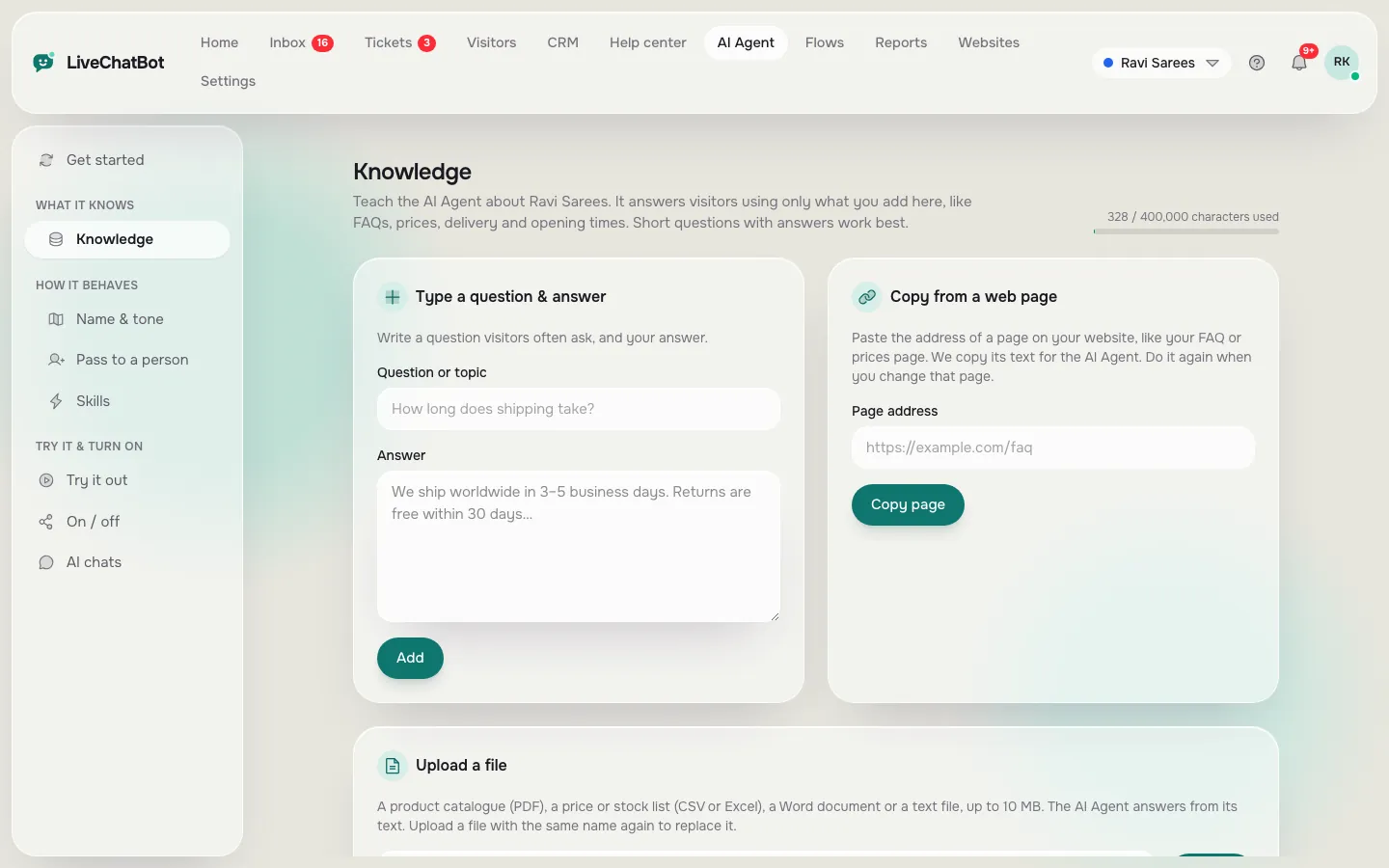
- AI Agent: answers from knowledge you type, copy from a web page or upload as PDF, Word, Excel, CSV or text.
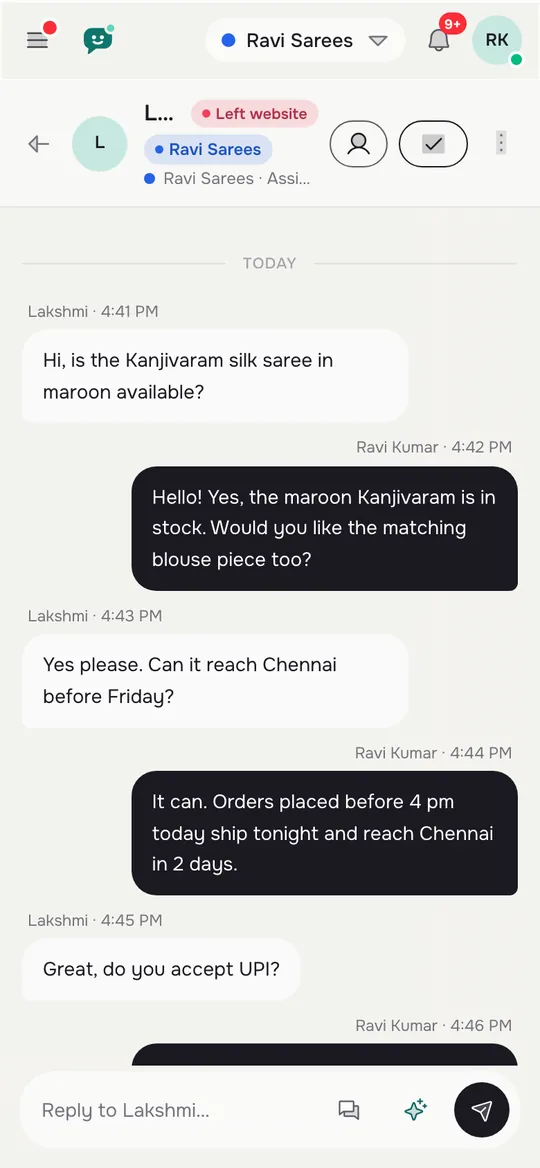
- Phone: the Android app buzzes when a Page message arrives. There is no iOS team app.
Two limits to know before you start. First, the connection runs through Meta, so Meta’s rules apply and can change. Second, LiveChatBot does not read Facebook comments or Instagram DMs. If your leads arrive as comments under ads, this tool will not see them.
The “Powered by LiveChatBot” badge stays on every plan, and you cannot choose the AI model or bring your own key.
Original data
Counted in the dashboard: 3 steps, 4 pasted values and 1 subscription
These counts come from LiveChatBot’s own Integrations page, not from a survey.
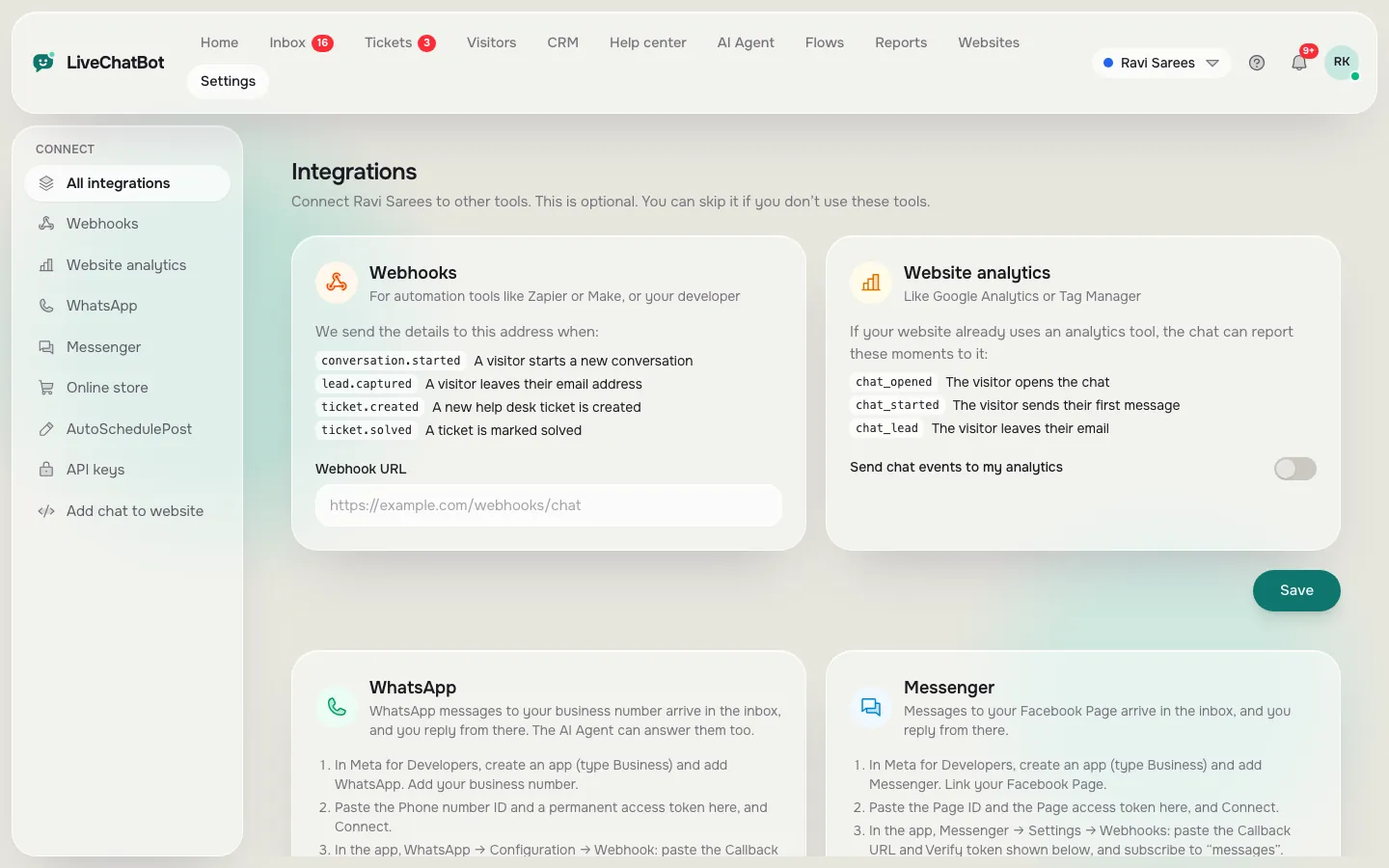
| Where | What you do | Count | |—|—|—| | Meta for Developers | Create a Business app, add Messenger, link your Page | 1 step | | LiveChatBot | Paste the Page ID and Page access token, press Connect | 2 values in | | LiveChatBot (optional) | Paste the App secret so only Meta-signed messages are accepted | 1 value | | Meta again | Paste the Callback URL and Verify token, subscribe to messages | 2 values back, 1 subscription |
Total: 3 steps, 4 required pastes and 1 optional secret. No code is written. Connecting costs nothing extra on the free plan.
The method
Mine your sent replies first, because the best bot knowledge is what you already wrote
The fastest way to train a Page chatbot is to copy the answers you have already sent, not to write new ones.
Open your Page inbox and scroll back through the last 30 days of conversations. You are looking for one thing: a reply you typed more than once. A price list. A location with a landmark. A delivery promise. A return rule. Those are the facts the bot needs.
Do it in four moves.
- Copy each repeated reply into one plain document, one fact per line.
- Delete anything that was a one-off favour or a special price.
- Paste the cleaned lines into the AI Agent’s knowledge, or turn the short ones into saved replies.
- Keep a list of messages you answered with a question mark, because those are the facts you do not have written down yet.
This works because each reply was already tested on a real customer.
For a deeper walkthrough of the training screen itself, read how to train your AI chatbot.
Worked example
A Page with 24 messages a day spends 36 hours a month typing
Typing replies by hand costs real hours, and a worked example shows how many.
Illustrative example (our maths; the Page and its numbers are made up). A boutique Page gets 24 Messenger messages a day. Each takes about 3 minutes to read and answer.
- 24 messages × 3 minutes = 72 minutes a day
- 72 minutes × 30 days = 2,160 minutes
- 2,160 ÷ 60 = 36 hours a month
Now suppose 15 of those 24 messages are the same five questions. That is 15 × 3 = 45 minutes a day, or 22.5 hours a month, spent on repeats. If a bot answers just those five from your knowledge and you only handle the other 9, your time drops from 72 to 27 minutes a day.
To get your own two numbers, count one normal week from your inbox and divide by seven.
The other 9 messages are often your best leads.
Real screens
Real screens: connect the Page, add knowledge and answer from your phone
Real screens from the LiveChatBot panel, shown with sample data. Click any picture to see it full size.
Our rule
What most guides miss: the three-times rule decides what the bot knows
Most guides tell you to write a list of FAQs. Our rule is stricter and simpler: a reply you have typed three times in Messenger becomes bot knowledge; a reply you have typed once does not.
The three-times rule.
- Typed once: leave it with a person. It may be a special case.
- Typed twice: add it to your notes. Watch for a third time.
- Typed three times: move it into the AI Agent’s knowledge today.
Why three. One reply could be a favour for one customer. Two could be a coincidence. Three is a pattern, and patterns are what a bot is good at. The rule also keeps the knowledge short, which makes wrong answers easier to spot.
Add a second half: when the bot gets a question wrong, do not rewrite the whole knowledge. Fix only the one fact behind that answer and test it again. Small edits mean you can see exactly which change helped.
The rule suits Page owners because Messenger conversations are short and repetitive.
Seven days
A seven-day plan to go live on your Page
One small job a day. Nothing here needs code.
Note messages a day and how many are repeats. Write both numbers down.
Copy every reply you typed three times into one document.
Paste the cleaned lines into the AI Agent. Set opening hours and the away message.
Do the three Meta steps and press Connect. Check the green connected label.
Message the Page from a second Facebook account with no role on your Meta app.
Put the Android app on the phone of whoever answers, and check the alert sound.
Read what people really asked. Fix one wrong fact, not ten.
Testing
Test a Page chatbot from a second Facebook account, not your own
A reliable test message comes from an account that is not an admin, developer or tester on your Meta app.
A Meta app that is still in development mode may only deliver messages from people who have a role on it. If you test from your own admin account, the message arrives, you relax, and a real customer’s message never shows up. Always use a second account for the final check.
Then run five messages and write down what happens.
- A question the bot knows. It should answer correctly.
- A question you never taught it. It should say it is not sure and hand over, not guess.
- “Can I talk to a person?” It should reach your team, and your phone should buzz.
- A message at a time you are closed. The away message should appear.
- A photo or a voice note. Decide in advance what a person will do with it.
If any step fails, fix the connection or the knowledge before you tell anyone the bot is live. Our guide to the best free chatbot for Facebook Messenger covers the inbox side, and our Messenger 24-hour reply window plan shows when to check.
Limits
Where a free chatbot for Facebook Page messages stops being enough
Be clear about the edges, because no free tool covers every job on a Page.
- Comments are not covered. If customers write “price?” under a post, the bot does not see it. Our six Facebook doors guide shows what to do instead.
- Instagram DMs are not connected.
- Meta controls the connection. Its rules, approvals and any charges are outside LiveChatBot.
- Visitor limit. Free covers 100 visitors per website each month, and every person who messages your Page appears as a visitor of the website you connect. Check the count in your dashboard.
- No iOS team app, no removal of the badge.
- Voice notes and images need a human.
Start free, measure for two weeks, then decide. If you need to compare buying options first, our guide to the best chatbot for Facebook and the checklist for a chatbot with Facebook Messenger integration show what to ask a vendor.
Next step
After week one, move from replies to leads
Once the Page bot answers repeats, the next gain comes from capturing contact details.
Add your website too. Flows can greet visitors on chosen pages, and the chat rescuer asks for email and phone if nobody replies within seconds. A person who starts on Facebook and later visits your site then meets the same team and the same inbox.
Use Reports to see replies and response times. If one extra customer a month pays for ₹299, Starter is worth it. See pricing for the detail, and the wider integrations page for what else can be connected. You can sign up on livechatbot.in at any time.
Frequently asked questions
Is there a free chatbot for Facebook Page owners?
Yes. LiveChatBot’s free plan costs ₹0 for 2 websites and includes a shared inbox with an AI Agent. Messenger messages from your Page arrive in that inbox after you connect through Meta.
How do I connect my Facebook Page to LiveChatBot?
Create a Business app in Meta for Developers with Messenger added, paste the Page ID and Page access token into LiveChatBot, then paste the Callback URL and Verify token into Meta and subscribe to messages.
Can the bot answer on its own?
Yes. The AI Agent answers from the knowledge you give it, and replies go back to Messenger. When it is unsure it should hand over to a person, so test that with a question you never taught it.
Does it answer Facebook comments or Instagram DMs?
No. Comments and Instagram DMs are not connected. Only Messenger messages to your Page arrive in the inbox.
Can several people reply to Page messages?
Yes. The inbox is shared, with Assign to me, Teams and saved replies, and there are no per-seat charges.
Keep reading
Related guides
Free Chatbot for Facebook Messenger: The 24-Hour Reply Window Counted in Hours, and a Check-Time Plan for Small Teams
Free Chatbot for HTML Website Owners: Add Chat to Plain Pages and Keep It on Every File
Free Chatbot for Facebook: The Six Doors Customers Use, the Two LiveChatBot Covers, and a Sign for the Rest (Free Door Finder)
Stop typing the same reply
Connect your Facebook Page, add the replies you already wrote and keep one inbox. Start free on livechatbot.in.