Best Chatbot for Facebook Pages: Reply Lines for the Questions Facebook Customers Ask Most, and Where Each One Should Be Answered (Free Copy-Ready Lines)
Best chatbot for Facebook is a question about replies as much as software: people message a Page with the same few questions, expect a quick answer, and leave if they wait. This guide lists those questions, gives you reply lines to copy, and explains how LiveChatBot brings Messenger messages into the same inbox as your website chats so one team can answer both.
⚡ In short
- Facebook customers ask the same handful of questions: price, availability, location, delivery and how to order.
- Write the answers once, then reuse them wherever the question arrives.
- LiveChatBot receives WhatsApp and Facebook Messenger messages in the same inbox as website chats, connected through Meta.
- Test any automatic answers yourself before relying on them, and keep a person ready for the rest.
The real job
What the best chatbot for Facebook actually has to do
Most Pages are run by one or two people with a phone. Messages arrive between customers, deliveries and dinner. A reply that comes the next day is often a lost sale.
So the job is simple: answer the common questions fast, and make sure the uncommon ones reach a human. That needs three things. A single place where messages land, so none are missed. Ready answers, so replying takes seconds. And a clear rule for what a person handles.
If you want the channel-by-channel comparison first, our guide to chatbots with Messenger integration covers what to check before buying. This post is the other half: what to say once messages are flowing. The wider picture is on our integrations page.
One inbox
Why one inbox beats two apps
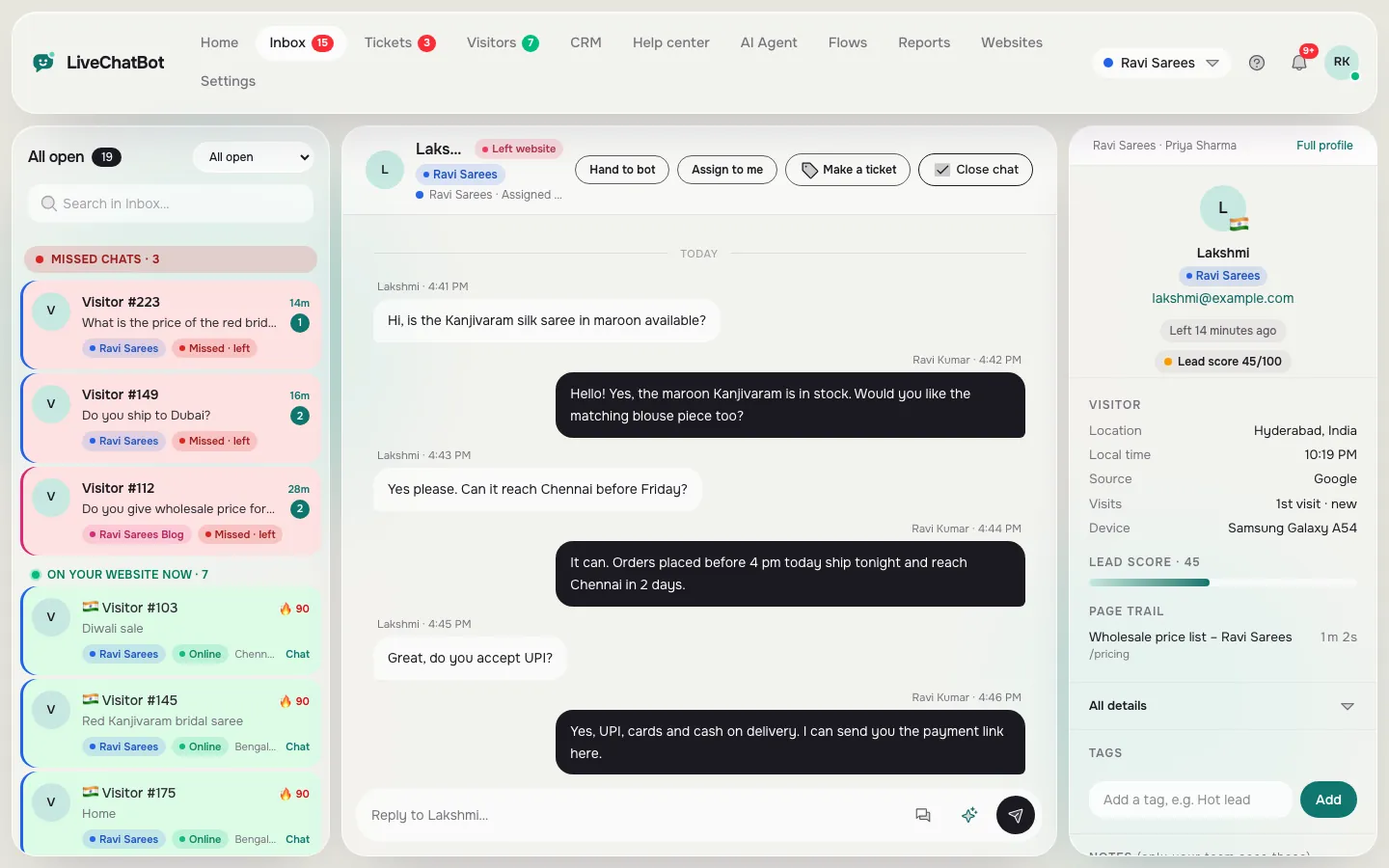
A Page inbox in one app and website chat in another means two places to check and two sets of notes. In LiveChatBot, Messenger and WhatsApp messages arrive in the same inbox as website chats, once you connect your accounts through Meta.
What that gives a small team
- One list of conversations, with Unassigned and Mine folders and Assign to me, so two people do not answer the same customer.
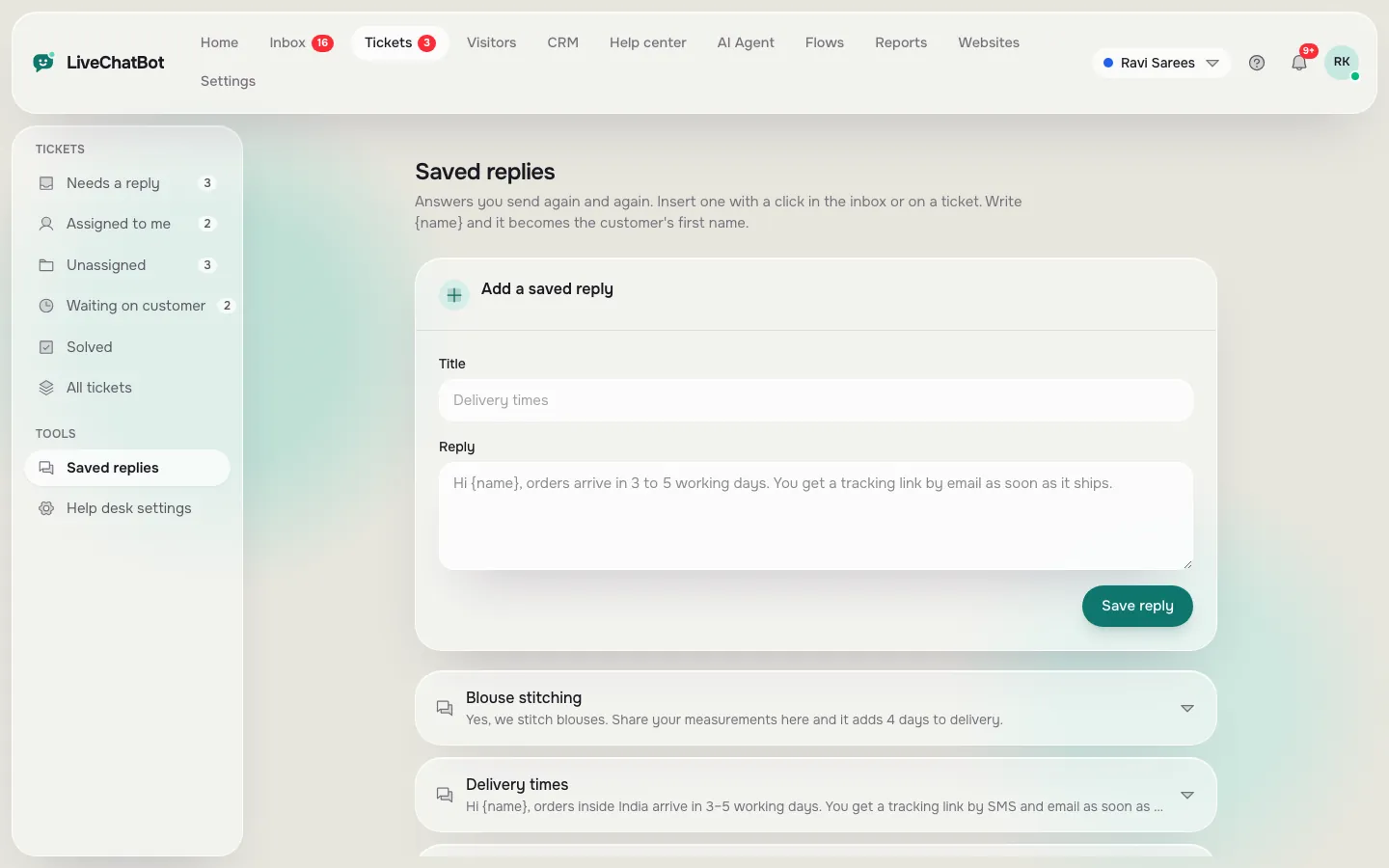
- Saved replies you write once and use in any chat.
- The Android app, so you can answer from your phone.
- The same visitor history when someone who messaged you on Facebook later opens your site chat.
What to be careful about
Ask what answers automatically on each channel, and test it. Do not assume a website feature behaves the same way on Messenger. What we promise is a shared inbox that your team answers from. See the shared inbox for how it works.
Free lines
Copy-ready replies for the questions Pages get most
Pick a tab, copy a line, replace the words in square brackets and save it as a saved reply.
Real screens
One inbox, and the saved replies you reuse
Real screens from the LiveChatBot panel, shown with sample data. Click any picture to see it full size.
Plan the day
Who answers what: a simple split for a small Page
Decide this once, so nobody guesses at 9 pm.
The bot or saved reply answers
Opening hours, location, price lists, delivery areas, how to order. These do not change from customer to customer. On your website, the AI Agent answers them from the facts you teach it, and the free keyword bot falls back to saved replies. On Messenger, answer with the same saved replies from the shared inbox.
A person answers
Complaints, refunds, custom orders, anything with money or health in it. Write a hand-over line so the customer knows a person is coming.
Everyone checks
Once a day, open Unassigned and clear it. A message nobody owns is a message nobody answers.
From Facebook to site
Use your Page to send people to a chat that converts
Choosing the best chatbot for Facebook also means thinking about what happens after the tap. Many visitors tap a link in a post and land on your website. If a chat is waiting there, they can ask the same question without leaving. A Flow can greet visitors from a social source with a short, relevant message, using the source condition. See chat flows.
Add a WhatsApp button card for people who prefer it, and turn on the chat rescuer so a visitor nobody answers in time is asked for email and phone instead of vanishing.
Your first week
A first week that makes the best chatbot for Facebook pay off
You do not need a big project. Spread it over five short sessions.
- Monday: collect. Scroll your last fifty Page messages and list the questions that repeat. Most Pages find five to eight.
- Tuesday: write. Turn each into a reply using the lines above, with your real prices and times.
- Wednesday: connect. Link your accounts through Meta and send yourself a test message from a second profile.
- Thursday: assign. Agree who answers in the morning and who in the evening, and who clears Unassigned.
- Friday: review. Read the week’s chats. Which questions had no saved reply? Write those next.
After a month, check Reports for first response time and response rate. If they improve, the setup works. If a question keeps arriving that you cannot answer well, that is a sign your website or Page needs a clearer post about it. More connections are listed on the integrations page.
Limits and cost
What it does not do, and what it costs
Be clear about the gaps. There is no Instagram DM inbox, no iOS team app and no way to remove “Powered by LiveChatBot”. Slack, Telegram and CRM apps are not native either, though Zapier and webhooks can bridge some.
On cost: free for two websites with 100 visitors each a month, Starter at ₹299 a month, Growth at ₹699 a month, all prepaid with no per-seat charges. See pricing. Sign up at livechatbot.in and connect your Page from the dashboard.
Frequently asked questions
What is the best chatbot for Facebook if I run a small shop?
One that puts Messenger and website chats in a single inbox, lets you reuse saved replies and reaches your phone. Test it with real questions before you commit.
Do Messenger messages arrive in LiveChatBot?
Yes. Messages from WhatsApp and Facebook Messenger arrive in the same inbox as website chats, connected through Meta.
Does LiveChatBot support Instagram DMs?
No. There is no native Instagram DM inbox.
Can several people answer from one Page?
Yes. There are no per-seat charges, and Assign to me with the Unassigned and Mine folders keeps replies tidy.
Is there a free plan?
Yes: two websites with 100 visitors each every month, at no cost.
Keep reading
Related guides
Best Chatbot Development Platform for a Small Team: Which Criteria Deserve the Most Weight, and What You Are Really Choosing Between (Free Weighted Scorecard)
More to read
More guides on this topic
Chatbot With Document Upload: Questions to Ask Before You Upload a File, and Copy-Ready Lines for the No-Upload Route (Free Copy Lines)
Answer Facebook and website chats from one inbox
Free plan for two websites and no per-seat charges. Start free on livechatbot.in.