Visitor insights
Know who is on your website, right now
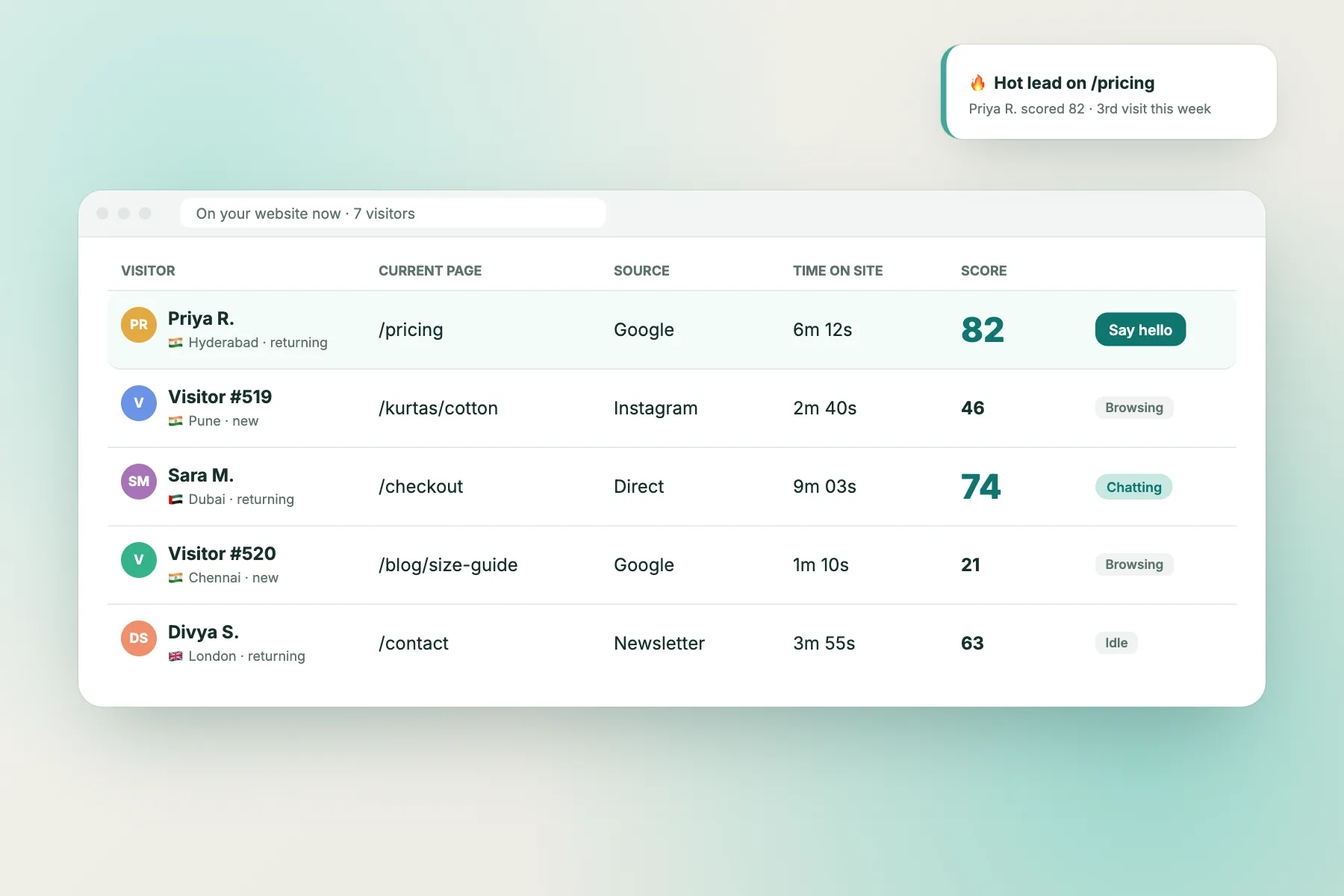
See every visitor live: the page they are on, where they came from, how long they have stayed and how likely they are to buy. Then say hello at exactly the right moment.
⚡ In 30 seconds
- A live list shows everyone on your website right now, with page, source, city and time on site.
- Each visitor gets a lead score from 0 to 100. At 60 they are “hot” and your team gets an alert.
- You can start the chat yourself, and every chat comes with the visitor’s full story.
Interactive walkthrough
Watch a visitor turn into a hot lead
Follow one visitor over two visits and see how the lead score and alerts work. Click any step, or press Play.
No secrets
How the lead score is calculated
The score adds up simple signals from the visitor’s current visit and history. It never goes above 100, and 60 or more means “hot”.
| Signal | Points | Why it matters |
|---|---|---|
| Pages viewed this visit | +5 each, up to 25 | More pages means more interest |
| Minutes on site this visit | +3 per minute, up to 15 | Reading takes time |
| Return visits | +8 each, up to 16 | People come back to things they want |
| Opened a key page | +15 | Pricing, plans, contact, quote, demo, cart, checkout, order… |
| Left a name, email or phone | +15 | They want you to get back to them |
| Has chatted with you | +10 | Already in conversation |
| Visiting from a business network | +10 | Often a B2B buyer at work |
| Came from Google or Bing | +4 | They searched for what you sell |
Example: 3 pages (15) + 4 minutes (12) + 2nd visit (8) + opened /pricing (15) + left email (15) = 65 → hot 🔥
Reading the list
What each column in the visitor list tells you
Visitor
Name if they told you, otherwise a number. Flag, city and new or returning.
Current page
Where they are right now. /pricing or /cart means they are close to deciding.
Source
Google, Instagram, a newsletter or direct. Tells you what brought them.
Time on site
How long this visit has lasted so far.
Score
0–100. Sort by it to see your best leads first.
Say hello
Start the chat yourself with one click.
The full picture next to every chat
Page trail
Every page they opened, in order, with time on each.
Location and local time
City, country and their local time, so you greet them right.
Device and browser
Mobile or desktop, Chrome or Safari: useful when helping with a problem.
Visit history
Which visit this is, and every past chat.
Tags and notes
What your team already learned about them.
Contact details
Name, email and phone once they share them.
Reports
Learn what your visitors want
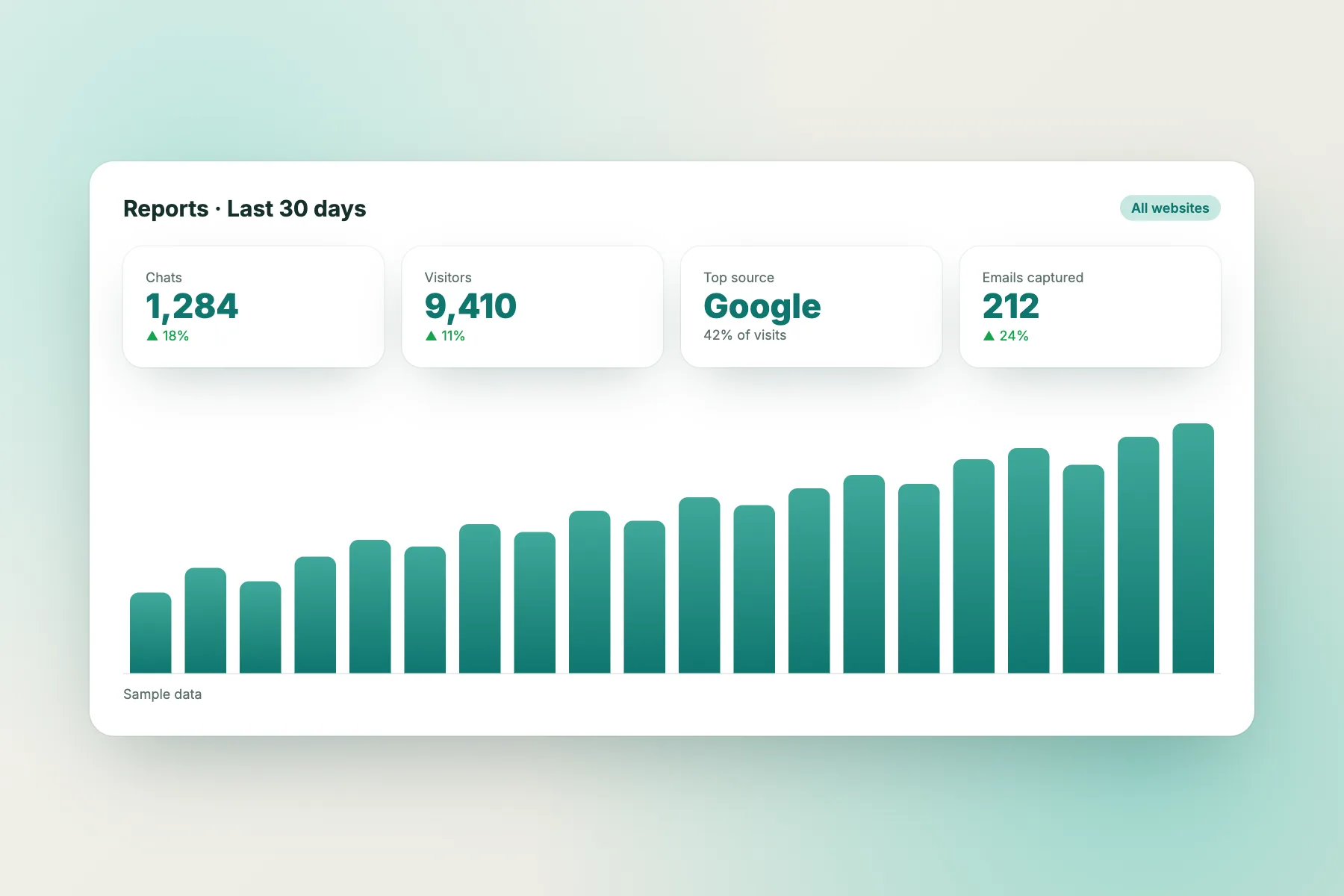
Reports show chats, visitors, emails captured and your top traffic sources. Traffic reports go further: which pages lose visitors, what people searched for on your site, the questions they asked in chat, and ideas for new pages to write.
- Chats, visitors and leads over time
- Pages to improve
- Content ideas from real visitor questions
Send chat events to Google Analytics
If your site uses Google Analytics or Tag Manager, LiveChatBot can report key moments as events, so you can see how much chat contributes to your sales.
Events you can track
- chat_opened: the visitor opens the chat
- chat_started: the visitor sends their first message
- chat_lead: the visitor leaves their email
Tips
How to use visitor insights well
Sort by score every morning
Start the day with the warmest leads.
Watch cart and checkout
A visitor stuck on /checkout for 3 minutes probably has a question.
Welcome back returners
A returning visitor already knows you. A short hello works well.
Mind the local time
Say “good evening” at 9pm their time, not yours.
Fix pages that lose people
Use the “pages to improve” report to find weak pages.
Don’t pounce
One friendly message is helpful. Three is pushy.
Visitor insights questions
Do I need to install anything extra?
No. Visitor insights work as soon as the chat widget is on your website.
Can visitors see that they are being tracked?
Visitors only see the chat bubble. You should mention chat and analytics in your own privacy notice. See our Privacy Policy.
What is a hot visitor?
A visitor whose lead score reaches 60 or more. Your team gets a hot-visitor alert once per visitor.
Are bots counted?
Known bots get a score of 0 and are not treated as leads.
See who is on your website today
Free to start. No credit card. Live on your website in about two minutes.