Facebook Messenger Chatbot Free Setup, Counted Step by Step: What Is Free and What Is Not
Facebook Messenger chatbot free is possible today: LiveChatBot’s free plan costs ₹0, and messages sent to your Facebook Page arrive in the same inbox as your website chats. The catch is not the price. It is the connection through Meta, which has three steps and four values to copy. This guide counts every one, shows what the free plan includes, and gives you a test that tells you whether real customers can reach you.
Short answer
You can run a free Messenger chatbot on LiveChatBot. Create a Meta app, link your Facebook Page, paste the Page ID and a Page access token into Integrations, then subscribe the webhook to messages. Page messages then land in your inbox, and the AI Agent or your team can reply. The plan costs ₹0; Meta does not charge for this connection.
The question
A free Messenger chatbot means a free connection plus a free inbox, not a magic button
A free Messenger chatbot is a bot that answers messages sent to your Facebook Page without a monthly bill. Two things have to be free: the tool that holds the conversations, and the link between Facebook and that tool.
The first part is simple. LiveChatBot’s free plan is ₹0 for 2 websites, with 100 visitors per website a month, and there are no per-seat charges. Messenger sits inside the same inbox as your website chat, so one person can answer both.
The second part is where most people stall. Facebook does not let any tool read your Page messages without a connection you approve. LiveChatBot connects through Meta, and you do the approval once. Our integrations guide lists every channel that connects this way. If you want the wider comparison of tools, read the best free chatbot for Facebook Messenger; this page is about the setup itself and the traps in it.
Counted
The Facebook Messenger chatbot free setup has 3 steps, 4 values and 1 subscription (our count)
The setup is three steps long, and we counted every field in the Integrations → Messenger card of the real dashboard. This is original data from the product, not an estimate.
Step 1: In Meta for Developers. Create an app of type Business, add the Messenger product and link your Facebook Page.
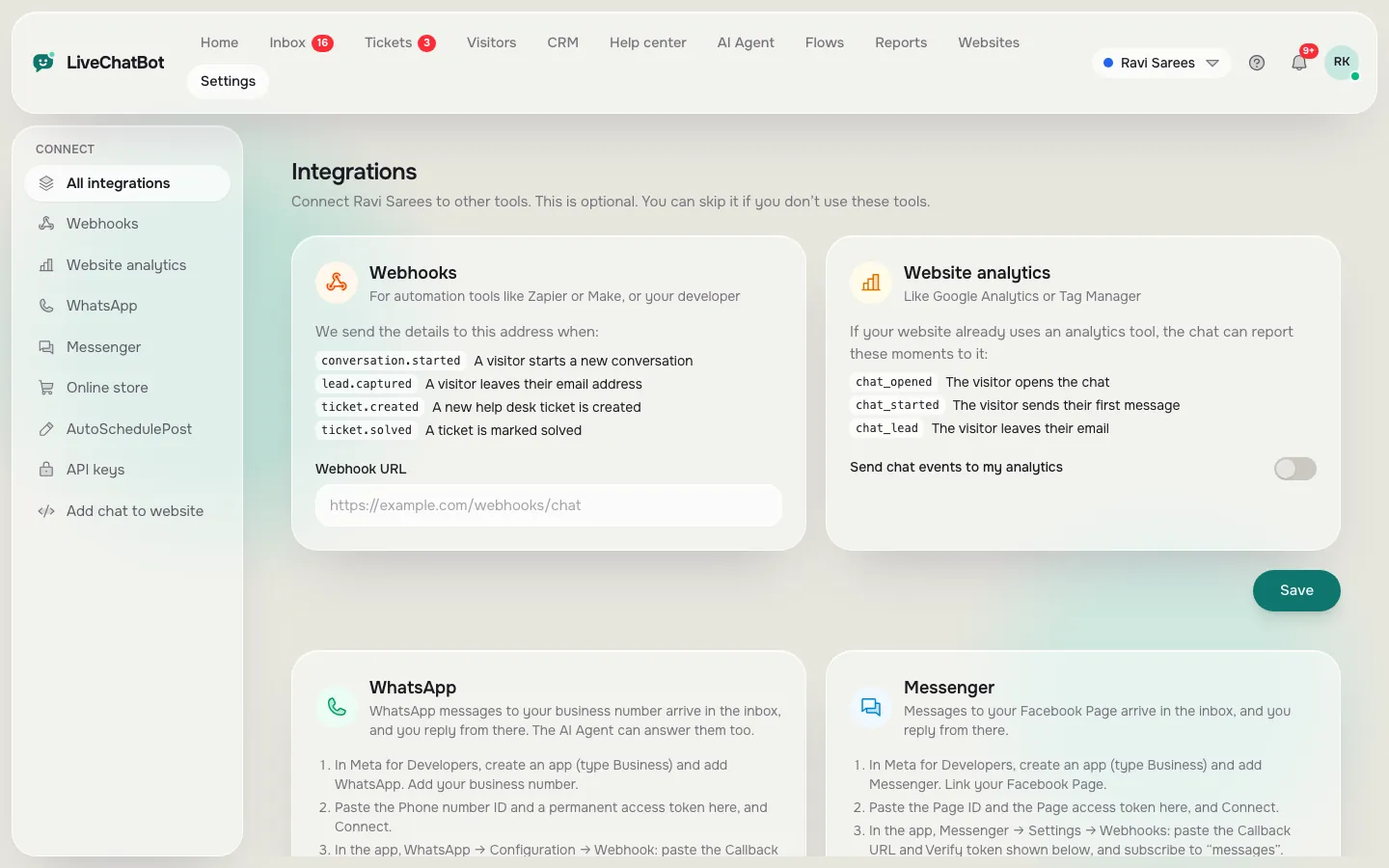
Step 2: In LiveChatBot. Open Integrations, find the Messenger card and paste two values: the Facebook Page ID and the Page access token. The token comes from Meta app → Messenger → Settings → Access tokens → Generate, and needs the pages_messaging permission. Press Connect. LiveChatBot checks the details with Meta and shows your Page name when they work.
Step 3: Back in Meta. Open Messenger → Settings → Webhooks. Paste two values that LiveChatBot now shows you, the Callback URL and the Verify token, and subscribe to the messages field.
That is 3 steps, 2 values pasted in and 2 values pasted out, 4 in total. There is also an optional app secret field; adding it means only Meta can post to your webhook address, so we suggest filling it in.
Real screens
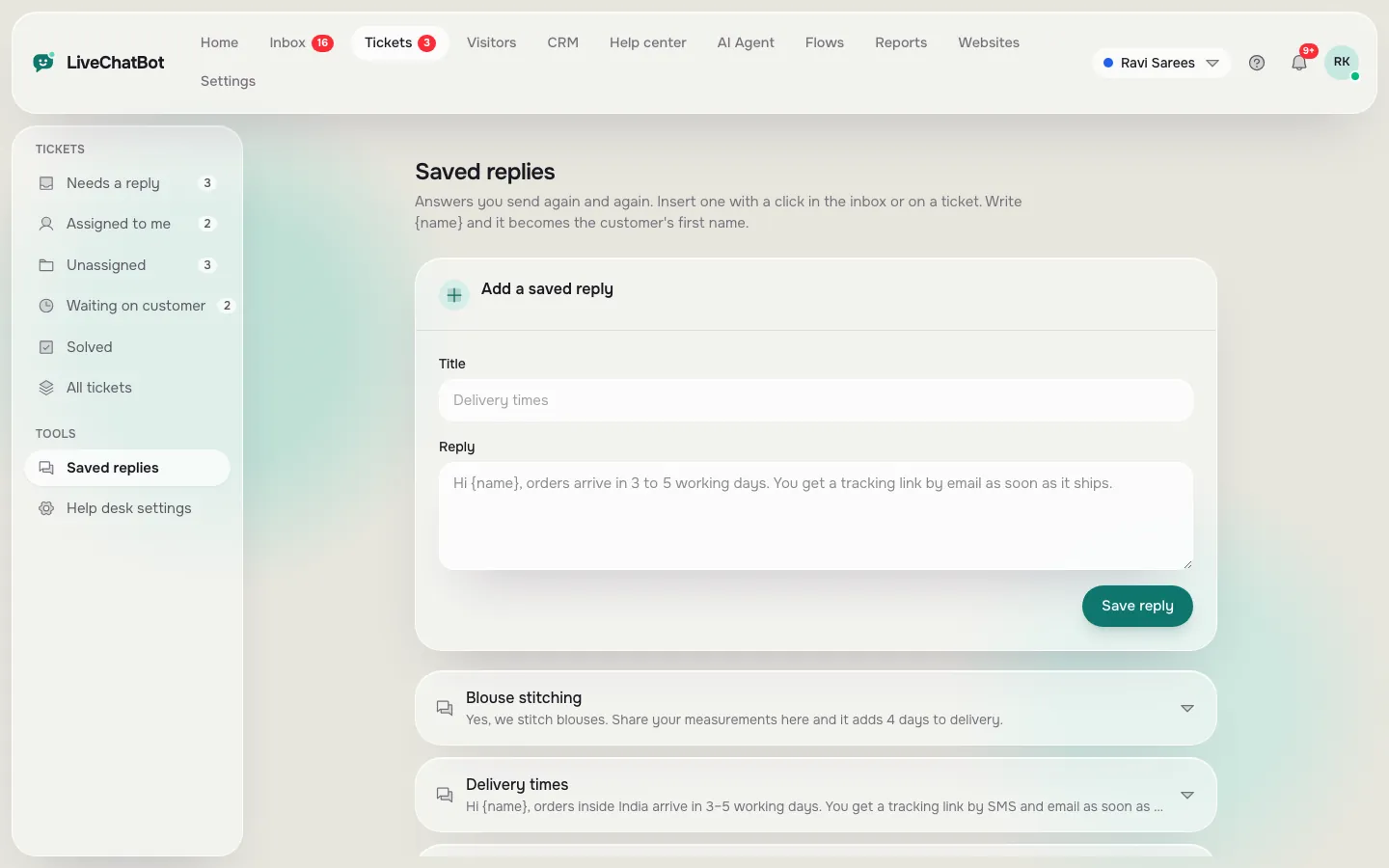
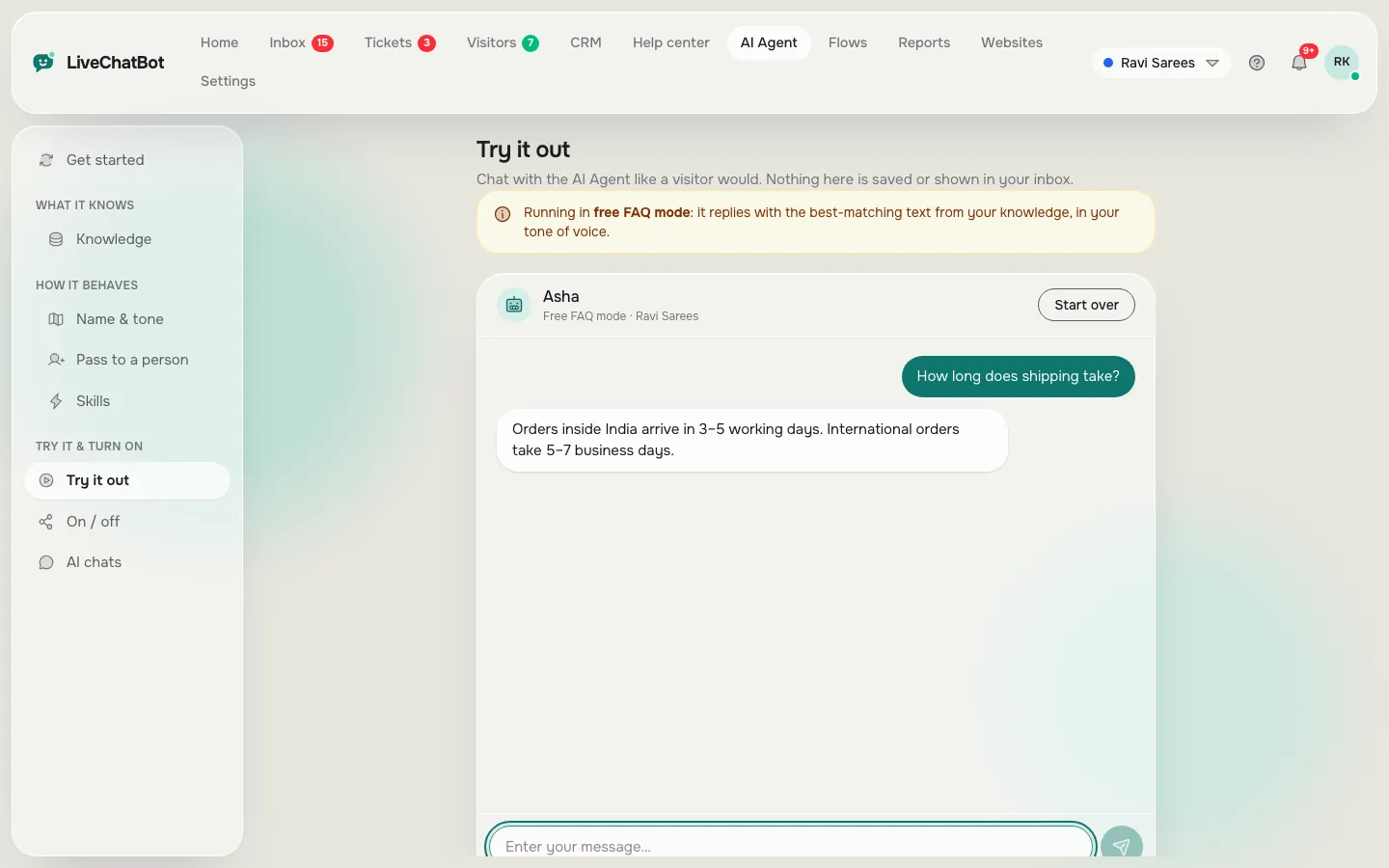
Where you connect Messenger, the replies you reuse and the AI Agent that answers
Real screens from the LiveChatBot panel, shown with sample data. Click any picture to see it full size.
What you get
What a Facebook Messenger chatbot free plan does with your Page messages
Once connected, a message to your Page behaves like a website chat. Each Messenger user becomes a visitor of the website you linked, so you can see the person’s history, add notes and assign the chat to a teammate.
- Same inbox. Use Assign to me, the Unassigned and Mine folders, and Teams for routing.
- Saved replies. Write your delivery, price and opening-hours answers once, then insert them in a click.
- AI Agent. It can answer Messenger messages from the knowledge you give it: typed answers, a copied web page or an uploaded PDF, Word, Excel, CSV or TXT file. AI replies come with every plan, with a monthly allowance shown in the dashboard.
- Phone alerts. The Android app tells your team when a message arrives.
- Replies go back to Facebook. If Meta refuses a reply, the inbox notes it in the chat so you are not left guessing.
Be clear about the limits too. Instagram DMs are not connected. There is no iOS team app, and the Page must be one you manage. For visitors counted on the free plan, check your numbers in the pricing page.
Time maths
A worked example: what answering Messenger by hand costs in minutes
The point of a bot is time, so here is the maths, with made-up but realistic numbers. This is an illustrative example, not a measured result.
Say your Page gets 20 Messenger enquiries a day and 14 of them ask the same four things: price, delivery, hours, location.
- Typing each answer by hand takes about 90 seconds, so 14 × 90 = 1,260 seconds, which is 21 minutes a day.
- Inserting a saved reply and changing one word takes about 15 seconds, so 14 × 15 = 210 seconds, which is 3.5 minutes a day.
- The difference is 17.5 minutes a day, about 8.75 hours in a 30-day month, before the AI Agent answers anything on its own.
Measure your own: count a normal day of messages, mark the repeats, and multiply. If the repeats are under five a day, saved replies alone are probably enough and you can skip the AI Agent for now. Our guide to saved replies shows how to write the first ten.
What most guides miss
Our rule: test Messenger with a stranger’s account, never your own
Here is the insight we have not seen elsewhere: a Messenger bot that works for you may not work for your customers.
You, as Page admin and app owner, can always message your own Page through a Meta app that is still in development. Meta’s own rules, which can change, restrict who an unapproved app can hear from. So your test passes, you relax, and a real customer’s message never arrives. Nothing in the inbox tells you that nobody wrote.
The five-minute test we recommend:
- Ask a friend who has no role on your Page or Meta app to send “hello” to the Page from their own Facebook account.
- Watch your inbox. It should appear within seconds.
- Reply with a saved reply and ask the friend whether it arrived.
- If nothing came in, check the Meta app’s mode and permissions before you announce the chat to customers.
- Repeat the test once a month, because it takes one friend and two minutes.
Treat the first stranger’s message as the real finish line, not the green Connected badge.
Quick check
Tick off your free Messenger launch
Work down the list in order. Each line is a real step, and the last three are the ones people skip.
Bot or person
Decide which Messenger questions the bot answers and which a person takes
Let the bot answer questions that have one factual answer: opening hours, address, delivery areas, price lists, return rules. Send anything that involves a decision to a person: refunds, complaints, custom quotes, anything with money or emotion in it.
A practical split for a small shop:
- Bot: “Do you deliver to my pincode?”, “What time do you open?”, “Is this in stock?” (if you gave it the facts).
- Person: “My order is damaged”, “Can you give me a discount?”, “I want to speak to the owner”.
Write one Rule in the AI Agent’s Rules to follow box, for example “Never promise delivery dates; hand over to the team.” Rules work while the website has AI replies. The free keyword bot, which uses saved replies, cannot follow written rules, so keep its replies short and factual.
Our AI Agent page explains how the knowledge and the rules fit together.
Honest limits
What a Facebook Messenger chatbot free route does not do
A free Messenger chatbot has limits, and you should hear them before you start.
- Instagram DMs are not connected. Only Facebook Messenger and WhatsApp reach the inbox.
- No native Slack, Telegram or Teams bridge. Zapier and webhooks can pass some data on.
- No iOS team app. iPhone users answer from a browser; Android has an app.
- The Powered by LiveChatBot badge stays on every plan. It affects the website widget; your Messenger replies are plain messages.
- No sentiment scoring, captcha or role builder.
- You need access to the Meta side. If a freelancer made your Page, you need Page admin rights first.
If those do not bother you, the free plan is a good fit for a small business. When your website visitors grow, Starter is ₹299 a month for 750 visitors shared across 2 websites, and Growth is ₹699 a month for 2,500 shared across 5. Plans are prepaid with no auto-renew, so nothing is charged automatically. Back to the overview on integrations for the full list of connections.
Frequently asked questions
Is a Facebook Messenger chatbot free on LiveChatBot?
Yes. The free plan is ₹0 for 2 websites, and Messenger messages arrive in the same inbox as your website chats. Meta does not charge for the connection, though you do the setup in Meta for Developers.
Do I need to code to connect Messenger?
No code, but you do work in Meta for Developers: create a Business app, add Messenger, generate a Page access token and paste a webhook address. Count on three steps and four values.
Can the AI Agent answer Messenger messages?
Yes, from the knowledge you give it. Replies go back to Facebook, and anything it cannot answer can be handed to a teammate.
Why do my own test messages work but customers’ do not?
Because you hold a role on the Meta app and Page. Test with a stranger’s account, and check the app’s mode and permissions on the Meta side.
Does it connect Instagram DMs?
No. Instagram DMs are not connected. Facebook Messenger and WhatsApp messages reach the inbox.
Start your free Messenger inbox
Free plan for two websites, no per-seat charges, Page messages and website chats in one inbox. Start free on livechatbot.in.