Build a Working Answer Bot in 60 Minutes With the Free Chatbot API for Website Owners: One API Call and No Model Key (Free Build Timeline)
Free chatbot API for website projects often turns into a week of keys, tokens and servers when all you wanted was a bot that answers visitors. There is a shorter route. On LiveChatBot you teach the bot with your own answers, paste one line of code, and use the REST API for the one job that really needs code: sending a lead from your own system. This guide gives a minute-by-minute plan.
The quickest free way to get a chatbot on a website is to skip the model API. Teach the AI Agent your answers, paste the embed line, and call the REST API only to push leads from your own forms. The free plan covers two websites and 100 visitors per website each month, with no model key to manage.
The goal
A chatbot API is only worth it if it saves you an hour
A chatbot API is a set of requests your code can send to a bot service. For a website owner, it matters only when it removes work.
Many people search for a free chatbot API for website use because they picture a model endpoint: send a question, get an answer, build the rest yourself. That path means writing the chat window, storing history, handling hand-over and guarding a key. It is a fine project for a developer. It is a poor first step for a shop owner who wants answers on the page by tonight.
The other path is a hosted bot with an API at the edges. The chat window, inbox, phone alerts and hand-over already exist. You use code only where your own system has to talk to the chat. If you are still weighing the two paths, our free AI chatbot API guide explains the brain-versus-plumbing split, and the free live chat page lists what the free plan includes before any code.
The plan
Your 60-minute build, step by step
Six steps, each with a minute budget. The times are a planning estimate, not a measured benchmark, so adjust them to your own site.
Create the account at livechatbot.in, add your website, and copy the one install line from the install page.
Paste it before the closing body tag, or install the WordPress plugin. Load a page and confirm the chat bubble appears.
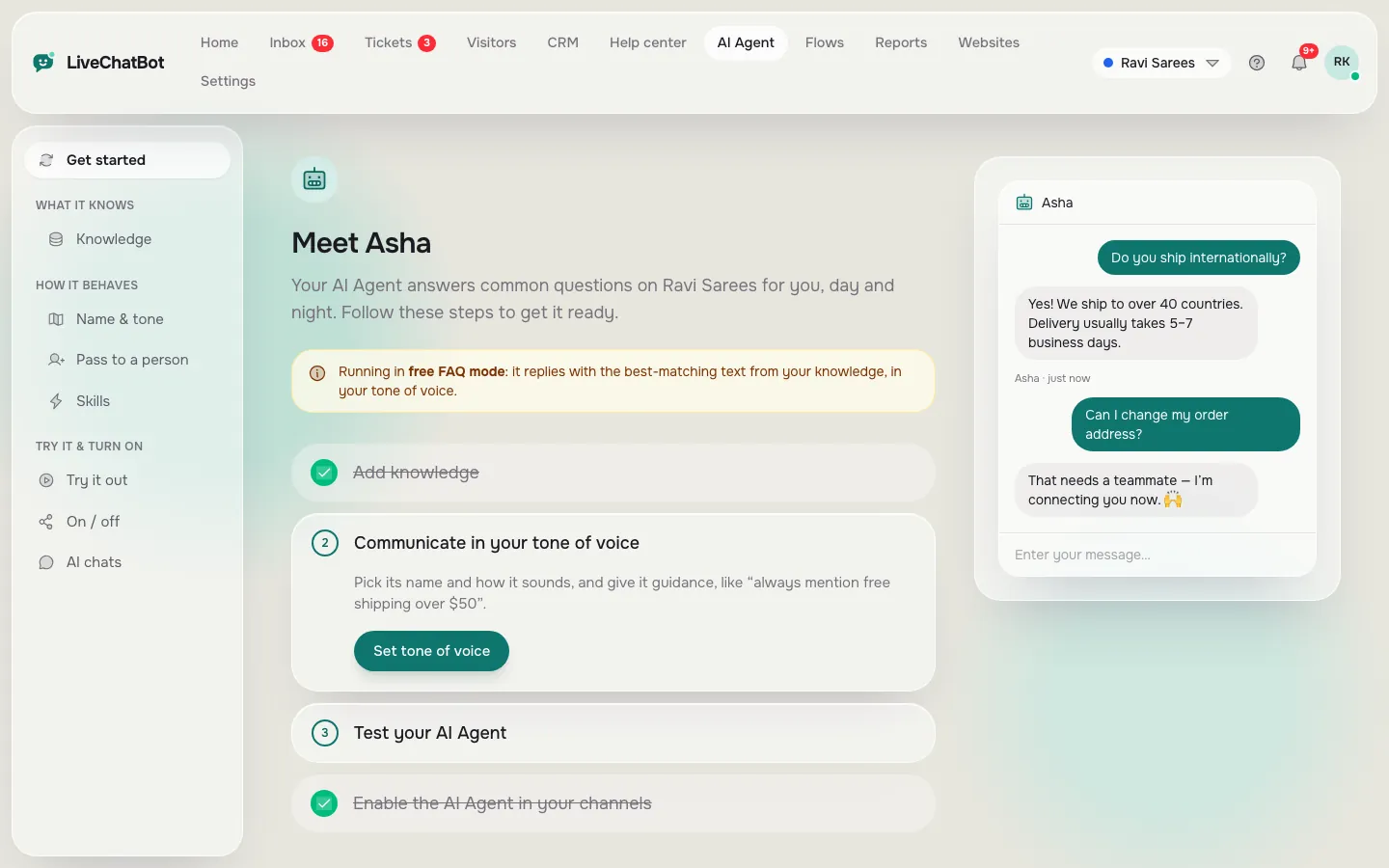
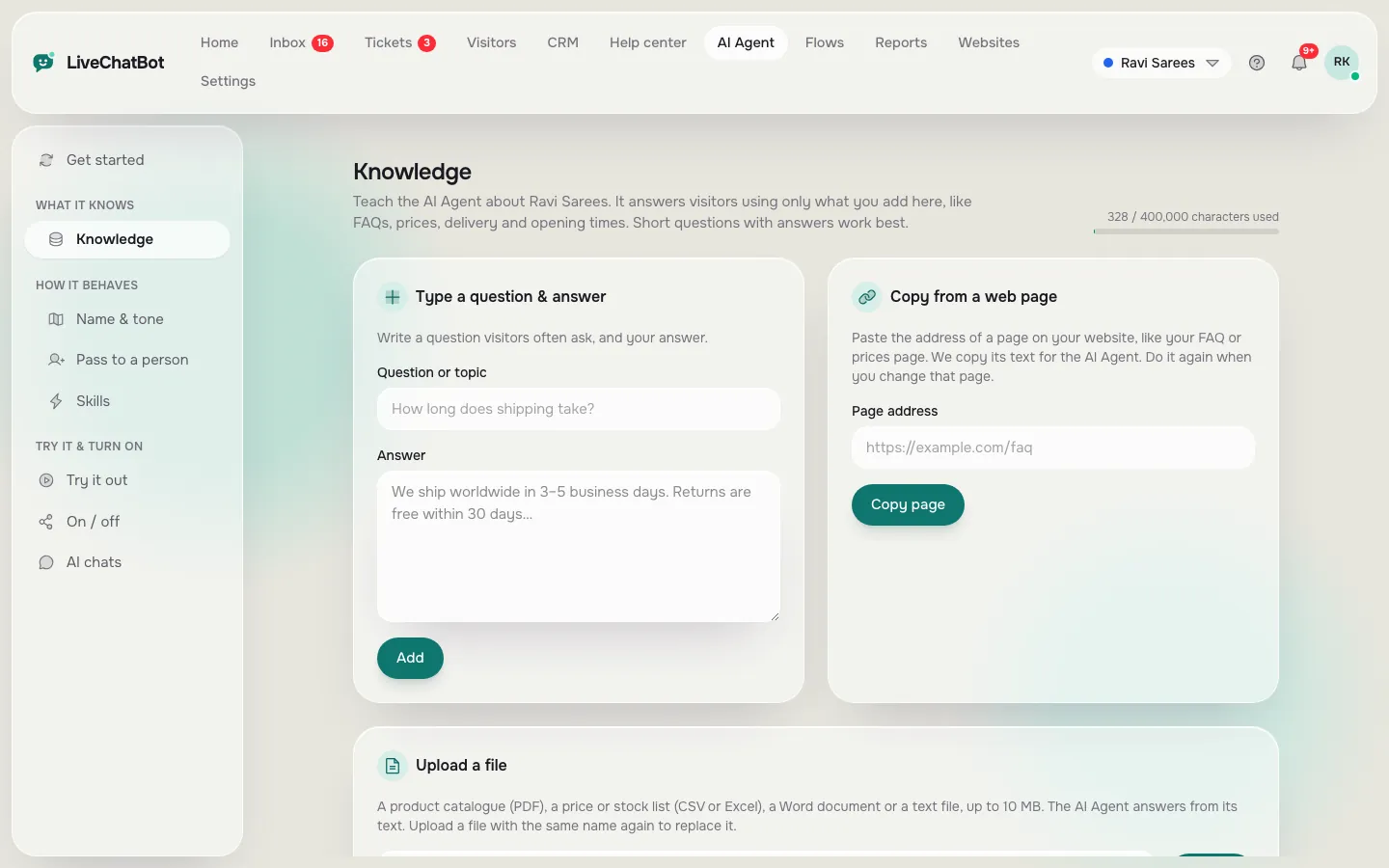
Open AI Agent, then Knowledge. Type answers for your ten most-asked questions, or copy a web page, or upload a PDF, DOCX, XLSX, CSV or TXT file.
Write a few lines of behaviour, such as never promise delivery dates. Rules work while the website has AI replies.
Set opening hours and the away form, and install the Android app so a person is alerted.
Ask one thing you never taught it. A good bot says it is not sure and offers a person.
Step by step
A free chatbot API for website visitors needs no model key
You do not need a key to make the bot answer, because the AI replies run on LiveChatBot’s side.
The AI provider is set by LiveChatBot on the server. You cannot pick the model or paste your own key, and that is a feature for a small site: nothing to leak, nothing to renew, no bill that grows with a busy day. Every plan has a monthly allowance of AI replies, shown in the dashboard. When it is used up, the free keyword bot answers from your saved replies instead of going silent.
Where the answers come from
The AI Agent answers from the Knowledge you give it. There are three ways to add it: type answers, copy a web page, or upload a file. Our guide on how to train your AI chatbot shows what to write first.
Why this beats a raw model endpoint
A bare model knows nothing about your delivery times or fees. A hosted bot answers from your own facts, and it already has the inbox where a person can take over.
Real screens
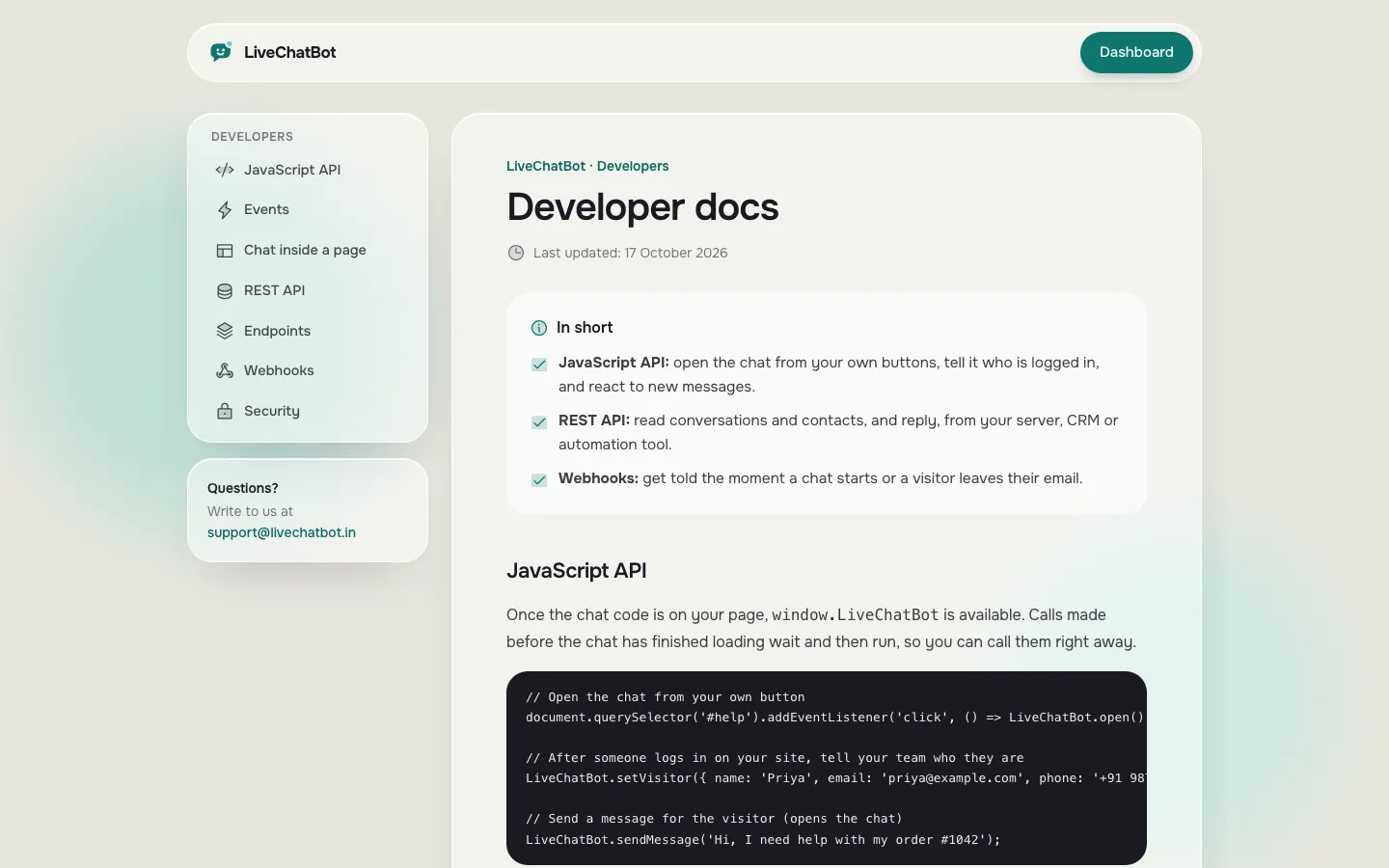
Real screens: teaching the bot, and the API page
Real screens from the LiveChatBot panel, shown with sample data. Click any picture to see it full size.
The one API call
Use the REST API for the one job that needs code
The REST API is for the moment your own system has a lead the chat does not know about.
Typical case: a custom order form or a booking page that is not a normal website form. The chat cannot see it, so you send the lead yourself. The call is POST /api/v1/leads with your API key sent as a Bearer token. Create the key under Integrations, and call it from your server only, never from browser code where anyone can read it.
The REST API has a fixed limit of 120 requests per minute per key. A form that sends one call per submission will never come near that. Ask our team for developer documentation if you need the field list, and see the live chat API integration guide for the browser-side commands such as open, setVisitor and pageView.
Form plugins for WordPress, such as Contact Form 7 and WPForms, and normal forms on any page are caught automatically as leads, so many sites need no API call at all.
Original data
Counting the work: 6 steps, 1 call, 0 keys
Original data, from the product’s own dashboard and routes: the plan above has six steps, uses one pasted line, one optional API call and zero model keys.
Compare that with a do-it-yourself model endpoint. Worked example with the maths shown, using the same shop and a typical list of jobs:
- Chat window, history, hand-over, inbox and phone alerts: 5 jobs to build yourself
- Key storage and a server proxy so the key is not in the page: 1 job
- Knowledge and rules: 1 job either way
That is 7 jobs against the hosted route’s 1 (knowledge) plus 1 optional call. If each job took only half a day, which is a low guess, the build would take 3.5 days against about an hour. These are illustrative numbers, not a survey. Your own estimate will differ, but the shape holds: the hosted route moves almost all the jobs onto the vendor.
For the extra reading on the build-yourself path, our make-versus-buy guide lays out the trade-off honestly.
What most guides miss
Our rule: your page must work with the bot switched off
Here is a rule most API guides never state: every page with a chatbot must still let a visitor reach you when the bot is down.
Call it the fail-open test. It takes five minutes. Block the chat script in your browser (or load the page with the widget hidden), then look at the page as a stranger would. Can you still find a phone number, an email or a contact form without the chat?
If the only way to reach you is the bot, then any outage, any paused chat or any blocked script cuts off your customers. That includes the over-limit case: when a free plan hits its monthly visitor limit, chat pauses for new over-limit visitors. A visible contact route keeps those visitors from leaving.
Our rule: the bot adds a faster route to you, it never replaces the only route. Keep a plain contact link in the footer and on the contact page. Treat the chat as an extra door, not the only one.
Limits
Limits to know before you pick a free chatbot API for website use
Every free chatbot API has limits, and LiveChatBot’s are fixed rather than settings.
- REST API: 120 requests per minute per API key.
- Visitor chat messages, ratings and article votes: 20 per minute per IP address.
- Widget API overall: 240 requests per minute per IP address.
- Free plan: 2 websites, 100 visitors per website each month. Starter at ₹299 a month gives 750 shared visitors across 2 websites, and Growth at ₹699 gives 2,500 shared across 5. There are no per-seat charges and no charge per API call.
The visitor-side limit matters when you test with a script. Twenty messages a minute from one address is generous for a person and a hard stop for a bot, which also keeps spam down. Our chatbot API free tiers guide works through how traffic maps to limits.
Plans are prepaid, with no auto-renew and no automatic charges. See pricing.
Honest gaps
What this free chatbot API for website route does not give you
Know the gaps now, not after the build.
- No choice of AI model, and no bring-your-own key. The provider is set by LiveChatBot.
- No white label. “Powered by LiveChatBot” stays on all plans.
- No native CRM apps for HubSpot, Salesforce or Zoho. Zapier, webhooks (ticket.created and ticket.solved) and the REST API can bridge them.
- No iOS team app. Agents use Android or a browser.
- No voice. The chat is text only.
If you truly need a raw model endpoint, this is the wrong product for that part. If you need a bot that answers, hands over and reports, it fits. The integrations page lists the connectors that exist today.
Checks
Check the build before you tell anyone
Run four checks. They take fifteen minutes in total.
- Question you never taught. The bot should say it is not sure, not guess.
- Hand-over. Type “talk to a person” and watch your phone alert.
- Fail-open. Hide the chat and confirm a phone or email is still visible.
- Lead call. If you use the REST API, send one test lead and find it in the dashboard.
Fix anything that fails, then add the next twenty answers from real chats, not guesses. For the wider story of how the pieces connect, see our free chat API for website owners layers guide and the setup guide for live chat.
Frequently asked questions
Is there a free chatbot API for website owners?
Yes. LiveChatBot’s free plan includes the embed line, a JavaScript API, a REST API and webhooks, for 2 websites and 100 visitors per website each month. The bot answers without any model key from you.
Do I need an API key to make the chatbot answer?
No. Answers come from the AI Agent and the Knowledge you add. You only need an API key if your own system calls the REST API.
Can I use my own OpenAI or other model key?
No. The AI provider is set by LiveChatBot, and bringing your own key or choosing the model is not available.
How many REST API calls are allowed?
120 requests per minute per API key. That is a fixed limit, not a setting.
What happens when the AI reply allowance runs out?
The free keyword bot answers from your saved replies, and a person can still take over from the inbox.
Keep reading
Related guides
Free Chat Widget for Website Owners: What the Free Plan Includes, What It Leaves Out, and a 5-Minute Fit Test (Free Myths vs Facts)
Free Chatbot Builder Flow Check: Find Dead Ends, Broken Buttons and Missing Exits Before You Publish (Free Flow Map Checker)
Free Chat Software for Website Owners: Work Out the Day Your Free Visitors Run Out, Before the Month Starts
More to read
More guides on this topic
Best WordPress Chatbot Plugin Free: Go From Nothing to a Working Bot in 90 Minutes, With a Timeline You Can Follow Tonight
Build it in an hour
Free plan for two websites, no per-seat charges and no model key to manage. Start free on livechatbot.in.