Customer Service Chatbot Platform or Separate Tools? Count the Re-Typing Steps in One Support Request Before You Choose
Customer service chatbot platform software is one product that holds the bot, the shared inbox, tickets and a help center, so a support request moves between them without anyone copying it by hand. Many buyers compare bot features and forget the joins between tools. This guide follows one real request from first message to closed ticket, counts where information gets re-typed, and shows how to run the same count on any vendor.
A customer service chatbot platform combines an AI bot, a shared inbox, tickets and a help center in one product. Choose one when your team keeps copying customer details between tools. With LiveChatBot, a chat can become a ticket in one click, and the free plan covers two websites at no cost.
⚡ In short
- A platform is judged by its joins: how a request moves from bot to person to ticket to answer.
- Count the re-typing steps. Every time a person copies a name, order number or question between tools, that is a leak.
- Separate tools can win when you already own a good help desk; a platform wins when you own nothing yet.
- Our rule: pay for the join, not the feature list.
Definition
A customer service chatbot platform is four layers sharing one customer record
A customer service chatbot platform is a single product with a bot, an inbox for people, tickets and a help center, all sharing the same conversation history.
The four layers
- The bot answers the questions that repeat. In LiveChatBot this is the AI Agent, answering from facts you give it.
- The shared inbox is where a person takes over. Chats can be assigned with Assign to me, and the inbox has Unassigned and Mine folders.
- Tickets hold anything that cannot be solved in one chat, with an owner and a customer ticket page.
- The help center publishes the answers as public articles, so fewer people need to ask.
A tool does one layer well and leaves the joins to you, which moves the work from software to staff. If you want the wider view of how chat serves support teams, our live chat for customer service guide covers the daily routine.
The test
Follow one request through the stack and count what gets re-typed
The fastest way to compare a platform with separate tools is to follow a single support request from start to finish and count the hand-copies.
Worked example. A customer writes: “My order 4821 arrived damaged, I want a replacement.” Here is the route in a stack of four separate tools, a bot from one vendor, a chat inbox from another, a ticket tool from a third and a help center from a fourth.
- The bot cannot solve it and hands over. The order number is in the chat transcript only.
- The agent opens the chat inbox and reads the message. Re-type 1: the agent copies the order number into the ticket tool.
- Re-type 2: the agent copies the customer’s name and email into the ticket.
- Re-type 3: the agent pastes the complaint text so the ticket makes sense alone.
- Re-type 4: after resolving, the agent searches the help center to send a link, then pastes the article address into the reply.
- Re-type 5: the agent types a note into the bot’s training so it handles the next case.
That is five hand-copies for one request. If your team handles 20 such requests a day at about 40 seconds per copy, that is 20 × 5 × 40 seconds = 4,000 seconds, or about 67 minutes a day. This is a worked example with assumed timings, so replace them with yours.
Try it
The life of one support request
Mark where a person copies something by hand.
The bot answers from your facts or says it does not know. Nothing to copy yet.
The chat lands in the shared inbox. Does the transcript come with it, or only the last message?
In LiveChatBot this is one click, and the conversation travels with it. In a separate tool, count the copies.
A named person owns the ticket and the customer gets a ticket page link.
Solved tickets can fire the ticket.solved webhook. Add the new fact to Knowledge so the bot knows next time.
What most guides miss
Our rule: pay for the join, not the feature list
The re-typing count, not the feature count, is the number that predicts whether a platform will save you time.
Two vendors can tick every feature box and still differ by an hour a day, because one passes the conversation between layers and the other makes a person do it.
The five-minute vendor test
Run it on any demo:
- Start a chat as a customer and ask something the bot cannot know.
- Take over as an agent and turn the chat into a ticket.
- Count every field you had to fill, paste or retype.
- Close the ticket and check whether the customer sees the outcome.
- Write down the count. Zero or one is a join. Three or more is a gap.
A cheaper tool with a count of six costs more than a dearer one with a count of one, once you price your agents’ time.
Real screens
What you will see in LiveChatBot
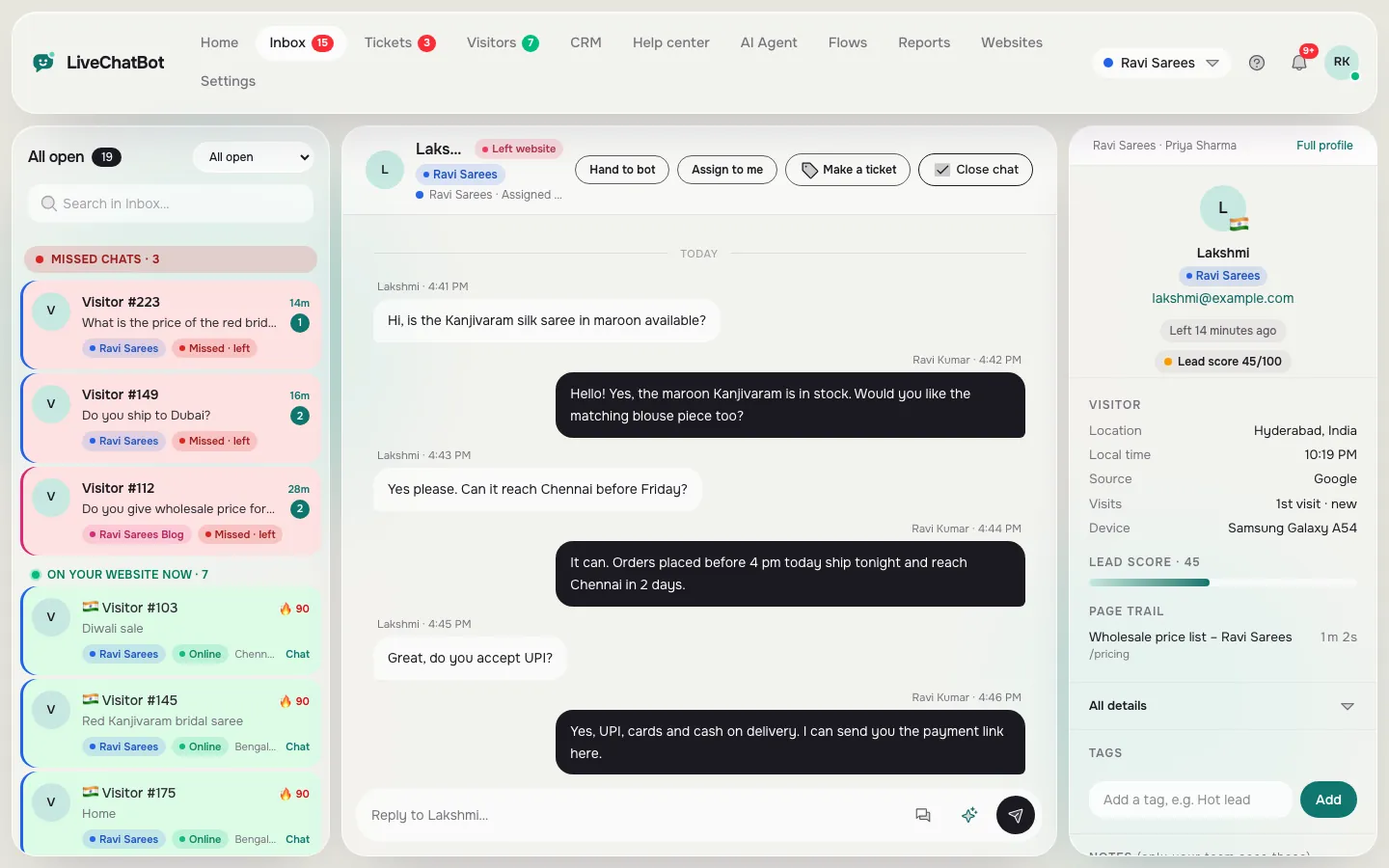
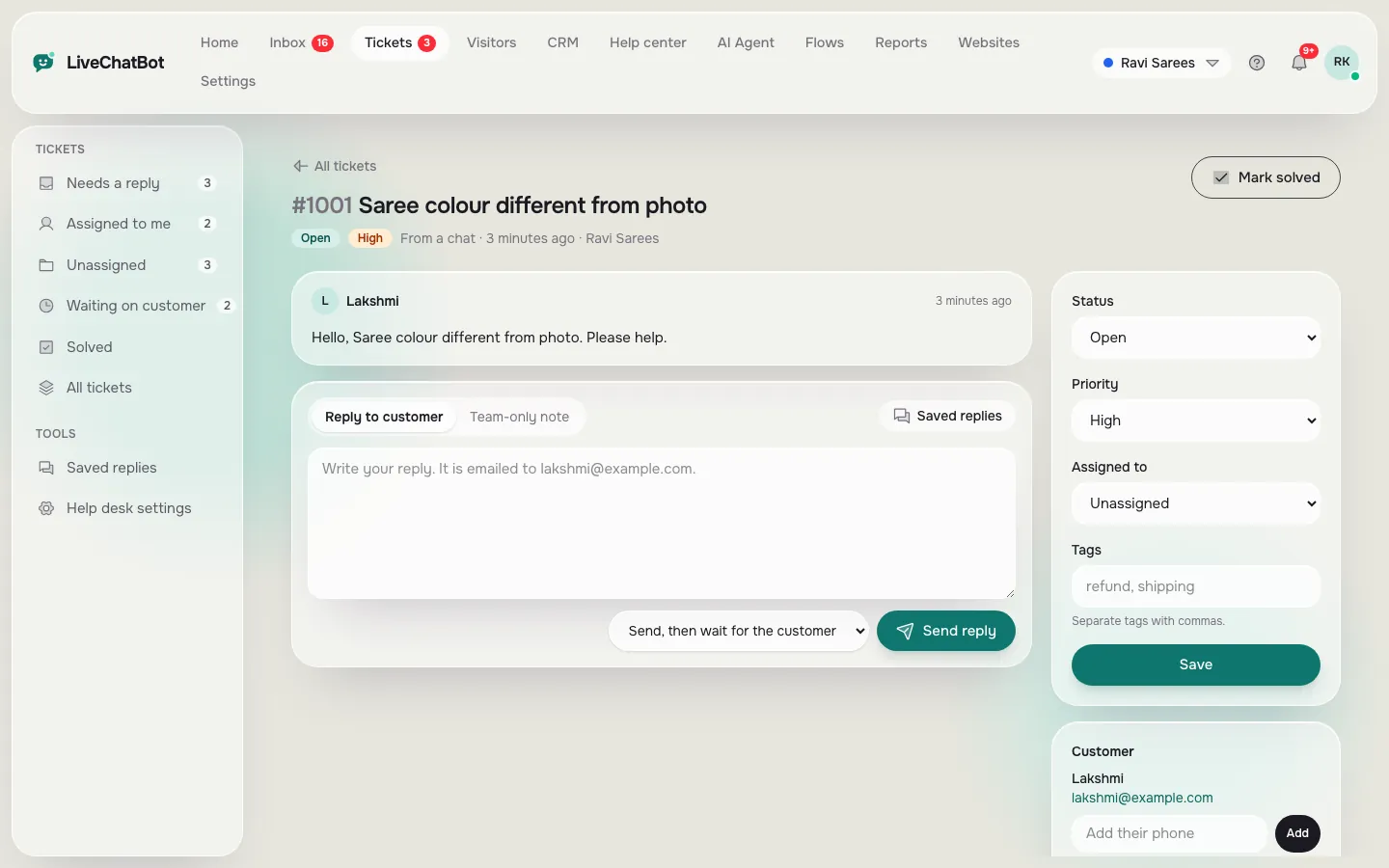
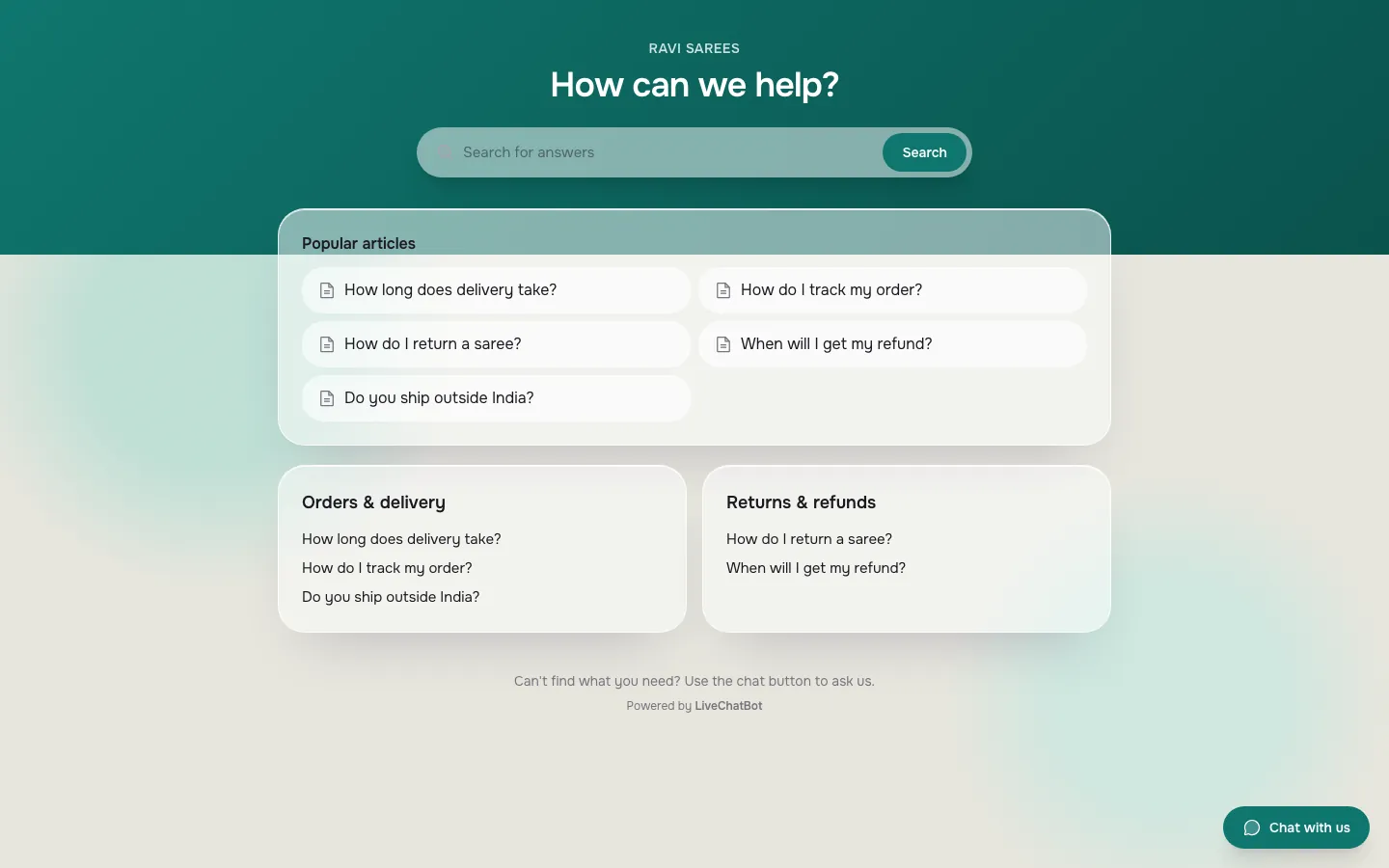
Real screens from the LiveChatBot panel, shown with sample data. Click any picture to see it full size.
Layer 1
The bot should answer from your facts and know when to stop
The bot layer earns its place by answering repeat questions correctly and handing everything else to a person.
In LiveChatBot you give the AI Agent knowledge in three ways: type answers, copy a web page, or upload a file (PDF, Word DOCX, Excel XLSX, CSV or TXT). Behaviour goes in the Rules to follow box, which takes up to 5,000 characters, for example “Never promise delivery dates”.
You cannot pick the AI model or edit a raw system prompt; the Rules box and Knowledge are the controls.
Before you trust any bot layer, ask whether it says “I am not sure” instead of guessing, and whether it hands over with the transcript attached. If no one answers, LiveChatBot’s chat rescuer asks for an email and phone number after a few seconds. Our guide to training your AI chatbot shows how to build the first twenty answers.
Layer 2
The shared inbox decides how fast a person can take over
The inbox layer is where a handover succeeds or fails, because it is the first screen your agent sees.
WhatsApp and Facebook Messenger messages arrive in the same LiveChatBot inbox as website chats, connected through Meta, so a customer who switches channel does not become a stranger. Teams let you route chats to a group, with a My teams folder, and Assign to me stops two people answering one visitor. There is no automatic round-robin assignment, so decide who watches the Unassigned folder.
The Android app covers agents away from a desk (no iOS team app). Our guide to using saved replies covers common answers.
Layer 3
Tickets catch what a single chat cannot finish
The ticket layer exists for problems that take longer than one conversation, and it should keep the chat attached.
In LiveChatBot an unresolved chat can become a ticket with an owner, and the customer gets a ticket page where they can follow the thread. Webhooks (ticket.created and ticket.solved), Zapier and a REST API pass events to tools with no native link.
Not available: native Zendesk, Freshdesk, HubSpot or Salesforce links, SSO, audit logs and role builders. If you need those, use a mature help desk plus a separate bot.
For the longer ticket workflow, see our guide to turning a chat into a support ticket.
Layer 4
The help center stops the same question arriving twice
The help center layer lowers your chat volume by letting customers find answers without asking.
LiveChatBot has a public help center with articles, and visitors can vote whether each one helped. Reports then show which articles get the most “not helpful” votes, a weekly to-do list from real customers.
The useful habit is a loop: when an agent answers the same question a third time, it becomes an article and a bot fact.
Reports also show first response time and how many chats the AI Agent resolved without a person. There is no CSAT survey builder, no sentiment scoring and no scheduled emailed reports, so plan to look at the dashboard yourself.
When to choose
Pick a platform when you own nothing, separate tools when you own a good help desk
Choose a platform if you do not already have a help desk, and keep your tools if you do.
A platform fits when
- You answer by WhatsApp, email and a form with no shared record.
- Your team is one to ten people and nobody manages integrations.
- You want predictable costs, with no per-seat charges.
Separate tools fit when
- You already run a help desk with years of ticket history your team trusts.
- You need SSO, audit trails or strict roles.
- You need a native link into a CRM that LiveChatBot does not have.
A middle path exists: run the bot and inbox in front, and send tickets through a webhook into your existing help desk. If you are comparing AI-first options, our AI chatbot for customer service post looks at the choice from the bot side, and the live chat for customer service guide shows how a team runs it daily.
What it costs
Cost: free to start, then one price for all four layers
On LiveChatBot every layer comes with the plan, so you do not buy the bot, inbox, tickets and help center separately.
The free plan gives you 2 websites and 100 visitors per website a month. Starter is ₹299 a month for 2 websites and 750 visitors shared across them. Growth is ₹699 a month for 5 websites and 2,500 shared visitors. Plans are prepaid with UPI and similar methods, there is no auto-renew and no per-seat charge, and paying yearly gives 12 months for the price of 10. The sign-up code WELCOME100 adds 100 visitors once.
Worked comparison with the assumed 67 minutes a day: 67 × 22 working days is about 1,474 minutes, or roughly 24.6 hours of copying a month. Multiply by your own hourly staff cost and put that beside the plan price. Current details are on the pricing page.
Frequently asked questions
What is a customer service chatbot platform?
It is one product that combines an AI chatbot, a shared team inbox, tickets and a help center, so a support request moves between layers without manual copying. LiveChatBot includes all four on every plan.
How is a platform different from a chatbot tool?
A tool does one job, such as answering FAQs. A platform also handles the handover, ownership and follow-up. The difference shows up in how many fields an agent must retype per request.
Does LiveChatBot replace my existing help desk?
It can for small teams, since it has tickets, saved replies and a help center. It has no native Zendesk or Freshdesk link, so larger teams can bridge through webhooks and Zapier instead.
Can I connect other tools to it?
Yes, through Zapier, the ticket.created and ticket.solved webhooks, a REST API and the JavaScript API. Native Slack, HubSpot, Salesforce and Zoho integrations are not available.
Is there a free plan?
Yes. The free plan covers 2 websites and 100 visitors per website each month. Paid plans are prepaid with no auto-renew and no per-seat charges.
Keep reading
Related guides
Customer Service Chat Software Sized by Your Busiest Hour: How Many People You Really Need, With the Maths Shown (Free Setup Quiz)
Customer Support Chat Software Seen From the Agent’s Chair: What Should Already Be on Screen When a Chat Arrives (Free Agent Screen Test)
Customer Service Chat App: It Is Really Two Apps, One for Your Customer and One for Your Agent (Free Pocket Test Checklist)
Run the re-typing test yourself
Open a free LiveChatBot account, start a chat, turn it into a ticket and count the steps. If the count is low, you have found your platform.