Customer Support Chat Software Seen From the Agent’s Chair: What Should Already Be on Screen When a Chat Arrives (Free Agent Screen Test)
Customer support chat software is the tool your team uses to answer customers in real time, and most buyers judge it from the customer’s side: how the widget looks. The money is saved on the other side. This guide takes the agent’s chair, lists what should already be on screen when a chat arrives, counts the questions you stop asking, and gives you a free screen test to run in any trial.
Customer support chat software lets a team answer website visitors live from one shared inbox. Good software shows the visitor, their page and past chats before the agent types, so nobody re-asks known facts. LiveChatBot adds an AI Agent, tickets and an Android app, and starts free for two websites.
⚡ In short
- Test the software from the agent’s chair: what is already on screen when a chat arrives?
- Every question an agent asks that the software already knew is a gap you pay for in minutes.
- A support chat that cannot become a ticket, or cannot be answered from a phone, will lose customers after hours.
- Our rule: run the Ask-Nothing test for one week before you judge any tool.
Definition
Customer support chat software is a shared inbox plus the context around each chat
Customer support chat software is a shared inbox for live conversations, plus the customer context that makes each reply faster and more accurate.
Three parts make up the basic package:
- A chat widget on your website, which is the part customers see.
- A shared inbox, where chats from the site, and in LiveChatBot also WhatsApp and Facebook Messenger messages connected through Meta, arrive together.
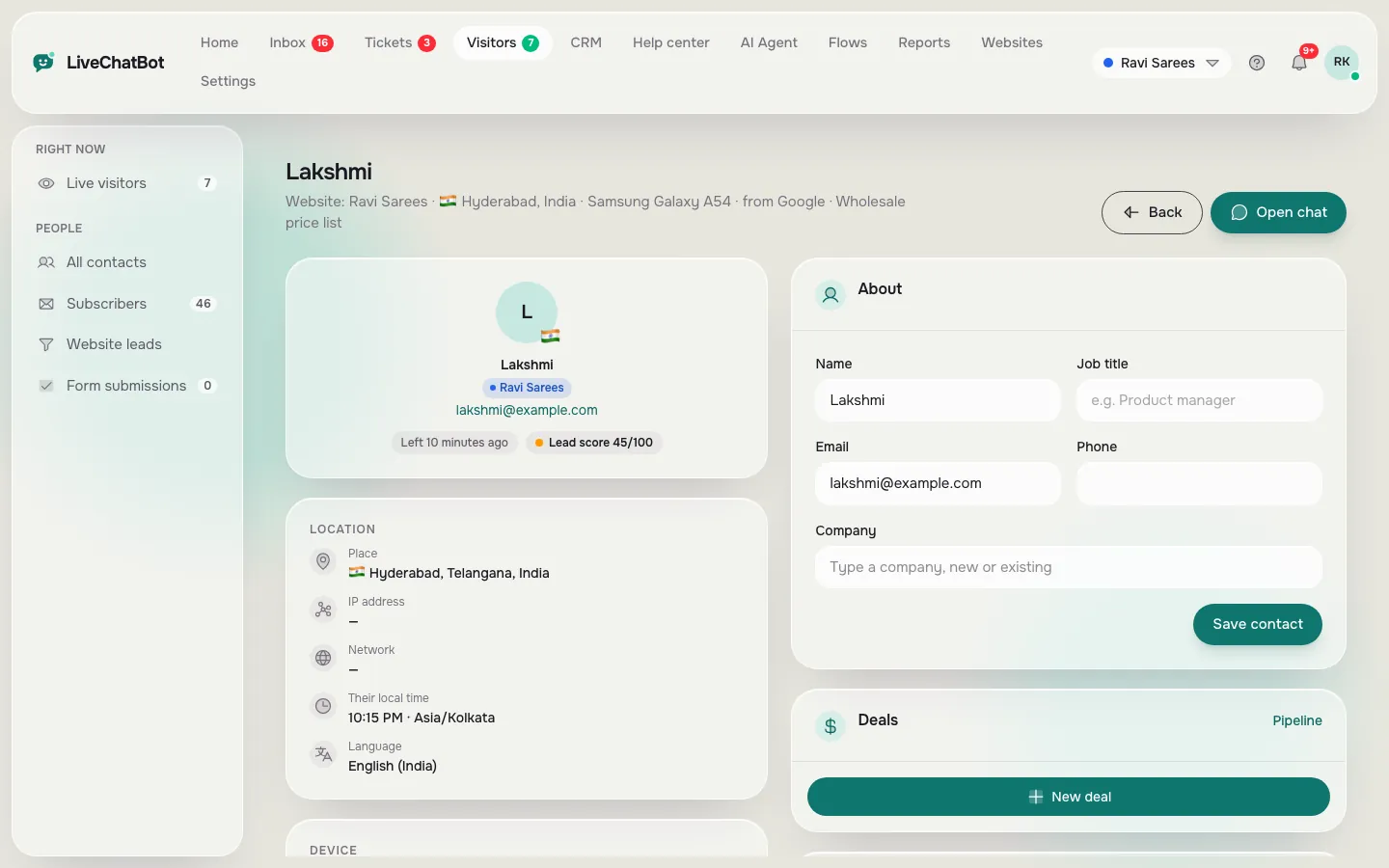
- Customer context, which means who the visitor is, which page they are on, where they came from and what they said before.
Many buyer guides stop after the first part and compare colours and chat bubbles. That is the cheap part to change later. The inbox and the context are what your staff live inside for eight hours a day, so they deserve most of your trial time.
If your team is mostly answering people who already bought from you, our guide to live chat for customer service covers the daily routine in more detail. This page is about choosing the software itself.
The agent’s chair
The software should answer the agent’s first five questions before they type
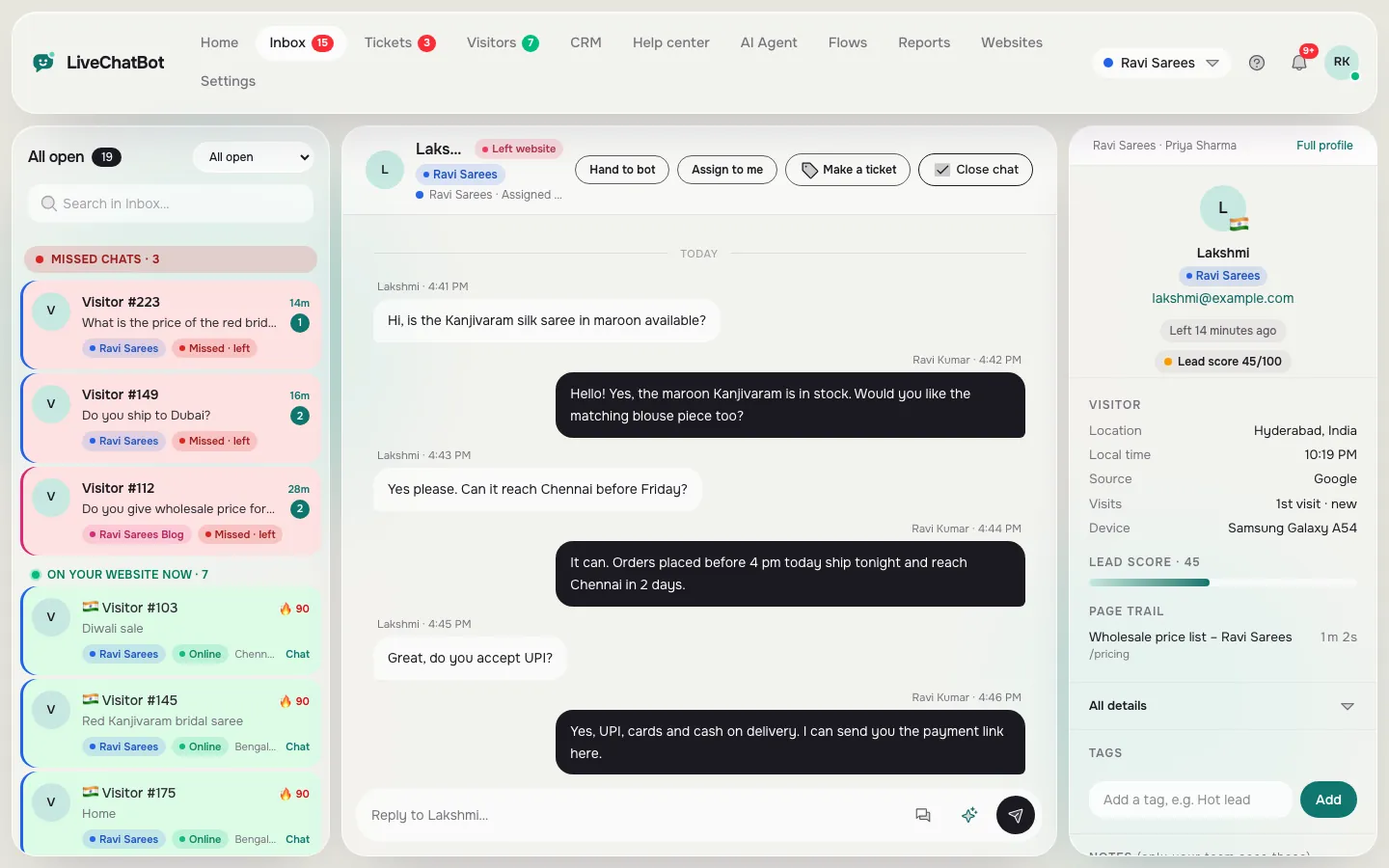
When a chat arrives, the agent silently asks five things, and good software answers all of them on the same screen.
- Who is this? A name, email or phone number if they gave one, or a clear “new visitor” label if not.
- Where are they? The page they are reading, since “How much is this?” means nothing without the product.
- How did they arrive? The source, such as a search, an ad or a link from another site.
- Have they talked to us before? Earlier chats and tickets in one place.
- Are they worth a faster reply? In LiveChatBot the visitor profile carries a lead score, and connected WooCommerce or Shopify stores show the cart to agents.
If an agent has to ask the customer any of these, the customer feels it as friction: “Which product?”, “What is your email again?”. Each question is small, but a support day contains dozens.
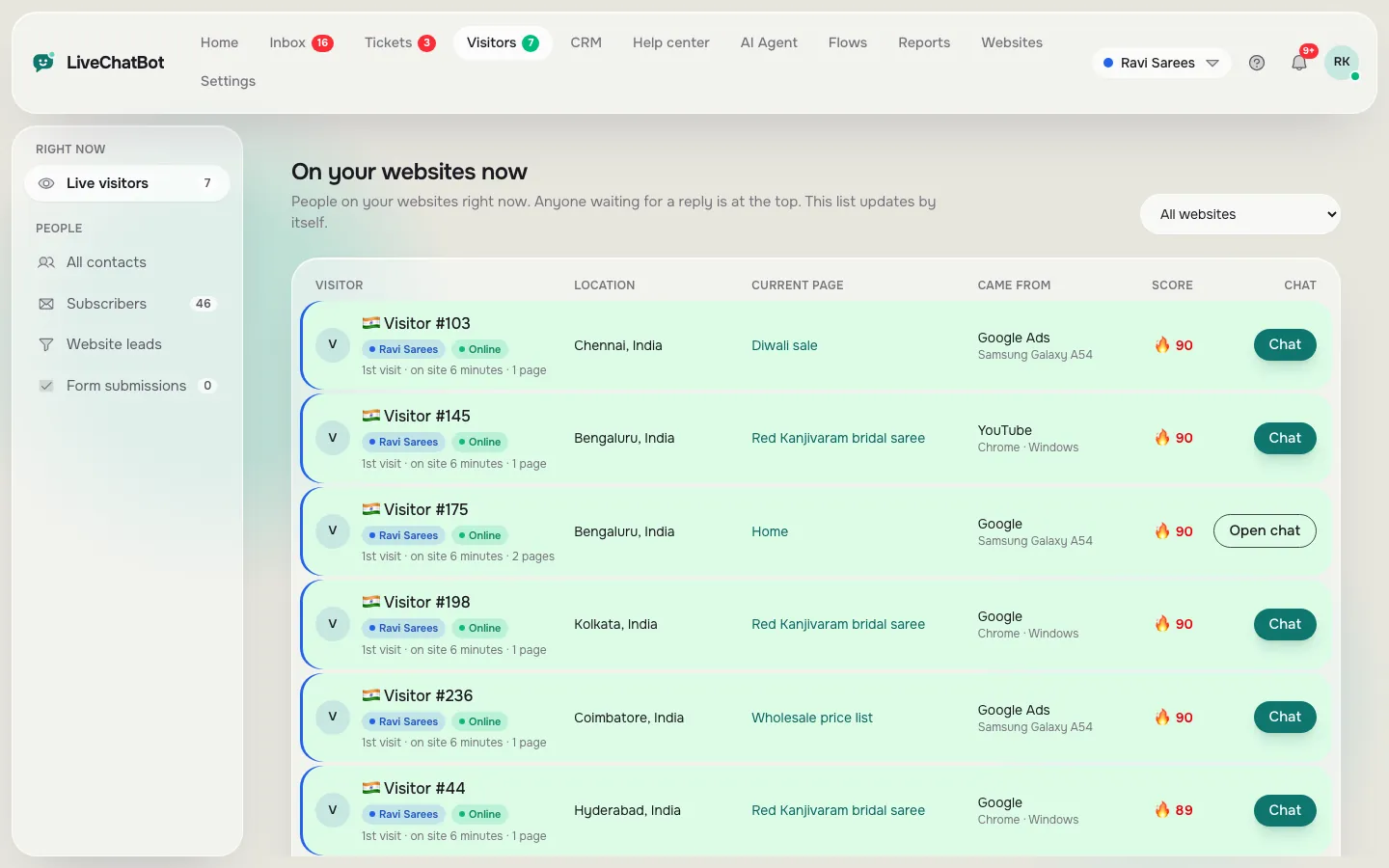
In LiveChatBot the live visitors list shows people on your site right now, so an agent can see a customer arrive before they open the chat. The visitor profile gathers the rest. You should expect any serious tool to match this, and you should ask to see it, not just read about it.
Original data
Worked example: the cost of five questions you should never have to ask
Here is the maths for a small team, using assumed timings you should replace with your own.
Suppose your team handles 30 support chats a day. In 20 of them, the agent asks the customer two questions the software could have answered, for example “Which page are you on?” and “What email did you use?”. Each question-and-answer round trip costs about 15 seconds of waiting and typing.
- Questions asked: 20 chats × 2 questions = 40 per day
- Time lost: 40 × 15 seconds = 600 seconds, which is 10 minutes a day
- Over 22 working days: 10 × 22 = 220 minutes, or roughly 3.7 hours a month
That is the labelled worked example: invented timings, real arithmetic. The hours are not the biggest cost. Customers who are asked the same question twice rate a chat lower, so the true price is the goodwill you lose on top of the 3.7 hours.
Real screens
What you will see in LiveChatBot
Real screens from the LiveChatBot panel, shown with sample data. Click any picture to see it full size.
What most guides miss
Our rule: run the Ask-Nothing test for one week before you judge any tool
The best measure of support software is the number of questions your agents are forced to ask, and no comparison page publishes it.
Here is the test. During your trial, keep a tally sheet next to the screen. Every time an agent types a question whose answer the tool should have known, add a tick. Do this for five working days, then divide the ticks by the number of chats.
- Under 0.3 ticks per chat: the tool is giving your agents context. Keep it.
- 0.3 to 1 tick per chat: acceptable, but check which fields are missing.
- Over 1 tick per chat: the tool is a plain message pipe. You are paying for the widget and doing the rest by hand.
Why this beats feature lists: two tools can both claim “visitor details” and differ hugely in what appears without a click. The tally cuts through the claim in a week with a pencil.
Add one honest condition. A new visitor who gives nothing away cannot be known by any software, so ignore ticks for people who arrive with no data. You are measuring the tool, not the visitor.
Try it
Free agent screen test
Open a trial chat as a customer, then switch to the agent view and tick every item you can see without clicking away or asking.
Handover
A chat that cannot be finished must become a ticket, not a lost email
Support chats that cannot be solved in one conversation need a second home, and that home should be a ticket with an owner.
In LiveChatBot an unresolved chat can become a ticket with a named owner. The customer gets a ticket page where they can follow the thread, and saved replies work inside tickets as well. Webhooks for ticket.created and ticket.solved, a REST API and Zapier let you pass events to other tools. There is no native Zendesk, Freshdesk, HubSpot or Salesforce connection, so larger teams bridge through those routes.
When you test any tool, look for these things:
- Does the ticket carry the full chat text?
- Is there one owner, visible to the whole team?
- Does the customer see the outcome, or only an email that says “closed”?
Our guide to a ticketing system explains the owner-and-status model, and help desk software compares when a chat tool is enough and when a dedicated desk is needed.
The bot layer
An AI Agent should take repeat questions so agents keep the real ones
The bot layer exists so your people spend their day on the questions that need judgement.
The LiveChatBot AI Agent answers from knowledge you supply: type answers, copy a web page or upload a file (PDF, Word DOCX, Excel XLSX, CSV or TXT). Its Rules to follow box takes up to 5,000 characters, for example “Never promise delivery dates”. There is no raw system-prompt editor, and you cannot choose the AI model.
AI replies come with every plan, up to a monthly allowance shown in the dashboard. When the allowance is used up, a free keyword bot answers from saved replies instead of leaving the chat silent.
If the bot cannot answer and no human replies within seconds, the chat rescuer asks the visitor for email and phone, so the enquiry is not lost. That behaviour matters more than the bot’s cleverness: a mediocre bot with a good rescue beats a clever bot that goes quiet.
For the bot side of this choice in more depth, read our AI chatbot for customer service post.
Honest gaps
What a lean tool at this price does not include
Know the gaps before you commit, because they decide whether a lean tool fits.
- No SSO, audit logs or role-based permission builder. If compliance needs these, choose a different class of product.
- No removing the badge. “Powered by LiveChatBot” stays on every plan.
- No iOS team app. Android only for agents.
- No native Slack, Teams, Telegram or CRM links. Zapier and webhooks bridge some of them.
- No automatic round-robin. Someone has to watch the Unassigned folder.
- No voice, captcha or sentiment analysis.
Teams that need two or more of these should budget for a heavier product from the start.
Cost
Cost: one plan, and no seat charges
On LiveChatBot the price depends on websites and visitors, never on how many agents you add.
The free plan gives you 2 websites and 100 visitors per website each month. Starter is ₹299 a month for 2 websites and 750 visitors shared across them. Growth is ₹699 a month for 5 websites and 2,500 shared visitors. Plans are prepaid by UPI and similar methods, with no auto-renew and no automatic charges. Yearly billing is 12 months for the price of 10. The sign-up code WELCOME100 adds 100 visitors once.
Because there are no per-seat charges, hiring a fourth agent costs nothing extra in software. Full details are on the pricing page.
Frequently asked questions
What is customer support chat software?
It is software that lets a team answer website visitors in real time from a shared inbox, with customer context beside each chat. LiveChatBot adds an AI Agent, tickets, a help center and an Android app.
What should I look for in customer support chat software?
Look at the agent’s screen first. The visitor, their page, their source and past chats should be visible without asking. Then check handover to tickets, saved replies, phone alerts and limits.
Is there a free option?
Yes. LiveChatBot’s free plan covers 2 websites and 100 visitors per website a month, with no per-seat charges.
Can several agents use one account?
Yes. Chats arrive in a shared inbox, agents can use Assign to me, and teams can route chats to a group. There is no per-seat charge.
Does it work with my help desk or CRM?
There is no native Zendesk, Freshdesk or HubSpot link. Zapier, ticket webhooks, a REST API and a JavaScript API can pass events to other tools.
Keep reading
Related guides
Customer Service Chat Software Sized by Your Busiest Hour: How Many People You Really Need, With the Maths Shown (Free Setup Quiz)
Customer Service Chat App: It Is Really Two Apps, One for Your Customer and One for Your Agent (Free Pocket Test Checklist)
Run the screen test yourself
Open a free LiveChatBot account, start a chat and tick the agent screen test. See how many questions your team stops asking.