Customer Service Chat App: It Is Really Two Apps, One for Your Customer and One for Your Agent (Free Pocket Test Checklist)
Customer service chat app is a phrase that hides two different products. One is the chat your customer sees on your website or phone. The other is the app your agent uses to answer. Most reviews test only the first, and that is why teams miss messages they never knew arrived.
Short answer
A customer service chat app has two halves: a chat window customers open in their browser with nothing to install, and an agent app that alerts your team on a phone. Judge the agent half first, because a message nobody hears about is a message lost. LiveChatBot gives you both, with an Android app and a browser inbox.
⚡ In short
- Two apps, not one: the customer side (a chat widget, no download) and the agent side (inbox plus phone alerts).
- The agent side decides your reply speed. Test it with a locked phone, not at your desk.
- Original data below: a worked example showing how much of a working day a desktop-only team is out of reach.
- Our rule: run the pocket test, a 10-minute check with the phone locked and in your pocket.
Two halves
A customer service chat app is two products that must work as one
A customer service chat app is a pair: the customer half is a chat window, and the agent half is an inbox with alerts. If either half is weak, the pair fails.
The customer half
Your customer does not install anything. They tap a bubble on your site, or open a full-page chat link, and type. It works on a phone browser as well as a computer. That is a feature, not a shortcut: every download you ask for loses people.
The agent half
This is the part you install and live in: the inbox where chats arrive, the alert that tells you something came in, and the buttons to answer, assign or turn a chat into a ticket. Teams usually spend their whole evaluation on pretty widgets and ten minutes on this half. Reverse that. For the wider picture of chat on a service desk, see our guide to live chat for customer service.
Real screens
The customer half on a phone, the agent half in the inbox, and the alert settings
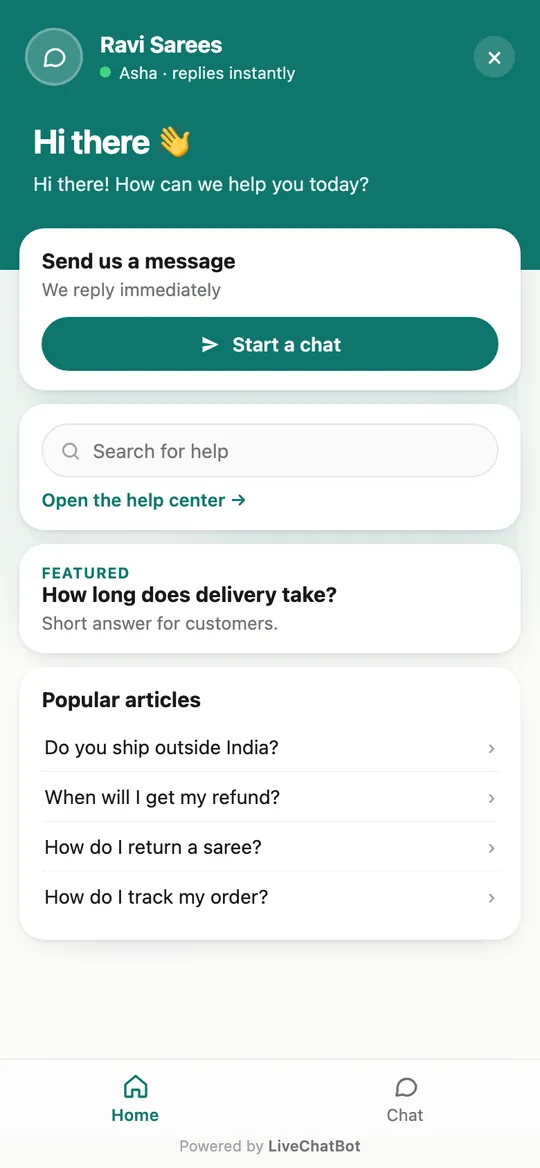
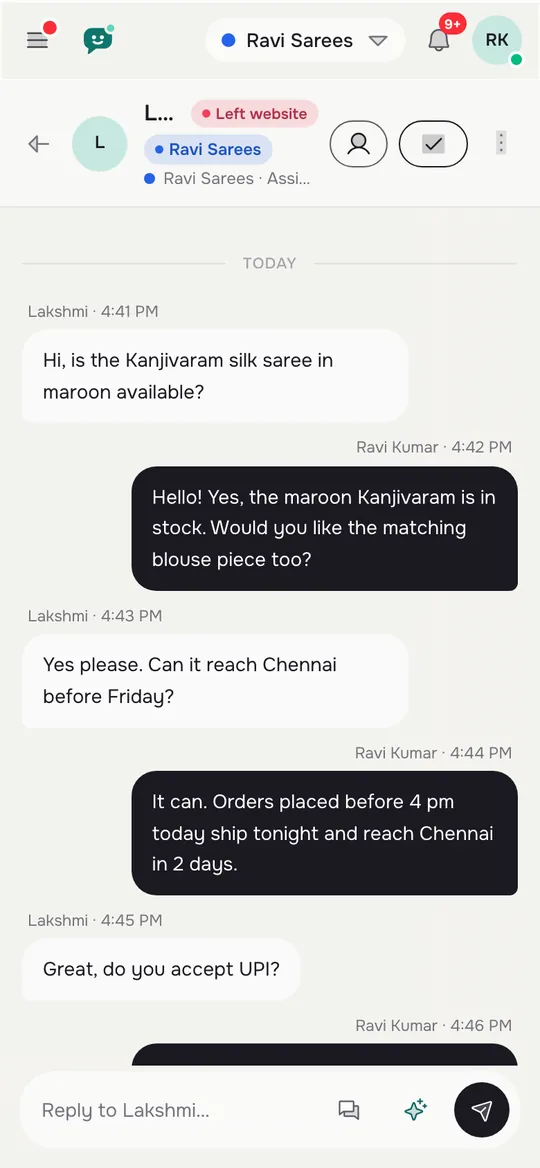
Real screens from the LiveChatBot panel, shown with sample data. Click any picture to see it full size.

Customer half
What the customer sees: a chat with nothing to download
The customer half should open in one tap, on any phone, without an account. On LiveChatBot the chat shows as a bubble on your website, and you can also share a full-page chat link.
What you can shape
- Look: colours, button style and position in Settings, Widget design.
- Words: the welcome text and the away message.
- Where it appears: pages, devices and countries.
- Language: the chat can follow the visitor’s browser language.
What the customer should never meet
A dead end. If nobody can answer, the chat asks for an email and phone so you can call back. The chat rescuer does this when no one replies within seconds, and it is on by default. A customer who leaves details is a customer you can still serve. Read the AI Agent page to see how the bot covers the first answers while your team is busy.
Agent half
What the agent uses: an Android app, a browser inbox and loud alerts
The agent half is the Android app plus the web inbox, and both show the same chats in real time.
On a phone
The Android app gives push alerts and lets an agent reply from a pocket. There is no iOS team app, so iPhone owners answer from the browser instead. This is a real gap, and you should know it before you buy.
In the inbox
Agents use Assign to me, the Unassigned and Mine folders, saved replies and teams. WhatsApp and Facebook Messenger messages arrive in the same inbox once connected through Meta. Saved replies stop typing the same address ten times a day.
Alerts
You can choose a recorded tone per website for each agent, so a busy owner of two shops can tell them apart by sound alone. Open the mobile app guide for what the app does, and treat the alert settings as the most important page in the whole product.
Original data
A team that only answers at a desk is out of reach for about 3 hours of every 8
A desk-only team is unreachable for a surprising share of the day, and the arithmetic is simple.
*Source: a worked example we built for this guide. The inputs are assumptions you should replace with your own; the formula is the point.*
Worked example
- Working day: 8 hours.
- Time away from a desk (lunch 1 hour, shop floor 1 hour, calls and errands 1 hour): 3 hours.
- Share of the day with nobody at the screen: 3 ÷ 8 = 37.5 percent.
- Chats: 40 a day × 3 minutes each = 120 minutes, or 2 hours of actual typing.
What it means
The typing is only 2 hours, but the chats arrive across all 8. With a desk-only setup, about 15 of those 40 chats (37.5 percent of 40) land when nobody is looking. With a phone alert, the same person can answer from the shop floor in one minute.
Replace the 3 hours with your own number. If it is above 2, the agent half of the app matters more than any widget colour. Our write-up on best live chat apps compares what to test on the phone side.
What most guides miss
Run the pocket test: lock the phone, put it away, send a chat
Our rule is the pocket test: if you cannot hear an alert with the phone locked in your pocket, the app has not passed. Almost every review tests alerts with the screen on and the app open, which is the easiest case.
Why it is the right test
Real life is a locked phone, a noisy room and an agent walking between tasks. Battery savers on some Android phones quietly stop apps in the background. A test that ignores this gives you a pass you will not see in practice. This is our own method, not a standard, and it takes ten minutes.
The steps
- Sign in on the phone, then lock it and put it in a pocket or bag.
- From a laptop, open your site in a private window and send a chat.
- Count the seconds until you hear and feel the alert.
- Open the chat from the lock screen and reply with a saved reply.
- Repeat with the app swiped away, then after an hour of idle.
If step 5 fails, change the phone’s battery setting for the app and test again. Do this before a customer finds the gap for you.
Try it
Run the pocket test with this checklist
Tick each step as you finish it. All seven ticked means your agent half is ready for real customers.
Bot and human
Let the bot take the first answer so the agent half has less to carry
A bot lowers the load on the agent half, but it does not replace it. The AI Agent answers from the facts you gave it: typed answers, a copied web page, or an uploaded PDF, DOCX, XLSX, CSV or TXT file.
What belongs where
- Bot: hours, prices, delivery areas and repeated questions.
- Agent: complaints, exceptions and anything that needs a decision.
- Ticket: anything that cannot be solved in the chat itself.
Keep the rules short
The Rules box takes up to 5,000 characters of written behaviour, such as never promising a delivery date. AI replies come with every plan as a monthly allowance shown in the dashboard. When it is spent, the keyword bot and saved replies keep working. For ticket handling, read help desk software and ticketing system, which explain the step from chat to solved ticket.
Honest limits
What this app does not do
Be sure you can live with these before you choose.
- No iOS team app. Android only for agents; iPhone users use the browser.
- The badge stays. Powered by LiveChatBot appears on all plans.
- No native helpdesk integrations. There is no built-in Zendesk, Freshdesk, Slack, Teams or HubSpot link. Zapier, webhooks and the REST API can bridge some.
- No SSO, audit logs or role builder. Larger IT teams may need these.
- No voice or sentiment scoring. It is text chat.
If none of those is a must-have, the app fits small teams well, and our live chat for customer service guide shows the wider setup. If two or more are, treat any tool at this level as a stepping stone and budget for a bigger service desk.
Cost
What the two halves cost a small team
A small team can run both halves of the app for ₹0 on the free plan, and pay only when traffic grows.
- Free, ₹0: 2 websites, 100 visitors per website a month.
- Starter, ₹299 a month: 2 websites, 750 visitors shared.
- Growth, ₹699 a month: 5 websites, 2,500 visitors shared.
Plans are prepaid by UPI and similar, with no auto-renew, no automatic charges and no per-seat charges, so adding an agent never changes the bill. Yearly means pay for 10 months and get 12. The code WELCOME100 adds 100 visitors once. See the pricing page for the detail, or compare with the chatbot customer service guide if you want the bot to carry more of the load.
Frequently asked questions
Does a customer have to download a customer service chat app?
No. The customer chat opens in the browser from a bubble on your website or a full-page link. Only your agents install the Android app.
Is there an iPhone app for agents?
No. There is no iOS team app. iPhone users answer from the browser inbox, and Android users get the app with push alerts.
Can several agents share one inbox?
Yes. The inbox is shared, with Assign to me, Unassigned and Mine folders, plus teams to route chats. There are no per-seat charges.
What happens if nobody answers a chat?
The chat rescuer asks the visitor for email and phone after a few seconds, so you can follow up. The AI Agent can also answer from your saved facts.
How do I test the agent app before buying?
Run the pocket test: lock the phone, send a chat from a laptop, and count the seconds to the alert. The free plan lets you try it with no card.
Keep reading
Related guides
Customer Service Chat Software Sized by Your Busiest Hour: How Many People You Really Need, With the Maths Shown (Free Setup Quiz)
Customer Service AI Chatbot Report Card: Which Numbers Prove It Works and Which Ones Mislead (Free Monthly Review Checklist)
Test both halves for free
Two websites, 100 visitors each, an Android app for your agents and no per-seat charges. Start free on livechatbot.in.