Best Plugin for Live Chat in WordPress Also Catches Your Form Leads: Follow One Contact Form Submission From Click to Alert
Best plugin for live chat in WordPress is usually judged on the chat bubble, but half of your WordPress enquiries never touch it: they arrive through a contact form and sit in an inbox nobody checks. This guide follows one form submission from the visitor’s click to your phone alert, and shows what to ask any plugin about forms.
⚡ In short
- Many WordPress enquiries come from forms, not chat. A good plugin should treat a form submission as a lead too.
- LiveChatBot’s plugin and widget catch Contact Form 7, WPForms, Elementor Pro, Gravity, Fluent and Ninja forms.
- A submission becomes a lead with an instant New lead alert on your phone.
- To pick a plugin, test the form path as well as the chat path.
The blind spot
The leads your chat plugin never sees
Most owners hunting for the best plugin for live chat in WordPress judge a plugin by how the bubble looks and how fast it loads. That is only half of the picture. On a typical WordPress business site, a good share of enquiries arrive through the contact page, the quote form or the booking request, and they land in an email inbox with all the other mail.
Those leads go cold fast. A person who fills in a form at 6 pm and hears back at 11 am the next day has probably already messaged someone else. If your chat plugin also catches the form submission and alerts your phone, that gap shrinks.
This post is deliberately different from our general guide on choosing a live chat plugin for your site, which matches plugin types to hosting and team size. Here we look only at forms. Our WordPress live chat plugin page covers everything else the plugin does.
One submission
Follow a form from click to alert
This is the path a single submission takes when the LiveChatBot plugin is active.
They give a name, email and a message on your contact page, built with a supported form plugin.
The widget on the page spots the submission, so you do not rebuild the form or add code.
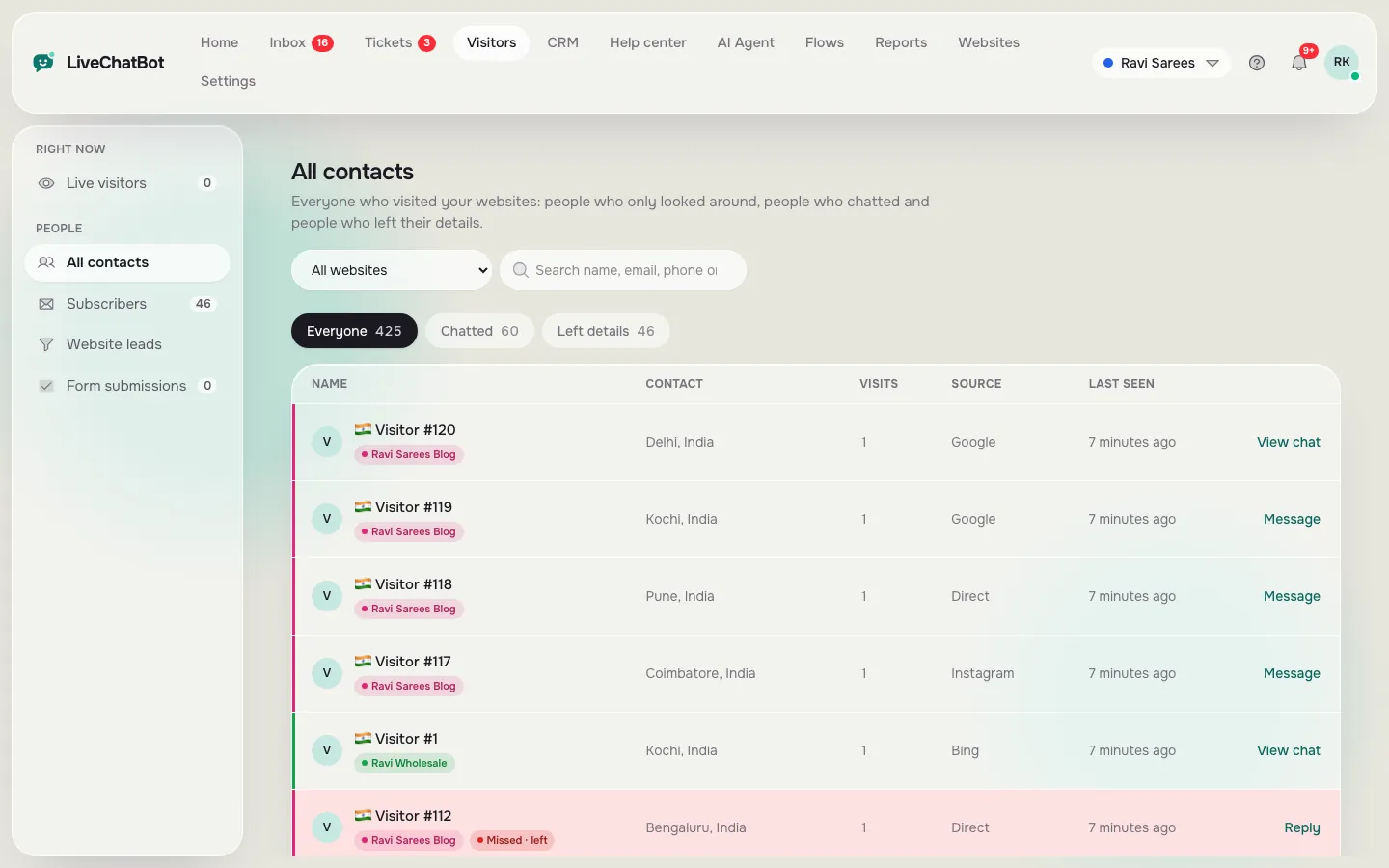
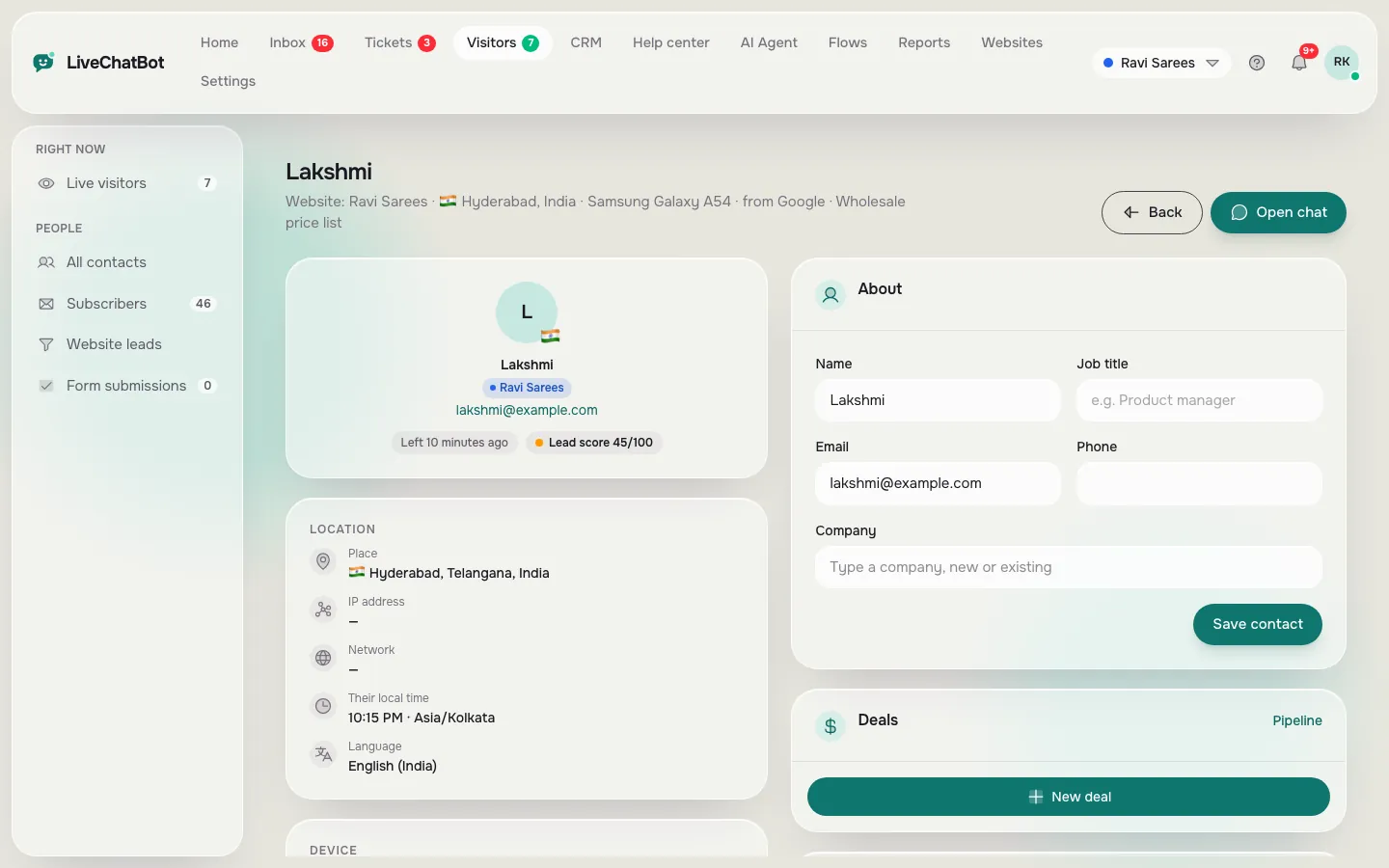
The details appear as a lead with the page it came from, ready to be opened in the inbox and contacts.
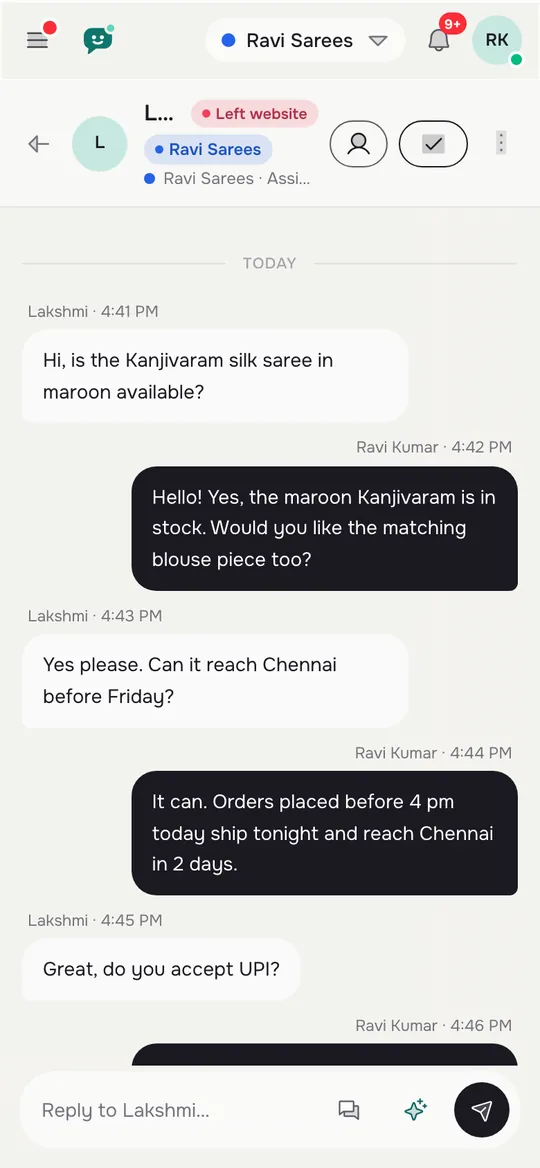
The Android app pushes an instant alert, so you can reply while the visitor is still on the site.
Reply from the inbox, add the person to the pipeline as a deal, or turn it into a ticket.
Which forms
The form plugins that count as leads
LiveChatBot catches submissions from six popular WordPress form tools: Contact Form 7, WPForms, Elementor Pro forms, Gravity Forms, Fluent Forms and Ninja Forms. The widget and the WordPress plugin do the catching, so you do not touch the form settings.
What counts as a lead
A submission needs contact details. Names and emails are expected, and a phone number is even better. The chat also asks for email and phone in other places, such as the away form after hours and the chat rescuer, which asks for both if nobody replies within seconds.
What it does not do
It does not replace your form. The original email notification from your form plugin still works. LiveChatBot adds a second, faster route to the same person. It also does not push leads into HubSpot, Salesforce or Zoho natively. If you need that, Zapier and webhooks can pass data on.
Test your own setup by submitting your form from your phone and watching for the alert.
Why speed matters here
A form is a quiet way to ask for help. People expect a slow answer, so a quick reply surprises them and often wins the job. Even a short note such as “Thanks, we have your request and will call you today” sent within minutes keeps the lead warm. Saved replies with {name} make that note a one-click job, and the inbox shows the page the person came from so you know what they were looking at.
Real screens
Where a form lead lands: contacts, profile and the phone inbox
Real screens from the LiveChatBot panel, shown with sample data. Click any picture to see it full size.
Five tests
Test any plugin’s form handling before you commit
Whatever plugin you choose, run these five checks on a staging page or on your live site with a test entry.
- Submit and time it. Fill in your real form and note how many seconds pass before you see an alert anywhere.
- Check the details. Does the lead show the name, email, phone and the page it came from?
- Check the duplicate. Does the same person appear twice if they also chat? Good tools link them.
- Check the phone. Does the alert reach your phone, not only the dashboard?
- Check the spam path. Submit nonsense. Know what happens, and how to block a visitor or IP if it repeats. There is no captcha in LiveChatBot, so keep your form plugin’s own spam protection on.
These are the same checks you would use when picking the best plugin for live chat in WordPress for a lead-driven site.
Try it
Which of your WordPress enquiries are you missing?
Pick the answer that is closest to your site.
Three quick questions about how enquiries reach you.
Setup
Turn it on in ten minutes
Many owners expect the best plugin for live chat in WordPress to need a long setup. This one does not. Install the LiveChatBot plugin from your WordPress dashboard, paste your site key and save. Open a page with a supported form, submit a test entry and watch your phone. If the alert does not arrive, check that the page has the chat widget on it and that the page is not hidden in your Where it shows settings.
If you also run WooCommerce, the same plugin connects to the store so agents see the cart. See WooCommerce live chat for that side.
After the test
Keep a short habit going. Once a month, submit each form on your site from your phone and confirm the alert still arrives. Themes, caching plugins and form updates can change how a page behaves, and a quiet break means weeks of missed leads. Add the check to the same reminder you use for backups.
Honest limits: “Powered by LiveChatBot” stays on every plan, and the plugin does not read forms from plugins outside the six listed. Anything else can still be bridged with the JS API or webhooks.
Frequently asked questions
What is the best plugin for live chat in WordPress if I mostly get form enquiries?
One that also catches form submissions as leads and alerts your phone. Test it by submitting your own form and timing the alert.
Which form plugins does LiveChatBot catch?
Contact Form 7, WPForms, Elementor Pro forms, Gravity Forms, Fluent Forms and Ninja Forms.
Do I have to change my forms?
No. The widget notices submissions on its own, and your form’s own email notification keeps working.
Can leads go to my CRM?
LiveChatBot has a built-in pipeline with deals and companies. For other CRMs, use Zapier, webhooks or the REST API.
Is there a charge per agent?
No. There are no per-seat charges on any plan.
Keep reading
Related guides
Best Online Chat Software Without a Developer: 12 Setup Steps You Can Finish in One Afternoon (Free Progress Checklist)
Best Online Chat Platform for Where Your Business Will Be in a Year: A Month 1, Month 3, Month 12 Growth Timeline
Best Shopify Chat App Listings Decoded: Theme Files, App Embeds, Checkout Limits and Other Words You Need Before You Install (Free Shopify Glossary)
Stop losing form leads
Install the free WordPress plugin and get an alert on your phone for every new lead. Start free on livechatbot.in.