Best Live Chat Solution Is the One That Passes a 30-Day Test: A Week-by-Week Trial With a Pass Mark for Each Week (Free Timeline)
Best live chat solution is a verdict you can only reach by using a tool on your own site for a month. Reviews and feature tables cannot tell you whether your visitors will type, whether your team will reply or whether leads actually arrive. This guide gives you four weeks, a clear job for each week and a pass mark you can check in Reports.
⚡ In short
- The best live chat solution for you is proven on your own traffic, not on a comparison chart.
- Week 1 installs and tests, week 2 teaches the bot, week 3 measures replies, week 4 decides.
- Give every week one pass mark, so the decision at the end is not a feeling.
- If two weeks fail, change one thing and re-test before you blame the tool.
Why test
A feature table cannot tell you if chat will work for your visitors
Two tools with identical feature lists can behave very differently on your site. One loads slowly on a cheap phone. One has a bot that guesses. One sends alerts that arrive ten minutes late.
You also bring variables the vendor cannot see: your traffic, your questions, your team’s habits. A month is long enough to see all of them and short enough to stay motivated.
Before you start, write your goal in one sentence, for example: “More enquiries from the pricing page without hiring anyone.” Every pass mark below measures that goal. If you want a weighted comparison first, read our best live chat software guide, then use this plan to prove the winner.
Free timeline
Your four-week trial, with a pass mark for each week
Work through the weeks in order. Do not move on until you have met the pass mark or decided to change one setting.
Add the widget, set colours and a welcome message, then test from your own phone. Pass mark: you receive an alert on your phone within a minute of a test chat, and the page still loads quickly.
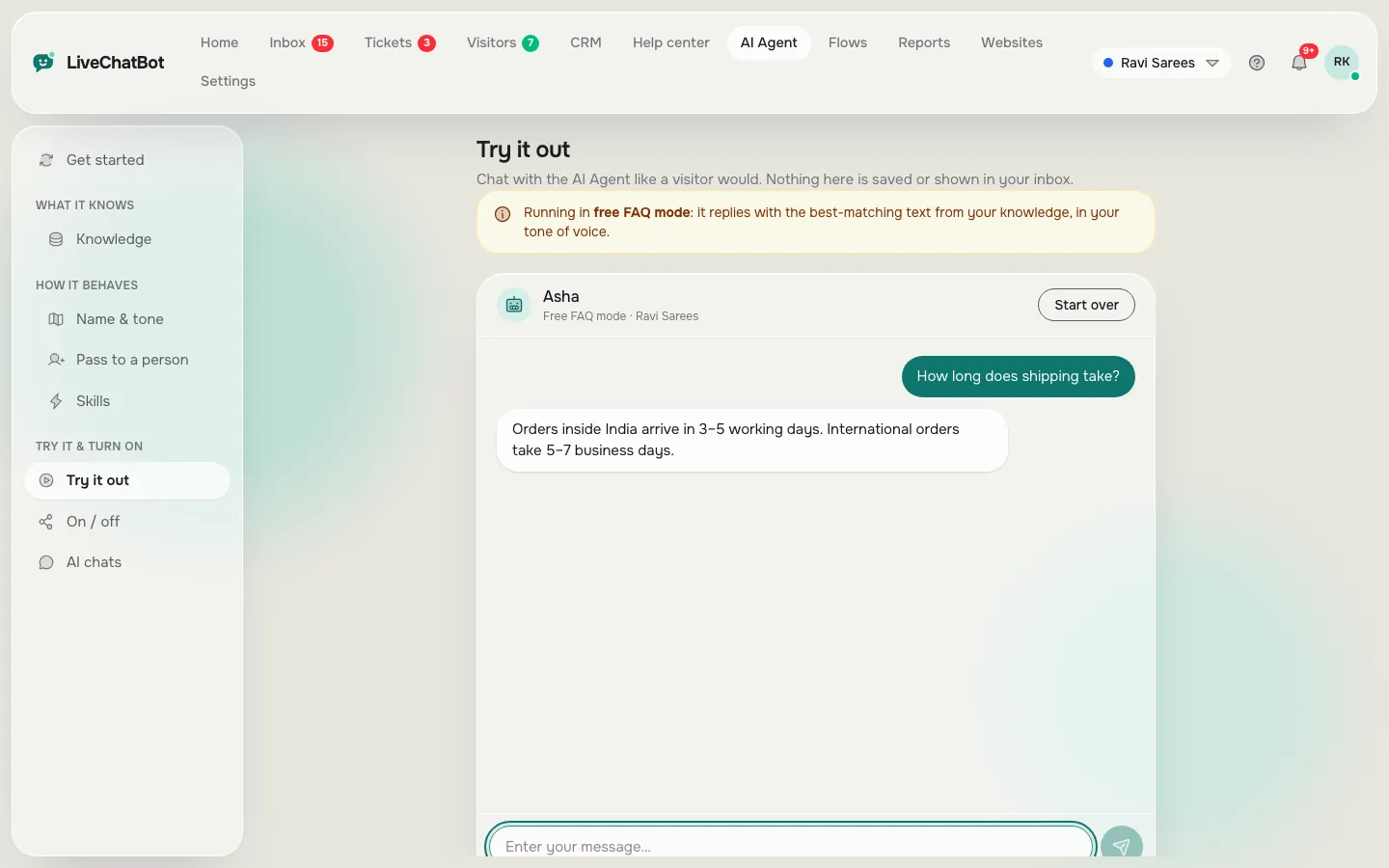
Add your 15 most common answers to the AI Agent by typing, copying a page or uploading a file, then set opening hours and the away form. Pass mark: 8 of 10 test questions get a correct answer, and an unknown question gets a handover, not a guess.
Leave the widget on all chosen pages and answer every chat. Pass mark: you reply to most chats fast, and Reports show a first response time you are happy with.
Open Reports for conversations, leads and ratings, then compare against your goal. Pass mark: chat produced at least some leads you would not have had otherwise, and it cost less time than it saved.
Week 1
Install it, then try to break it
Install the widget on a real page, not just a test page. Then try the awkward cases.
- Open the site on a slow phone connection and watch how the widget loads.
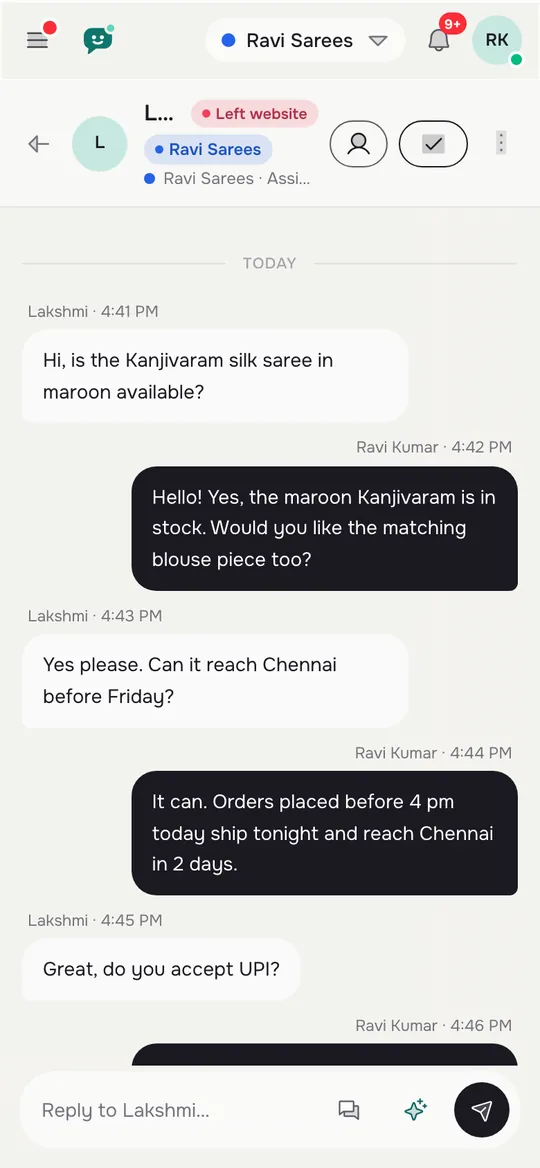
- Send a chat while your phone is locked and check the alert arrives.
- Switch to a different browser language and see whether the welcome text follows.
- Hide the widget on a page where you do not want it, using the where-it-shows rules.
If any of these fail, you have learned something useful in week one for the price of an afternoon. The how to set up live chat on a website guide lists the install steps for each platform.
Weeks 2 and 3
Teach it, then let real visitors in
Week 2: accuracy over cleverness
Give the AI Agent facts, not slogans: prices, hours, delivery areas, how to book, what you do not do. Then ask ten questions, including three it was never taught. A solid answer is correct and short. A good non-answer says it is not sure and offers a person or a contact form. The how to train your AI chatbot page explains the method.
Week 3: speed and handover
Visitors judge chat by how quickly someone answers. Keep saved replies for repeat questions, and keep the chat rescuer on so a chat nobody answers in seconds asks for email and phone. Note how many leads come from after hours.
Add a rule to the Agent’s Rules box for anything sensitive, such as “Never promise delivery dates”. Remember the Rules box works while AI replies are available.
Real screens
What you check each week: playground, phone and reports
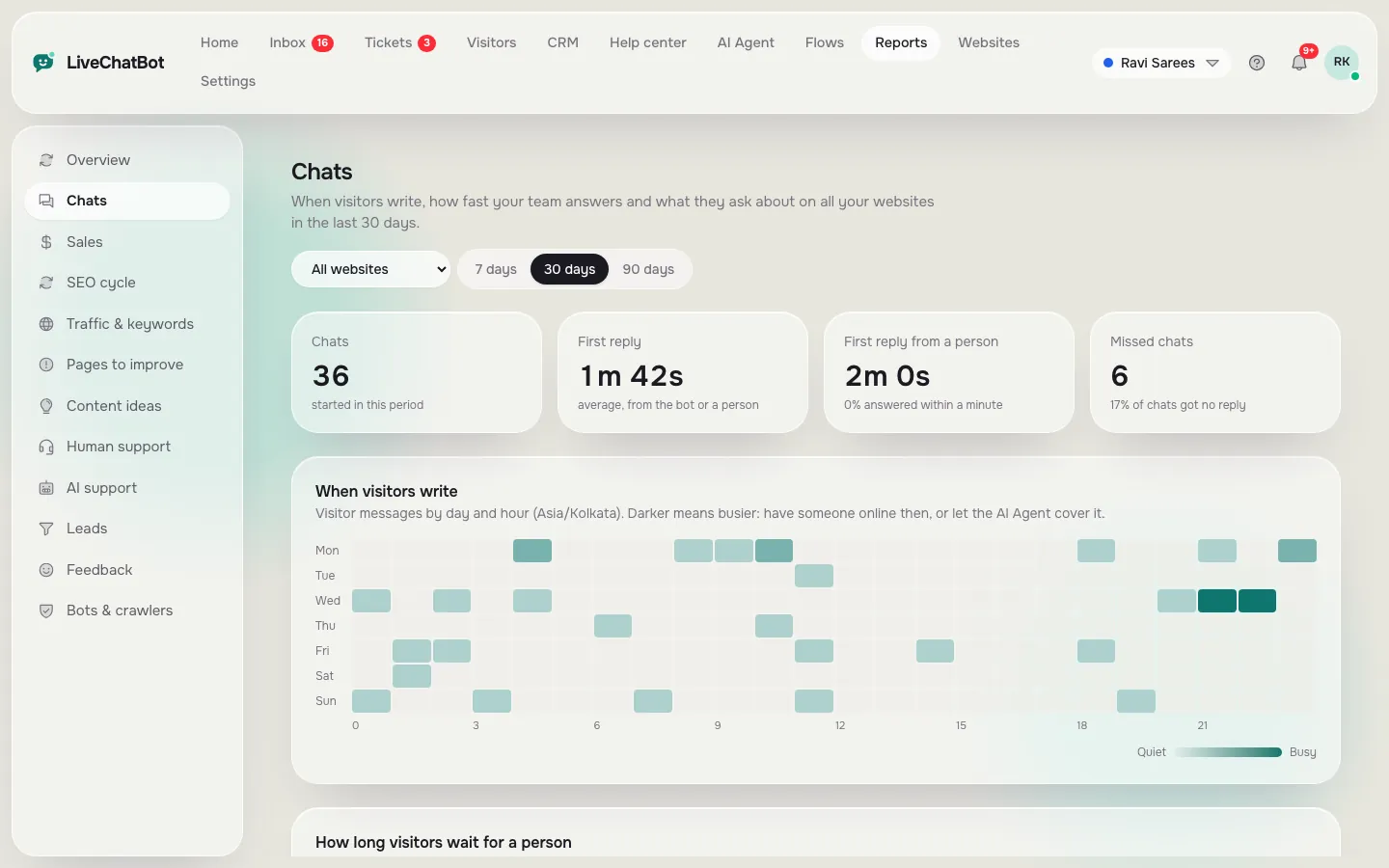
Real screens from the LiveChatBot panel, shown with sample data. Click any picture to see it full size.
Week 4
Read the numbers and name your best live chat solution
Open Reports with a date range of your whole trial and the right website selected. Look at:
- Conversations per day to see if people use chat at all.
- First response time and response rate to see how your team did.
- Resolved by AI to see how much the bot handled alone.
- Leads acquired and Ratings to see outcome and happiness.
- Pages to improve to find pages where visitors leave without acting.
Then answer three questions in writing. Did chat help the goal? Would I miss it if I switched it off? Could I run it for another year? Three yeses mean you have found a keeper. If your answer depends on your type of business, see our situation-by-situation live chat guide. Three noes mean the tool, the setup or the goal needs changing, and that is a useful result too, because you found it out cheaply and early. This is also how the business live chat solution rules procedure fits in: once you pass, write the one-page routine for your team.
Costs and limits
What the best live chat solution costs to test, and what a trial will not tell you
You can run the whole test on the free plan: two websites and 100 visitors each a month. If your trial needs more traffic, Starter is ₹299 a month for 750 visitors shared across two websites, and Growth is ₹699 a month for 2,500 shared across five. Payment is prepaid with no auto-renew and no per-seat charges.
Be clear about what a trial will not reveal. “Powered by LiveChatBot” stays on all plans. There is no iOS team app, no single sign-on and no audit log, and Slack or HubSpot links need Zapier or webhooks. Check these against your own list in week one, not week four. For the bigger picture, see the live chat pillar and pricing.
Frequently asked questions
How do I choose the best live chat solution for my site?
Set one goal, run a 30-day trial on real traffic and give each week a pass mark. Decide from your own Reports, not from a comparison chart.
Is 30 days enough to judge live chat?
Usually yes for a site with steady visitors. Very quiet sites may need six weeks to see enough chats.
What should I measure first?
Alert speed in week one, answer accuracy in week two, first response time in week three and leads in week four.
Can I run the trial for free?
Yes. The free plan covers two websites with 100 visitors each a month.
What if the trial fails?
Change one setting, such as page rules or the welcome message, and repeat the failing week before dropping the tool.
Keep reading
Related guides
Best Live Chat Software for Websites Depends on How Your Site Is Built: Match Plugin, Pasted Code or API to Your Platform (Free Platform Quiz)
Best Live Chat Software for Small Business Is the Kind You Can Run Alone: A 15-Minute-a-Day Checklist for Owners Who Do Everything (Free Checklist)
Best Live Chat Software for Ecommerce Is Scored on Carts, Sales and Store Questions: A Scorecard You Fill In Yourself (Free Store Scorecard)
Start your 30-day test today
Free plan, no per-seat charges, real reports. Start free on livechatbot.in.