Best Free Online Chat App Starts With One Question: Who Is on the Other End? Sort Customer Chat From Team Chat From Social Chat (Free Sorter Quiz)
Best free online chat app is a search that mixes up three very different products: apps for talking to friends, apps for your team to talk to each other, and apps that let your website visitors talk to you. Pick the wrong kind and the free plan is useless however good it looks. This guide sorts the three, shows what each one really costs at zero rupees, and ends with a four-question quiz that points you to the right kind.
⚡ In short
- Decide who talks to whom first: friends, your own team, or website visitors and customers.
- For visitors and customers you want a website chat app with an inbox, not a messenger.
- A free plan is only good if its limit matches your real traffic, so read the limit before the feature list.
- Take the quiz below and you will know which kind to install today.
Three products
Why the best free online chat app search gives you three kinds of app
Type the phrase into a search box and the results are a mix. Some are messengers for friends and family. Some are team tools for office staff. Some are chat widgets for business websites. They all say “free” and “online”, and they have almost nothing else in common.
The mix-up costs time. A shop owner installs a group messenger and finds customers cannot reach it from the website. A freelancer signs up for a widget and discovers it does not suit chatting inside a team. So sort first, compare later.
The three kinds
- Social chat. You and people you already know. Free because the company earns from ads or phone numbers.
- Team chat. Colleagues talking to each other. Free for a few users, then paid per seat.
- Website chat. Strangers on your site talking to your business. Free for a small number of visitors, then paid by traffic or plan.
If you run a business and want customers to message you, the best free online chat app is the third kind. The rest of this guide is about that, and how to judge its free plan honestly. Our free live chat guide goes deeper on what free should include.
Website chat
What a free website chat app should do
A free website chat app has three parts, and a good one gives you all three at zero cost.
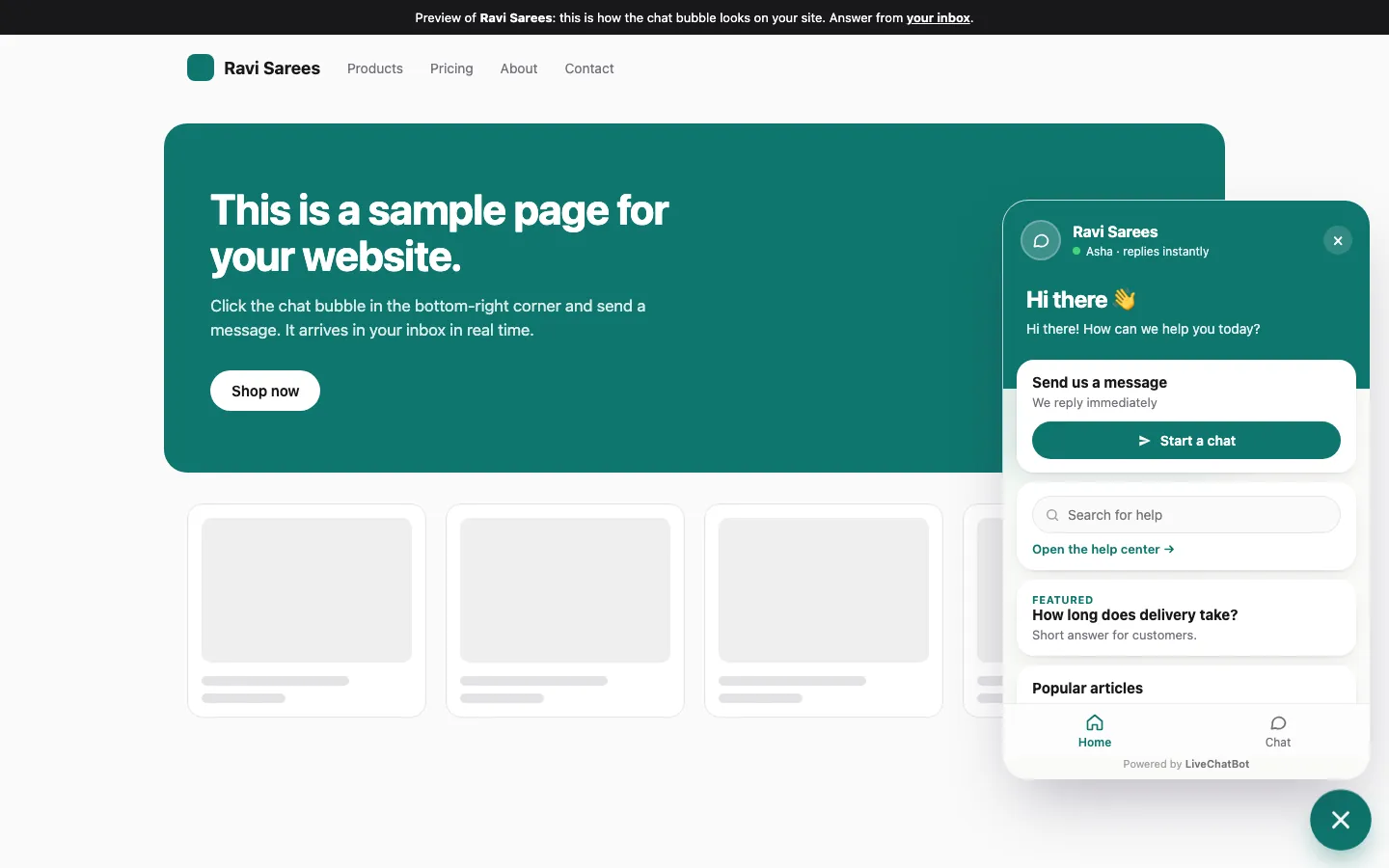
1. A widget visitors can see
A small bubble on your pages. Visitors click it and type. You set the colours, welcome line and which pages show it.
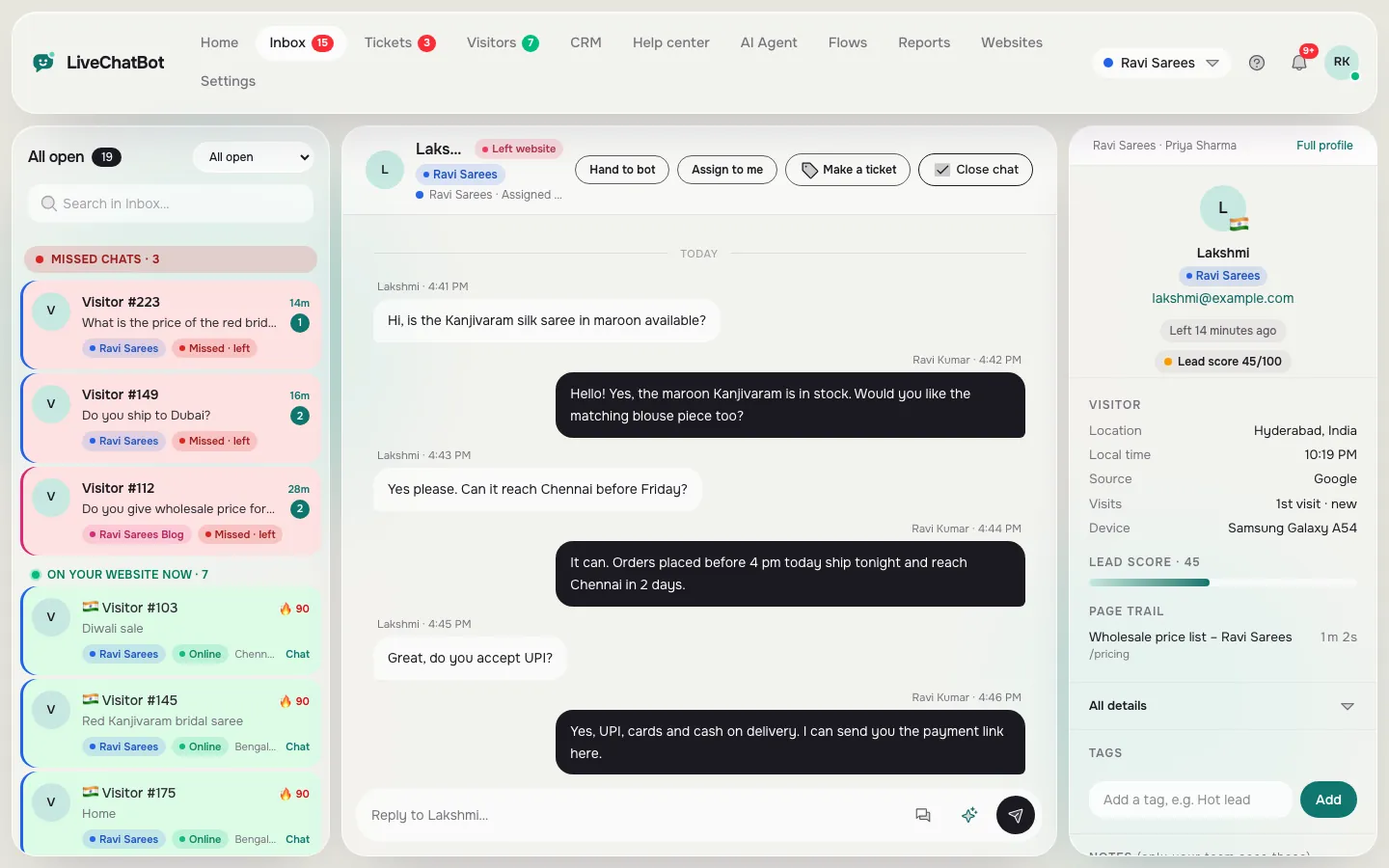
2. An inbox for you
Every chat lands in one place, from any website. You see who is online and which page they are on. Assign a chat to yourself and reply.
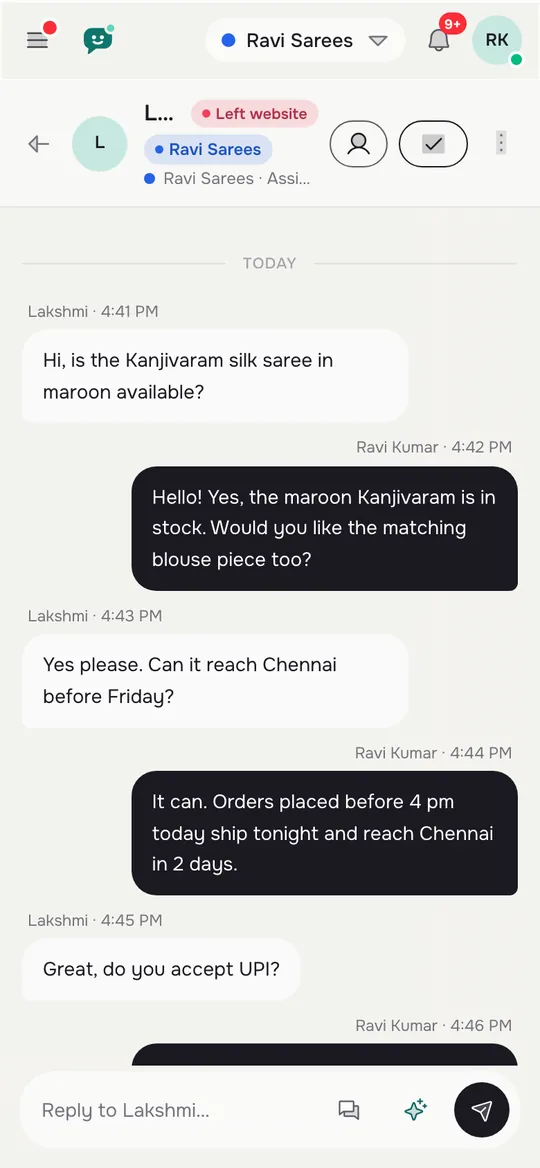
3. Alerts that reach you
A chat nobody sees is a lost lead. You need phone alerts. LiveChatBot has an Android app for the team; there is no iOS team app, so iPhone users answer from a browser.
None of this should need a card. The free plan on LiveChatBot covers two websites, with 100 free visitors per website each month, no per-seat charges, and a free keyword bot that answers from your saved replies when nobody is around.
Real screens
The three parts of a website chat app, in the real panel
Real screens from the LiveChatBot panel, shown with sample data. Click any picture to see it full size.
The catch
How to read the limit on a free plan
Every free plan has a limit. The skill is finding it before you sign up.
- What is counted? Some apps count chats, some count visitors, some count messages. Visitors are the easiest to predict from your analytics.
- What happens at the limit? Chat may pause, alerts may stop, or you may be moved onto a paid plan. On LiveChatBot, tracking and alerts continue and chat pauses for new visitors over the limit until the month resets. Nothing is charged automatically.
- Is the limit per site or shared? A free plan that covers two websites separately is better than one shared pool.
- How many people can answer? Per-seat pricing turns a free plan into a paid one as soon as you hire. LiveChatBot has no per-seat charges.
Check last month’s visitor count per site against the limit. Our pricing page lists what happens next.
Honest gaps
What the free tier will not give you
No app is right for everything, and a free tier always leaves something out. Here is what LiveChatBot does not include, so you can rule it in or out quickly.
- Removing the brand badge. “Powered by LiveChatBot” stays on all plans.
- An iOS team app. Android only. iPhone users use a browser.
- Corporate controls. No single sign-on, audit logs or role builder.
- Native links to Slack, Telegram, HubSpot or similar. Zapier and webhooks can bridge some tools.
- A messenger for friends. It is a business chat app, not a social one.
What you do get is broad: Flows for proactive messages, opening hours and an away form, tickets, saved replies, WhatsApp and Facebook Messenger messages arriving in the same inbox, and a CRM with a sales pipeline. If your needs sit inside that list, the free plan will carry you a long way. For a wider comparison of what each kind of chat app gives you, see AI chat apps sorted by job and our live chat app guide.
Free tool
Which best free online chat app kind do you need?
Four questions, one verdict. Nothing is sent or saved.
Answer honestly. The verdict follows the answer you pick most often.
Getting started
Set up your best free online chat app in 20 minutes
If the quiz said website chat, here is the short route.
- Sign up at livechatbot.in and add your website.
- Paste the install code, or use the WordPress plugin. Shopify, Wix and Squarespace take a pasted snippet.
- Set your colours and welcome line in Widget design.
- Add a handful of saved replies for your most common questions.
- Set opening hours so the away form collects an email and phone number after hours.
- Install the Android app for whoever answers chats.
Then visit your own site on a phone and send yourself a test message. If you can reply from your pocket, you are done. Add Flows and the AI Agent later.
Frequently asked questions
What is the best free online chat app for a business website?
One that gives you a widget, an inbox and phone alerts at no cost, with a visitor limit that fits your traffic. LiveChatBot’s free plan covers two websites.
Is a free online chat app really free?
Usually free up to a limit. Read what is counted, what happens at the limit and whether extra staff cost money before you rely on it.
Can customers chat with me without downloading anything?
Yes. Visitors chat in the widget on your site. Only your team uses an app, and the Android app is optional because the inbox also works in a browser.
Do I need an AI chatbot as well?
No. The free keyword bot answers from saved replies. AI replies come with every plan, with a monthly allowance shown in your dashboard.
Does LiveChatBot work on an iPhone?
Visitors can chat from any phone. For the team there is an Android app but no iOS app, so iPhone users answer from a browser.
Keep reading
Related guides
Best Live Chat App for Shopify: A Weighted Scorecard to Pick One for Your Own Store (Free Scorecard)
Best Free Live Chat Plugin for WordPress When Several People Run Your Site: Who Installs It, Who Answers It and Who Gets the Login (Free Copy-Ready Messages)
Best Free Live Chat for WordPress Is One You Can Undo: A 30-Minute Trial on a Copy of Your Site Before Anything Goes Live (Free Trial Checklist)
Pick the right kind, then start free
A free website chat app for two websites with no per-seat charges. Start free on livechatbot.in.