Best Chat App for Website Types: A Blog, a Service Business, a Shop and a Software Product Each Need a Different Setup (Free Quiz)
Best chat app for website owners is a question with four different answers, because a blog, a service business, a shop and a software product use chat for different jobs. Take the four-question quiz to see which job yours is, then read the setup that fits, with what LiveChatBot does for it and what it does not.
⚡ In short
- The right chat app depends on the job chat does on your site: answer, qualify, sell or support.
- Blogs want a light touch, service sites want leads, shops want fast answers near the cart, software wants support.
- Check the same basics for all: handover to a person, an away form, phone alerts and a price that doesn’t punish growth.
- Take the quiz, then use the setup notes for your type.
Start with the job
What chat does differently on each kind of website
Most advice on the best chat app for website visitors treats every site as one thing. In practice, the same chat bubble is doing four different jobs.
On a blog or content site, chat is quiet. Readers mostly want to read; a few want to ask which article to start with, or whether you do consulting. A bubble that shouts will annoy them.
On a service business such as a clinic, a tutor or an agency, chat is a lead catcher. The visitor has a need, and the question is whether they leave a number before they go elsewhere.
On a shop, chat answers the doubts that stop a purchase: delivery, returns, sizes, payment options.
On a software or app site, chat is support and onboarding: how do I log in, what does the plan include, why did this fail?
Different jobs mean different settings: which pages show chat, how fast the first reply must be, and what the bot is allowed to say. Our live chat guide covers the basics that every site shares.
Free quiz
Which job does chat do on your site?
Four questions, tap an answer for each. Nothing is saved or sent.
Answer all four for your verdict.
Same for everyone
Five basics that every site should check, whatever the type
Whatever the quiz says, test these before you commit to any app.
- Handover. Ask the bot something it cannot know. It should say so and pass the chat to a person or take contact details.
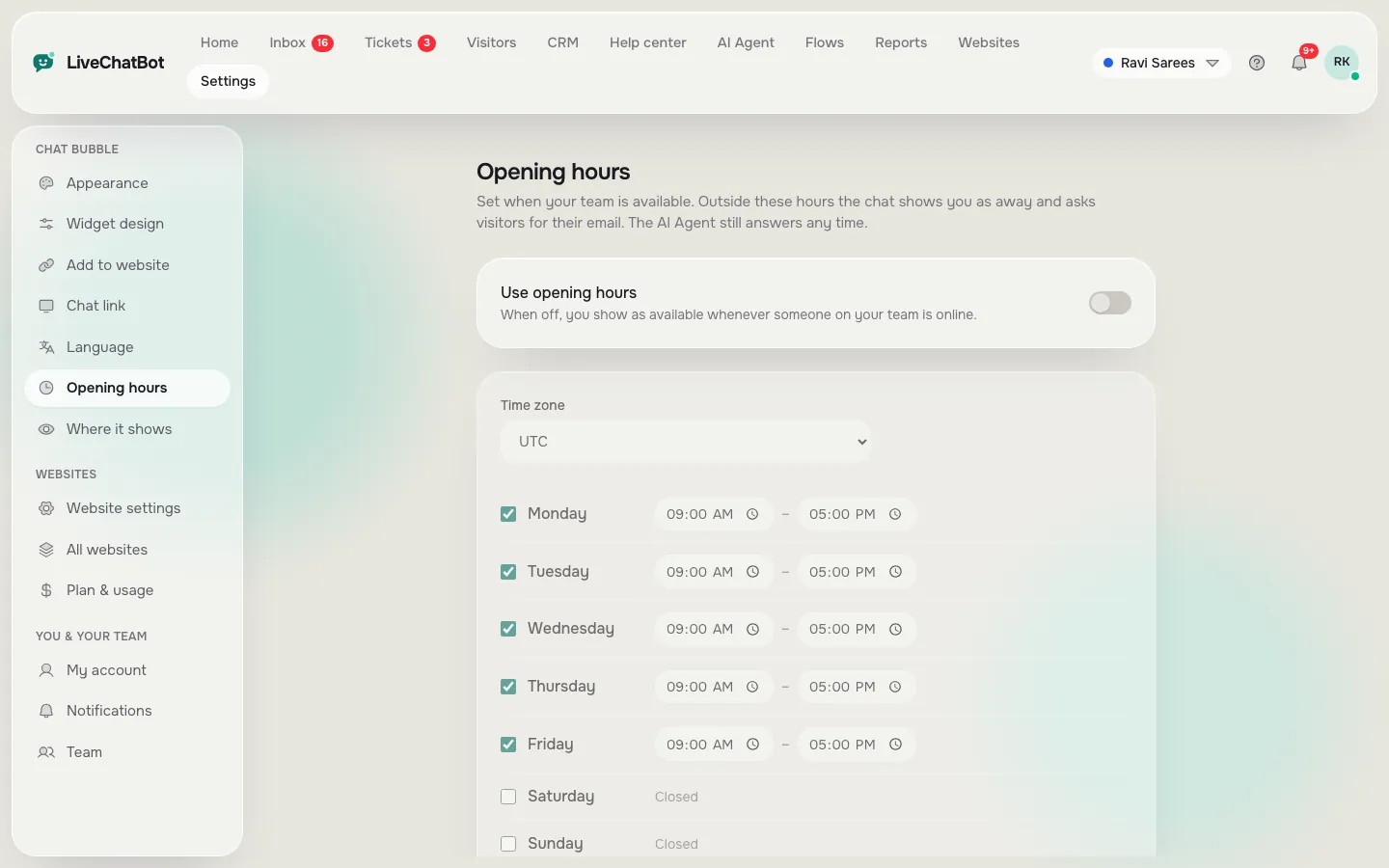
- After-hours form. Set opening hours and make sure the away form collects email and phone.
- Phone alerts. Install the team app and send a test chat. LiveChatBot has an Android app; there is no iOS team app, but an iPhone can use a browser.
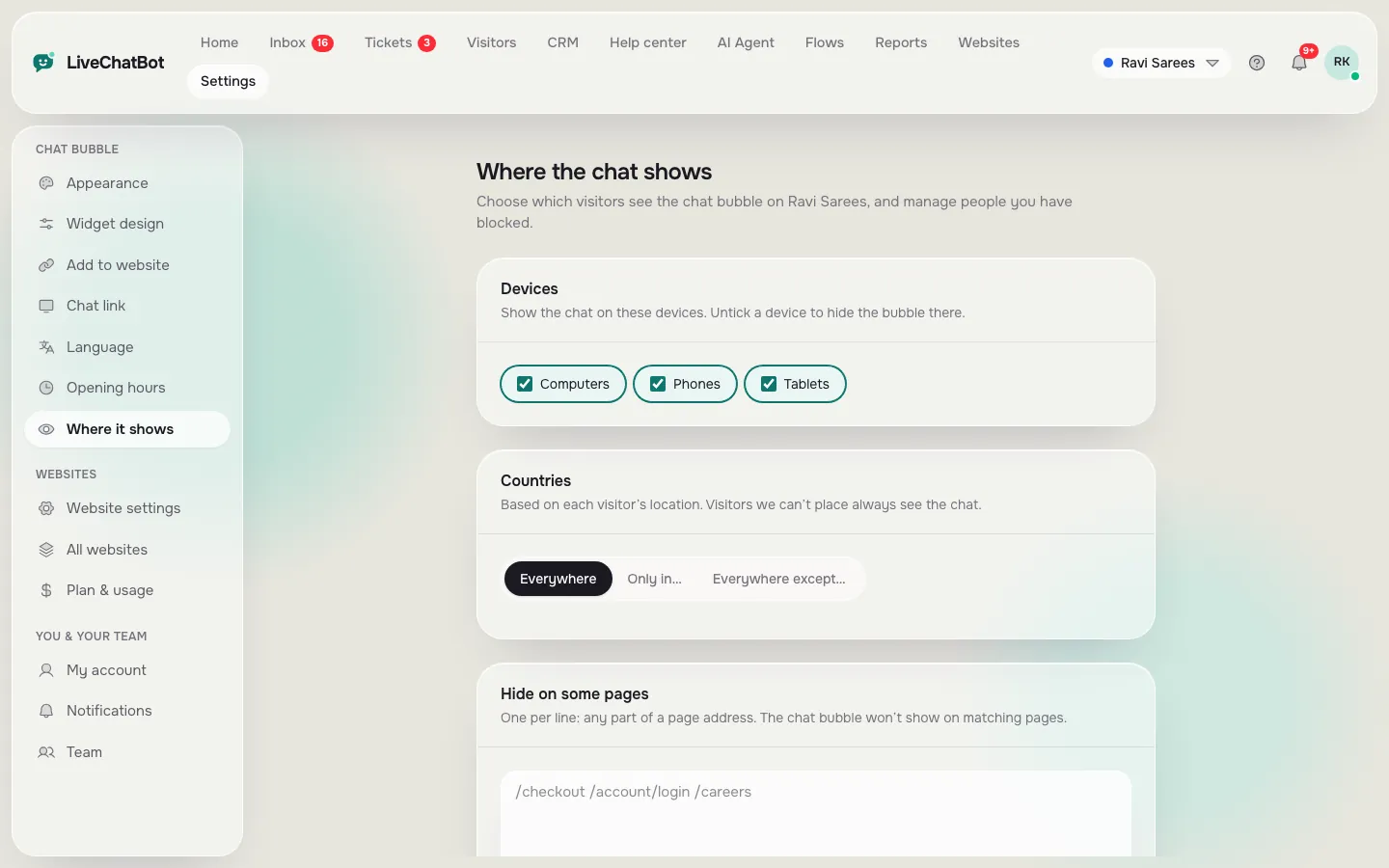
- Page control. You should be able to choose which pages and devices show the chat.
- Predictable price. Find what happens when traffic doubles. LiveChatBot counts visitors, not chats or seats, and nothing is charged automatically.
Our best live chat for website guide goes deeper on the live-chat side of these checks, while the best chatbot for website guide covers the bot side.
Real screens
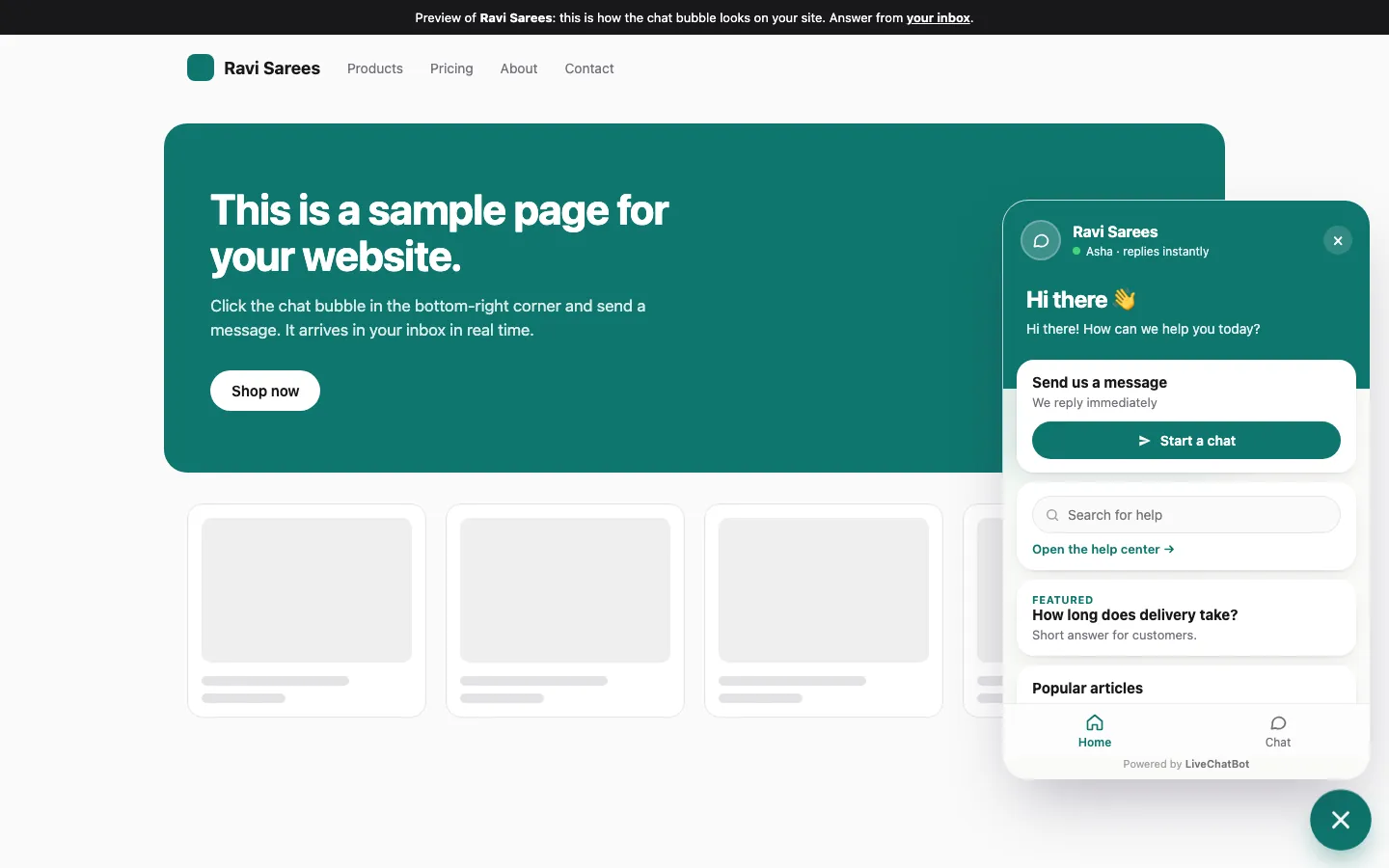
The chat on a website, the page rules and opening hours
Real screens from the LiveChatBot panel, shown with sample data. Click any picture to see it full size.
Setup by type
Setting up the best chat app for website types: the first hour
Blog or content site
Install the snippet, then use the page rules to show chat only where it helps. Add a welcome line such as “Not sure where to start? Ask me.” Teach the AI Agent your top ten articles by copying those pages into Knowledge.
Service business
Set opening hours first, then the away form. Turn on a Flow that greets visitors on your pricing or services page after a few seconds. Read our lead generation guide for message ideas that ask for a phone number without feeling pushy.
Shop
Connect your store if it is Shopify or WooCommerce, then write shipping, returns and payment facts into Knowledge. Keep the cart page chat-friendly: check on a phone that the bubble does not hide the checkout button.
Software product
Publish help-center articles, set up teams so billing questions reach the right person, and use saved replies for the ten questions you answer weekly.
What it costs
Price and limits in plain numbers
LiveChatBot’s free plan costs ₹0 and covers two websites with 100 visitors per website a month. Starter is ₹299 a month for 750 visitors shared across two websites. Growth is ₹699 a month for 2,500 visitors shared across five. Payments are prepaid, for example by UPI, with no auto-renew, and yearly plans pay for ten months and give twelve. In dollars ₹299 is about 3 to 4 US dollars, so check today’s rate.
The sign-up code WELCOME100 adds 100 visitors once, and a referral gives both companies 200 visitors. AI replies come with every plan, with a monthly allowance shown in your dashboard.
The best chat app for website growth is one whose bill stays predictable. A tiny blog may never leave the free plan. A busy shop will want a paid plan sooner, and that is a better problem to have than choosing a tool that charges per seat before you’ve made a single sale.
Honest limits
What this chat app does not do
If any of these is a must-have for your site, look elsewhere or plan a workaround.
- The “Powered by LiveChatBot” badge stays on every plan.
- No iOS team app, only Android.
- No single sign-on, audit logs or role builder.
- No native HubSpot, Salesforce, Slack or Calendly link; Zapier, webhooks and the REST API can bridge some of them.
- No voice or captcha.
What you do get is the core: a widget you can design, the AI Agent, Flows with conditions, a shared inbox, tickets, a CRM, a help center, and WhatsApp and Messenger messages in one inbox. For a platform-by-platform look at installing it, see the chat widget for website guide, and return to the live chat overview when you are ready to pick.
Frequently asked questions
What is the best chat app for website owners?
The one whose settings match the job chat does on your site. A shop, a clinic and a blog need different setups, so run the quiz first.
Do I need a chatbot or live chat?
Most small sites do best with both: a bot answering common questions from your facts, and a person taking over for the rest.
Can one account run several websites?
Yes. Free covers two websites, and Growth covers five, each with its own design and visitor tracking.
Does it work on any website builder?
It works anywhere you can paste a code snippet, and there is a WordPress plugin as well.
Is there a free plan?
Yes. It covers two websites with 100 visitors each per month.
Keep reading
Related guides
Best Chat App for Shopify Is the One That Avoids These Seven Mistakes: What Store Owners Get Wrong When They Choose (Free Mistake-vs-Fix List)
Best Chat for WordPress Is Proven in Your First Week: Install, Watch Seven Days, Then Keep or Switch (Free Week-One Timeline)
Pick the setup that fits your site
Free plan for two websites. Paste one snippet, set your hours and test it on your phone.