Free Chat for WordPress as a Two-Week Experiment: Set Your Keep-or-Remove Number Before You Install (Free Experiment Timeline)
Free chat for WordPress costs nothing to try, which is exactly why most owners try it badly: they install it, forget it, and have no idea after a month whether it helped. Treat it as a two-week experiment instead. Decide what result means keep, decide what means remove, then run the test.
Run free chat for WordPress as a 14-day experiment. Before installing, write one keep number, such as five real chats, and one remove number, such as zero. Install the plugin, answer every chat fast, then compare the result to your numbers on day 14 and decide.
⚡ In short
- Free is not the same as costless: chats take your time, so a test needs a finish line.
- Write a keep number and a remove number on day 0, before you see any results.
- Change the welcome words on day 3 if nothing happened; do not change the tool.
- Judge on day 14 with the dashboard Reports, not with a feeling.
Why test
Free chat for WordPress needs a finish line because the cost is your time
The only real price of a free chat plugin is the minutes you spend answering, so you should decide up front what those minutes must earn.
The WordPress plugin and the free plan cost ₹0. Each chat still takes a person. If you never set a target, “it’s free” quietly becomes “it’s been on my site for a year and I don’t know if anyone used it”. That is how sites end up with a chat bubble nobody answers, which is worse than no bubble at all.
An experiment fixes this. It has a start date, an end date, a number you hoped for and a number that tells you to stop. Two weeks is enough because a small site can see its first real chats within days, and short enough that you will not lose interest.
If you want the plugin basics first, our WordPress live chat plugin guide covers what it is and how it connects to your account. This post is about what to do after it is on.
The two numbers
Pick a keep number and a remove number on day 0
A keep number is the result that makes you happy to carry on; a remove number is the result that makes you switch chat off without guilt.
Use plain counts you can read from your dashboard:
- Real chats: conversations where a visitor asked something genuine, not “test”.
- Contact details left: emails or phone numbers from chats, the away form or the chat rescuer.
- Questions that were new to you: things you had not put on your FAQ page.
Example numbers for a small site
A site with a few hundred visits in two weeks might write: keep if 5 or more real chats and 2 or more contact details; remove if 0 real chats after the welcome words were improved on day 3. Anything in between means “extend one more week”.
Write these on paper with the date. Do it before the install, so that hope cannot move the goalposts later.
Worked maths
Our original maths: what a 14-day test costs and what it must earn
A worked example shows how small the bar is. The figures below are illustrative, not measured results: swap in your own.
- Suppose you answer 15 chats in two weeks at 3 minutes each. That is 15 × 3 = 45 minutes.
- Suppose your time is worth ₹300 an hour. 45 minutes ÷ 60 × ₹300 = ₹225.
- Suppose an average sale brings ₹360 in profit. One extra sale (₹360) beats ₹225 of time.
So in this example the whole test pays for itself if chat helps close a single extra sale. If your profit per sale is ₹100, you would need three. If your profit per sale is ₹5,000, even one lost lead matters.
Plan facts you can rely on: the free plan covers 2 websites and 100 visitors per website each month, with no per-seat charges, so the money cost is ₹0 whatever you find. The only variable is your time, and now you know how much it can be.
Free tool
Your fourteen-day experiment timeline
Follow the days in order. Each step says what to do and what to write down.
Write the keep number and remove number. Note how many enquiries you get today by phone, form and message, so you have a before-picture.
Install the plugin on your WordPress site, sign up at livechatbot.in and connect it. Open your site in a private window and send yourself a test message so you know where it lands.
Put the Android app on the phone of whoever answers. Switch on notifications. A chat you hear about in 20 seconds is a chat you can win.
Look at the dashboard. Zero chats so far? Rewrite the welcome line so it names two things people can ask. Do not touch anything else.
Count real chats and contact details. Read every chat and note the questions you answered more than once. Those are your saved replies and AI facts.
Add the repeated questions to the AI Agent knowledge and to saved replies, so answers are faster and consistent.
Compare the counts with your two numbers. Keep, remove or extend one week. Write the decision down with the reason.
Real screens
Real screens: the widget, the Reports page you judge by, and the phone inbox
Real screens from the LiveChatBot panel, shown with sample data. Click any picture to see it full size.
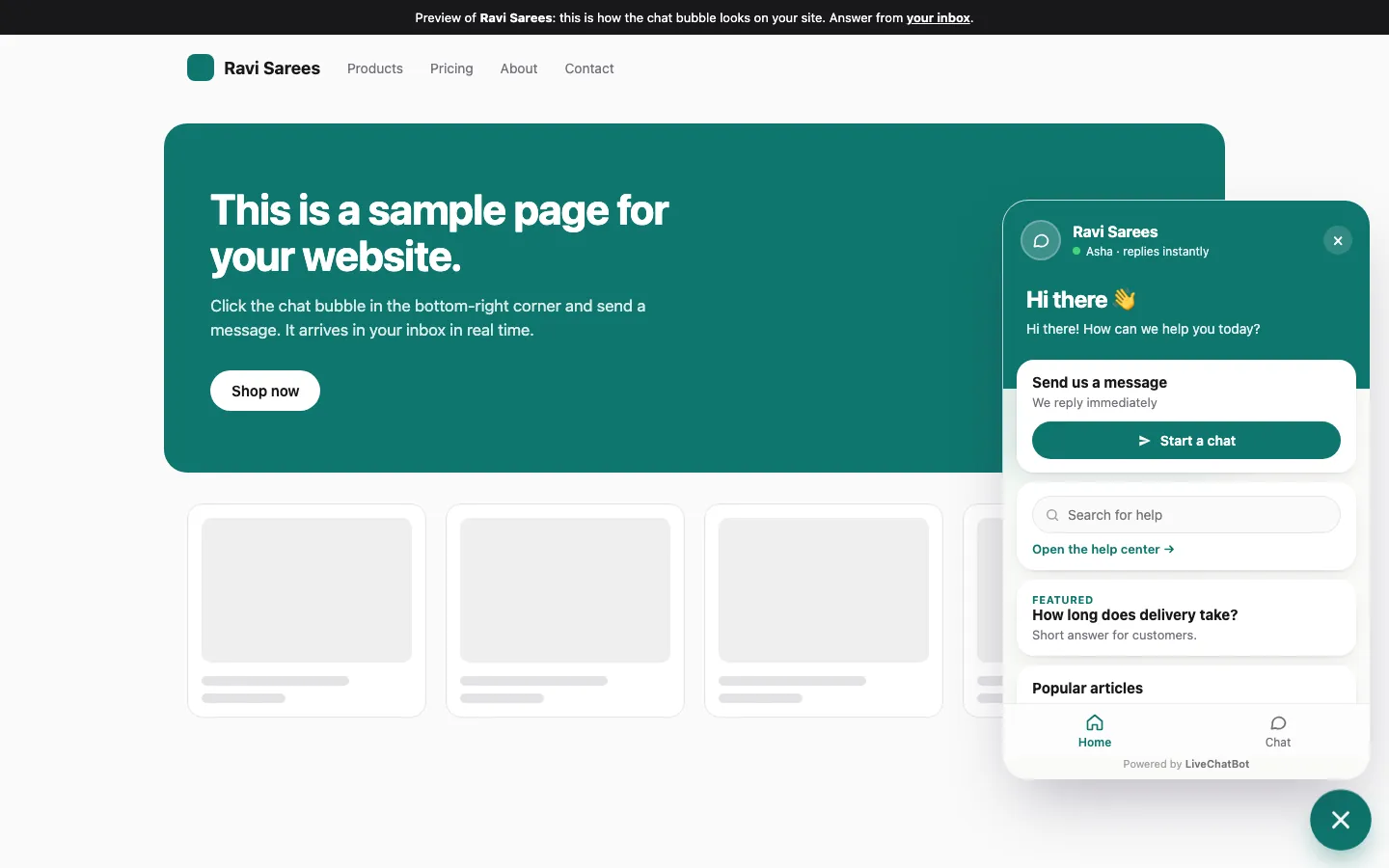
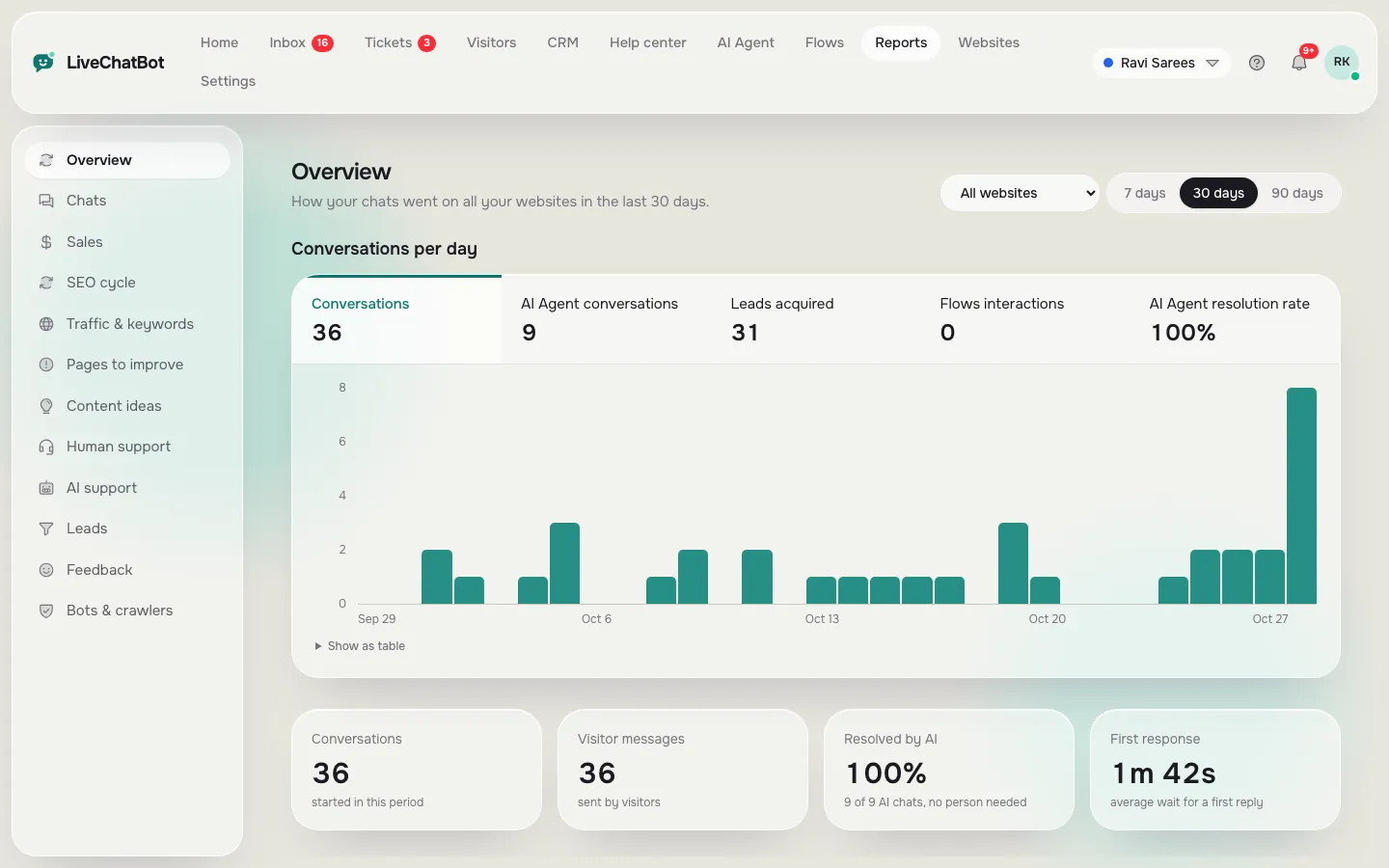
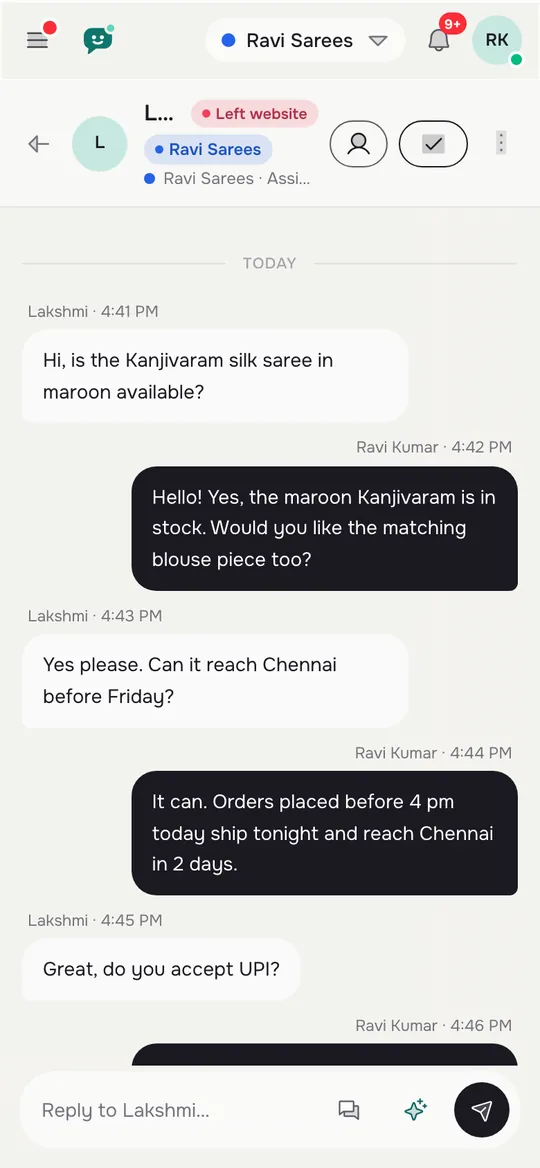
What most guides miss
Our rule: change the words on day 3, not the tool
Here is something most guides do not say: when a new chat widget gets no chats in the first three days, the cause is almost always the first line, not the software.
Most owners who see silence conclude “chat does not work for my site” and uninstall. But a welcome line like “Hi! How can we help?” gives a visitor nothing specific to react to. A line like “Ask about delivery times, sizes or returns” gives them a reason.
The rule: on day 3, if there are no real chats, change only the welcome text and the page where the chat shows, then wait four more days. Change one thing at a time so you know what caused any difference.
This is a rule of thumb from how the settings work, not a measured statistic. It keeps the experiment honest: if you swap the tool every three days you learn nothing about any of them. You can edit the words in Settings, and the how to customize your chat widget guide shows where each one lives.
Reading results
How to read free chat for WordPress results without fooling yourself
Read results by counting real events, because a busy-looking dashboard can hide a quiet week.
Count these three things
- Real chats, not visits or opens.
- Contact details left, including the away form and the chat rescuer, which asks for email and phone if nobody replies in seconds.
- New questions, written down as you read each chat.
Compare with your before-picture
Look at your day-0 note. If you used to get a handful of enquiries a week and now you get the same plus chats, chat has added reach. If chats simply replaced phone calls, it has saved you time instead. Both are wins, but different ones.
Beware of three traps
- Testing yourself: your own test chats inflate the count. Delete or ignore them.
- A slow reply: a chat answered after an hour is a lost chat. The live chat response time guide explains why speed matters.
- Too short a window: one quiet week can be school holidays or a festival, not failure.
After day 14
What to do after day 14: keep, remove or extend
Your decision on day 14 has three possible outcomes, and each has a clear next step.
Keep
You hit your keep number. Write the next goal, such as more contact details from the pricing page, and move on to proactive messages and Flows. Check the free plan numbers: 100 visitors per website a month is the free cap, so look at your visitor count before you decide whether a pack is needed. The pricing page lists the plans.
Remove
You hit your remove number even after the day-3 change. Switch the widget off and note why. That is a good result: you spent ₹0 and learned that your visitors prefer the phone or a form.
Extend
The result sits in between. Add one week and one change, such as showing the chat on fewer pages or adding a WhatsApp button card. Then decide again. See also our guide to free live chat for the broader picture, and the WordPress live chat plugin page for install help.
Frequently asked questions
Is free chat for WordPress really free?
The LiveChatBot plugin and free plan cost ₹0 for 2 websites with 100 visitors per website each month. Your time answering chats is the real cost, which is why a test needs a finish line.
How long should I test chat on my WordPress site?
Fourteen days is a good length for a small site. It is long enough to see real chats and short enough to stay focused. Extend by one week if the result sits between your keep and remove numbers.
What should I measure in the test?
Count real chats, contact details left and new questions you had not covered. Use the dashboard Reports rather than memory.
What if nobody chats in the first three days?
Change the welcome words to name two specific things people can ask. Change one thing at a time and wait four more days before judging.
Can I switch chat off if the test fails?
Yes. You can turn the widget off or deactivate the plugin at any time. You spent ₹0, and you now know what your visitors prefer.
Keep reading
Related guides
Free Chat Box for Website Owners: What You Get for ₹0, the 100-Visitor Test and When to Upgrade
Free Chat API for Website Owners: Pick the Smallest Layer That Does the Job, From One Pasted Line to the REST API
Run the experiment
Free plan for two websites, no per-seat charges, and an Android app for alerts. Start free on livechatbot.in.