Difference Between Chatbot and Conversational AI: Judge Them by How They Fail, Then Run a Five-Minute Three-Turn Test (Free Copy-Ready Script)
Difference between chatbot and conversational AI, in one line: a chatbot follows a script, while conversational AI follows the conversation. Vendors blur the two, so this guide gives you a five-minute test for any website bot, plus the exact way each one fails.
The difference between chatbot and conversational AI: a chatbot follows a fixed script and breaks off-path; conversational AI understands free wording, remembers earlier turns and writes replies from your facts. Most useful website bots mix both: scripts for fixed steps, AI for open questions, and a handover to a person when neither is sure.
⚡ In short
- Chatbot = scripted. Menus, buttons and keyword rules. Predictable, but it hits dead ends.
- Conversational AI = free-form. It understands rephrasing and follow-ups, but can answer wrongly with confidence.
- Compare them by their worst reply, not their best demo. Each has a different failure.
- Run the three-turn test below: memory, rephrase, unknown question. It takes five minutes.
Definitions
A chatbot follows a script; conversational AI follows the conversation
A chatbot is software that answers a visitor by matching what they typed or clicked to a prepared reply. Conversational AI is software that reads what the visitor means, keeps track of what was said earlier, and writes a reply in natural language.
The word “chatbot” is the wider label. Every conversational AI on a website is a chatbot in the everyday sense, because it chats. But not every chatbot is conversational AI. A bot that shows three buttons and a fixed answer for each is a chatbot with no AI at all.
That is why the question confuses people. The difference sits underneath, in how they decide what to say next. For the basics, read what is a chatbot.
Side by side
The difference between chatbot and conversational AI comes down to six behaviours
The six behaviours below are the ones a visitor actually notices. Read each pair as “what the script-style chatbot does” versus “what conversational AI does”.
Worked example
Why a menu bot runs out of road: the maths of hand-built paths
A menu bot needs one hand-built reply for every path a visitor can take, and the number of paths grows by multiplication. This is a worked example from the way Flows work in LiveChatBot, not a survey figure.
Say you build a button bot with 4 choices at each of 3 levels: topic, then detail, then follow-up.
- Level 1: 4 buttons
- Level 2: 4 × 4 = 16 branches
- Level 3: 4 × 4 × 4 = 64 end replies to write, check and keep current
If your delivery time changes, you may need to edit every branch that mentions it. Now compare the knowledge route. The AI Agent in LiveChatBot answers from the knowledge you give it, which you can type, copy from a web page or upload as a PDF, Word, Excel, CSV or TXT file. If the same business has 10 facts (delivery, returns, hours, price range and so on), that is 10 entries to maintain, and the AI can combine them for follow-ups.
64 hand-built replies versus 10 facts is the real size of the gap. It is also why small teams that start with scripts often move to AI for the open questions and keep scripts only for fixed steps like booking.
What most guides miss
Compare the failures, not the features: a chatbot fails by stopping, conversational AI fails by guessing
The best way to choose is to look at the worst reply each type can give, because that is the reply a customer remembers. This is our rule, and most comparison pages skip it because they list features instead.
How a script-style chatbot fails. It stops. The visitor types something off-script and gets “Sorry, I didn’t get that” or the same menu again. The cost is a visitor who leaves quietly.
How conversational AI fails. It guesses. If the answer is not in its knowledge, a weak setup invents a plausible one, such as a wrong delivery date. The cost is a promise you did not make.
So the question to ask is not “which is smarter?” but “which failure can my business afford?” A clinic or a bank should fear the guess more. A shop with simple questions may fear the dead end more. Either way, add a clear handover to a person. In LiveChatBot the Rules to follow box (up to 5,000 characters, premium AI replies only) is where you write lines such as “If you are not sure, say so and ask for the visitor’s phone number.”
Call this the worst-reply rule: pick the type whose worst reply you can live with, then add a safety net for it.
How the layers map
LiveChatBot gives you three layers, so you do not have to choose just one
LiveChatBot has three automatic layers, and they line up with the two ideas in this guide.
Layer 1: the keyword bot (the classic chatbot)
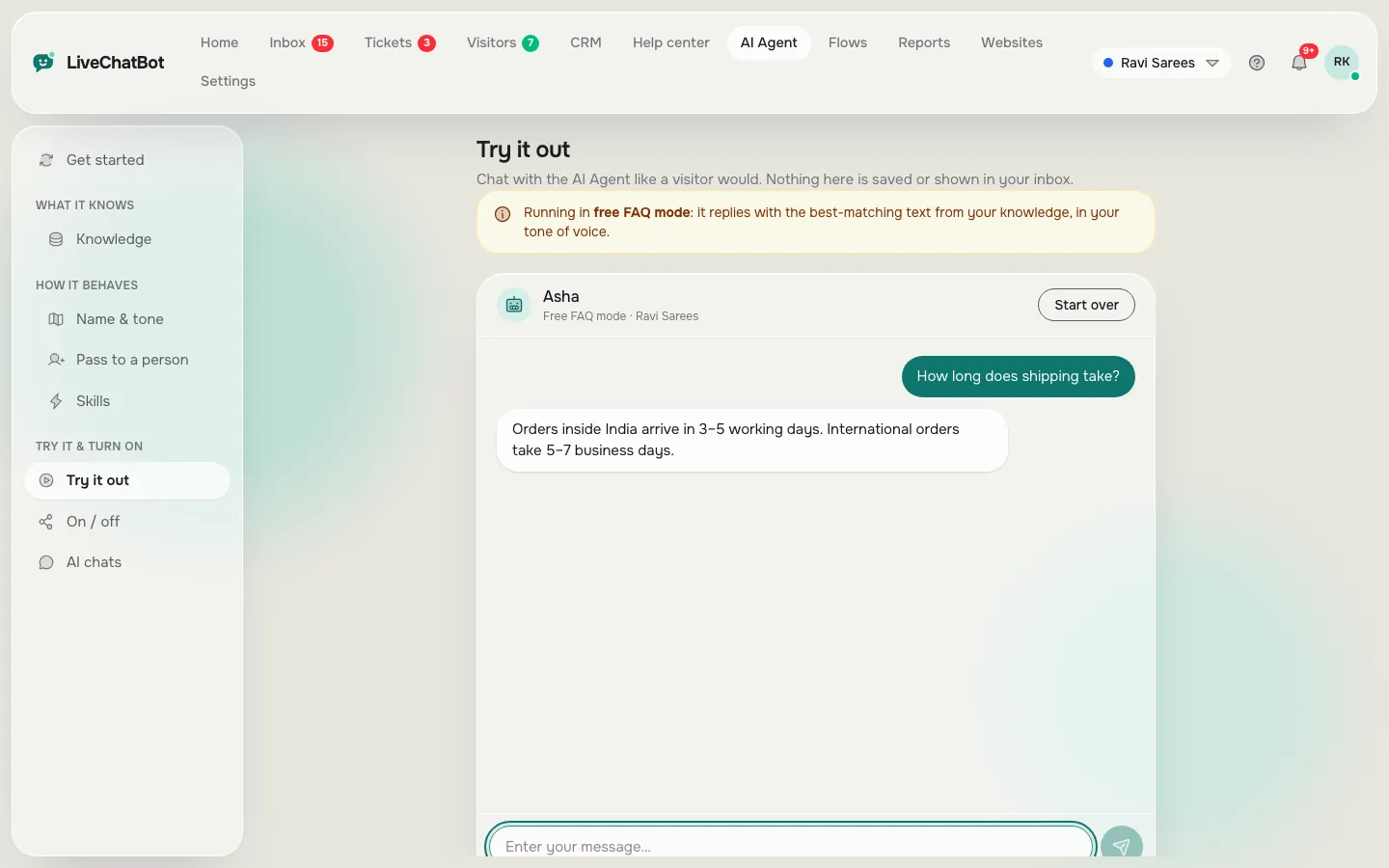
The free keyword bot answers from your saved replies when a visitor’s words match. It is predictable, and it is the fallback when AI replies are unavailable.
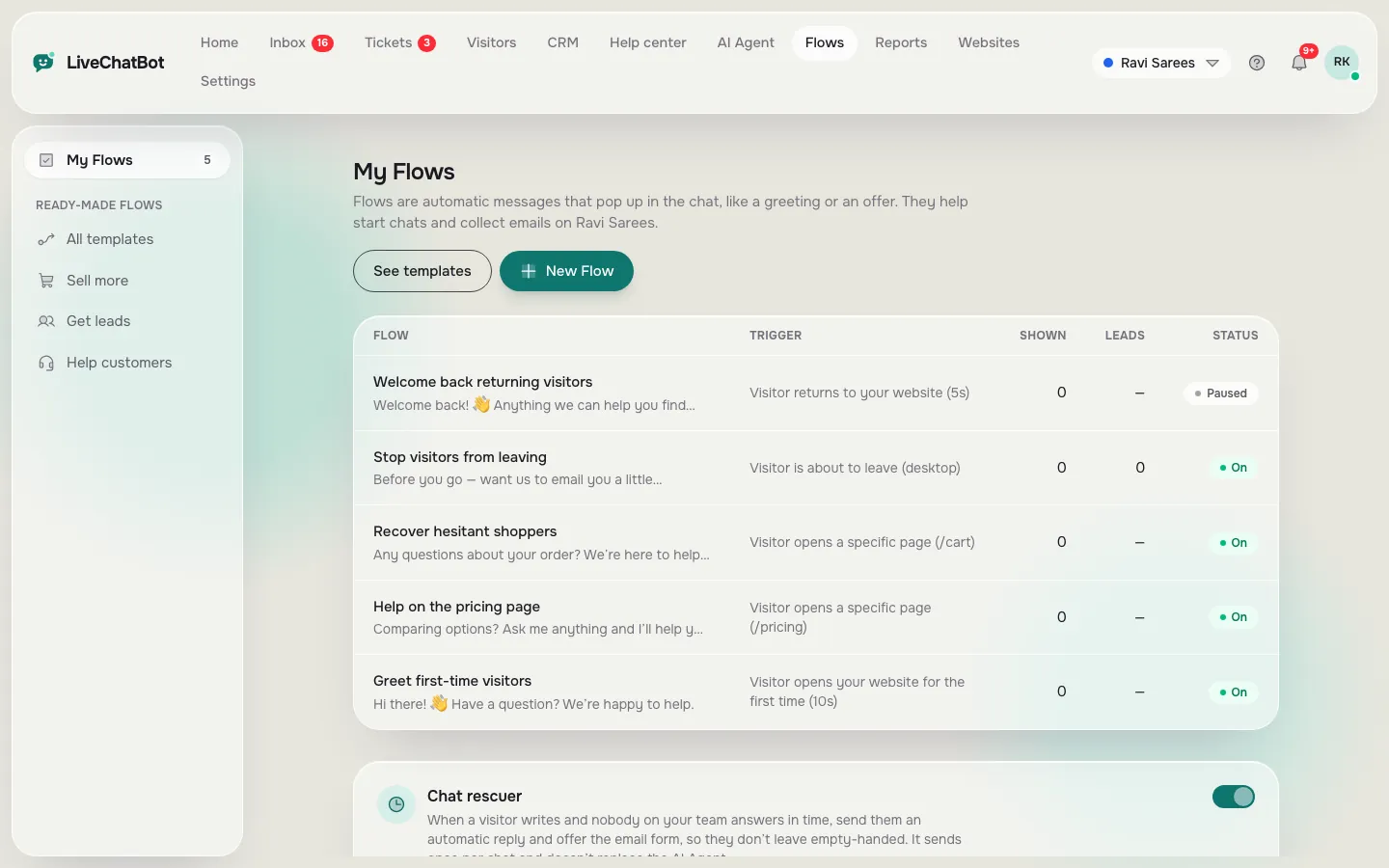
Layer 2: Flows (scripted, but proactive)
Flows show a chosen message on chosen pages, with up to 6 conditions such as page, source, country, device and number of visits. They are good for fixed steps like “Want a quote?” and they include a follow-up message.
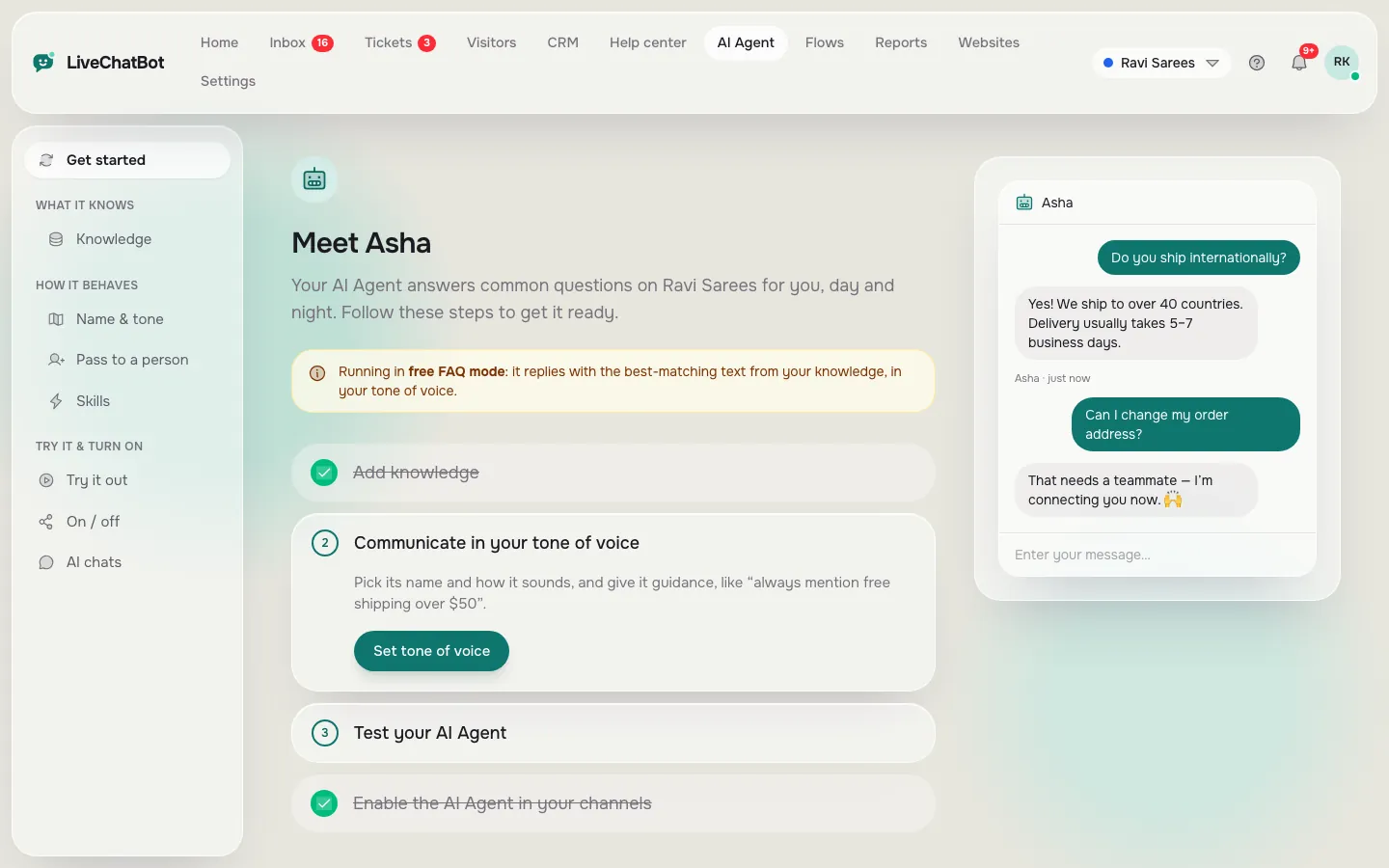
Layer 3: the AI Agent (conversational AI)
The AI Agent reads the visitor’s wording, answers from your knowledge and follows your Rules. It is the layer that handles “and on Sunday?”
The safety net
If nobody replies within 6 seconds, the chat rescuer asks for email and phone so the lead is not lost. Handover to a person, tickets and the away form sit behind all three layers. For the training steps, see how to train your AI chatbot.
Real screens
Real screens: set up the AI Agent, try it in the playground, and see the scripted Flows beside it
Real screens from the LiveChatBot panel, shown with sample data. Click any picture to see it full size.
Try it
Run the three-turn test on any website bot
Open the bot you are judging, copy one line at a time, and note what comes back. Do this on your own bot and on any you are comparing. It takes about five minutes.
Reading the result
Score the test with three simple marks
Give each turn one mark, so the difference between chatbot and conversational AI shows up as a score out of three.
- Memory. Did “And on Sunday?” get a sensible answer without you repeating “opening hours”? If yes, that is conversational behaviour. If it asked you to start again, it is script-style.
- Rephrase. Did at least two of the three odd wordings reach the right answer? Script-style bots usually get one at best, because they rely on matching words.
- Unknown. Did it say it was unsure and offer a person or a form? A made-up answer here is a failure, even if it sounded fluent.
A bot scoring 0 or 1 is a chatbot in the script sense. A 3 is conversational AI with a safety net. A bot that nails memory and rephrasing but guesses on the unknown question is the risky one: fix its rules before going live. Our chatbot vs live chat guide shows when a person should simply take over.
Choosing
Pick the script when the steps are fixed and the AI when the questions are open
Use a script for anything with a fixed order, and conversational AI for anything where visitors phrase things their own way.
- Script is better for: booking a slot, collecting a name and number, showing a promo only on the pricing page, or sending someone to a WhatsApp button.
- AI is better for: product questions, delivery and returns, “does this work with…” questions, and anything people type in their own words.
- A person is better for: complaints, refunds, and any question where a wrong answer costs money.
Most small websites end up with all three in one chat: a Flow to start the conversation, the AI Agent for open questions, and your team behind them. Each LiveChatBot plan includes a monthly allowance of AI replies, shown in your dashboard. The Free plan covers 2 websites with 100 visitors each a month, Starter is ₹299 a month and Growth is ₹699 a month, all prepaid with no per-seat charges. Details are on the pricing page.
Honest limits
What conversational AI in LiveChatBot does not do
Being clear about limits is part of the comparison. The AI Agent answers from the knowledge you provide; you cannot pick the underlying AI model or bring your own API key. It does not do voice or speech, and it does not score customer sentiment. A written Rules box shapes behaviour, but it is not a raw system-prompt editor.
Free-form AI replies come from the premium AI allowance. When that is used up, the free keyword bot takes over from your saved replies, so the chat never goes silent. If you need voice calling or sentiment scoring, check that against any vendor before you buy. To see the pieces that do exist, read the full AI Agent guide, or compare with chatbots and conversational AI answered four ways. For a wider look at where AI talks to people beyond a website chat, see our guide to conversational AI examples beyond the website chatbot.
Frequently asked questions
What is the main difference between chatbot and conversational AI?
A chatbot follows a script or keyword rules. Conversational AI reads the meaning of free-form wording, remembers earlier messages and writes its own reply from your knowledge. Chatbot is the wider label; conversational AI is the smarter kind.
Is every chatbot conversational AI?
No. A bot with buttons and fixed answers is a chatbot with no AI. Only bots that understand free wording and context count as conversational AI.
Which is cheaper to run on a small website?
Script-style bots cost less per reply but take more time to build and edit. Conversational AI takes less setup because you give it facts, but AI replies come from a monthly allowance. LiveChatBot has a free plan to try both.
Can conversational AI give wrong answers?
Yes. If the answer is not in its knowledge, a weak setup may guess. Write a rule that tells it to say it is unsure and hand over, then test with a question you never taught it.
Do I need a human if I have conversational AI?
Yes, for complaints, refunds and anything costly if wrong. Keep a handover, the away form and the chat rescuer behind the AI.
More to read
More guides on this topic
Best Conversational AI Chatbot: Ten Test Conversations to Run Before You Choose, Each Built to Expose a Weakness (Free Copy-Ready Test Script)
Try both on one free account
Keyword bot, Flows and the AI Agent in one chat, with a person behind them. Start free on livechatbot.in and run the three-turn test tonight.