Chatbots and Conversational AI: One Customer Question Answered Four Ways, Showing Exactly Where One Ends and the Other Begins
Chatbots and conversational AI are often sold as the same thing, yet they answer in very different ways. This guide takes one real customer question and shows how a button bot, a keyword bot, an AI Agent and a person each handle it, so you can see the line for yourself.
A chatbot is any program that answers in a chat window. Conversational AI is a kind of chatbot that understands free-typed sentences and writes its own reply from facts you gave it. Simple chatbots follow fixed buttons or keywords. Most small businesses need both layers, plus a person as the last step.
⚡ In short
- Chatbot is the wide word. Conversational AI is one type of chatbot, the type that reads ordinary sentences and writes a reply.
- Button bots and keyword bots are cheap, predictable and fine for fixed questions. AI answers cover the unpredictable ones.
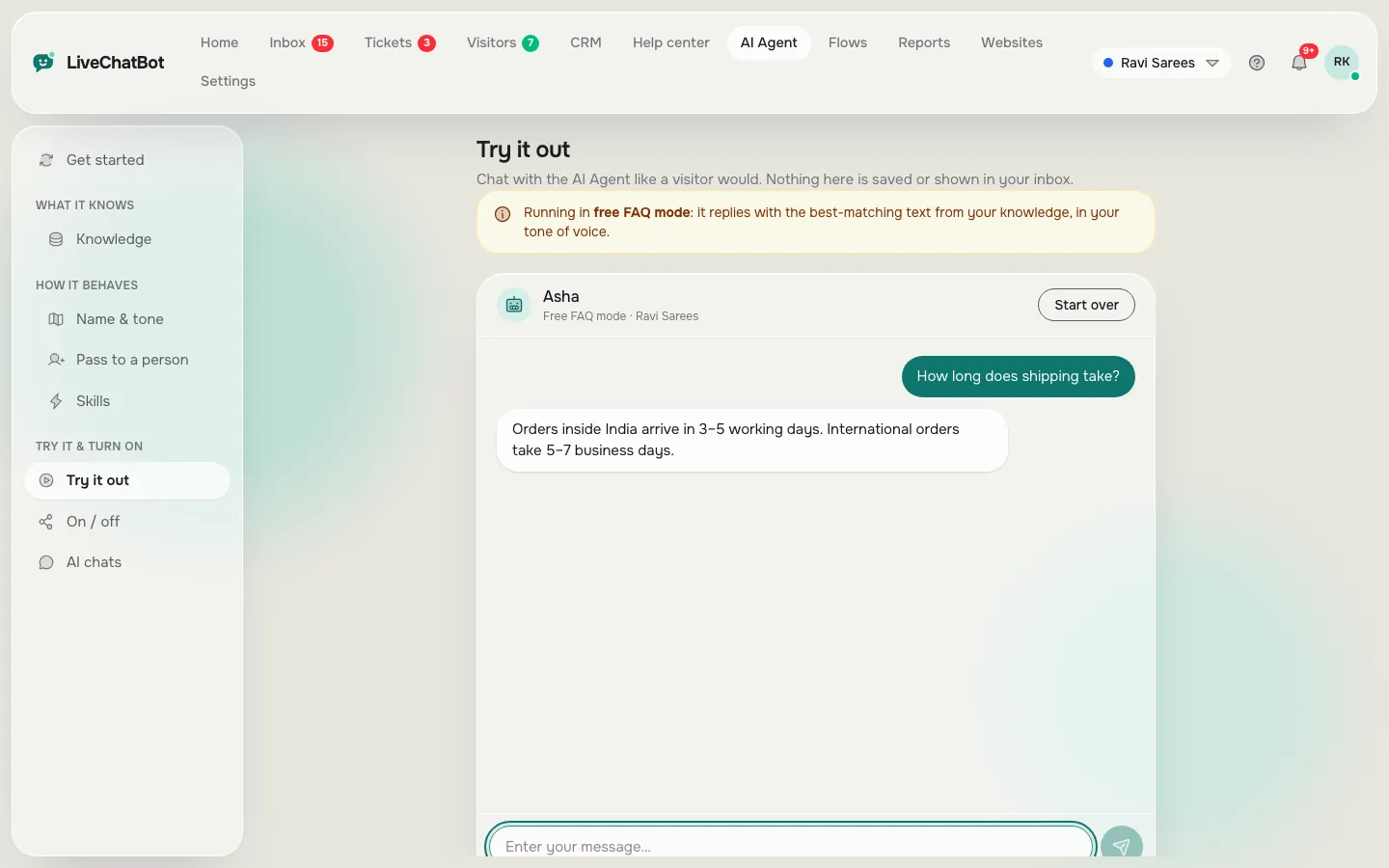
- In LiveChatBot the AI Agent writes answers from your Knowledge, and a free keyword bot answers from saved replies when AI is unavailable.
- Judge any bot by what it does when it does not know, not by its best answer.
The difference
Chatbots and conversational AI differ in how they choose an answer
The difference is the method: a plain chatbot looks up a prepared answer, while conversational AI builds an answer from the question you typed. That is the whole line, and everything else follows from it.
A button bot shows choices and you tap one. A keyword bot spots words such as “price” or “delivery” and sends a saved reply. Conversational AI reads the whole sentence, finds the relevant facts you gave it and writes a reply in your tone. A person reads, thinks and decides.
Why the word “chatbot” confuses buyers
Vendors use chatbots and conversational AI as if they were synonyms, because “AI” sells better. Our guide to what a chatbot is covers the basics, and the AI Agent page shows the AI layer in LiveChatBot.
Why you rarely choose just one
Each layer fails somewhere. Buttons cannot handle a surprise. Keywords misread a long sentence. AI can sound sure when a fact is missing. A working setup stacks them, with a person at the end.
Same question, four ways
One question, four answers
A visitor types the same message to four different setups. Click each tab to see what comes back and where it breaks.
Fast and safe, but it answered the topic, not the wedding question.
It spotted the word return. It never noticed the word wore.
It combined the policy with the detail in the sentence.
A person can make an exception the policy does not allow the bot to make.
Where conversational AI wins
Conversational AI wins when people phrase the same need many ways
AI earns its place when the same question arrives in a hundred different phrasings. “Delivery to Pune?”, “will it reach by Friday”, “do u ship outside Maharashtra” all mean one thing.
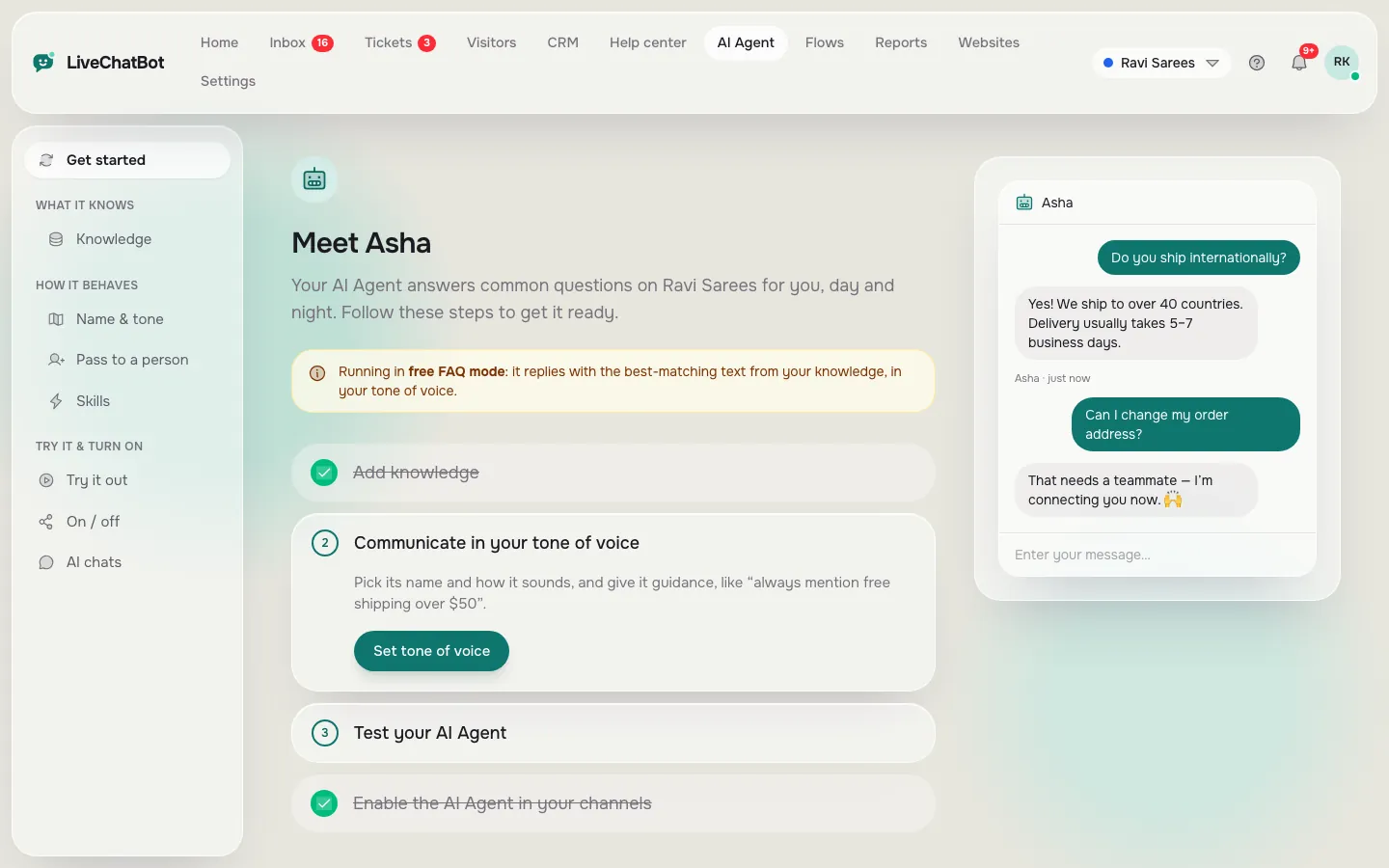
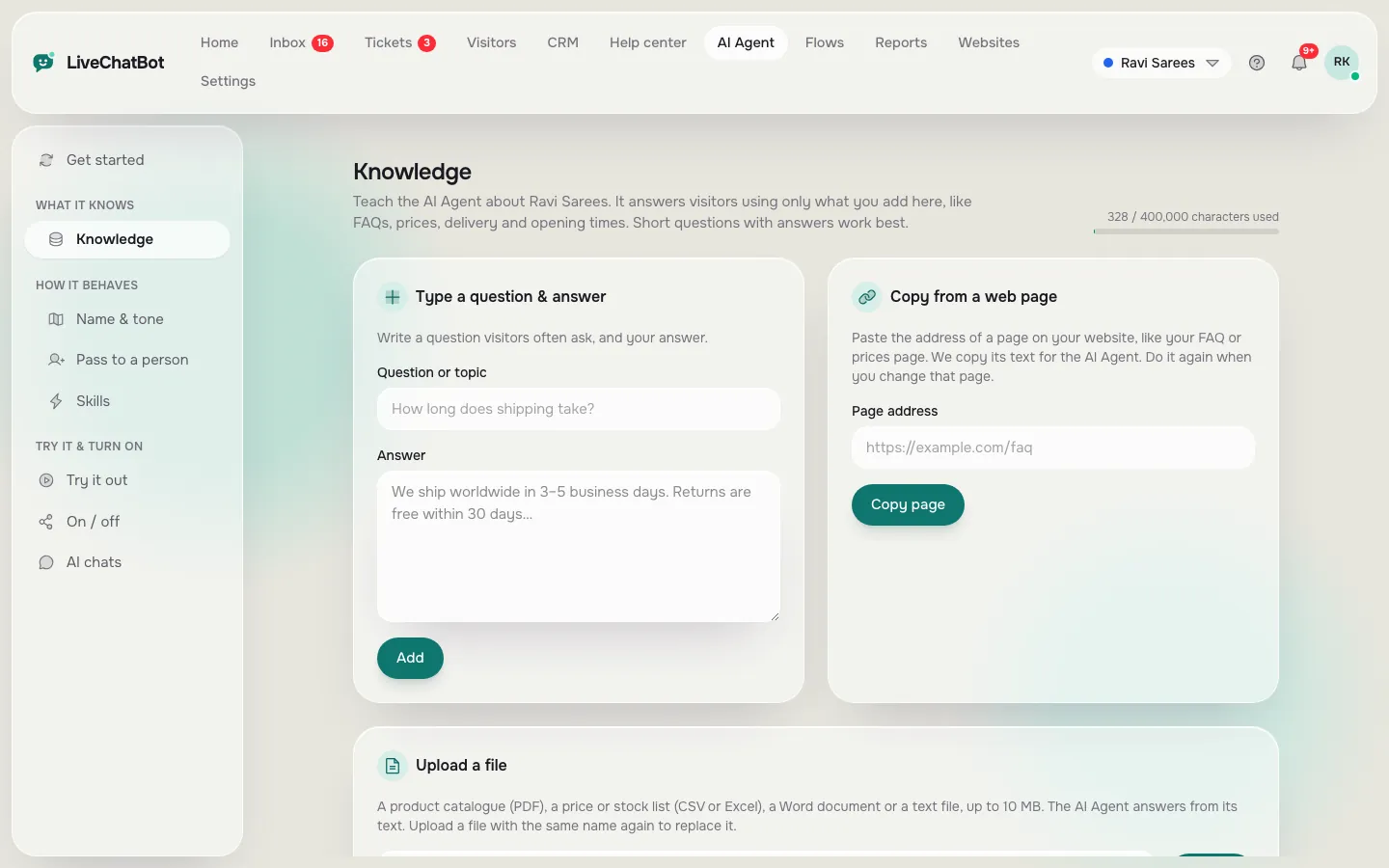
A keyword bot needs a rule for each phrasing. An AI Agent reads the meaning and looks in your Knowledge, where you can type answers, copy a web page or upload a file (PDF, Word, Excel, CSV or text). It also follows the Rules to follow box on the Name and tone page, up to 5,000 characters, such as “Never promise delivery dates”.
Where AI loses
AI is weak where the answer is not in your Knowledge or where an exception is needed. It can also be too fluent about a gap. That is why the handover to a person matters more than the AI itself. Our guide on how to train your AI chatbot covers writing facts so gaps are rare.
Real screens
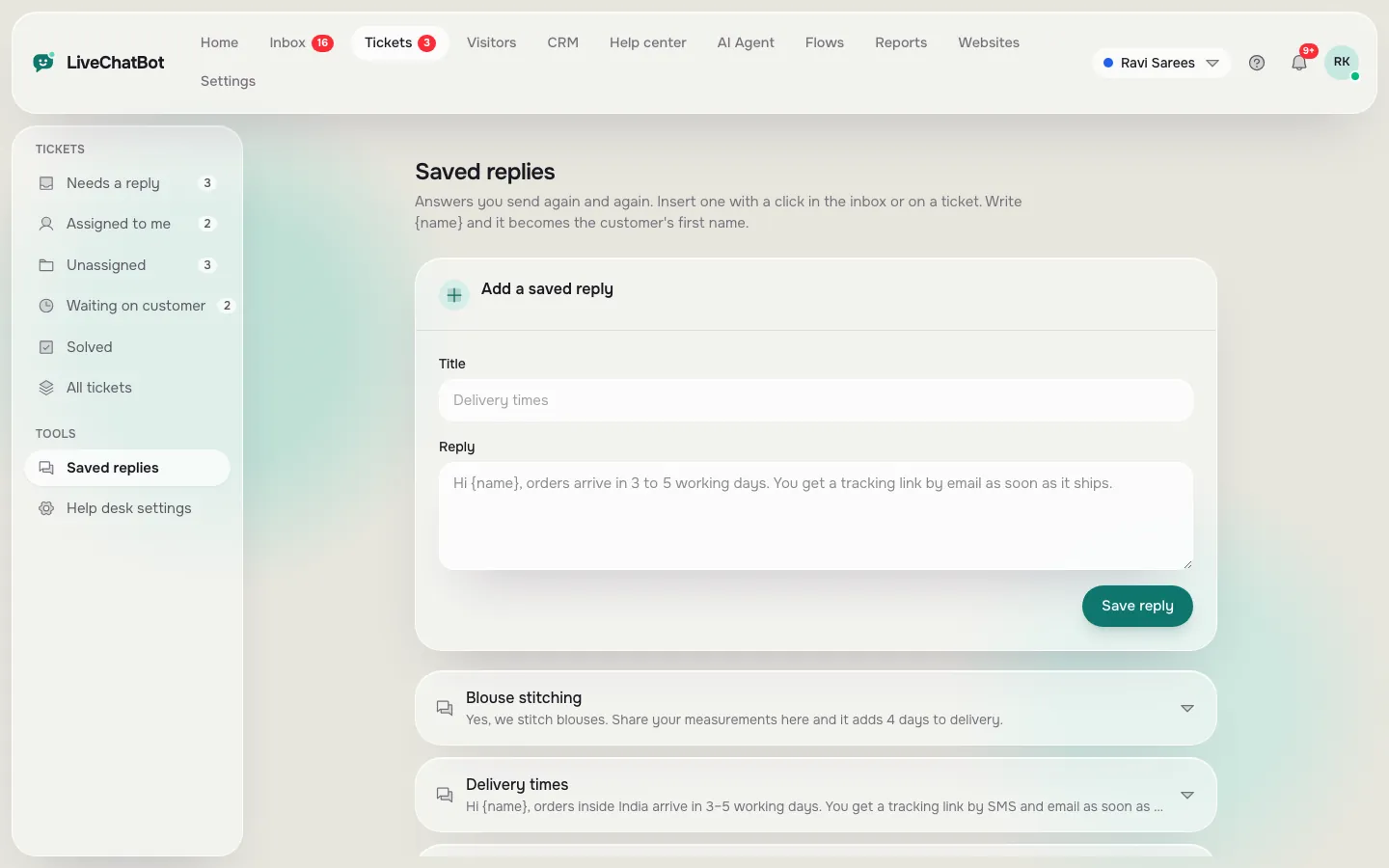
The AI layer and the keyword layer, side by side
Real screens from the LiveChatBot panel, shown with sample data. Click any picture to see it full size.
Where simple bots win
Simple chatbots win when the question is fixed and the answer must never change
A button or keyword bot is the right tool when the answer is one exact line. Opening hours, a refund window, a WhatsApp number and a booking link do not need a model to rewrite them every time.
Predictability is a real benefit. A saved reply says the same thing every time, so you can check it once. In LiveChatBot, saved replies power the free keyword bot, and Flows add proactive messages with up to six conditions, such as page, source, country, device or number of visits. Read how to create a chat flow for examples.
The fallback is built in
When AI replies are unavailable for a website, the keyword bot answers from your saved replies. So a quiet month of AI use does not leave visitors with silence.
Use the cheaper layer first
If a question can be answered by a button, let the button answer it. Save the AI allowance for the messy questions. This keeps every plan stretching further.
Original data
LiveChatBot’s own numbers for the two layers
These figures come from LiveChatBot’s product, not from a survey, and the worked example is illustrative.
- Knowledge sources for the AI Agent: 3 ways to add facts (type, copy a page, upload a file) and 5 file types (PDF, Word DOCX, Excel XLSX, CSV, TXT).
- Rules box: up to 5,000 characters of written behaviour instructions.
- Chat message limit: 20 visitor messages a minute per IP, a fixed built-in limit that protects the bot from floods.
- Free plan: 2 websites with 100 visitors each a month, so up to 200 new visitors a month at ₹0.
- Starter: ₹299 for 750 visitors shared across 2 websites, about ₹0.40 per visitor if all are used (299 ÷ 750).
Worked example (illustrative)
A shop gets 30 chats a day and each takes a person 3 minutes: 30 × 3 = 90 minutes a day. If 12 of those are repeat questions the AI Agent settles alone, the team saves 12 × 3 = 36 minutes a day, so 54 minutes remain. The Resolved by AI report shows your real number after a week.
What most guides miss
Our rule: grade a bot by its worst answer, using the 5-and-5 test
A bot should be graded by how it fails, not how it shines. Every demo shows the best answer. Your customers meet the worst one.
The 5-and-5 test
Take ten questions. Five must have answers in your Knowledge, five must not. Ask all ten and score yourself.
- For the five known questions, the answer should match your facts.
- For the five unknown questions, the right result is “I’m not sure” plus a handover or a request for contact details.
- Count wrong-but-confident replies. Even one is a reason to add a Rule or a fact.
Most comparisons score only the first five. The unknown five is where chatbots and conversational AI really differ, and where trust is won or lost. Repeat the test after every big change to your prices or policies. The AI based chatbot guide explains why wording matters here.
Try it
Which layer does your business need first?
Answer four questions. The most common answer decides the result.
Being honest
What LiveChatBot does not do
No bot setup is complete, so here are the limits. You cannot choose the AI model or bring your own API key. There is no sentiment analysis, no voice, and no native Slack, HubSpot or Salesforce link, although Zapier, webhooks and the REST API can bridge some tools. The team app is for Android only, and “Powered by LiveChatBot” stays on all plans.
What you do get
A shared inbox with Assign to me and Unassigned and Mine folders, Teams, tickets, WhatsApp and Messenger messages in the same inbox, ratings, and a Reports area that shows replies, first response time and what the AI Agent settled. Read more on the AI Agent page, see pricing for plan limits, then sign up at livechatbot.in.
Frequently asked questions
What is the difference between chatbots and conversational AI?
A chatbot is any program that replies in chat, including button and keyword bots. Conversational AI is the kind that understands typed sentences and writes its own reply from facts you provide.
Is conversational AI always better than a simple chatbot?
No. For fixed answers like opening hours, a saved reply is more predictable and cheaper. AI helps most when the same need arrives in many phrasings.
Can I use both on one website?
Yes. In LiveChatBot the AI Agent answers from your Knowledge, and the free keyword bot answers from saved replies when AI is unavailable.
What happens when the AI does not know?
It should say so and hand over. Test this with questions you never taught it, and add the missing fact to Knowledge afterwards.
Does LiveChatBot let me pick the AI model?
No. The provider is set on the server by LiveChatBot. You control the facts in Knowledge and the behaviour in the Rules box.
See both layers in one chat
Start free on livechatbot.in with 2 websites, and add AI answers on top of saved replies.