Best Free Live Chat Apps Are Three Apps in One: Visitor Widget, Team Inbox and Phone Alerts (Free Scorecard)
Best free live chat apps are really three apps bundled together: the widget your visitor sees, the inbox your team works in, and the alerts that reach a phone. A product can be excellent at one and weak at the others, and you only notice on a busy day. This guide splits the bundle into its three parts, shows how to judge each, and gives you a scorecard to compare your shortlist.
⚡ In short
- Judge a chat app in three parts: the visitor widget, the team inbox and the phone alerts.
- A weak part ruins the whole: a lovely widget is useless if nobody hears about the message.
- LiveChatBot has a customisable widget, a shared inbox, and an Android app for agents. iPhone users answer from a browser.
- Use the scorecard to weight the parts by what matters to your business.
The bundle
Why the best free live chat apps need to be judged in parts
Search for free chat tools and the results look identical: a screenshot of a bubble, a promise of more leads, a free plan button. Underneath, the products differ in three places.
The widget. This is what your visitor meets. It should look like your brand, load quickly, work on a phone and let you choose where it appears.
The inbox. This is where your team works. It should show who is waiting, let a teammate take a chat, and keep a history.
The alerts. This is how you find out. A message nobody hears about is a lost customer, however good the widget is.
We separate these because owners usually test only the first. They install the bubble, admire it, and discover three weeks later that replies arrive late because alerts depend on an open browser tab. Our guide to free live chat explains what a free plan normally includes; this one explains how to test it.
Part one
The widget: what your visitor meets
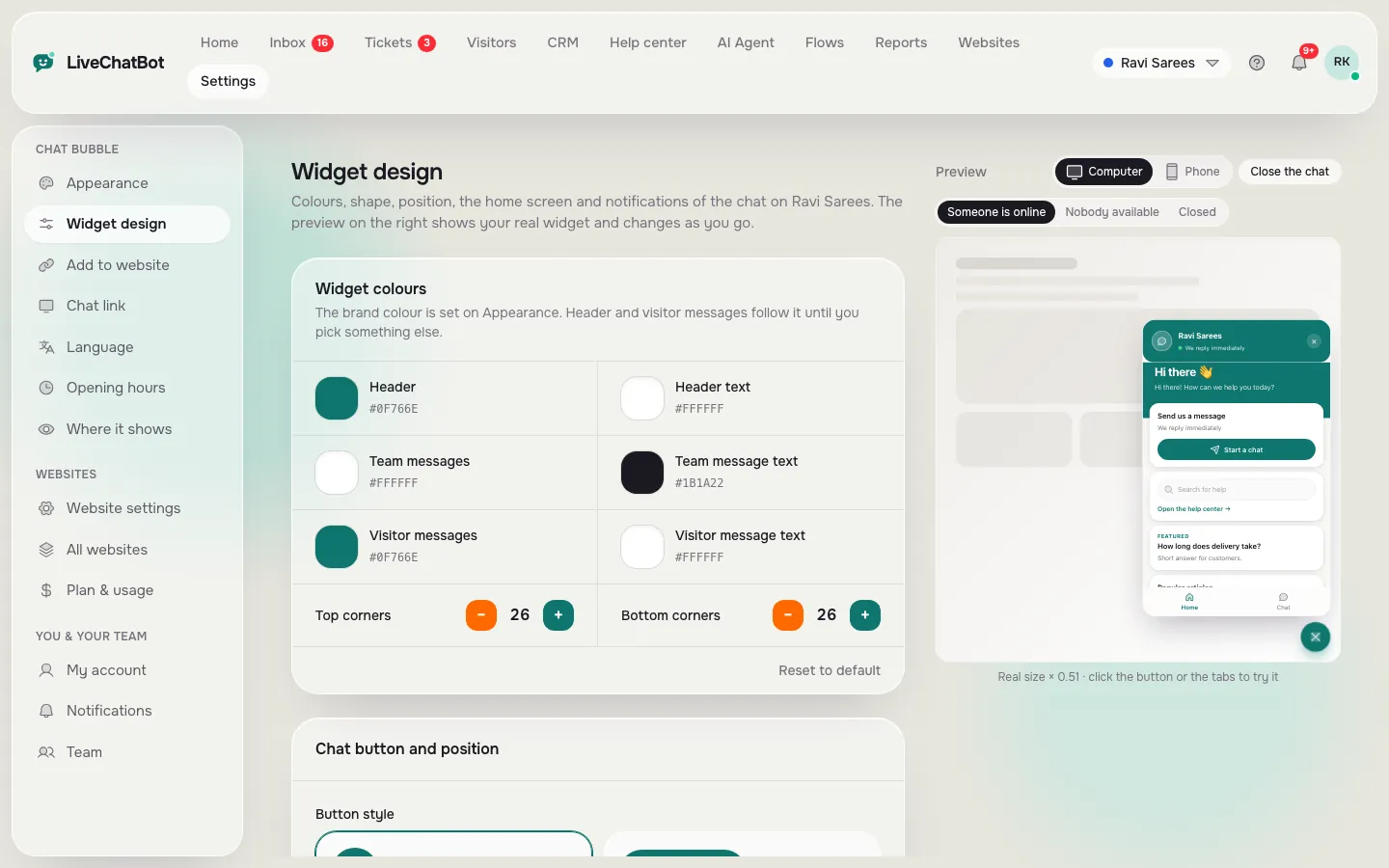
Open the widget design settings and you can change the colours, corner radius, button style and size, position and texts, with a live preview. A separate settings page controls where the chat shows, so you can switch it on or off for computers, phones, tablets, countries and pages. Another sets the chat language and every text visitors see.
Test it like a visitor:
- Open your site on a mid-range phone with a normal connection. The page should not freeze.
- Look at the bubble on your busiest page. Does it cover a button?
- Read the welcome line aloud. Does it tell people what to ask?
Cards are a useful extra. You can add a WhatsApp button card, and attention-grabbing cards on chosen pages. Our chat widget guide covers installation on WordPress, Shopify, Wix and plain HTML.
Real screens
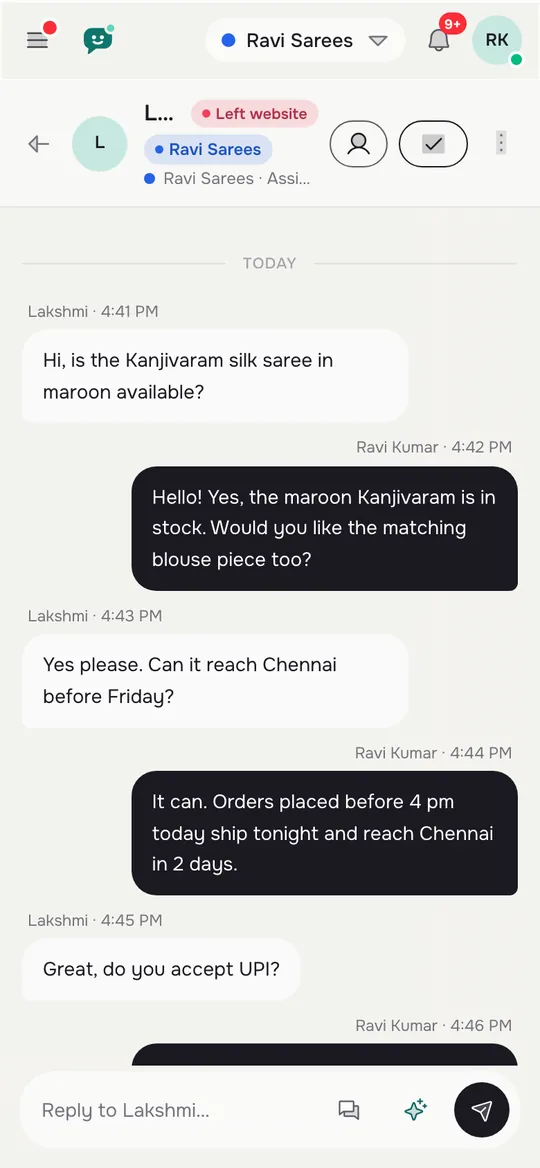
The widget design, the phone inbox and the alert settings
Real screens from the LiveChatBot panel, shown with sample data. Click any picture to see it full size.

Part two
The inbox: where your team works
The inbox is the app you will use most, so test it hardest.
- Shared by default. Several people can sign in without a per-seat charge. LiveChatBot has none.
- Ownership. Use Assign to me to claim a chat, and the Unassigned and Mine folders to see what is free. Teams route chats to a group, with a My teams folder.
- Saved replies. Your common answers, one tap away.
- Context. Visitor profiles, a lead score, and a CRM with deals, companies and activities.
- Other channels. WhatsApp and Facebook Messenger messages arrive in the same inbox, connected through Meta.
Not included: Instagram DMs, and native bridges into Slack, Telegram or Teams. Zapier and webhooks can send some data on.
Part three
The alerts: how you hear about a chat
Alerts decide response time, and response time decides whether the visitor stays.
LiveChatBot has an Android app for agents, with notification settings you can tune and recorded tones, including a different tone per website for each agent. There is no iOS team app: iPhone users open the inbox in a browser instead, which works but does not match a native app for alerts. If most of your team uses iPhones, count that as a real cost.
Two more safety nets help. The chat rescuer asks for email and phone if nobody replies within seconds, so the lead is not lost. Opening hours plus an away form take messages overnight.
Test alerts honestly: ask a friend to start a chat while your phone is locked and see how many seconds pass before you know.
Try it
Score your shortlist
Rate how important each part is to you, then score each app from 1 to 5. Replace the three labels with your own shortlist. It runs in your browser and saves nothing.
Colours, wording, page rules
Importance Score Score Score
Loads fast, easy to type
Importance Score Score Score
Several people, no per-seat charges
Importance Score Score Score
How quickly your team hears
Importance Score Score Score
Opening hours, away form, bot
Importance Score Score Score
Websites, visitors, badge
Importance Score Score Score
Fine print
Free limits to check for the best free live chat apps
Read three numbers before you choose. The free plan is ₹0 for 2 websites with 100 visitors per website each month. Going over does not charge you: tracking and alerts continue and chat pauses for new over-limit visitors until the month resets or you upgrade. Starter is ₹299 a month (2 websites, 750 visitors) and Growth ₹699 a month (5 websites, 2,500 visitors), prepaid and shared across your sites.
Also note the "Powered by LiveChatBot" badge stays on all plans, so pick another tool if you need a badge-free widget.
For a deeper look at the phone side of things, our phone field trial runs ten tests in an evening, and our best free chat software guide covers the hours a free tool costs in time.
Frequently asked questions
What are the best free live chat apps?
The best free live chat apps combine a customisable widget, a shared team inbox and reliable phone alerts. Judge each part separately and weight them by what your business needs. LiveChatBot offers all three on a free plan.
Is there a free live chat app for iPhone?
LiveChatBot has no iOS team app. iPhone users can answer from the inbox in a browser. There is an Android app for agents.
Do free live chat apps charge per agent?
LiveChatBot does not. There are no per-seat charges on any plan.
What happens when I pass the free visitor limit?
Tracking and alerts continue, and chat pauses for new over-limit visitors until you upgrade or the month resets. Nothing is charged automatically.
Can I answer WhatsApp and Messenger from the same app?
Yes. WhatsApp and Facebook Messenger messages arrive in the same LiveChatBot inbox as website chat, connected through Meta.
Keep reading
Related guides
Best Free Chatbot Plugin for WordPress: Read the Fine Print on What Free Really Means (Free Scorecard)
Best Free Chatbot for WordPress Should Also Catch Your Forms: Turn Contact Form 7, WPForms and Other Submissions Into Leads
Best Free Live Chat for WordPress Is One You Can Undo: A 30-Minute Trial on a Copy of Your Site Before Anything Goes Live (Free Trial Checklist)
Three parts, one free plan
Customisable widget, shared inbox and an Android app for your team. Start free on livechatbot.in.