Best Chat Software for Business Changes With Your Team Size: What a Solo Owner, a Small Team and a Growing Team Each Need (Free Team-Size Decision Tree)
Best chat software for business looks different to a one-person shop than to a ten-person team. The solo owner needs speed and a phone app. A small team needs to know who is answering. A growing team needs reports, routing and a record of every lead. This guide sorts the needs by team size, shows a decision tree to find your stage, and says which LiveChatBot features fit each one.
⚡ In short
- The right chat software depends on how many people answer. Pick for the team you have in six months.
- Solo: a phone app, saved replies and after-hours capture. Small team: shared inbox and clear ownership. Growing team: teams, reports and a CRM.
- Per-seat pricing punishes a growing team. Check it before you sign.
- Use the decision tree to find your stage, then test on a free plan.
Team size
Why team size decides the best chat software for business use
Most buying guides compare features in a long table. But the same feature matters very differently depending on how many people use it. A shared inbox is useless to one person. A round of saved replies is a luxury to a team of ten and a lifeline to a team of one.
So start with how many people will answer chats, and how many of them will be online at the same time. Then look at three questions:
- Who answers right now? Can the team see who owns a chat?
- Who answers later? What happens at night and on weekends?
- Who learns from it? Can anyone see which questions repeat?
For the wider picture of what chat is for, see our live chat guide. The rest of this page takes the three stages in turn.
Try it
Find your stage
Start at the top and follow the branch that matches your business today.
Stage one
Stage one: the solo owner needs speed, not a big feature list
If you answer chats alone, you probably answer from your phone between other jobs. Your best chat software for business is the one that alerts you fast and makes replying quick.
What matters
- An Android app with push alerts. LiveChatBot has one. There is no iOS team app, so iPhone owners reply from a browser.
- Saved replies with the visitor’s name filled in, so a reply takes seconds.
- Opening hours and an away form, so late visitors leave an email or phone number.
- The free keyword bot or AI Agent for the common questions.
What you can ignore
Detailed team reports, role settings and routing. You are the team. Start on the free plan and add features when you feel the pain.
Real screens
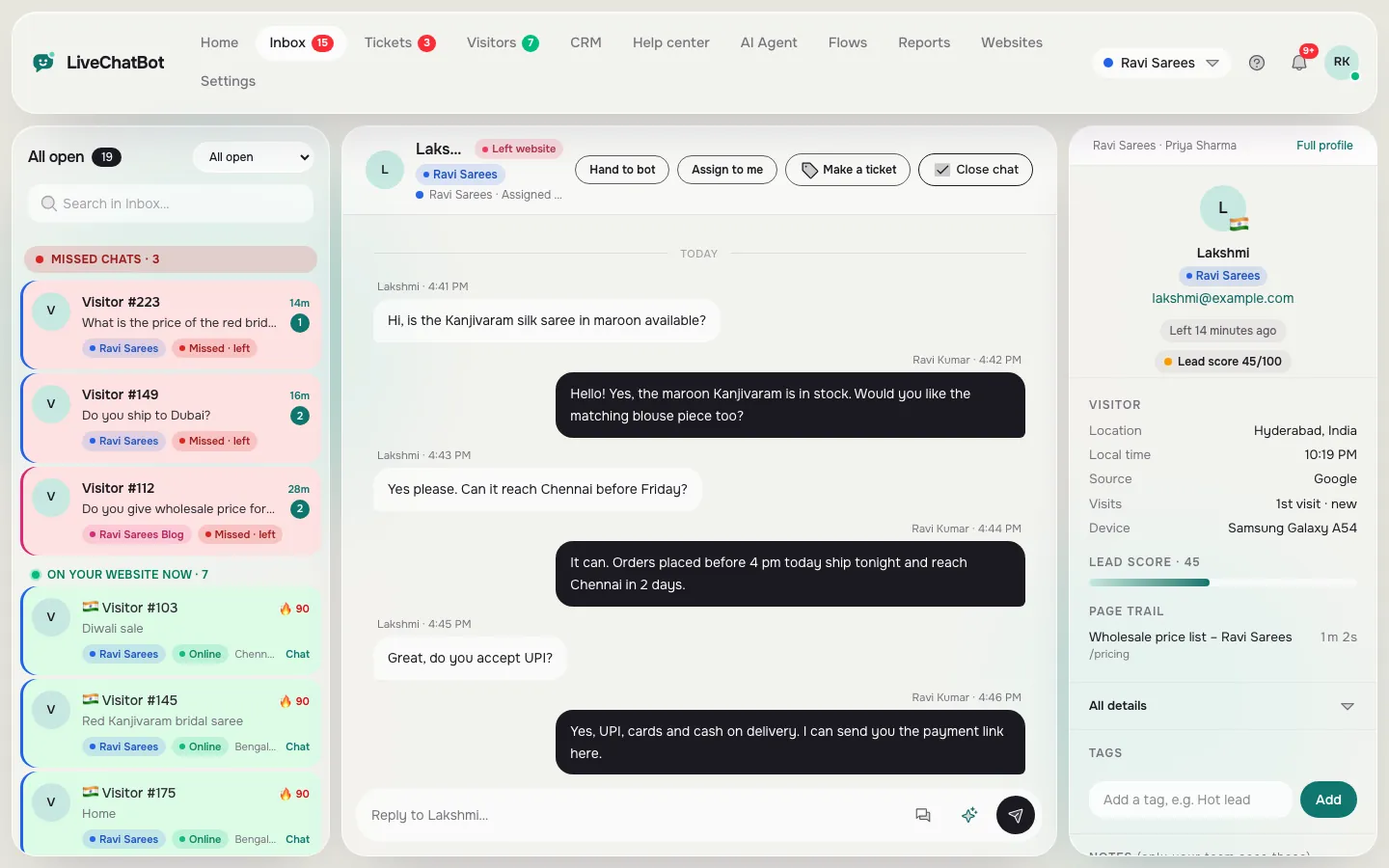
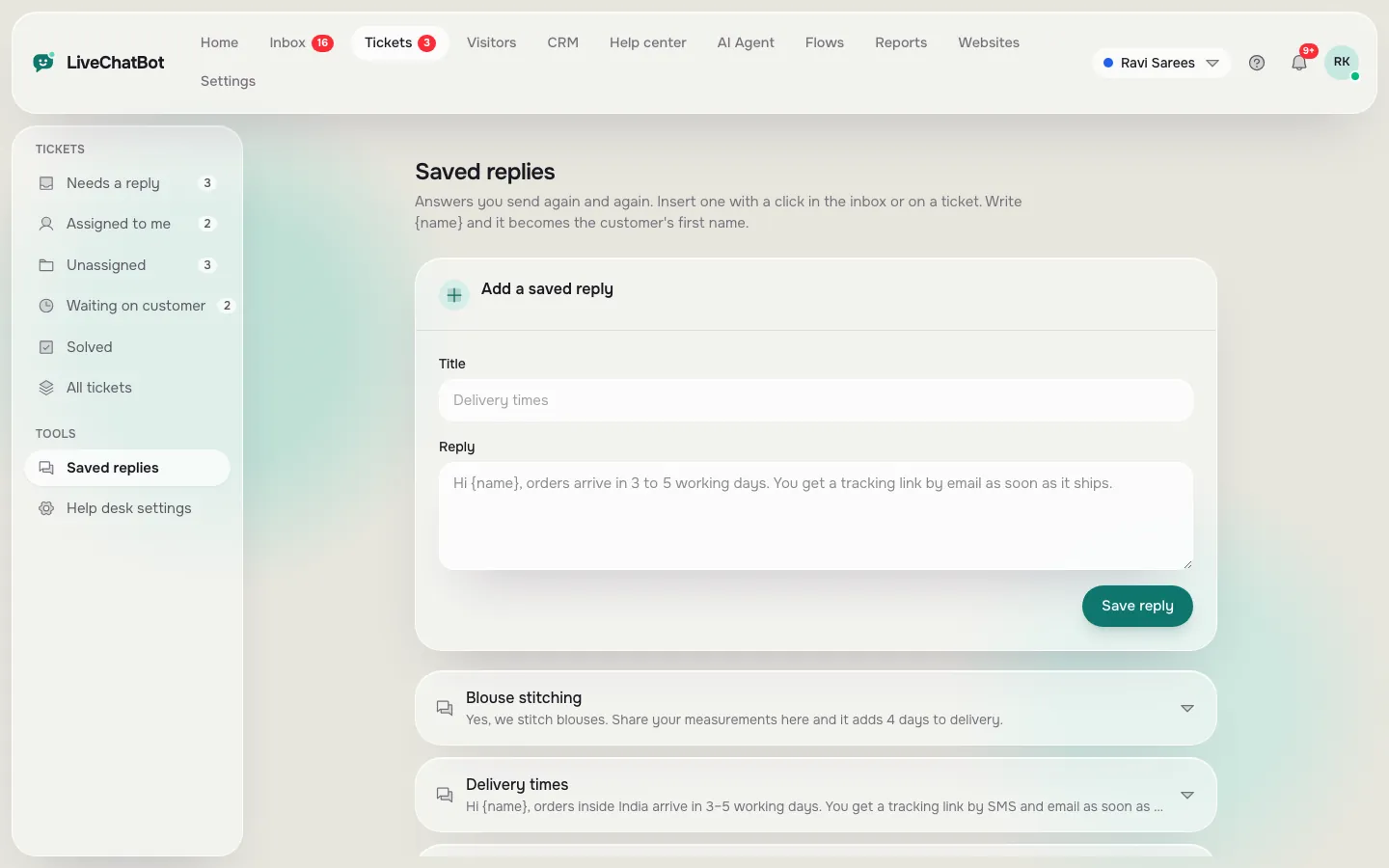
A shared inbox conversation, and the saved replies behind fast answers
Real screens from the LiveChatBot panel, shown with sample data. Click any picture to see it full size.
Stage two
Stage two: a small team needs to know who owns each chat
Two to five people create a new problem: two people answer the same chat, or nobody does.
Ownership
The inbox has Unassigned and Mine folders, and an Assign to me button. There is no automatic round-robin assignment, so agree the rule: for example, “first to click takes it”.
Teams and hours
Teams let you route chats to a group, such as Sales or Support, with a My teams folder. Combine them with a simple coverage plan that says who is online when.
Pricing
Check the price per person. LiveChatBot has no per-seat charges, so adding a fourth person changes nothing on your bill. That is not true of every tool, and it is the biggest cost difference for a growing team.
Stage three
Stage three: a growing team needs reports, a CRM and a habit
At six people or several websites, chat stops being a side job. You need to know what is working.
See what happens
Reports show chats per day, first response time, a busy-hour heatmap, and replies per agent. Ratings let visitors give a thumbs up or down. Traffic reports show which pages bring visitors and which pages they leave without acting.
Keep the leads
The CRM has a pipeline with deals, companies and activities, and visitor profiles with a lead score. Website form submits from the common WordPress form plugins arrive as leads with instant alerts. Our live chat for sales page shows how teams use this.
Review weekly
Pick one weekly slot to read missed questions and add the answers to the AI Agent’s knowledge.
Moving up
How to move between stages without starting again
The nice thing about growing is that you should not have to switch tools. Check three things before you pick, so that the move from one stage to the next is a setting change and not a migration.
Your data stays
Saved replies, knowledge for the AI Agent, Flows and contacts should all carry over as you add people. Ask any vendor what you lose when you add a second website or a fourth teammate.
Your costs stay predictable
Visitor plans are shared across websites, so a quiet site can cover a busy one. Plans are prepaid with no automatic charges. Yearly billing means paying for ten months and getting twelve. Compare that with a per-person price that doubles when your team does.
Your habits stay simple
Write down who covers which hours, who owns tickets and who updates the knowledge. A one-page rule beats any feature. Our guide on turning a chat into a ticket shows how follow-up can have an owner from the first day.
Honest gaps
What the best chat software for business may still lack for you
No single tool covers every business. Be clear before you commit.
- “Powered by LiveChatBot” stays on every plan.
- There is no pre-chat form.
- No single sign-on, audit logs or role builder, which larger companies sometimes need.
- No native Slack, Teams, HubSpot, Salesforce or Zoho integrations. Zapier, webhooks and the REST API can connect many tools.
- No custom report builder or scheduled emailed reports.
- No iOS team app.
If your IT team requires any of those, the free plan will still tell you a lot, but plan for another tool. Otherwise see the pricing page and compare it with your current costs.
Frequently asked questions
What is the best chat software for business with only one employee?
One with a phone app, saved replies and after-hours capture, on a free plan. You can add features when your volume grows.
Does LiveChatBot charge per agent?
No. There are no per-seat charges, so adding teammates does not change the price.
How do I stop two people answering the same chat?
Use Assign to me and the Unassigned and Mine folders. Agree a simple rule in the team about who takes new chats.
Can LiveChatBot route chats to different people automatically?
You can route chats to a team. There is no automatic round-robin or skill-based assignment.
Which plan suits a growing team?
Growth is ₹699 a month for 5 websites and 2,500 visitors shared across them. Start on the free plan to test first.
Keep reading
Related guides
Best Chat Support Software Is Judged After the Chat Ends: Test Offline Messages, Tickets, Owners and Follow-Ups Before You Choose (Free Follow-Through Scorer)
Best Chat Service for Website Owners in India: Rupee Prices, UPI Payment, Android Replies and WhatsApp Habits That Global Reviews Skip (Free Mistake-vs-Better List)
Best Chat Plugin for WordPress Free to Install Safely: A Backup, Staging and Rollback Checklist Before You Click Activate (Free Safe-Install Checklist)
Start with the team you have
Free plan for two websites, no per-seat charges. Start free on livechatbot.in.