Best Chat Service for Website Owners in India: Rupee Prices, UPI Payment, Android Replies and WhatsApp Habits That Global Reviews Skip (Free Mistake-vs-Better List)
Best chat service for website owners in India is judged by different things than a review written in the United States. Prices in dollars, cards that need international payments, apps built only for iPhone and customers who prefer WhatsApp to email all change which service works. This guide lists the India-specific checks, shows the usual mistakes next to the better choice, and says plainly where LiveChatBot fits and where it does not.
⚡ In short
- Most global reviews assume dollar prices, card payments and iPhones. Many Indian businesses use rupees, UPI and Android.
- Check five things: price in rupees, how you pay, phone for the team, languages, and where customers actually message you.
- Prepaid plans with no automatic charges remove the fear of surprise foreign-currency bills.
- Read the mistake-versus-better list, then test one service for a week.
Why India differs
Why a global ranking may not give you the best chat service for website needs here
A typical review ranks tools on features and dollar plans. For a shop in Jaipur or a clinic in Coimbatore, other questions matter first.
- What will it cost in rupees, every month? A dollar price changes with the exchange rate and may add card fees.
- How do I pay? Some services accept only international cards. Prepaid options such as UPI are easier for many small businesses.
- Who answers? Most owners reply from an Android phone between other jobs, not from a desk.
- Which language? Customers write in Hindi, Tamil, Marathi or a mix with English.
- Where do customers prefer to talk? Many Indians go to WhatsApp first.
Keep these in mind while you read on, and see our general live chat guide for the basics that apply everywhere.
Money
Rupee prices, UPI and no surprise charges
Prices in rupees
LiveChatBot lists prices in rupees. The free plan costs ₹0 and covers 2 websites with 100 visitors per website each month. Starter is ₹299 a month for 2 websites and 750 visitors shared across them. Growth is ₹699 a month for 5 websites and 2,500 visitors shared across them. Paying yearly means paying for 10 months and getting 12.
If you compare with a dollar-priced service, check today’s exchange rate: ₹299 is roughly 3 to 4 US dollars, but a foreign service may add card or currency fees on top.
Prepaid, no auto-renew
Plans are prepaid, for example by UPI, and do not renew automatically. There are no automatic charges and no per-seat charges, so adding a staff member costs nothing extra. See the pricing page for the current plans.
Try it
Mistake or better choice? Read each pair
These are the choices that cost small Indian businesses time or money. Each pair shows the mistake and the better move.
Real screens
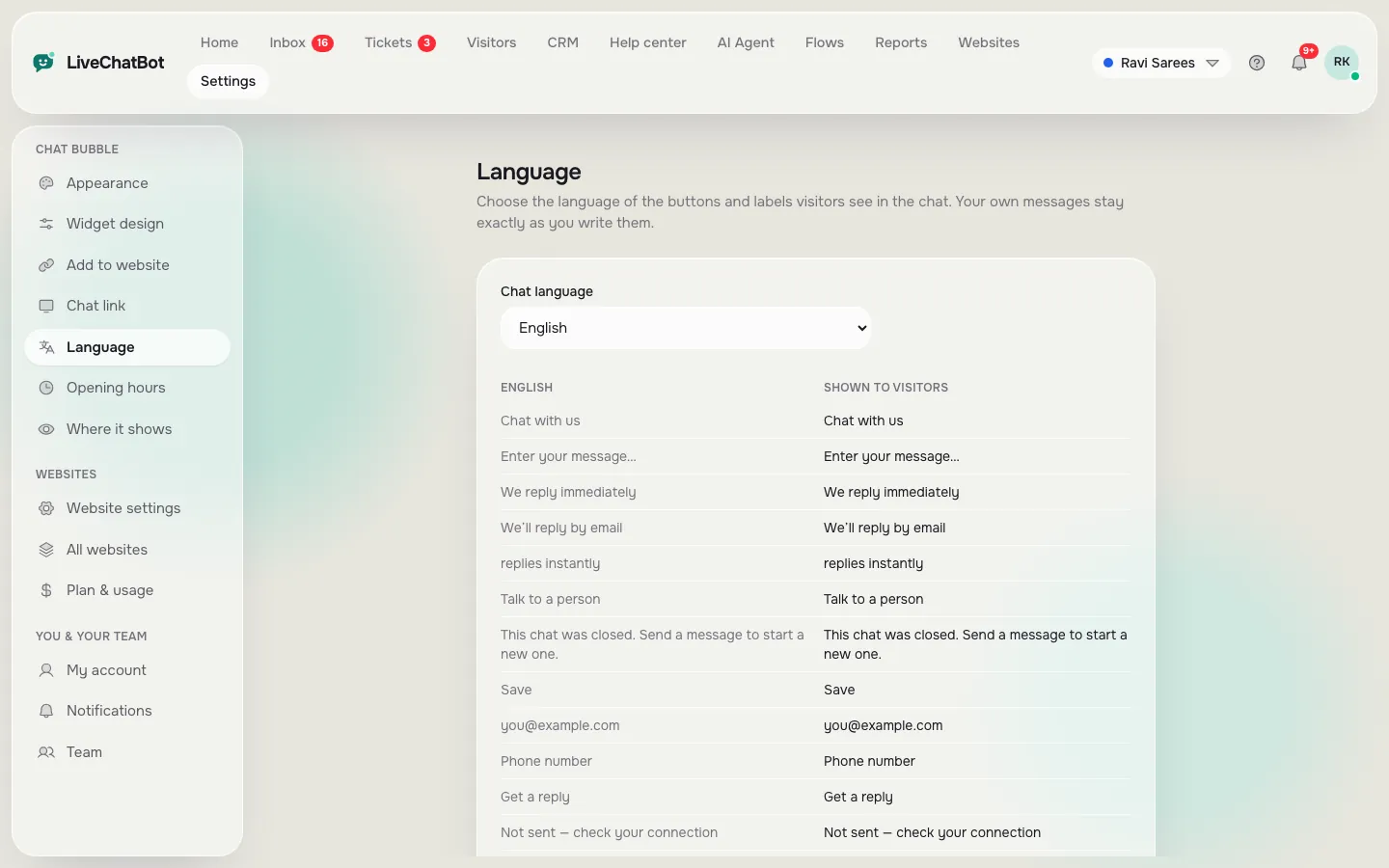
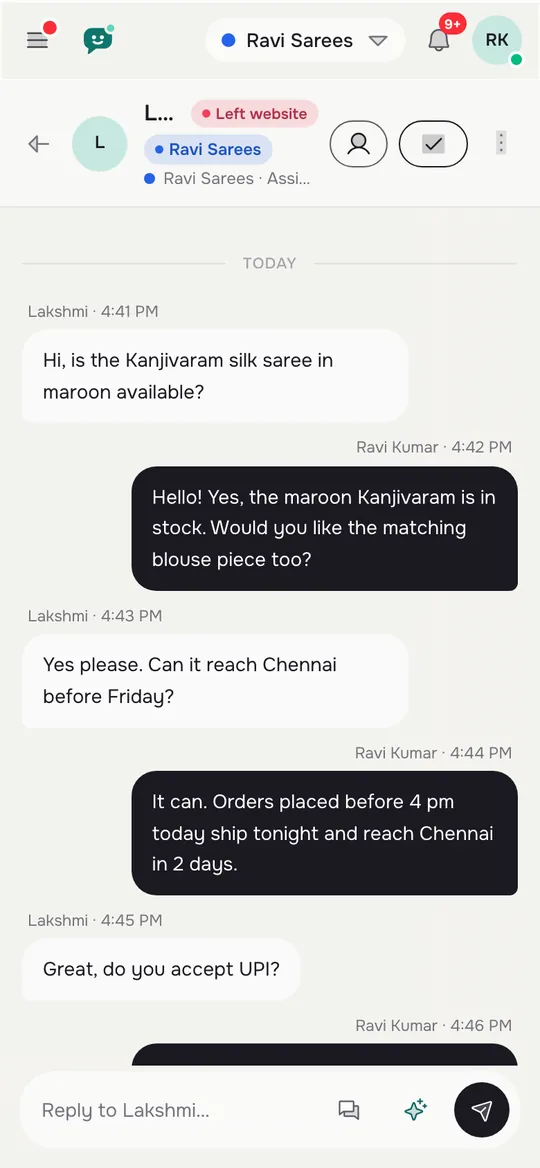
Replying from an Android phone, and choosing the chat language
Real screens from the LiveChatBot panel, shown with sample data. Click any picture to see it full size.
Phone and language
Android replies and your customers’ languages
The team on Android
Small teams answer between jobs. The LiveChatBot Android app sends alerts, shows the inbox and lets you reply with saved replies. Our guide on using the Android app shows the steps. There is no iOS team app, so an owner with an iPhone replies from a browser.
Customers’ languages
The chat can pick the visitor’s language automatically, and you can write welcome texts in several languages. The dashboard itself is available in eight languages including English. Check this with any service you test: send a message in Hindi or Hinglish and see how it copes. Remember that an AI Agent answers from the facts you give it, so write them in the language your customers use.
Read more about multilingual live chat for setup ideas.
WhatsApp and the chat on your site work together
Indian customers often ask on WhatsApp, so a chat service that fights this habit is a poor fit. LiveChatBot lets WhatsApp and Facebook Messenger messages arrive in the same shared inbox, connected through Meta. It also offers a WhatsApp button card on the widget for visitors who prefer to move there.
What is not available: Instagram DMs, Slack or Telegram as native channels. Zapier and webhooks can bridge some of them.
See the WhatsApp chat button page for how the card looks and when to use it. A good habit is to answer on the site while the visitor is there, and offer WhatsApp when they leave without buying.
One-week test
A one-week test for any service you shortlist
Before you pay, put the best chat service for website use on a fair test, using only your phone.
- Open the chat on your own site from a mobile network, not Wi-Fi. Does it load quickly?
- Send a message in the language your customers use. Does it reach your Android phone as an alert?
- Ask for a person after closing time. Does an away form take an email or phone number?
- Check the price in rupees for a month twice as busy as today, including any taxes.
- Write down what happens at the visitor limit. On LiveChatBot, tracking and alerts continue and chat pauses only for new over-limit visitors.
A service that passes all five on the free plan is worth paying for. One that fails two is not, whatever its review score.
Honest gaps
Where LiveChatBot is not the best chat service for website needs
No service fits every business, so here are the limits.
- “Powered by LiveChatBot” stays on every plan. If you need a fully branded widget, look elsewhere.
- There is no pre-chat form.
- No single sign-on, audit logs or role builder, which large companies may require.
- No native CRM links to HubSpot, Salesforce or Zoho. LiveChatBot has its own CRM with deals, companies and activities, and Zapier and webhooks can connect others.
- No iOS team app.
If none of these is a blocker, test it on the free plan for a week using the method in our setup guide.
Frequently asked questions
What is the best chat service for website owners with a small budget in India?
One with a rupee price, a free plan to test on and no per-seat charges. LiveChatBot offers all three.
Can I pay by UPI?
Plans are prepaid and do not renew automatically. Check the payment options at checkout for what is available to you.
Does the service work in Hindi?
The chat can pick the visitor’s language and you can write welcome texts in several languages. Test your own language before you commit.
Do I need an iPhone or an Android phone for the team app?
The team app is for Android. On an iPhone, use the dashboard in a browser.
Will WhatsApp messages reach my chat inbox?
Yes, WhatsApp and Facebook Messenger messages arrive in the same inbox once connected through Meta.
Keep reading
Related guides
Best Chat Plugin for WordPress Free to Install Safely: A Backup, Staging and Rollback Checklist Before You Click Activate (Free Safe-Install Checklist)
Best Chat Support Software Is Judged After the Chat Ends: Test Offline Messages, Tickets, Owners and Follow-Ups Before You Choose (Free Follow-Through Scorer)
Best Chat for WordPress Is Proven in Your First Week: Install, Watch Seven Days, Then Keep or Switch (Free Week-One Timeline)
Try it in rupees, on your phone
Free plan for two websites, no per-seat charges. Start free on livechatbot.in.