Create Your Own Bot for Your Website: Five Inputs, One Hour and a Test You Can Copy
Create your own bot for your website without writing code: in LiveChatBot the AI Agent needs only five inputs, a name, a tone, written rules, your business facts and a test. This guide counts each input, gives a worked one-hour time budget, and shows the one rule most guides miss.
To build your own bot in LiveChatBot, open AI Agent, give it a name and tone, write rules for how it behaves, add your business facts as text, a web page or a file, then ask it test questions in the playground. Add the chat code to your site and it starts answering.
⚡ In short
- Five inputs make the bot: name, tone, rules, knowledge, test. Nothing else is required.
- Facts (prices, hours, policies) go in Knowledge. Behaviour (what it must never promise) goes in Rules.
- A first working version takes about one hour; the time goes into writing facts, not clicking.
- The free plan covers two websites with 100 visitors each a month, and no coding.
Real screens
The AI Agent pages you will fill in
Real screens from the LiveChatBot panel, shown with sample data. Click any picture to see it full size.
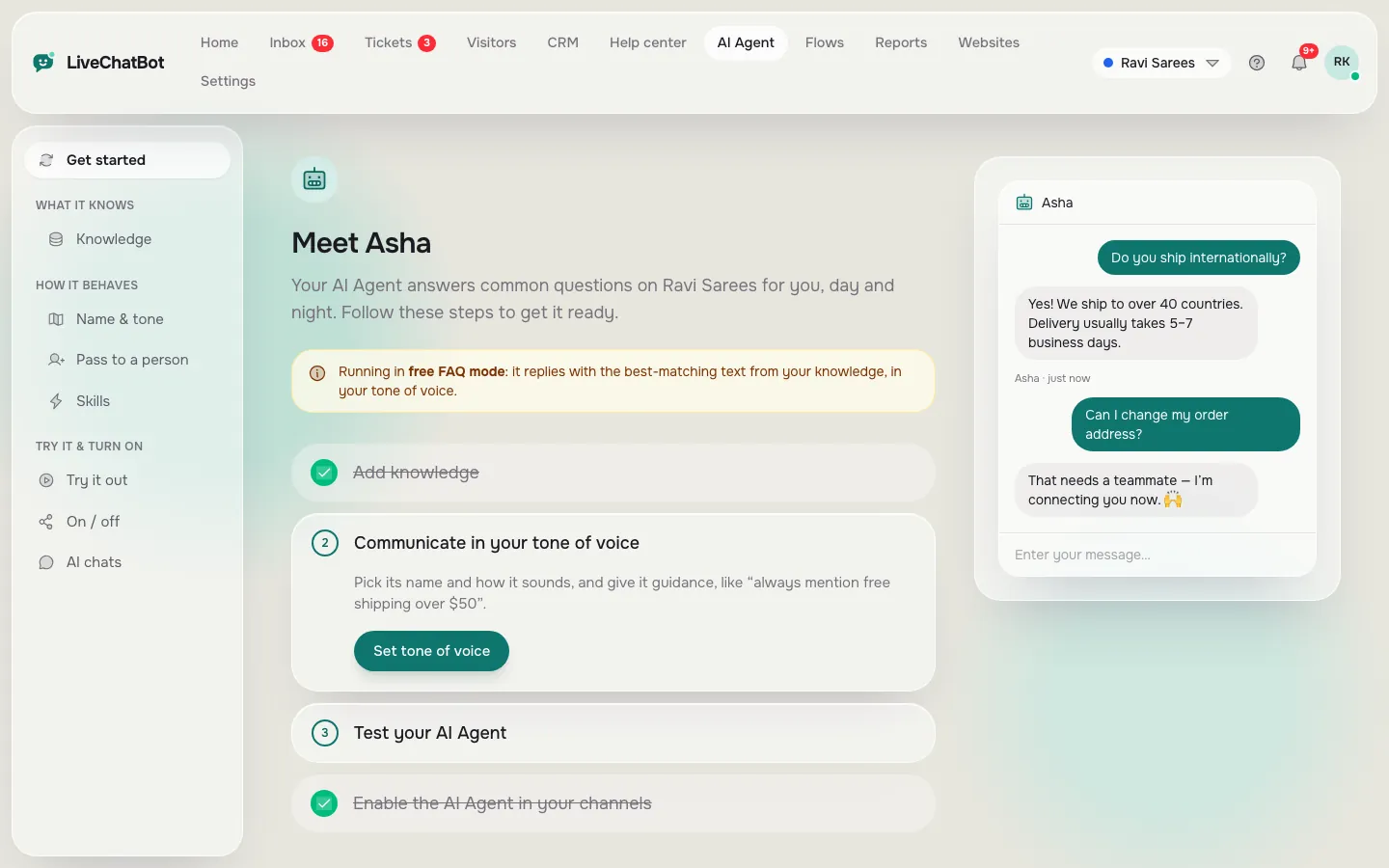
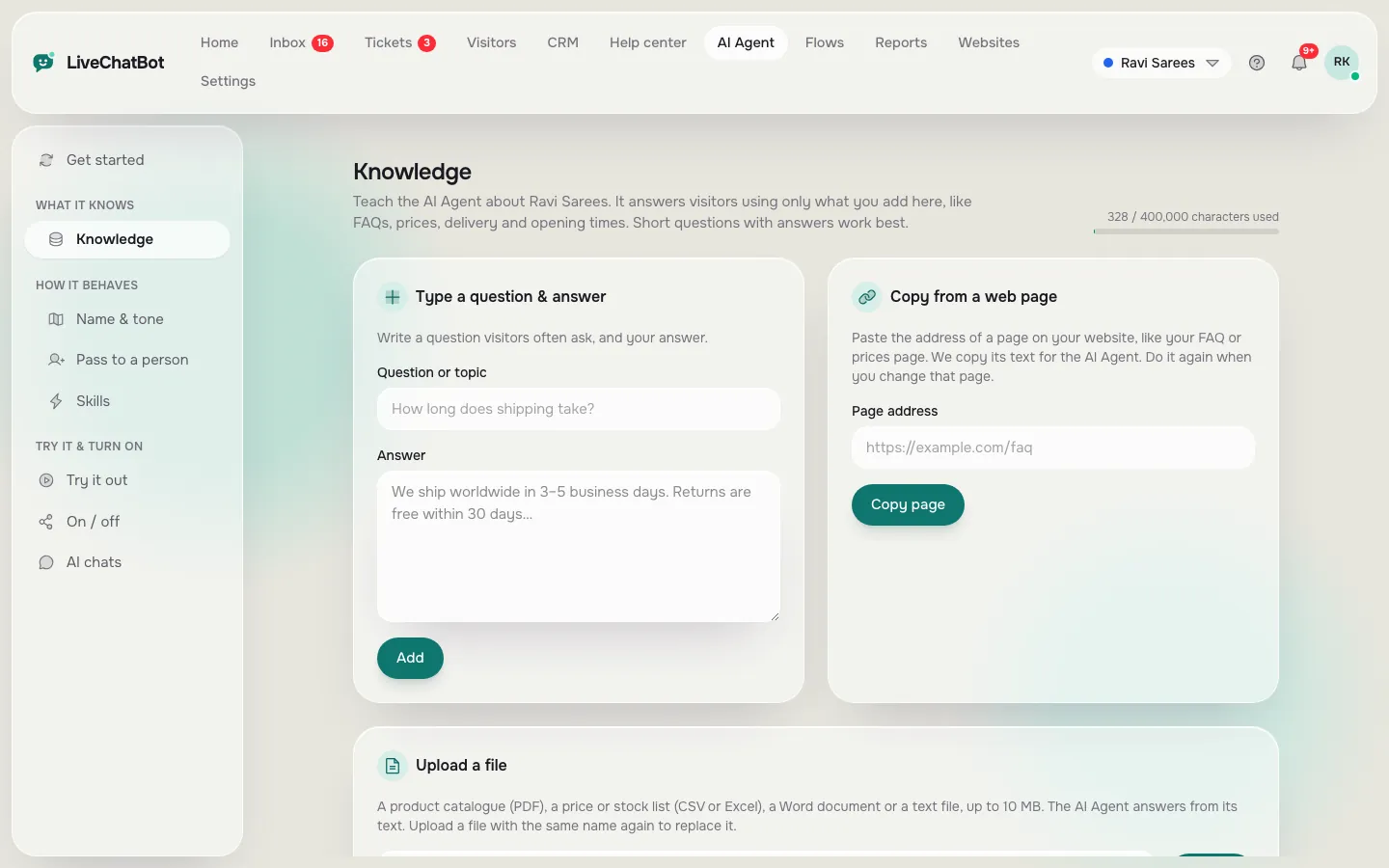
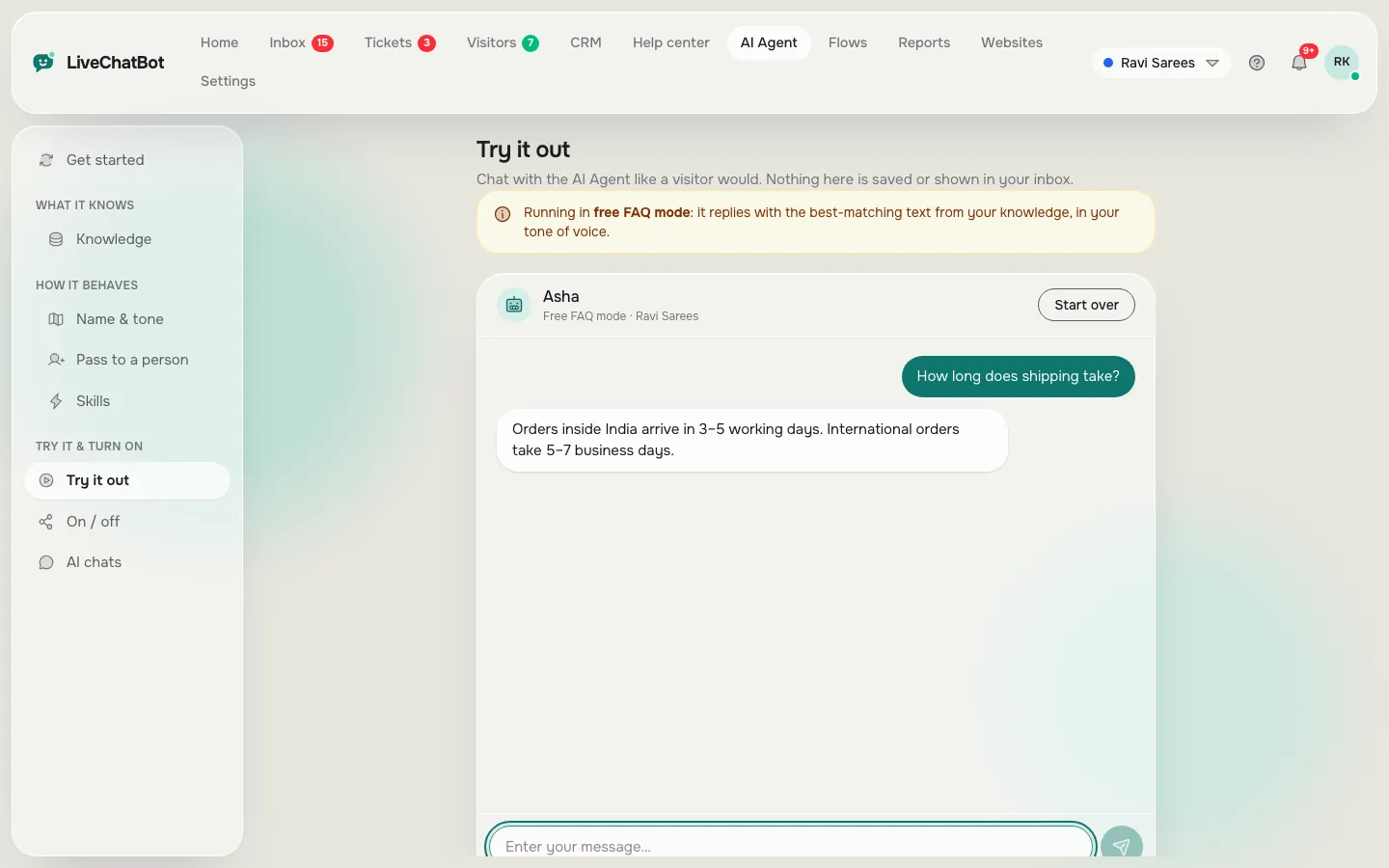
What you are building
A bot is five inputs, not a program
You build a website bot by filling in five inputs: a name, a tone, written rules, your knowledge and a round of tests.
With the AI Agent there is no flowchart. The bot reads the facts you give it and writes a reply to each question in your chosen tone, while the rules keep it inside limits you set.
That changes where the work is. The clicking takes minutes. The thinking takes the hour when you create your own bot: deciding what your customers really ask, writing the answers down accurately, and deciding what the bot must never say. If you can write a clear email to a new employee, you can build this bot.
The AI Agent is part of the same inbox your team uses, so a person can step in at any moment. If you want the wider picture of how it fits in, read our AI Agent page first, then come back.
Input 1 and 2
Name and tone decide how the bot sounds
The name and tone are the first two inputs, and together they take about two minutes.
Name
Give the bot a name visitors will recognise as a helper, such as “Asha from Green Leaf Tea”. Do not pretend it is a human; a welcome line such as “I’m the shop’s assistant” keeps trust high.
Tone of voice
Pick the tone that matches how your best staff member talks. A tuition centre can be warm and simple. A law office should be calm and formal. If you are unsure, choose friendly and short, then read ten test answers and adjust. For welcome wording, our guide to the live chat welcome message has lines you can reuse.
Input 3
When you create your own bot, rules say what to do and what never to do
Rules are the written instructions the bot follows in every chat, in a box that holds up to 5,000 characters.
Rules work only while the website has AI replies. The free keyword bot, which answers from saved replies, cannot follow written rules. That is one more reason to keep your rules short and checkable.
Good rules are plain sentences, one idea each:
- Answer in two or three short sentences.
- If you do not know, say so and offer to connect a person.
- Never promise a delivery date. Say the courier decides it.
- Ask for the visitor’s phone number before ending a chat about a quote.
- Do not discuss other companies.
Do not put prices or opening hours here. Facts change, and rules should not. Prices belong in Knowledge, where one edit updates every future answer.
Input 4
Knowledge is the facts the bot is allowed to use
Knowledge is where the bot gets every fact it states, and you can add it three ways: type answers, copy a web page, or upload a file.
Files can be PDF, Word DOCX, Excel XLSX, CSV or TXT. A price list in a spreadsheet works well, because each row is already one fact. A brochure PDF works too, but check that the numbers inside are current before you upload it.
What to add first
Start with the questions customers already ask on the phone. Open your WhatsApp or call notes and list the ten that repeat. For each one, write the answer as you would say it aloud, with the real number or the real step in it.
What to leave out
Leave out anything you would not want quoted. Old offers and private notes should not go in. If a fact is not in Knowledge, the bot should say it does not know. Our guide on training your AI chatbot goes deeper into writing good answers.
Original data
A worked one-hour time budget for your first bot
A first working bot takes about 60 minutes when you plan 12 questions, and most of that time is writing, not clicking.
This is a worked example, not a survey. The minutes are our estimate for a small shop with a price list and a policy page, so adjust them for your business.
| Step | Work | Minutes |
|---|---|---|
| Name and tone | 2 fields, one decision | 2 |
| Rules | 5 sentences, about 400 characters | 10 |
| Knowledge | 12 answers at 2 minutes each | 24 |
| Testing | 12 questions asked, 1 minute each | 12 |
| Fixes | 4 answers rewritten at 2 minutes each | 8 |
| Install | Paste the chat code once | 4 |
| Total | 60 |
The maths: 12 answers × 2 minutes = 24 minutes of writing. The 5-sentence rules use about 400 of the 5,000 characters, so you use under a tenth of the box. If you already have a web page with the answers, copying it cuts the 24 minutes to a few, which is why a clear FAQ page is the fastest start.
The same time budget also shows where to save: testing and fixing together (20 minutes) are as large as the writing. Skip them and the bot ships with mistakes.
Input 5
Testing: ask 12 questions before any visitor does
Testing means asking your bot questions in the playground until every answer is something you would be happy to see on a customer’s screen.
The playground is a private chat with your bot, so nobody sees these questions. Use three groups.
- Six questions from your list. Each should return the right fact. If not, the answer in Knowledge is missing, unclear or contradicted by another one.
- Three questions you never taught it. The bot should say it is not sure and offer a person, not guess.
- Three tricky questions. Ask for a discount, a delivery promise, and an opinion about a rival. The rules should hold.
Write down any failed question and fix the knowledge or rule behind it. Then ask the same question again. A fix that is not re-tested is only a hope. For a longer routine you can repeat after each change, see automated chatbot regression testing.
What most guides miss
Our rule: write one refusal for every fact
Here is a method we use that we have not seen in other bot guides: for every fact you add to Knowledge, write one matching refusal in Rules.
If Knowledge says “Delivery takes 3 to 5 working days”, Rules says “Never promise a delivery day or a date.” The fact gives the bot something to say. The refusal stops it from stretching that fact into a promise you cannot keep.
Why it works. A bot goes wrong at the edge of a fact. It knows the range, and a customer asks about a specific date. Without the refusal the bot may fill the gap with something helpful and wrong. With it, the bot repeats the range and offers a person.
Try it in five minutes. Take your three most important facts: a price, a time and a policy. For each, ask the bot the most specific version of the question possible, such as “Will it arrive on Friday?”. If it answers yes or no, you need the matching refusal. Add it, ask again, and check the bot now gives the range and offers a handover.
Note that this is our working rule, not a feature of the product. It simply uses the two boxes, Knowledge for facts and Rules for behaviour, the way they are meant to be used.
Try it
Your build plan, step by step
Follow these stages in order. Each one maps to a page in the dashboard.
Create a free account at livechatbot.in and add your website.
Open AI Agent and fill in the name and tone fields.
Five short sentences, including one refusal per important fact.
Type, copy a page or upload your price list for 12 answers.
Run the 12-question test in the playground and fix failures.
Paste the chat code on your site and watch your first chats.
Going live
Install it, then watch the first week of your own bot
Going live with your own bot means pasting the chat code once, then reading real chats for a week.
Install the code from the install page, or use the WordPress plugin if your site runs on WordPress, which also works with WooCommerce. After that, the first week matters more than the first hour. Open the inbox each morning and read every chat the bot handled. Look for answers you would rewrite and questions it could not answer. Add each missing fact to Knowledge the same day.
Your team stays in control. A person can take over any chat from the inbox or the Android app, and the dashboard Reports show how many chats the AI Agent resolved without a human. Use chat flows to open the conversation yourself on key pages, and free live chat for the team side.
Be clear about limits. You cannot choose the AI model or bring your own API key, there is no raw system-prompt editor (use the Rules box), and “Powered by LiveChatBot” stays on the widget on every plan.
Cost
What it costs to keep your own bot running
Your own bot costs ₹0 to start, because the free plan includes two websites with 100 visitors each per month.
When traffic grows, Starter is ₹299 a month for 750 visitors shared across two websites, and Growth is ₹699 a month for 2,500 visitors shared across five. Yearly means 10 months for 12. Payment is prepaid, with no auto-renew and no per-seat charges. AI replies come with every plan, with a monthly allowance shown in your dashboard. See pricing for details, and the AI Agent page for what it can do.
Frequently asked questions
Do I need to know how to code to create your own bot?
No. You fill in a name, tone, rules and knowledge in the dashboard, then paste the chat code on your site once. WordPress users can install the plugin instead.
How long does it take to build a first version?
About one hour for 12 questions in our worked example: 24 minutes writing answers, 12 minutes testing, and the rest on rules, fixes and install. A ready FAQ page shortens it a lot.
Where should I put prices and policies, in Rules or Knowledge?
Put facts such as prices, hours and policies in Knowledge. Put behaviour, such as never promising a date, in Rules. Facts change often, and rules should stay stable.
Can I choose which AI model powers my bot?
No. The provider is set by LiveChatBot on the server, and you cannot paste your own API key. You shape the answers through Knowledge, tone and the Rules box.
What if the bot does not know an answer?
Write a rule that it should say so and offer a person. Your team can take over from the inbox, and the away form collects an email or phone number when nobody is online.
Keep reading
Related guides
Create Your Own Chatbot on One Page: The 3-3-1 Sheet to Fill In Before You Touch Any Tool
Create My Own Chatbot and Still Own It: What Is Yours, What Is Rented, and a 15-Minute Exit Drill
Create your own bot today
Free plan for two websites, no coding and no per-seat charges. Start free on livechatbot.in.