Create Your Own Chatbot on One Page: The 3-3-1 Sheet to Fill In Before You Touch Any Tool
Create your own chatbot by first filling one page: three jobs it does, three things it never does and one handover to a person. People who open a tool before they have that page spend hours adjusting settings without knowing what good looks like. This guide gives you the sheet, a worked example with the maths shown, copy-ready wording for each line and the exact places in LiveChatBot where every line goes, so the build afterwards takes minutes.
To create your own chatbot, write one page with three jobs (what it answers), three never-do rules (what it must not say) and one handover (who takes over, and when). Then enter the jobs as knowledge, the rules in the Rules box and the handover as opening hours plus an away form. On LiveChatBot the free plan covers it.
⚡ In short
- The 3-3-1 sheet is the whole design: 3 jobs, 3 never-do rules, 1 handover. Everything you enter in a tool comes from it.
- Three jobs is a limit on purpose. A bot that does three things well beats one that half-does thirty.
- Our rule: write the never-do rules from your last three bad customer moments, not from imagination.
- Each line has a home in LiveChatBot: jobs go into Knowledge, rules into the Rules box, the handover into opening hours and the away form.
The sheet
A chatbot is a small agreement, and one page is enough to write it down
A chatbot is a promise to every visitor that certain questions will get a fast, correct answer and everything else will reach a human, and the 3-3-1 sheet is that promise written on one page.
Most tutorials on how to create your own chatbot start with the tool: pick a platform, name the bot, upload documents. That order is why so many first bots feel vague. The tool asks for settings, and you answer them on the spot, without a reference point.
The sheet fixes this by deciding the three things a tool cannot decide for you:
- Three jobs: the question groups the bot answers on its own.
- Three never-dos: the sentences it must never say, however a visitor asks.
- One handover: the exact moment a person takes over, and who that person is.
Fill it on paper or in a note. It takes about 25 minutes, and you will reuse it every time you review the bot. If you want the wider picture of how the pieces fit, read what a chatbot actually is, then come back to fill the sheet.
Three jobs
Pick three jobs because every extra job adds a way to be wrong
Three jobs is the right size for a first chatbot, because each job needs its own set of checked answers and an owner who keeps them true.
A job is a group of questions with one source of truth. “Opening hours and location” is a job. “Delivery charges and timing” is a job. “Everything about our products” is not a job; it is twenty jobs hiding in one sentence.
How to choose
Open your WhatsApp, email and call notes from the last month. Tally the questions into groups. Take the three biggest groups that have a stable answer: one that changes rarely (hours, address), one about money (prices, fees) and one about the next step (how to book, order or return).
What to leave out
Leave out anything that depends on a person’s judgement, such as custom quotes, complaints and refunds. Those belong in the handover. Keep three jobs now and add a fourth only after a week of reading real chats.
Worked example
The maths behind three jobs, with an illustrative shop
Original data: a worked example with the sums shown. The shop is made up and the numbers are illustrative; swap in your own.
| Step | Illustrative number |
|---|---|
| Questions logged in 4 weeks | 120 |
| Hours and location | 38 questions |
| Delivery charges and timing | 31 questions |
| How to order or return | 22 questions |
| Three jobs together | 38 + 31 + 22 = 91 of 120 (about 76%) |
| Time saved if the bot answers all 91 at 2 minutes each | 91 x 2 = 182 minutes, about 3 hours a month |
| Left for people (custom quotes, complaints) | 29 questions |
The lesson is in the last row. Even a tight three-job bot covers most of the volume in this example, and the 29 leftover questions are the ones a human should answer anyway. Your own tally will differ, but the method holds: count first, then pick.
Three never-dos
Write never-do rules from real bad moments, because that is where bots hurt you
A never-do rule is one sentence that stops the AI Agent doing something that has cost you or could cost you a customer.
Think of the last three times a customer was upset: a delivery date you promised and missed, a discount quoted by mistake, a policy explained wrongly. Each one becomes a rule. Invented rules (“be polite”) are wasted space; real ones are specific.
Examples of good rules
- Never promise a delivery date. Say the courier decides and give the tracking route.
- Never quote a price that is not in the knowledge. Offer a person instead.
- Never give medical, legal or tax advice. Point to the right professional.
Where they go
In LiveChatBot, open the AI Agent, then Name and tone, and paste them into the Rules to follow box. It holds up to 5,000 characters, and it applies while the website has AI replies on. The free keyword bot cannot follow written rules, so keep facts in Knowledge and behaviour in Rules. For deeper wording advice, see how to write the instructions that shape every answer.
Original data
How much of the Rules box three rules really use
Original data: LiveChatBot’s Rules box holds up to 5,000 characters. Here is what that means in practice.
Take the three example rules above. Counted by hand, they come to about 85, 80 and 75 characters.
- 85 + 80 + 75 = 240 characters.
- 240 / 5,000 = 4.8% of the Rules box.
- At a generous 100 characters per rule, the box has room for about 50 rules.
The point is not to fill the box. Fifty rules would contradict each other. The point is that space is never the limit; clarity is. Three sharp rules beat fifteen vague ones, and leave 95% of the space free for the day a real incident teaches you a fourth.
One handover
One handover decides whether a stuck visitor becomes a lead or a bounce
The handover is the single most important line on the sheet, because every bot fails on some question and the handover decides what happens next.
Write it as four short answers: who takes over, during which hours, how they are alerted and what the visitor sees when nobody is there.
Fill it in LiveChatBot
- Set opening hours so the widget knows when a person is available.
- Switch on the away form, which collects an email or phone number outside those hours.
- Install the Android app on the phone of whoever answers, so alerts reach them.
- Use Assign to me in the inbox so two people don’t answer the same chat.
The chat rescuer adds a safety net. If nobody replies within seconds, the chat asks for an email and a phone number, so a visitor who gets no answer still leaves a way to be reached.
What most guides miss
Write the refusal before the personality
Our rule: write what the bot says when it cannot help before you decide anything about its name, tone or avatar.
Most guides spend a lot of time on personality. That is the part visitors forgive. What they remember is the moment the bot was stuck: whether it said “I’m not sure, let me get someone” or invented something confident.
The five-minute test
Take your three never-do rules and ask the bot each one in your own words, then in a messy way a real customer would. If it breaks any of them in the playground, fix the rule or the knowledge before you touch the tone.
Do this before the name, the avatar or the colours. Style is a Friday-afternoon job; the refusal is a day-one job. To keep the bot yours later, run the 15-minute exit drill. For the same idea from a design angle, see how the chatbot for website guide frames the first conversation.
Copy-ready
Wording you can paste into each line of the sheet
Switch tabs, copy a line and change the details to match your business.
Real screens
What you will see in LiveChatBot
Real screens from the LiveChatBot panel, shown with sample data. Click any picture to see it full size.
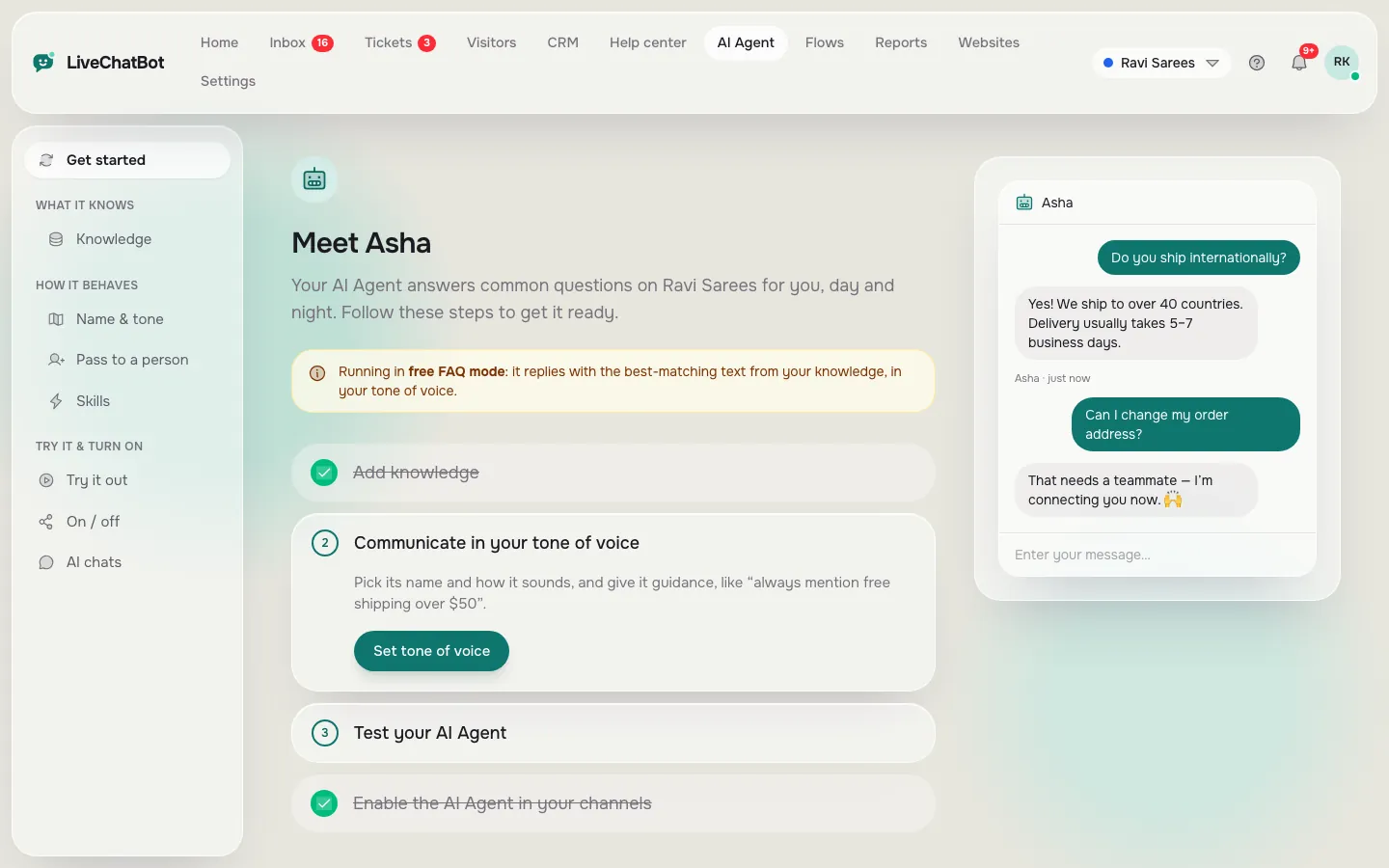
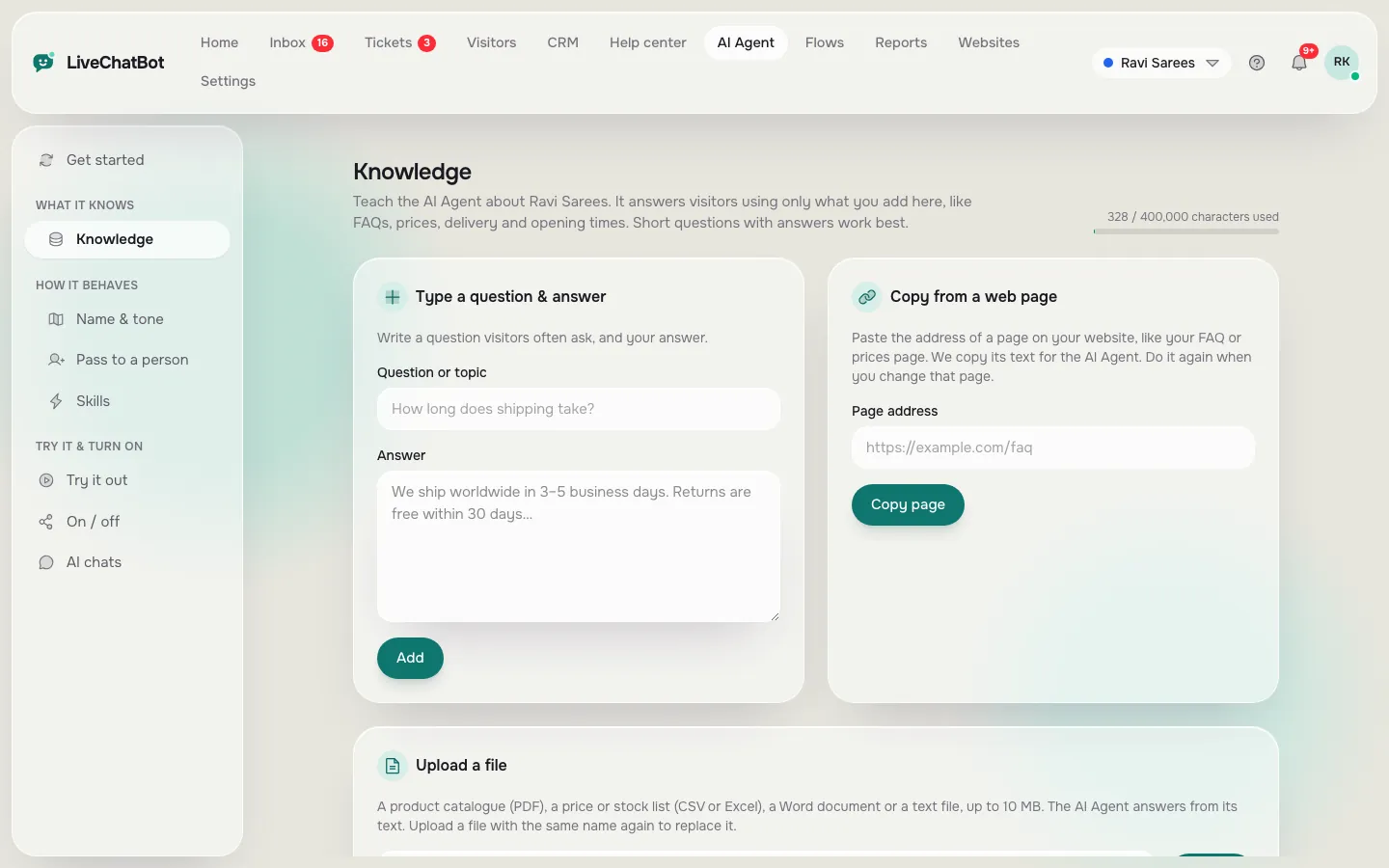
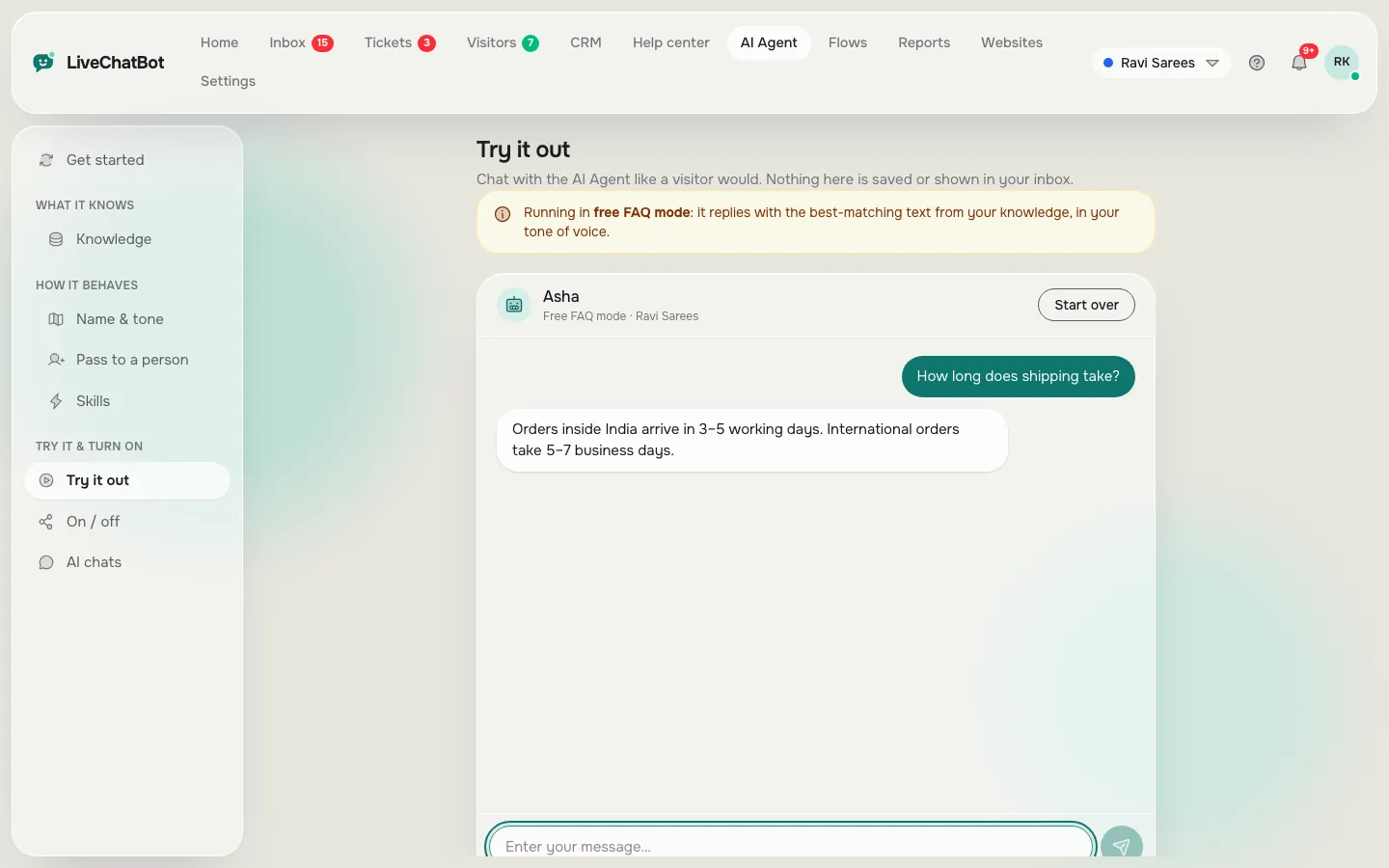
Entering the sheet
Create your own chatbot from the sheet in four places and no code
The sheet maps to four places in the dashboard, and none of them needs code.
- Knowledge: type each answer, copy a web page, or upload a file (PDF, Word, Excel, CSV or TXT). Add only what your three jobs need.
- Name and tone: choose the AI Agent’s name and tone of voice. Keep it plain; the style comes second.
- Rules to follow: paste your three never-dos.
- Playground: ask the bot your test questions privately before anything goes live.
Then paste the install code on your site and look at it on your own phone. If you want the long version of how to teach it well, read how to train your AI chatbot. The step-by-step is also covered on the AI Agent page.
What it costs
The free plan covers two websites with 100 visitors each per month. Paid plans start at ₹299 a month for Starter. See pricing for current details.
Review
Review the sheet weekly for a month, then monthly
A sheet stays useful only if you reread it against real chats, so put a short review in your diary.
Each week, open ten chats the bot handled and ask three things: did it stay inside its jobs, did it break a rule and did the handover happen when it should? Fix the knowledge first, then the rules, in the AI Agent.
After four weeks you will have enough evidence to add a fourth job. Choose the next biggest group from your tally and repeat the same steps. If you want ideas for what comes next, our AI-powered chatbot launch plan walks through the first 30 days.
Frequently asked questions
Can I create your own chatbot without coding?
Yes. With LiveChatBot you type or upload your answers, write rules in plain English and paste one code snippet into your site. No programming is needed.
Why only three jobs?
Each job needs checked answers and an owner. Three keeps the first version accurate and easy to review. Add a fourth after a week or two of reading real chats.
Do the rules work on the free plan?
Rules work while the website has AI replies. The free keyword bot answers from saved replies and cannot follow written rules, so keep its answers short and factual.
What if my business has many more than three kinds of question?
Start with the three biggest groups and hand everything else to a person. Grow one job at a time as you read real chats.
Can the bot take payments or book appointments?
Not natively. It can answer how to book and share your link, and pass the visitor to a person. Zapier and webhooks can bridge some tools.
Keep reading
Related guides
Create My Own Chatbot and Still Own It: What Is Yours, What Is Rented, and a 15-Minute Exit Drill
Fill the sheet, then build it
Free plan for two websites, no per-seat charges and no code. Start free on livechatbot.in.