Create Chatbot for Website in One Afternoon: A Four-Hour Build Plan, Worked Out Minute by Minute
Create chatbot for website pages in one afternoon by splitting the work into five blocks: facts, handover, rules, a private test and the install. Most people lose the day on the first block, because they write answers before they know what the bot is allowed to say. This plan gives every block a time budget, a stopping point and a check, so you finish with a bot that is live, tested and safe.
To build a chatbot for your website, write your 20 most-asked questions with answers, set a handover and opening hours, add a few written rules, test it privately in the AI Agent playground, then paste one code snippet into your site. With LiveChatBot a first version takes about four hours, and the free plan costs nothing.
⚡ In short
- Block order matters: facts first, then the handover, then rules, then a private test, and only then the install.
- Budget about four hours: 90 minutes of facts, 30 on handover and hours, 30 on rules, 60 on testing, 30 on install and a live check.
- Install last. A bot nobody has tested should never be on a live page.
- Our rule: write the answer to “I want a person” before any other answer.
The plan
Five blocks turn the job into a four-hour afternoon
The fastest way to create chatbot for website visitors is to treat it as five small jobs, each with its own clock, not as one big project.
Most guides start with the install, which takes five minutes and belongs last. The valuable work is deciding what the bot knows and what it does when it doesn’t.
Here is the whole plan in one view. The timings are a worked example for a small business with about 20 common questions, not a promise for every site.
- Block 1, facts (90 minutes): collect and write the answers.
- Block 2, handover (30 minutes): decide who takes over and when.
- Block 3, rules (30 minutes): what the bot must never do.
- Block 4, private test (60 minutes): break it before customers do.
- Block 5, install and live check (30 minutes): paste the code and watch it work.
If you run over in one block, stop at the time limit and ship what you have. A bot with twelve good answers beats a project that never goes live. For the slower route afterwards, our AI chatbot launch plan covers the first 30 days.
The clock
Your afternoon at a glance
Tick each block as you finish it. The time next to each one is the budget, not the minimum.
Block 1
Facts come first because the bot can only repeat what you give it
The AI Agent answers from the knowledge you add, so the quality of the bot is the quality of this block.
Start with real questions. Open your WhatsApp, email and call notes from the last month and list what people actually asked. Twenty is plenty: prices, hours, location, delivery or booking, returns, contact.
Three ways to add knowledge
- Type answers directly. Best for short facts such as opening hours.
- Copy a web page that already says it, such as your delivery policy.
- Upload a file: PDF, Word DOCX, Excel XLSX, CSV or TXT. Handy for a price list or a brochure.
Keep each answer to two sentences
A chat widget is narrow, so write what a polite shop assistant would say aloud: the fact, then the next step. If you want a longer walk-through of this block, read how to train your AI chatbot.
Block 2
The handover is a bot feature, not an afterthought
The handover is the plan for every question the bot cannot answer, and it decides whether visitors trust the chat.
Set three things in this block. First, opening hours, so the widget knows when your team is around. Second, the away form, which collects an email or phone number when nobody is online. Third, decide who takes over: one named person who gets the alert on the Android app. Agents can use Assign to me on a chat, and the inbox has Unassigned and Mine folders, so two people don’t answer the same visitor.
There is no automatic assignment, so name the person now. Our guide to setting live chat opening hours walks through the screen.
If nobody replies within seconds, the chat rescuer asks the visitor for an email and phone number, so the lead is not lost.
Our rule
What most guides miss: write the “I want a person” answer before any other answer
Write the handover reply first, before you write a single product answer.
Here is the rule in one line: the first answer you write is the one for “I want to talk to someone”. Almost every guide to create chatbot for website projects starts from the happy path, the questions the bot can answer. But the day your bot disappoints a visitor is the day a question falls outside the happy path, and the visitor’s very next message is a request for a person.
Written last, the exit comes out tired and rushed. Written first, it sets the voice. A good handover reply does three things:
- Says plainly that a person will follow up, not that the bot will “try its best”.
- Gives a real time, such as “within working hours today”.
- Asks for one contact detail, so the follow-up is possible.
Run this five-minute test: type “I want a person” into any bot, including your own. If the reply doesn’t contain a time and a request for contact details, the exit is not finished.
Block 3
Rules tell the bot how to behave, facts tell it what is true
Rules are written instructions about behaviour, and facts are the information the bot answers from; keep them in separate places.
In the AI Agent’s Name and tone page you pick a name, a tone of voice and a Rules to follow box that takes up to 5,000 characters. Rules apply while your website has AI replies. Prices, hours and policies belong in Knowledge. Behaviour belongs in Rules.
Good rules are short:
- Never promise delivery dates; say the team confirms them.
- Never quote a discount that is not in Knowledge.
- If the question is about a refund, ask for the order number and hand over.
A typical rule list uses 300 to 600 characters, which is about 6 to 12 per cent of the box (worked example: ten rules of roughly 50 characters each is 500 characters, and 500 divided by 5,000 is 10 per cent). You have far more room than you need, so spend your time on clarity, not length.
There is no raw system-prompt editor and you cannot choose the AI model; the Rules box is the control you get. For fuller design thinking, see how to build AI chatbot guardrails.
Block 4
A private test before any visitor sees it
Use the AI Agent playground and ask thirty questions. Mark each answer correct, partly right or wrong.
Real screens
What you will see in LiveChatBot
Real screens from the LiveChatBot panel, shown with sample data. Click any picture to see it full size.
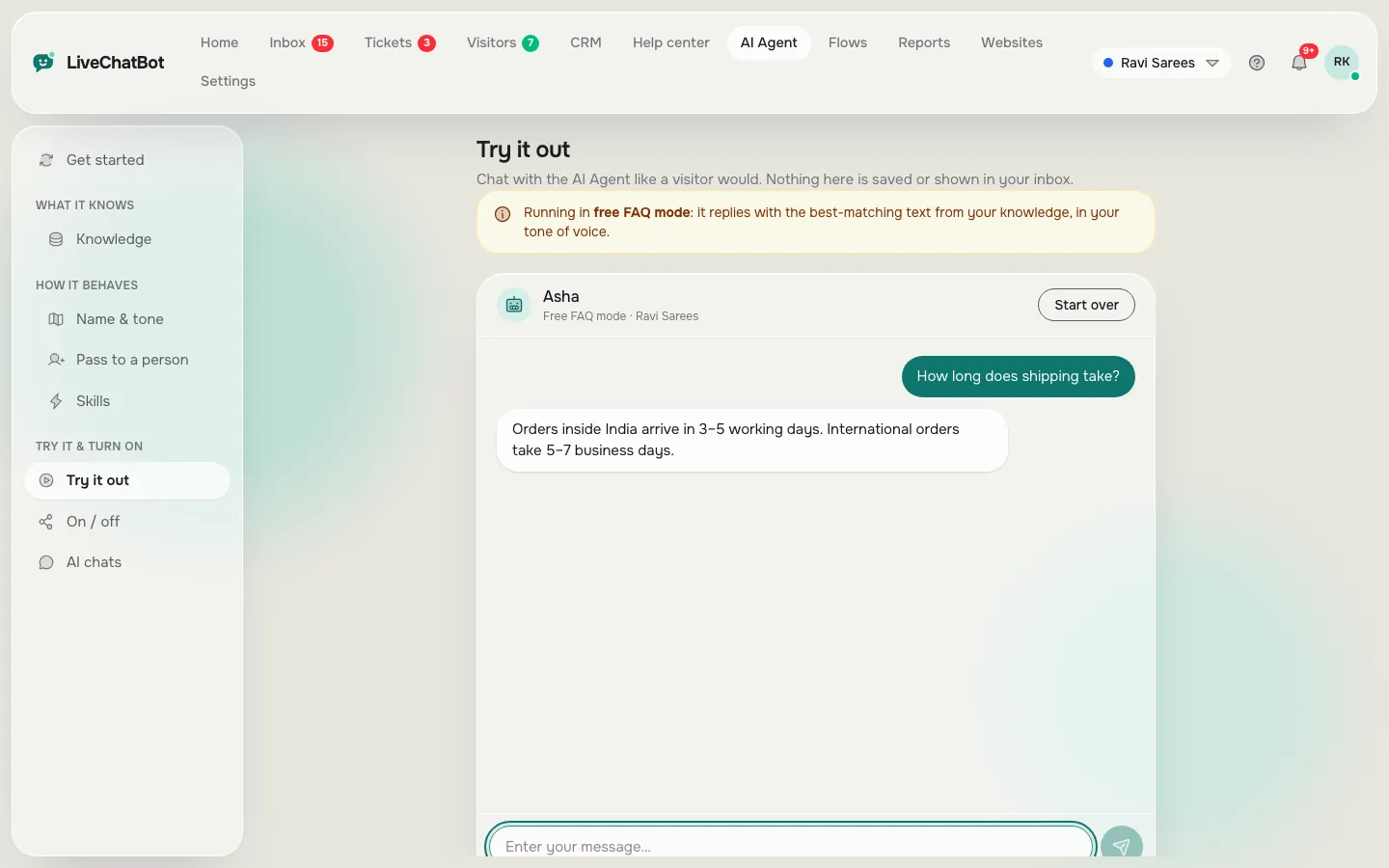
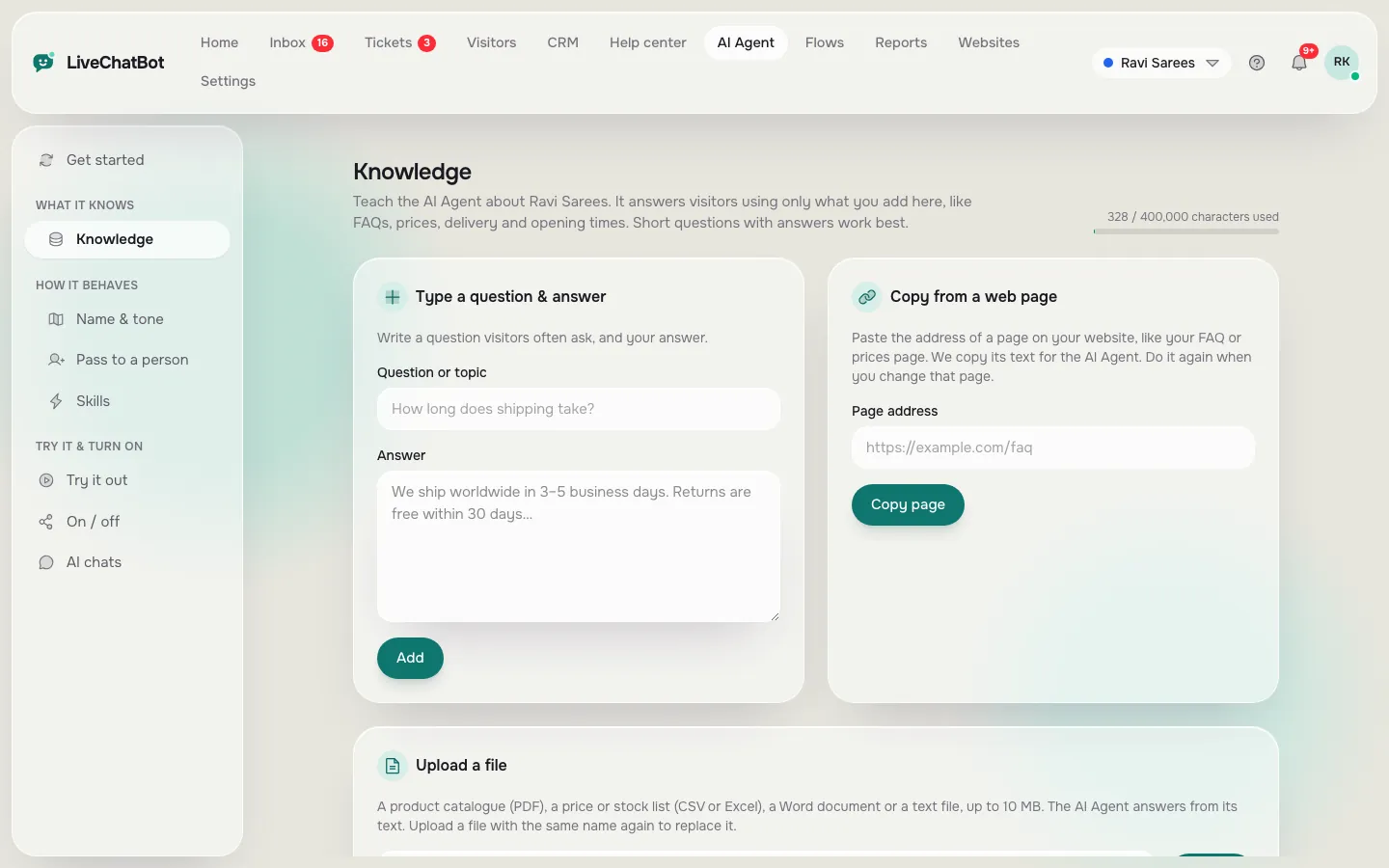
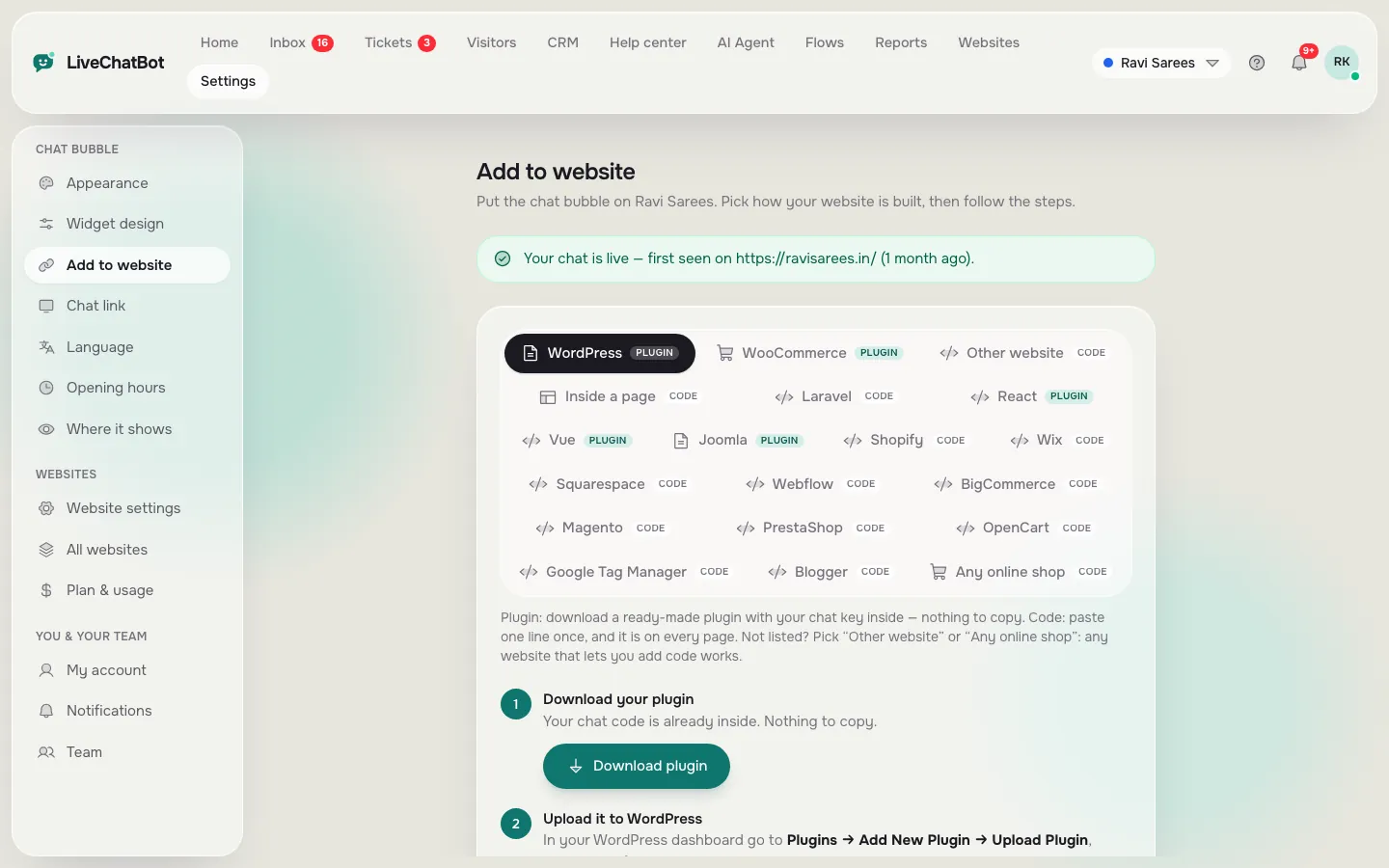
Block 4 in detail
Score thirty test questions, and ship at 24 or more right
A pass mark turns “seems fine” into a decision you can defend.
This is the worked maths we use. Thirty questions: ten taught, ten untaught but answerable from your facts, ten that should trigger a handover. Score one point per good outcome. For the last ten, a good outcome means a handover, not an answer.
- 27 to 30: ship it.
- 24 to 26: ship it on a quiet page, fix the misses this week.
- Below 24: do not install yet. Find the missing fact and test again.
A bot that gets all ten taught and nine untaught right, but guesses on four handover questions, scores 10 + 9 + 6 = 25: a quiet-page launch.
The ten handover questions are the most useful: a bot that invents an answer there will do it live too.
Block 5
Install last, then check on a real phone
Installing takes one pasted snippet, and the check afterwards takes longer than the paste.
Add your website in the dashboard, copy the install code and paste it before the closing body tag of your site. WordPress has a plugin that does it for you; Shopify, Wix and Squarespace take the pasted code. Our live chat setup guide has the platform-by-platform steps.
Once you create chatbot for website pages like this, do the live check:
- Open your site on your own phone, not the computer you built it on.
- Confirm the widget shows, in the right colour and position.
- Send a real message from a second device and see it arrive in the Android app.
Read the first 20 chats yourself; within a week you’ll know which facts to add.
What it costs
The plan costs ₹0 until your traffic grows
The free plan covers two websites and 100 visitors per website each month, so a first bot costs nothing.
When traffic grows, Starter is ₹299 a month for 750 visitors shared across two websites, and Growth is ₹699 a month for 5 websites and 2,500 shared visitors. Plans are prepaid, with no automatic renewal and no per-seat charges. The sign-up code WELCOME100 adds 100 visitors once. See pricing for the current numbers, and read about the AI Agent.
Worked example: a site with 80 new visitors a month stays inside the free 100. A site with 400 visitors a month on one website needs Starter (750 shared), so the cost is ₹299, which works out to about ₹0.75 per visitor at that volume (299 divided by 400).
To compare routes, the make-or-buy guide for chatbot makers and the one-page fact-sheet method take different routes to the same goal.
Frequently asked questions
How long does it take to create chatbot for website visitors?
About four hours for a first version: 90 minutes on facts, 30 on handover and hours, 30 on rules, 60 on testing and 30 on install.
Do I need to code?
No. You type or upload your facts, set rules in a box and paste one snippet. WordPress has a plugin, and Shopify, Wix and Squarespace use the pasted code.
Can I pick the AI model or use my own API key?
No. The model is set by LiveChatBot on the server. You control behaviour through the Rules box and the facts in Knowledge.
What happens when the bot doesn’t know an answer?
It should hand over to your team, or the away form collects an email or phone number when nobody is online. Test this in the playground before you install.
Is it free?
Yes to start. The free plan gives you two websites and 100 visitors per website each month. Paid plans are prepaid with no automatic renewal.
Keep reading
Related guides
Create Bot for Website in One Afternoon: A Four-Block Plan Where You Build the Handover First, Then the Answers
Create a Chatbot Online: The Seven Screens You Pass Through, What to Type on Each, and the Rule That Stops You Over-Building
Build it this afternoon
Open the AI Agent on livechatbot.in, add your twenty answers, test them privately and go live with the free plan.