Best Free Chat Plugin for WordPress Until You Outgrow It: Work Out Which Month the Free Limit Runs Out, and What Happens Then (Free Growth Quiz)
Best free chat plugin for WordPress is a fair thing to search for, but every free plan has a ceiling, and the useful question is when you will hit it. A blog with a trickle of visitors may never pay. A shop that gets a busy festival month may hit the limit in week two. This guide shows you how to estimate your month, what happens at the limit and how to plan so there are no surprises.
⚡ In short
- Even the best free chat plugin for WordPress has a limit. Learn yours before you install, not after your busiest day.
- On LiveChatBot the free plan gives 100 visitors per website each month, counted once per visitor.
- At the limit, tracking and alerts carry on, and chat pauses for new visitors until the month resets or you add visitors.
- Answer four questions in the quiz below to see which kind of site you are and what to plan.
Counting
How a free limit is counted, and why that matters more than the price
A free plugin can count three different things: chats, visitors or messages. They behave very differently. A tool that counts chats lets a hundred visitors browse in peace and only uses up the allowance when someone talks. A tool that counts visitors uses it up as people arrive, whether they chat or not.
LiveChatBot counts visitors. A visitor is counted once a month, at the moment they trigger a new-visitor alert. Returning visitors in the same month are not counted again. The free plan gives 100 per website, so a site with two websites has 200 between them.
Why does this matter? Because a traffic spike, a social post or an ad can burn through 100 visitors in a day. Knowing the counting rule lets you estimate your month. If you want the full picture of the plugin first, our WordPress live chat plugin guide covers install and features.
Your numbers
Estimate your month in three minutes
You do not need analytics skills. Open your site stats, or your host’s visitor counter, and find three numbers.
- Busiest month last year. Not the average. The month with the most visitors.
- New visitors only. If your stats show total visits, take about two thirds as new people, unless you know better.
- A growth guess. If you plan ads or a launch, add a third.
If the answer is under 100 per website, the free plan will probably be enough all year. Between 100 and 300, expect to need extra visitors in some months. Above 750 a month shared between two websites, a paid plan fits better than top-ups. These are rough sums, and your own site may behave differently.
Try it
Which kind of free-plan site are you?
Four quick questions. The answer tells you what to plan, not what to buy.
Real screens
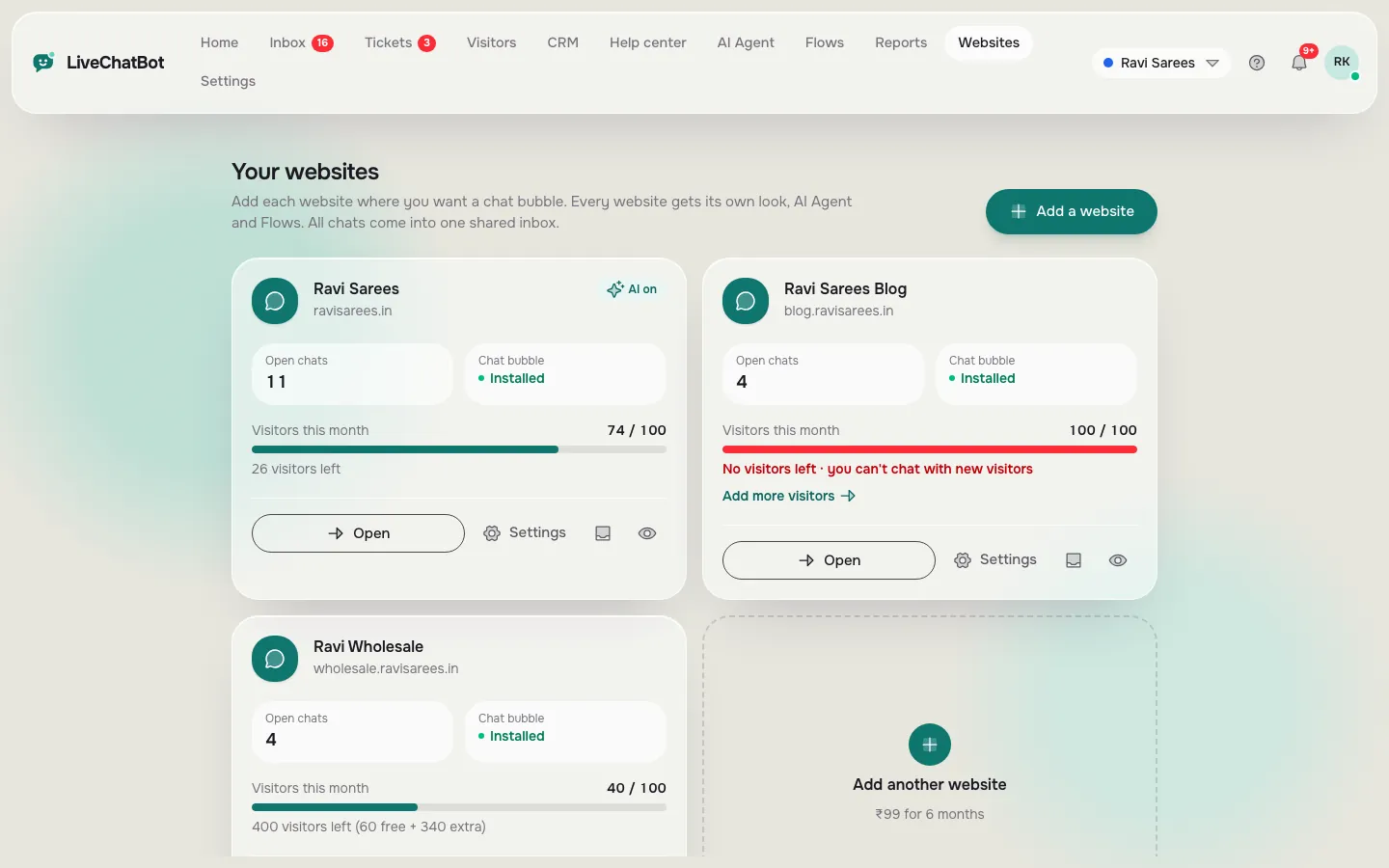
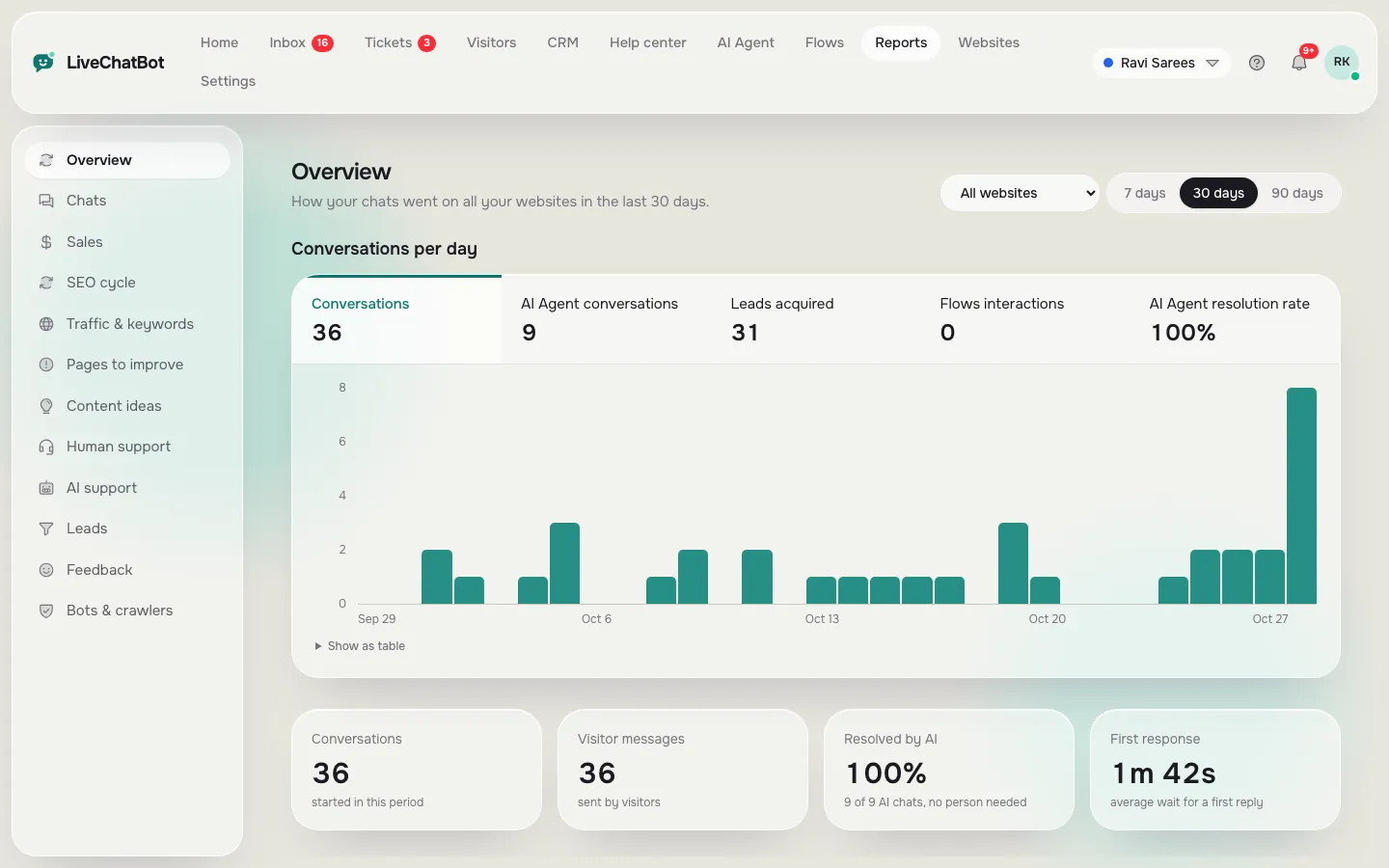
Two websites on one account, and the reports that show your traffic
Real screens from the LiveChatBot panel, shown with sample data. Click any picture to see it full size.
At the limit
What happens when the free visitors run out
This is the part most plugin pages hide. On LiveChatBot, when a website reaches its monthly visitor limit:
- Visitor tracking and alerts carry on, so you still see who is on your site.
- Chat pauses for new over-limit visitors, until the month resets or you add visitors.
- Visitors already chatting are not cut off mid-conversation.
- Nothing is charged automatically. There are no surprise bills.
Ask any plugin the same four questions before you install. Does tracking carry on? Does the chat vanish for everyone or only new visitors? Are existing chats protected? And does it charge your card without asking?
If you have a launch coming, set a reminder for the day before and check your count in the dashboard.
Worked example
A made-up shop, month by month: when the best free chat plugin for WordPress stops being free enough
This is an illustration, not a real customer. Imagine a small saree shop with one website and a WordPress plus WooCommerce store.
The quiet months
From January to August the shop gets about 60 new visitors a month. The free 100 visitors are plenty. The owner answers a few chats, adds saved replies and never pays anything.
The festival month
In October a festival sale and a few social posts bring 400 new visitors. After roughly the first week the shop reaches 100 and chat pauses for new visitors. The owner still sees the traffic and the alerts, but cannot talk to new arrivals.
What a sensible owner does
Looking at last year, they would have spotted October coming. Before the sale they add visitors, or move to Starter for the month. After the sale, they return to free. The cost is planned, and no lead is lost on the best day of the year.
Stretching free
Make the free visitors go further
You can cut the number of visitors the chat uses without hurting results.
Show the chat where it matters
Use the where-it-shows settings to hide the chat on pages that never lead to a sale, such as terms or old blog posts. Our guide on showing live chat on specific pages walks through it.
Block the noise
Block repeat spammers and your own team’s IPs, so they do not use up the allowance.
Share code and referrals
The WELCOME100 sign-up code gives 100 extra visitors once, and a referral gives both companies 200 extra.
Know the trade-off
Hiding the chat saves visitors but also saves you from leads. Hide pages only when you are sure.
Honest gaps
What free will not give you
Even the best free chat plugin for WordPress does not do everything, and it is better to know now.
- “Powered by LiveChatBot” stays on every plan, free or paid.
- There is no iOS team app. Android is supported, and iPhone users answer from a browser.
- There is no pre-chat form.
- The AI Agent has a monthly allowance shown in your dashboard. When it is used, the free keyword bot answers from your saved replies.
Our companion guide on the best chat plugin for WordPress free covers a different question: how to install any free plugin safely. Together they answer both “is it safe?” and “will it last?” See pricing for current plan details.
Frequently asked questions
What is the best free chat plugin for WordPress for a small blog?
One that fits inside its free limit all year. For a small blog that usually means a plan with a monthly visitor allowance, plus a way to take messages when you are away.
Do returning visitors use up my free allowance again?
On LiveChatBot a visitor is counted once a month, so returning in the same month does not count twice.
Will the chat stop for everyone at the limit?
No. It pauses for new over-limit visitors, while tracking and alerts continue and existing conversations carry on.
Do I get charged automatically after the free plan?
No. Plans are prepaid, with no automatic charges. You choose when to add visitors or move to a paid plan.
Can I use free on two websites?
Yes. The free plan includes two websites per account, each with its own 100 visitors a month.
Keep reading
Related guides
Best Free Chat Software Costs Time, Not Money: Where the Hours Go in Setup, Upkeep and Replies
Best Free Chatbot for Facebook Messenger: Keep Page Messages and Website Chats in One Inbox
Best Free Chatbot for Website Owners Is the One You Can Fill in One Afternoon: A Starter Pack of Copy-and-Paste Lines (Free Starter Pack)
Start free and watch your month
Free plan for two websites, no per-seat charges. Start free on livechatbot.in.