Customer Service AI Chatbot Report Card: Which Numbers Prove It Works and Which Ones Mislead (Free Monthly Review Checklist)
Customer service AI chatbot owners often ask one question a month later: is it actually working? The answer is in your Reports, but only if you read the right numbers. This guide shows which figures prove the bot helps customers, which ones look good and mean little, and gives you a monthly review checklist you can tick through in twenty minutes.
⚡ In short
- Trust four numbers: Resolved by AI, first response time, ratings and leads.
- Be careful with raw chat counts; more chats can mean worse answers.
- Read thumbs-down comments first; they show exactly what to fix.
- Run the monthly checklist below and change one thing at a time.
The problem
Why most bot owners measure the wrong thing
The easy number to find is the total number of chats. It is also the least useful. A bot that confuses people creates more chats, because they ask again, and a bot that answers well can lower the count.
What you want to know is simpler. Did customers get what they needed? Did they get it quickly? And did anyone leave a way to contact them when the bot could not help?
LiveChatBot’s Reports area answers these with a date range and a website filter, so you can compare this month with last month for each site. If you are setting up the bot for the first time, start with our 30-day plan for an AI customer service chatbot, then come back here once real chats are flowing. The numbers below come from the chats your AI Agent handles, so a clean Knowledge base makes them meaningful.
Real screens
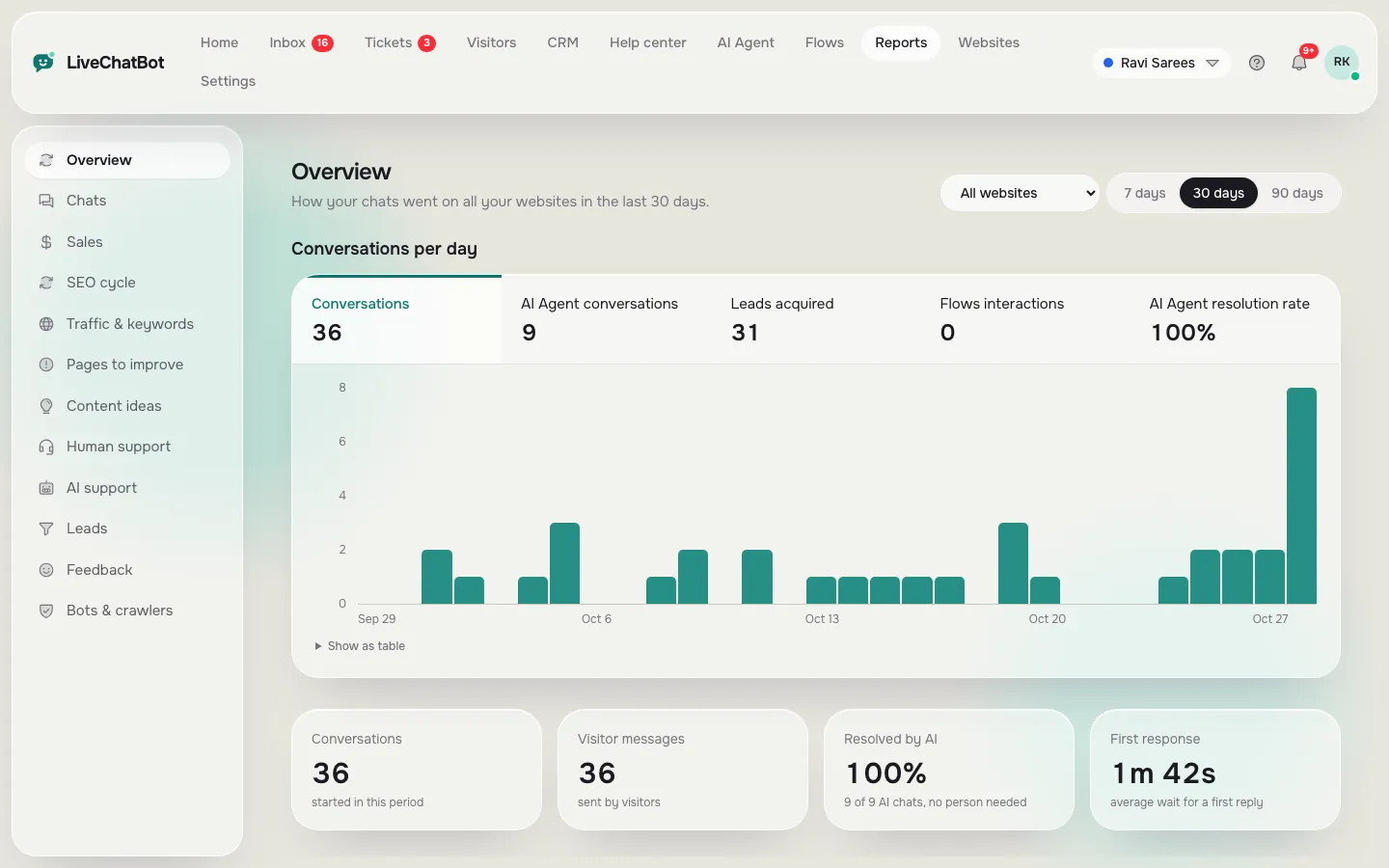
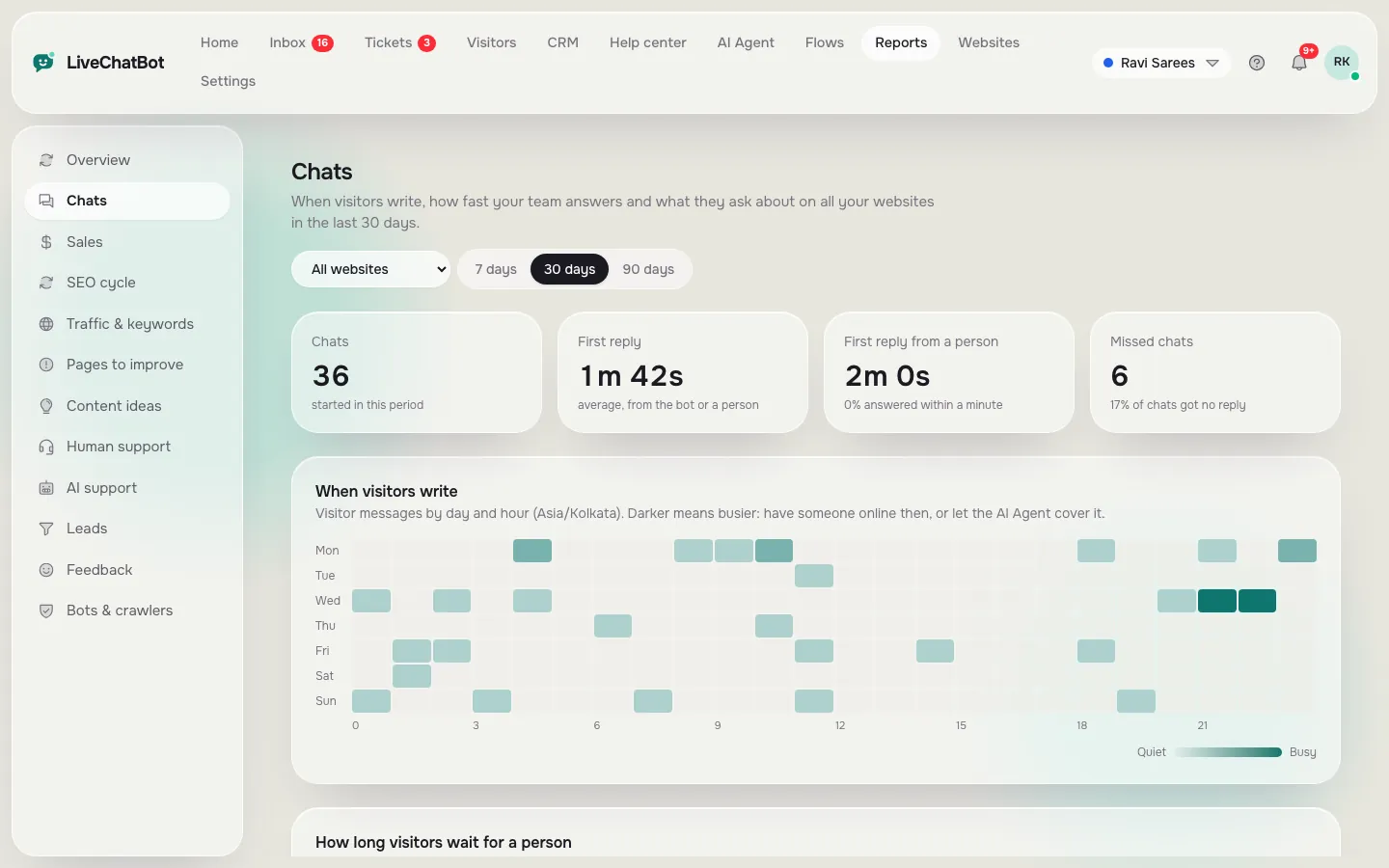
The two Reports pages behind this review
Real screens from the LiveChatBot panel, shown with sample data. Click any picture to see it full size.
Numbers that matter
The numbers that prove your customer service AI chatbot works
Resolved by AI
This is the share of conversations the AI Agent answered with no person needed. It is your headline figure. If it rises while ratings stay good, the bot is earning its place.
First response time
Customers care how fast someone answers. A bot should push this toward seconds. Check it separately for out-of-hours chats, where the away form matters more than speed.
Ratings
Visitors can rate a chat with a thumbs up or down and add a comment once someone has replied. Turn this on in Settings, Widget design, Features. It is a simple measure, not a full satisfaction survey, but the comments are gold.
Leads acquired
When the bot cannot answer, did the visitor leave an email or phone number? The chat rescuer and away form exist for this, and the lead count shows whether they work.
Misleading numbers
The numbers that look good and mislead
- Total chats. More is not better. Compare chats per day against Resolved by AI before cheering.
- Replies sent by your team. A high figure may mean the bot is handing over too often.
- A high rating on very few votes. Ten thumbs up from twelve votes is a hint, not proof.
- Resolved by AI without reading transcripts. A chat can count as answered while the answer was vague. Read ten transcripts a month to check.
A rule that helps: never judge by one number alone. Pair each with a second. Resolved by AI with ratings, response time with the busy-hour heatmap, leads with the pages they came from. Pairs expose the story a single figure hides.
Reading the pairs
Three pairs that tell you what to do next
High resolved, low ratings
The bot answers, but people are unhappy. Look at tone and Rules. Answers may be correct but too long, too stiff or missing the next step.
Low resolved, good ratings
Customers like the chats, yet people are doing the work. Your Knowledge has gaps. Add the questions humans keep answering.
Good both, few leads
The bot is helpful but never asks for contact details. Add a Flow on high-intent pages or tighten the away form. The guide to chat flows shows how, and our AI chatbot for customer service surge playbook covers the busiest days.
Free tool
Your monthly review checklist for a customer service AI chatbot
Tick each step as you do it. The bar shows how far through the review you are.
Cadence
A rhythm that keeps a customer service AI chatbot honest
Review weekly for the first month, then monthly. Weekly takes ten minutes: skim the thumbs-down comments and fix anything obviously wrong. Monthly is the fuller checklist above.
Change one thing at a time. If you edit Knowledge, Rules and a Flow in the same week, you cannot tell which helped. Write the change and the date in a note, then look at the same numbers a month later.
Share the figures with your team in plain words: “The bot solved four in ten chats and nobody was unhappy.” Staff trust a bot more when they see it is measured. If you want to prepare them, the post on training staff to work alongside an AI customer service bot explains how.
Targets
Set simple targets before you read the numbers
A number means little without a target. Before your first review, write three goals in plain words, such as “the bot solves a third of chats by month two” or “first response under a minute in working hours”. Targets should be small and based on your own last month, not on figures from other companies.
Start with a baseline
In month one, just record the figures. You are learning what normal looks like for your shop, your season and your traffic. A festival week will not look like a quiet week, so note the dates next to each reading.
Raise the bar slowly
Once a target is met two months in a row, nudge it up a little. If it is missed, do not panic: open the thumbs-down comments, find the missing fact and fix Knowledge. Then wait a full week before judging the change.
Keep a human in the loop
Even with strong numbers, keep a person watching handovers. The goal is not zero human chats but the right ones: complex, emotional or high-value conversations that deserve a real reply. Pair this with a short set of saved replies so your team answers those quickly.
Honest limits
What the Reports do not show
Be realistic about gaps so you do not expect more than the dashboard gives. There is no custom report builder, no scheduled or emailed reports, no sentiment scoring, and no native Google Analytics link. Ratings are a thumbs up or down, not a long survey.
You can still export what you need through the REST API or Zapier, and the Traffic and Page insights reports show which pages bring visitors and where they leave without acting. Together with the numbers above, that is plenty for a small team. When you want help choosing what to automate next, the AI Agent page is the place to start.
Frequently asked questions
How do I know my customer service AI chatbot is working?
Check Resolved by AI, first response time, ratings and leads in Reports, then read ten transcripts to confirm the answers are really helpful.
Are visitor ratings a full satisfaction survey?
No. Visitors give a thumbs up or down with an optional comment once someone has replied. It is simple, but the comments are very useful.
Can I email myself a weekly report?
Scheduled or emailed reports are not available. Open Reports on your review day, or pull data through the REST API or Zapier.
How often should I review the bot?
Weekly for the first month, ten minutes each, then monthly with the full checklist.
Should I worry if total chats go down?
Not by itself. Fewer chats can mean clearer answers on your site. Pair it with ratings and Resolved by AI before drawing a conclusion.
More to read
More guides on this topic
AI Chatbot Benefits for Customers, Staff and Owners: Which Ones You’ll Actually Get, and How to Prove Them
Measure what matters
Reports, ratings and a shared inbox are included on the free plan for two websites. Start on livechatbot.in and see your own numbers this week.