Why Visitors Leave Without Contacting You: Seven Reasons, How to Tell Which One Is Yours, and the Fix for Each
Why visitors leave without contacting you is rarely a mystery once you stop guessing and look at three things: what the page promised, how hard the next step was, and how fast anyone answered. This guide gives you seven common reasons, a way to tell which one is hurting your site, a fix for each, and a checklist you can tick through in an afternoon.
⚡ In short
- Most visitors never contact anyone. That is normal. The goal is to find the avoidable exits, not to reach 100%.
- Seven causes cover most sites: unclear offer, no visible next step, too much effort, no trust, slow or missing answers, the wrong page for the visitor, and a poor phone experience.
- Match each cause to a quick test, then fix the cheapest one first.
- Use data from your own site (pages people leave, questions they ask) rather than opinions.
The starting point
Why visitors leave without contacting you: most leave quietly, and that is not always a failure
Before you fix anything, accept one fact: the majority of visitors to any website never contact the business. Some came by mistake. Some were comparing five shops and will buy from one. Some only wanted your opening hours and got them from the page. None of these is a problem you can solve.
The visitors worth worrying about are the ones who wanted something you sell, reached the right page, and still left without a message, call, form or WhatsApp tap. Those exits are avoidable, and each has a reason. In the next sections you will meet seven of them. Read them as hypotheses, not verdicts: your site may suffer from one, two or none.
What counts as contacting you
Decide this first, because you can only improve what you count. For most small businesses, “contacting you” means one of five actions: a chat message, a call tap, a WhatsApp tap, a form submission, or leaving an email or phone number. If a visitor does none of them, you have a case of why visitors leave without contacting you, however long they stayed.
Why guessing fails
Owners usually blame price or design. But the same site can lose visitors for opposite reasons on different pages, so a site-wide redesign often fixes nothing. Work page by page.
Reasons one to three
The offer, the next step and the effort
1. The page does not say what you sell, for whom, and where
Visitors decide in a few seconds whether a page is for them. If the headline is clever but vague, they leave. Test: show the page to a friend for five seconds, hide it, and ask what the business does and where. If they cannot answer, rewrite the first screen in plain words: the service, the place, and one reason to choose you.
Fix: one clear headline, one supporting line, one button. Move the long story lower down.
2. There is no obvious next step
A page can be informative and still end in nothing. The visitor reads, nods, and does not know what to do. Test: scroll your top five pages on a phone and note where a button, number or chat bubble appears. If you have to hunt, so do they.
Fix: put the main contact action in two places, near the top and after the main information, and use the same wording everywhere (“Chat on WhatsApp”, “Call us”, “Ask a question”).
3. Contacting you takes too much effort
A form with eight required fields, a captcha, and a promise of a reply “within 2 business days” asks a lot from someone who only wanted a quick answer. Test: submit your own form on a phone and time it.
Fix: ask for the least you need. A name and a phone number is often enough to start. Offer a faster option next to the form, such as a chat bubble or a WhatsApp button, for people who do not want to fill anything in.
Quick check
Run the seven-reason checklist on your top pages
Open your website on your phone, go page by page, and tick each line only when you have really checked it. The progress bar shows how much of the audit you have done.
Reasons four to seven
Trust, speed, the wrong page and the phone screen
4. Nothing makes a stranger trust you
People contact businesses they believe are real and competent. Missing trust signals include no address, no photos of real work, no named people, no reviews and a contact page with only a form. Test: look for a reason a cautious stranger would believe you exist in your city.
Fix: add what is true and checkable: your address, a map link, photos you took, a named owner, real customer reviews that you have permission to show. Never invent testimonials.
5. The answer was slow, or nobody was there
A visitor who opens chat and waits two minutes is gone. A form that vanishes into an inbox nobody checks teaches customers not to bother. Slow answers are the cheapest problem to fix, because it is a process, not a design. See live chat response time for realistic targets.
Fix: set opening hours so the widget tells the truth, turn on notifications on a phone, and use saved replies for repeat questions so the first answer takes seconds.
6. The visitor landed on the wrong page
A single generic home page rarely matches what every visitor wants. Someone arriving from a search for a specific service lands on a page about everything and leaves. Test: look at which pages bring visitors in and which of them lead to no action.
Fix: create or improve a page for each thing people actually look for, and make the first screen match the search.
7. The phone experience is worse than the desktop one
A pop-up that covers the page, a tiny button, text that needs zooming and a widget that hides the contact number all cost enquiries. Test: use your own site on a phone for five minutes.
Fix: keep one tappable action, make text readable without zooming, and check that the chat bubble does not cover important buttons.
Using your own data
How to tell which reason is yours from your own data
Opinions are cheap; your site already holds better evidence on why visitors leave without contacting you. Look for patterns in these places.
Pages that get visitors but no action
List your pages by visitors and mark those where nobody chatted, called, tapped WhatsApp or left details. These are the pages to fix first. A page with 300 visitors and no action is worth more attention than a page with 12 visitors and one.
What visitors ask in chat
The questions people type are the reasons they hesitate. If many ask “Do you deliver to my area?”, the page does not say so. If they ask “Is this price final?”, the price is unclear. Each repeated question is a missing sentence on a page.
What they search on your site
Searches inside your own website show what they could not find. A visitor who searched “refund” did not see your refund policy where they looked.
Also check how fast you replied: if the gap to your first reply is long during open hours, the problem is staffing or alerts.
For a wider view of how conversion works, read how to increase website conversion rate.
What to fix first
Fix in this order: cheap, fast, high-traffic
You cannot fix seven things at once, and you do not need to. Rank the work with a simple rule: start with changes that cost nothing and affect your busiest pages.
- Speed of reply. Free and immediate.
- A visible next step on your top pages. One button or bubble, same words everywhere.
- A shorter form or a faster alternative next to it.
- Missing answers. Add a sentence or FAQ for each repeated question.
- Trust items. Real photos, address, reviews.
- Landing-page match. New or rewritten pages for the searches that matter.
- Mobile polish. Only after the above, unless your phone test was bad.
Change one thing at a time on one page, wait a couple of weeks, and compare actions before and after. If you change everything at once you will not know what worked.
How LiveChatBot helps
Where LiveChatBot fits into this diagnosis
LiveChatBot is built to catch the visitors who would otherwise leave silently, and to show you where that happens.
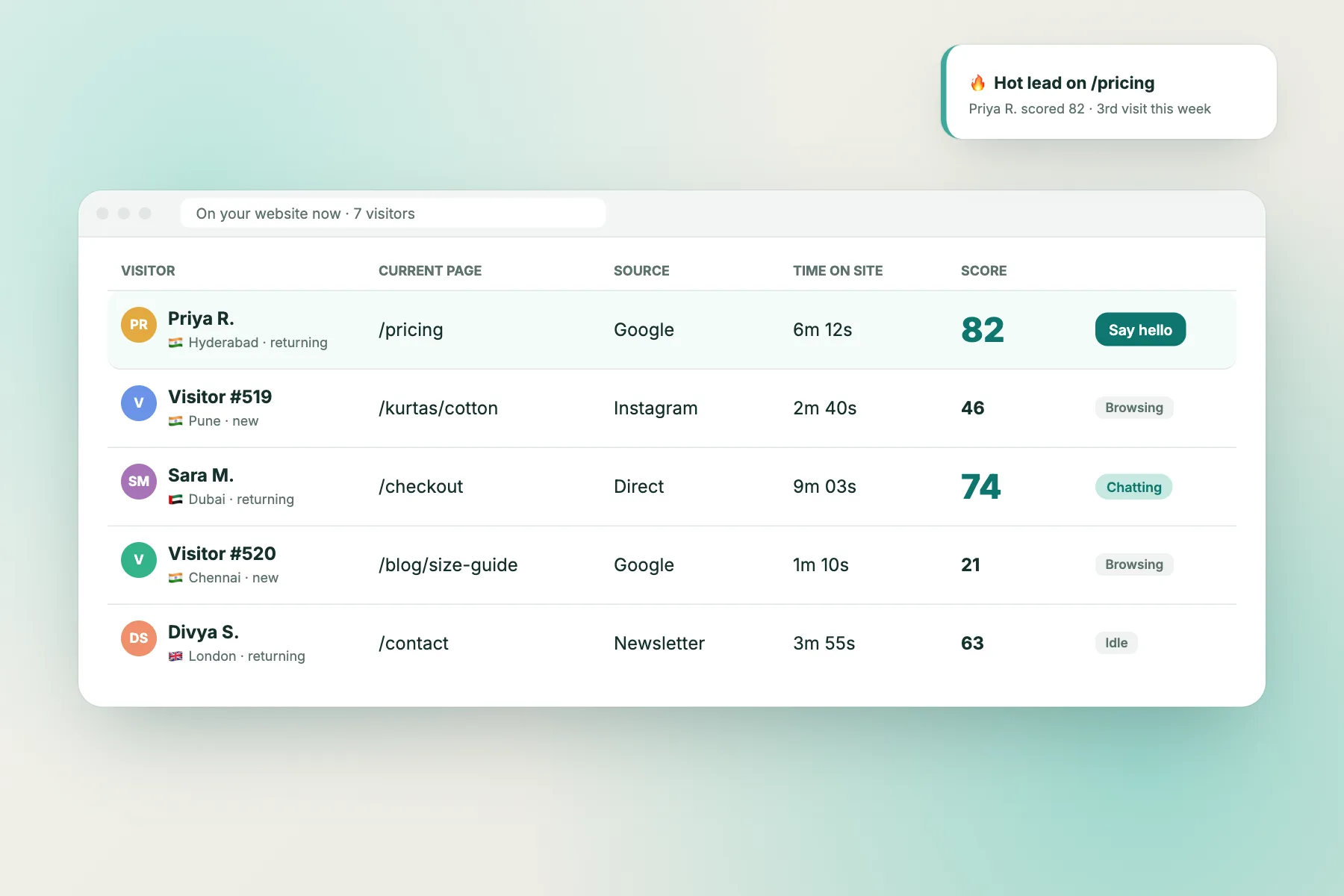
- Visitor tracking shows who is on your site and which page, so you can see exits as they happen. See visitor tracking.
- Reports show which pages bring visitors and how many act, and which pages people leave without acting. The Pages to improve view lists those pages with the questions visitors asked about them.
- Flows can open a short proactive message on a chosen page, for example after a visitor has been on a pricing page for a while, with conditions such as page, source, country, device and number of visits. Learn how in chat flows.
- Opening hours and the away form collect an email or phone number after hours, so a visitor at 11 pm still leaves a lead.
- Saved replies make fast first answers easy, and the Android app sends alerts so replies are quick.
- The free keyword bot answers common questions from your saved replies, and the AI Agent (premium AI replies, with a small free monthly allowance per website) can answer from your own knowledge.
The free plan covers two websites with 100 visitors per website per month; visitor packs are one-time and never expire. LiveChatBot does not have a pre-chat form, and it shows “Powered by LiveChatBot” on all plans. Start at livechatbot.in or see pricing.
Frequently asked questions
Why visitors leave without contacting you even when the site looks good: what is going on?
Design is only one factor. Visitors also need a clear offer, an obvious next step, a low-effort way to reach you, a reason to trust you, and a fast reply. A good-looking page can fail on any of those.
What percentage of visitors should contact a business?
There is no single honest number. It depends on the type of business, the traffic source and the page. Compare your own pages with each other and with your own past results instead of chasing a statistic.
Is a chat widget enough to get more enquiries?
It helps because it lowers the effort, but it will not rescue a vague page or a slow team. Fix the offer and the reply speed too.
Should I use a pop-up to stop people leaving?
Use proactive messages sparingly and on pages where visitors tend to hesitate, such as pricing. Constant pop-ups annoy people, especially on phones.
How long should I wait before judging a change?
Give each change a couple of weeks on the page it affects, and compare actions with the period before. Avoid changing several things at once.
Keep reading
Related guides
Landing Page Optimization That Starts With What Your Visitors Actually Asked
Where to Put a WhatsApp Button on Your Website: Seven Placements Ranked by Visitor Intent, With What to Say on Each
Catch the visitors who would have left
Free chat, visitor tracking and reports for two websites. Start free on livechatbot.in.