How to Track Leads From SEO: A Five-Step Method for Small Business Websites
How to track leads from SEO comes down to one habit: record which page and which source brought every enquiry, then add it up once a month. This guide gives you a five-step method that works with a spreadsheet, shows where each lead really came from, and explains what to do when the answer is awkward, such as a visitor who found you on Google and called a week later.
The five steps
- Decide what counts as a lead
- Give every contact route a trackable door
- Record page and source for each lead
- Credit the first page, not the last
- Review monthly and act
Real screens
See it in the LiveChatBot app
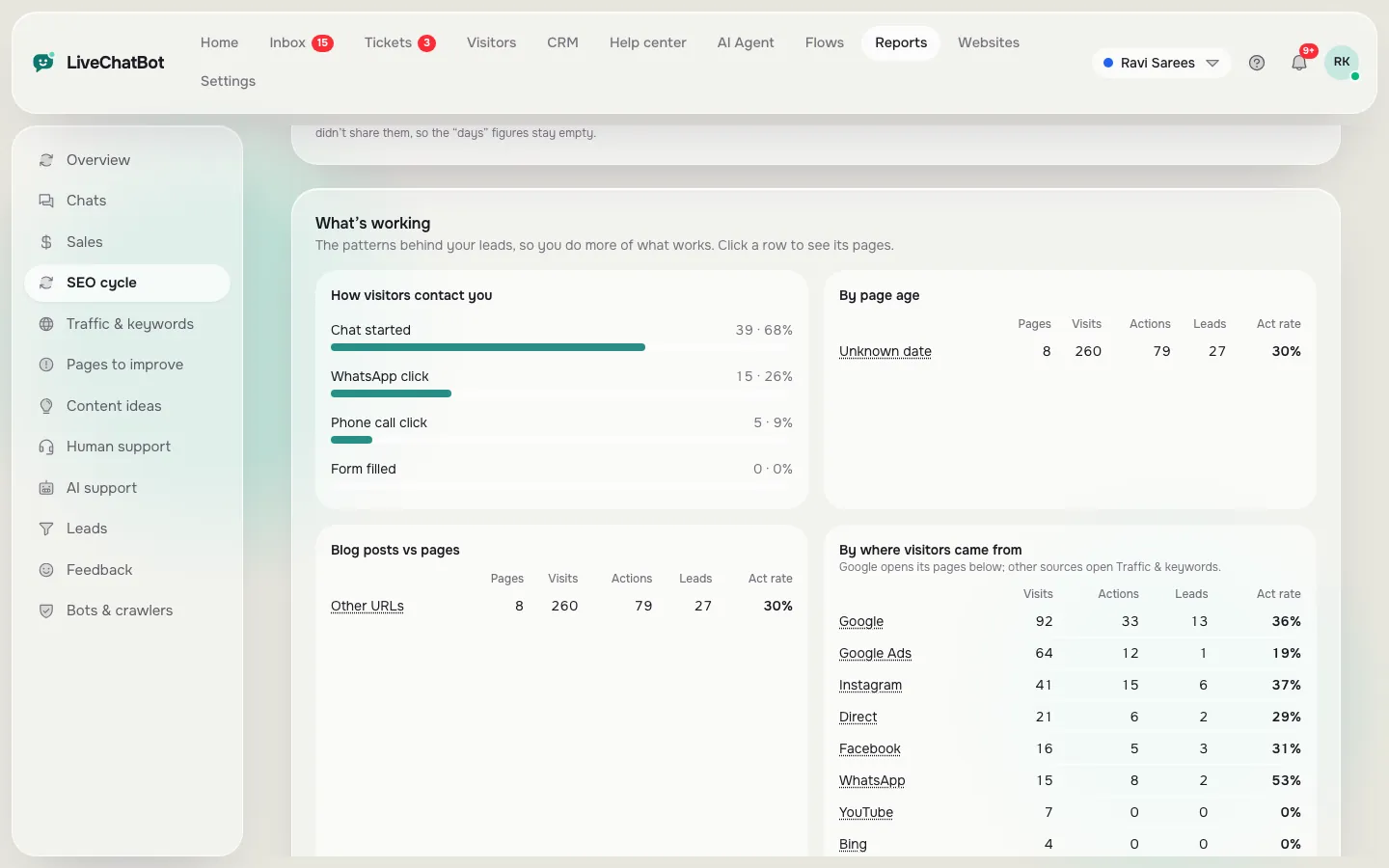
Real screens from the LiveChatBot panel, shown with sample data. Click any picture to see it full size.

⚡ In short
- Decide what a lead is first: a form, a call tap, a WhatsApp message, a chat with contact details.
- Capture the page and the source with every lead, at the moment it arrives, not weeks later from memory.
- Credit the first page that brought the visitor, because most people do not convert on the first visit.
- Look at leads per page once a month and write more about what already works.
Why this is hard
SEO leads leave no receipt
Someone types a question into Google, lands on your blog post, reads it, closes the tab and gets on with their day. Three days later they remember your business, open WhatsApp and send a message. When that message arrives, nothing on it says “I came from your article about pricing”.
That is why so many owners say SEO “does not work”. It may be working, but they cannot see it. Rankings and visitor counts are not leads, and a lead that arrives by phone or WhatsApp looks identical whether it came from Google, a friend or a poster.
Learning how to track leads from SEO means closing that gap. You need three facts for each enquiry: where it came from (Google search, social, direct), which page the visitor first landed on, and what they did (called, wrote, filled a form). With those three you can finally say that a particular post brought four enquiries last quarter, and a particular page brought none.
You do not need an expensive stack to do this. The method below needs a spreadsheet and a few small changes to your site. Using the right tools simply removes the manual work.
Step 1
Decide what counts as a lead before you count anything
Write down, in one sentence each, what a lead is for your business. Be strict, because a loose definition makes SEO look better than it is.
Hard leads
A visitor who gave you contact details or contacted you directly:
- Filled a contact, quote or booking form.
- Left a name, email or phone number in a chat.
- Sent a WhatsApp message.
- Called you.
Soft actions
Things that show interest but not yet a contact: opening a WhatsApp link, tapping a call button, starting a chat and not answering your question. Track these separately as actions. They are useful for spotting good pages, but do not report them as leads.
Why the split matters
If a page gets 30 WhatsApp taps and 2 real messages, that is useful information: the page attracts curiosity but something loses people after the tap. A report that lumps everything together hides that. Decide your two lists now, and keep them for at least a quarter so your numbers are comparable over time.
Step 2
How to track leads from SEO: give every contact route a door
Every way a customer can reach you should leave a mark that records the page and source. Go through your site and list the routes.
Forms
Make sure each form records the page it was submitted from. Many form plugins have a hidden “page URL” field or an option to include the referring page in the notification email. Turn it on. If you receive form emails with no page information, you are throwing away your best evidence.
Phone numbers
A tap on a phone number on a mobile page is an action you can count. A call made from a number printed on a poster is not. If calls matter, put a call button on your key pages so the tap is counted.
A WhatsApp message arrives with no page information at all. The usual fix is a short code in the pre-filled message, such as “Ref: K7Q2”, which links the message back to the visitor and the page. You then match it by hand when the message arrives. LiveChatBot adds such a code for you, as explained later.
Chat
A chat widget knows the page the visitor was on when they began. If your team asks for contact details inside the chat, that page goes into the lead record automatically.
Offline routes
Walk-ins and phone calls from printed material cannot be tied to a page. Ask “how did you find us?” on the first conversation and write the answer in the lead record. It is crude, but it catches what the tools miss.
Step 3
Record the page and the source at the moment the lead arrives
Your memory is a poor tracking tool. By Friday you will not remember where Tuesday’s call came from. So decide where leads are written down and fill it in the same day.
The simplest record is a spreadsheet with these columns:
- Date
- Name or contact
- What they did (form, call, WhatsApp, chat)
- Landing page (the first page they saw)
- Source (Google search, social, direct, other site)
- Result (won, lost, still talking)
Source is the one people get wrong. A visitor who arrives from a Google search result is “Google search”. A visitor who types your address is “direct”. A visitor from a link on another site or from a social post is “referral” or “social”. Your analytics or chat tool normally records this for you; the point is to copy it into the lead row rather than guess.
If you use a CRM or a contact list, add two fields: first page and source. LiveChatBot’s contact profiles keep a timeline of chats, visits and forms, so the page and source are already in the record when the lead arrives.
Finish with the result column. A lead that never buys is still a lead, but a page that brings only lost leads needs a different fix from a page that brings none.
Quick check
Is your lead tracking ready?
Tick what you already have. Anything unticked is the next small job.
Step 4
Credit the first page, not the last one
Imagine this journey. A visitor finds your article on Google on Monday. They leave. On Friday they type your address, land on the contact page and fill the form. A simple report says the contact page produced the lead.
That is misleading. The contact page did not persuade anyone; the article did. If you stop writing articles because the contact page seems to be doing all the work, your leads will dry up.
The first-touch rule
Credit the lead to the first page that brought the visitor to your site. Keep the form page as the last touch for your records, but report the first touch when you ask “which content works?”.
How to do it by hand
If you keep a lead sheet, ask on the first call or message, “Do you remember how you found us?” Often the answer is the title of the article. Write it down.
How to do it automatically
A tool that recognises returning visitors can do this for you. LiveChatBot’s SEO cycle report credits a lead to the page that first brought the visitor, even if they came back later and filled the form. You still decide what to do about it, but the arithmetic is done.
Step 5
Review monthly: how to track leads from SEO and act on it
Tracking only pays when it changes what you publish. Put thirty minutes in the diary each month and answer four questions.
- Which pages brought leads? Make a list, with counts.
- Which pages brought visitors but no actions? These need a clearer next step, an FAQ or a call to action.
- Which pages brought nothing at all? Check whether Google has even crawled them. Some pages are simply too new.
- What are visitors asking in chat or searching on your site that you have no page for?
Then pick one action: improve a weak page, write a supporting post for a page that already brings leads, or write a page for a missing topic. One action per month, done properly, beats a long list you never finish.
What a good month looks like
It is small and boring: three pages that bring leads, one that needs a better button, one topic worth a new post. Over a year that routine builds a site where you know which pages deserve your effort.
Where LiveChatBot helps
Do the same method with less typing
How to track leads from SEO can run on a spreadsheet through all five steps. If you want the counting done for you, LiveChatBot’s Reports include an SEO cycle report that follows every page of one website from published, to crawled by Google, to found on Google, to actions, to leads. See the full explanation on the SEO lead tracking page.
A few facts so you know what to expect:
- It uses LiveChatBot’s own data, so no Google Search Console or Analytics connection is needed.
- Actions counted include WhatsApp clicks, call clicks, forms and chats. Leads are visitors who leave a name, email or phone.
- Leads are credited to the page that first brought the visitor.
- WhatsApp buttons get a short “Ref:” code in the message, switched on by default in Settings then Widget, so you can match a message back to its page.
- Every number is clickable and opens the pages behind it.
What it does not show: rank positions, impressions, click-through rate or backlinks. For those use Google Search Console. Combine the two and you have position from Google and leads from LiveChatBot.
Other pieces help too: visitor tracking shows who is on your site now, live chat lead generation covers capturing contact details, and the WhatsApp chat button guide shows how to add the button. The free plan covers two websites with 100 visitors per website each month; see pricing.
Mistakes
Five traps that make SEO leads disappear
- Counting visits as leads. Visits are not enquiries.
- Crediting only the last page. You will cut the pages that did the persuading.
- Judging a page too early. New pages take time to be crawled and found. Compare pages of similar age.
- Not asking “how did you find us?” The cheapest tracking tool is a question.
- Changing the definition of a lead every month. You cannot compare months if the rules move.
Avoid these and you will already be ahead of most small business sites.
Frequently asked questions
Can I track SEO leads without Google Analytics?
Yes. A spreadsheet with page and source columns works, and a tool such as LiveChatBot’s SEO cycle report uses its own tracking instead of Google Analytics.
How do I track WhatsApp leads from my website?
Put a short reference code in the pre-filled message so you can match the message to the visitor and page, or simply ask how they found you. LiveChatBot adds a Ref code to WhatsApp button messages by default.
How long before SEO brings leads?
It varies by site and topic, so measure your own typical days from publish to first visitor and first lead rather than trusting a general number.
What if the lead came back days later?
Credit the first page that brought the visitor. That is the page that earned the lead.
Do I need to know my Google rankings?
Rankings are useful for diagnosing, but leads per page tell you whether SEO pays. Track leads first.
Keep reading
Related guides
SEO Lead Tracking: See Which Pages Bring Leads, Not Just Visitors
SEO Cycle: Follow Every Page From Published to Crawled, Found, Contacted and Lead
SEO ROI Calculator: Turn Google Visits Into Leads, Sales and Return in Rupees
Track leads page by page
See which pages bring actions and leads, without connecting Google Search Console. Start free on livechatbot.in.