Free Live Chat Software for Website Owners: When the Free Plan Is Enough and When to Move Up (Free Quiz)
Free live chat software for website owners is only a good deal if the free plan matches how you really work. For some sites it is plenty for years. For others it runs out in the second week. This guide shows what the LiveChatBot free plan includes, the three limits to watch, and a five-question quiz that tells you whether free is enough.
⚡ In short
- The free plan gives two websites, 100 visitors per website a month, the inbox, Android app, tickets, Flows and AI replies.
- The three limits that matter: visitors a month, number of websites, and the AI reply allowance.
- Starter is ₹299 a month and Growth is ₹699 a month, with visitors shared across your websites.
- Take the quiz, then run a free month to see your real numbers.
What you get
What free live chat software for website visitors includes here
Free should not mean crippled. On LiveChatBot the free plan includes the working parts of a support desk, not a demo.
Included on the free plan
- A chat widget in your colours, with a welcome message, team name and avatar.
- A shared inbox for your team, plus an Android app.
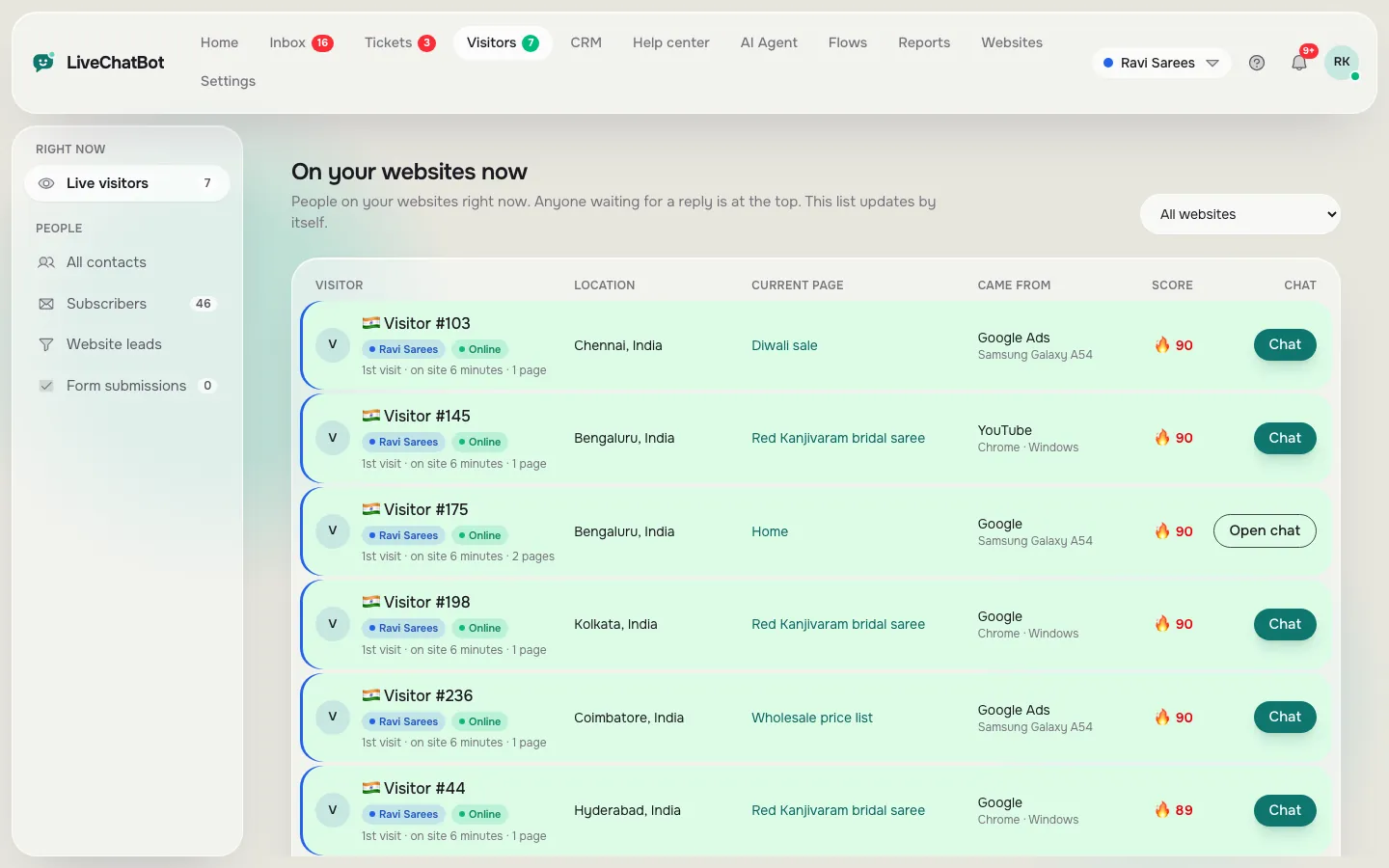
- Visitor tracking, so you see who is on your site and what page they are on.
- Flows: proactive messages with up to six conditions.
- Opening hours and an away form that collects email or phone.
- Tickets, saved replies and a free keyword bot.
- AI replies from your own knowledge, with a monthly allowance shown in the dashboard.
There are no per-seat charges, so a team of five costs the same as one person. Read the longer overview at free live chat.
Limits
The three limits that decide whether free is enough
Visitors a month
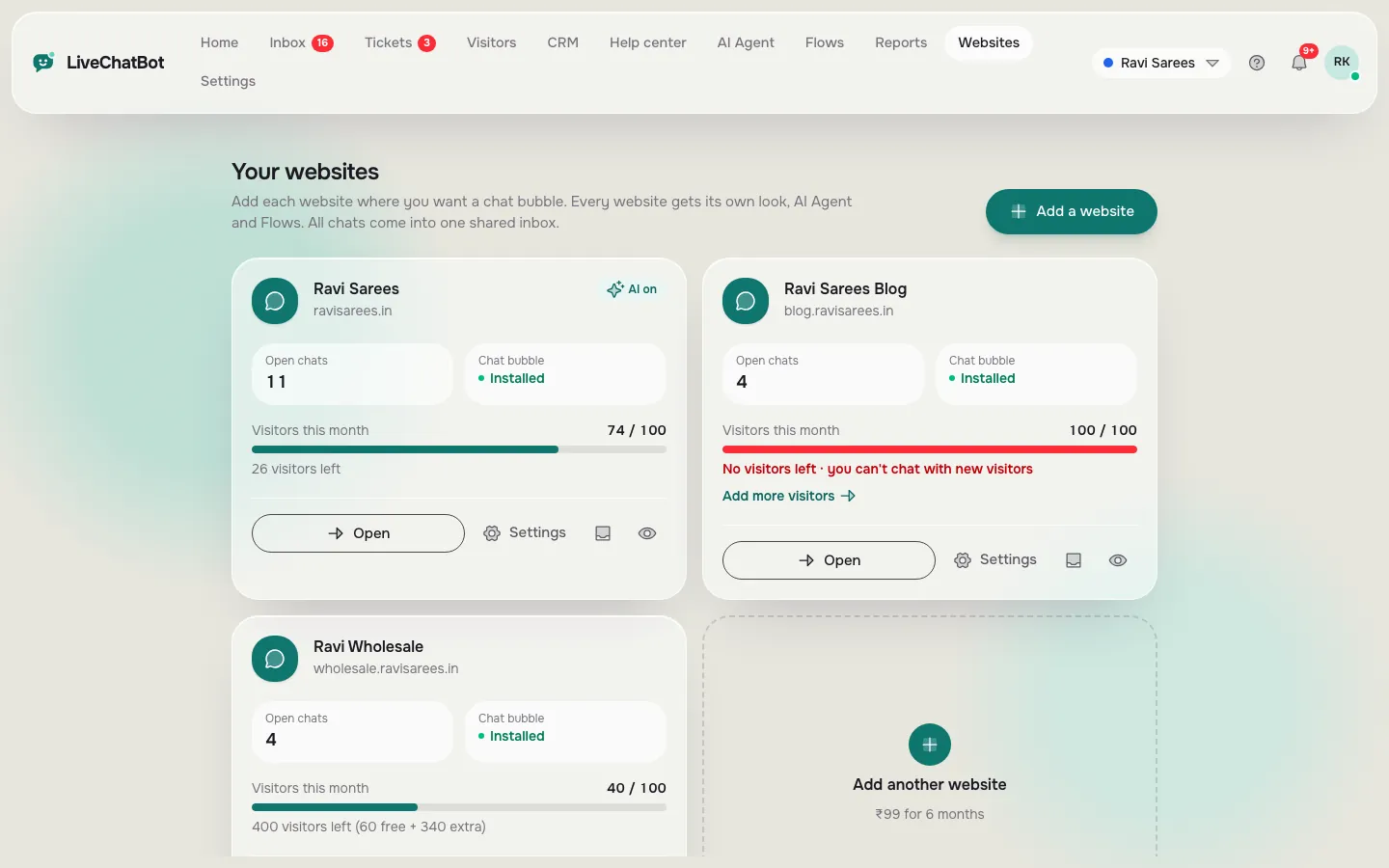
Each website gets 100 free visitors a month. A visitor is counted once a month when they trigger a new-visitor alert. If you go over, tracking and alerts continue, and chat pauses for new over-limit visitors until you move up or the month resets. Nothing is charged automatically.
Websites
Two websites per account are free. Starter also covers two, and Growth covers five, so the website count is rarely the first problem.
AI replies
AI replies have a monthly allowance. When it is used up, the free keyword bot answers from your saved replies. That means a quiet month never leaves a visitor with silence, but a busy month may mean fewer AI-written answers.
Paid plans are prepaid, with UPI and similar methods, and no auto-renew. Yearly means you pay for 10 months and get 12. See pricing for the current plans.
Try it
Is the free plan enough for you?
Answer five quick questions. The quiz counts your answers and shows the plan that usually fits.
Honest gaps
What the free plan doesn’t do
A fair look at free live chat software for website owners needs the gaps too.
- Powered by LiveChatBot stays on all plans, including paid ones.
- There is an Android app for agents, but no iOS app.
- No single sign-on, audit logs or role builder.
- You cannot pick the AI model or add your own API key.
- Visitors are limited each month, as above.
If none of those blocks you, free is a real option, not a trap. If one does, you know before you install. WhatsApp and Facebook Messenger messages can arrive in the same inbox once you connect them through Meta, and a WhatsApp button card sits on the widget, so you can serve customers where they already are without leaving one screen.
Signs to upgrade
Three signs your free live chat software for website traffic has outgrown the plan
You don’t need to guess. The dashboard tells you.
1. Chats pause for new visitors
If the monthly visitor count passes 100 on a website, chat pauses for new over-limit visitors. That is the clearest sign. Check it in the first week of each month, not on the last day.
2. You add a third website
Both free websites are in use and you want another. Growth covers five, and visitors are shared across them, so a quiet site helps a busy one.
3. The team lives in the inbox
When two or three people answer chats every day, the cost of a paused chat is higher than ₹299. Starter is cheap compared with one lost order.
Yearly pricing helps: you pay for 10 months and get 12. The sign-up code WELCOME100 adds 100 visitors once, and a referral gives both companies 200 visitors.
Real screens
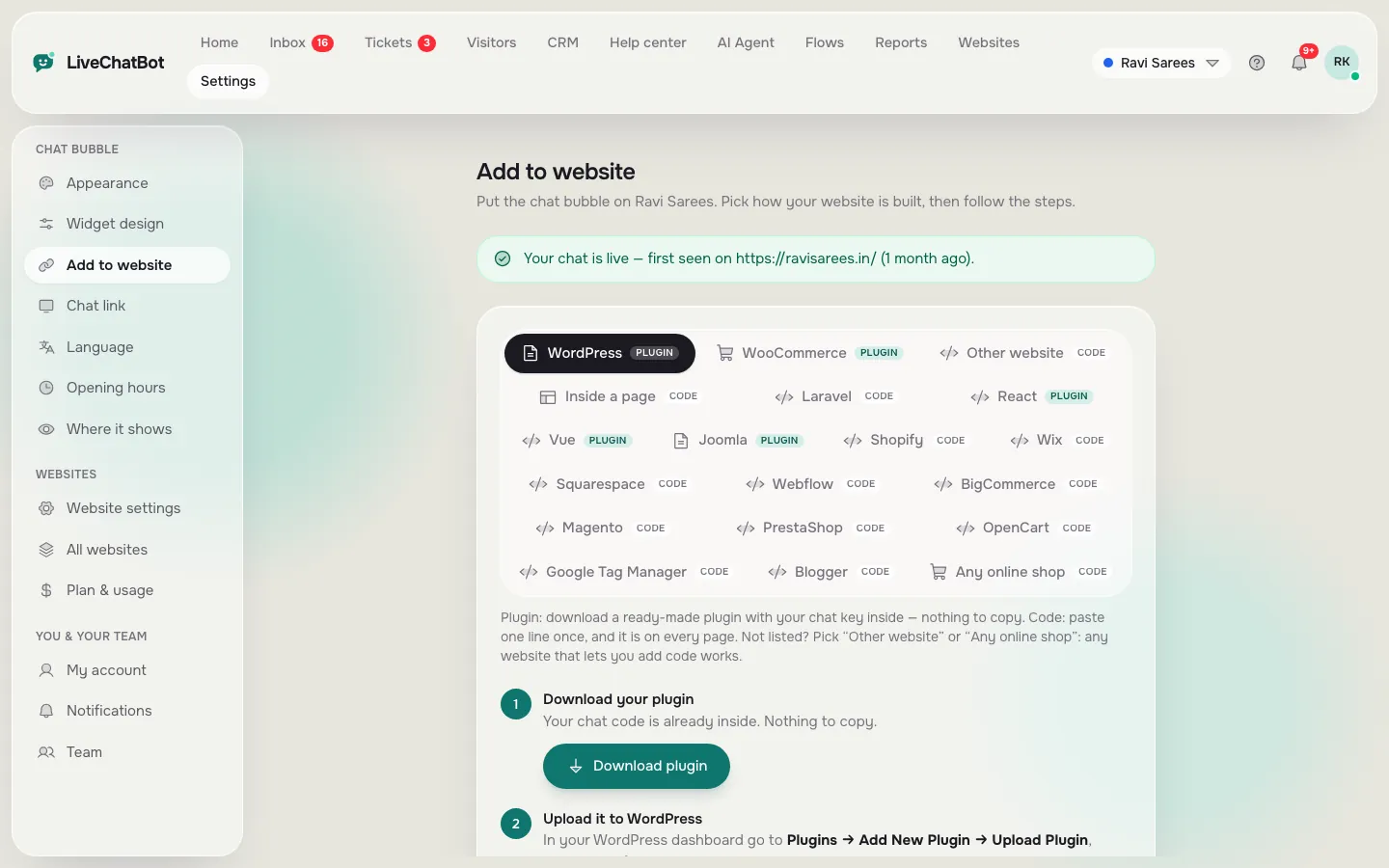
Install, watch visitors and manage your two free websites
Real screens from the LiveChatBot panel, shown with sample data. Click any picture to see it full size.
Setup
A 20-minute path from sign-up to a working chat
- Register at livechatbot.in and add your website.
- Paste the install code before the closing body tag, or use the WordPress live chat plugin.
- Open Widget design and match your colours.
- Write a welcome line using this welcome message guide.
- Add opening hours and turn on the away form.
- Install the Android app and send yourself a test chat.
Shopify, Wix and Squarespace take the pasted code. The full walkthrough is in how to set up live chat on a website.
First month
How to use your first free month well
Treat the first month as a measurement, a trial of free live chat software for your own traffic. Note how many visitors the dashboard counts, how many chats start, and how many are answered within five minutes. Use the Reports area for first response time, and Traffic reports for which pages bring people who act.
At the end of the month, you will know your real visitor count. If you stayed under 100 per site, you may never need to pay. If you went over, you will know which plan to choose, and that is exactly what free software should help you decide. Return to the free live chat guide for the plan details, or sign up at livechatbot.in.
Frequently asked questions
Is there really free live chat software for website use?
Yes. LiveChatBot’s free plan covers two websites with 100 visitors each per month, plus the inbox, Android app, Flows and tickets.
Do I need a credit card?
No. Paid plans are prepaid and do not auto-renew, so nothing is charged automatically.
What happens when I pass 100 visitors?
Tracking and alerts continue, and chat pauses for new over-limit visitors until you upgrade or the month resets.
Can I add team members for free?
Yes. There are no per-seat charges.
Can I remove the Powered by LiveChatBot line?
No. It stays on every plan.
Keep reading
Related guides
Free Chatbot for Website Builders: Which Free and Cheap Site Plans Let You Add One, and What to Do When Yours Doesn’t (Free Builder Checker)
Good Chatbots Share 9 Traits: A Self-Scoring Rubric to Grade Your Own Website Bot
Free Chatbot AI With a Backup Plan: Keep Visitors Answered When the Free AI Allowance Runs Out (Free Fallback Checker)
Try it free for a month
Add livechatbot.in to your website, learn your real numbers and upgrade only if you need to.