The Repeat-Question Audit for Chatbots and Customer Service: What a Bot Should Take Over (Free Audit Checklist)
Chatbots and customer service fit together best when the bot takes the questions your team has already answered a hundred times, and people keep the rest. This guide shows a simple audit you can run on last week’s chats, the arithmetic that turns repeat questions into hours, and a free checklist to set up the split in one afternoon.
Short answer: A chatbot helps customer service by answering the questions that repeat, such as hours, prices, delivery and returns, at any hour. People handle anything that needs judgement, money decisions or a calm voice. Audit last week’s chats to see which group each question belongs to, then build the bot around the repeats.
⚡ In short
- Sort last week’s chats into repeat questions, one-off questions and emotional chats. Only the first group belongs to the bot.
- Repeat questions cost real time: 40 chats a day with 60 percent repeats is about 48 minutes a day.
- A bot needs an exit: a handover to a person, an away form, or a ticket.
- Judge the bot by whether customers ask the same thing twice, not by how many chats it touched.
The fit
How do chatbots and customer service work together?
Chatbots and customer service work together by dividing the work by type, not by volume: the bot takes questions with one correct answer, and your team takes questions that need a decision.
Most small businesses hear two opposing stories. One says a bot will replace support. The other says bots annoy customers and should be avoided. Both miss the practical middle. A bot is a fast, patient colleague who knows a short list of facts and never sleeps. It is a poor colleague for anything that needs empathy, an exception or a judgement call.
The question to ask is not “should we use a bot?” but “which of our questions have a single right answer?” Opening hours, delivery areas, return windows, prices of standard items, how to book: these questions have one answer, and a customer wants it in seconds. Everything else should reach a person quickly. For a wider view of the human side, see our live chat for customer service guide.
Step one
What is the repeat-question audit?
The repeat-question audit is a five-minute count of last week’s chats that sorts every question into one of three groups.
Open last week’s conversations in your inbox and give each first customer question one tag:
- Repeat. You have answered this in almost the same words before. “Are you open Sunday?” “Do you deliver to Pune?”
- One-off. A genuine question about a particular order, document or situation.
- Emotional. An angry, worried or confused customer who mostly needs to be heard.
You do not need software for this. A pen and a page work. Count each group and write the three numbers down. In most small shops the repeat group is the largest, which is exactly why it is worth automating. If your count shows fewer repeats than you expected, that is useful too: it tells you a bot would not save much time yet, and a good saved replies library may be enough.
Original data
Worked example: what repeat questions cost in minutes
This example uses illustrative numbers. Swap in your own from the audit.
Assumptions (illustrative): 40 chats a day, 60 percent are repeat questions, each takes 2 minutes to type, check and send.
- Repeat chats per day: 40 × 0.60 = 24
- Time on repeats per day: 24 × 2 minutes = 48 minutes
- Time on repeats per month (24 working days): 48 × 24 = 1,152 minutes, about 19 hours
That is nearly two and a half working days a month spent retyping the same answers. If a bot took even two thirds of them, you would get about 12 hours back for the one-off and emotional chats, where a person adds real value.
Step two
Which questions should a chatbot answer and which go to a person?
A chatbot should answer questions with one correct answer, and a person should take anything involving money decisions, exceptions or feelings.
Use this quick split after your audit.
Give to the bot
- Opening hours, address, delivery areas and booking steps.
- Price lists and plan limits that are printed on your site.
- Return, refund and warranty rules, written as plain policy.
- Basic “how do I” questions that your help articles already cover.
Keep with a person
- Refund exceptions, discounts and any negotiation.
- Complaints, damaged goods and anything legal or medical.
- Order problems that need a lookup in your own systems.
- Customers who ask for a person. Always honour this.
The AI Agent in LiveChatBot answers from the facts you give it and can follow up to 5,000 characters of written rules, such as “never promise delivery dates”. Our guide to training your AI chatbot walks through feeding it those facts.
Real screens
Where the bot answers, and where a person takes over
Real screens from the LiveChatBot panel, shown with sample data. Click any picture to see it full size.
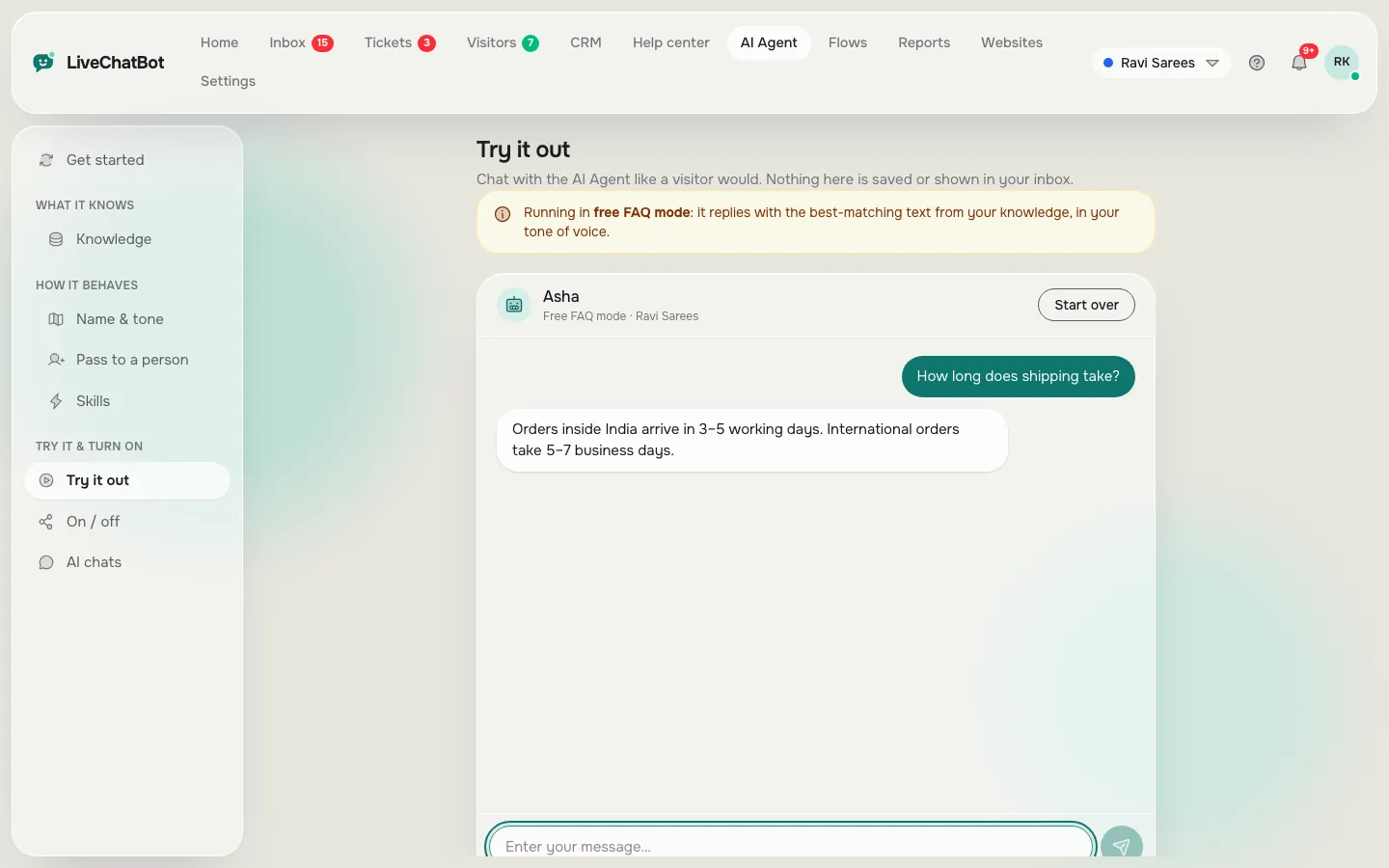
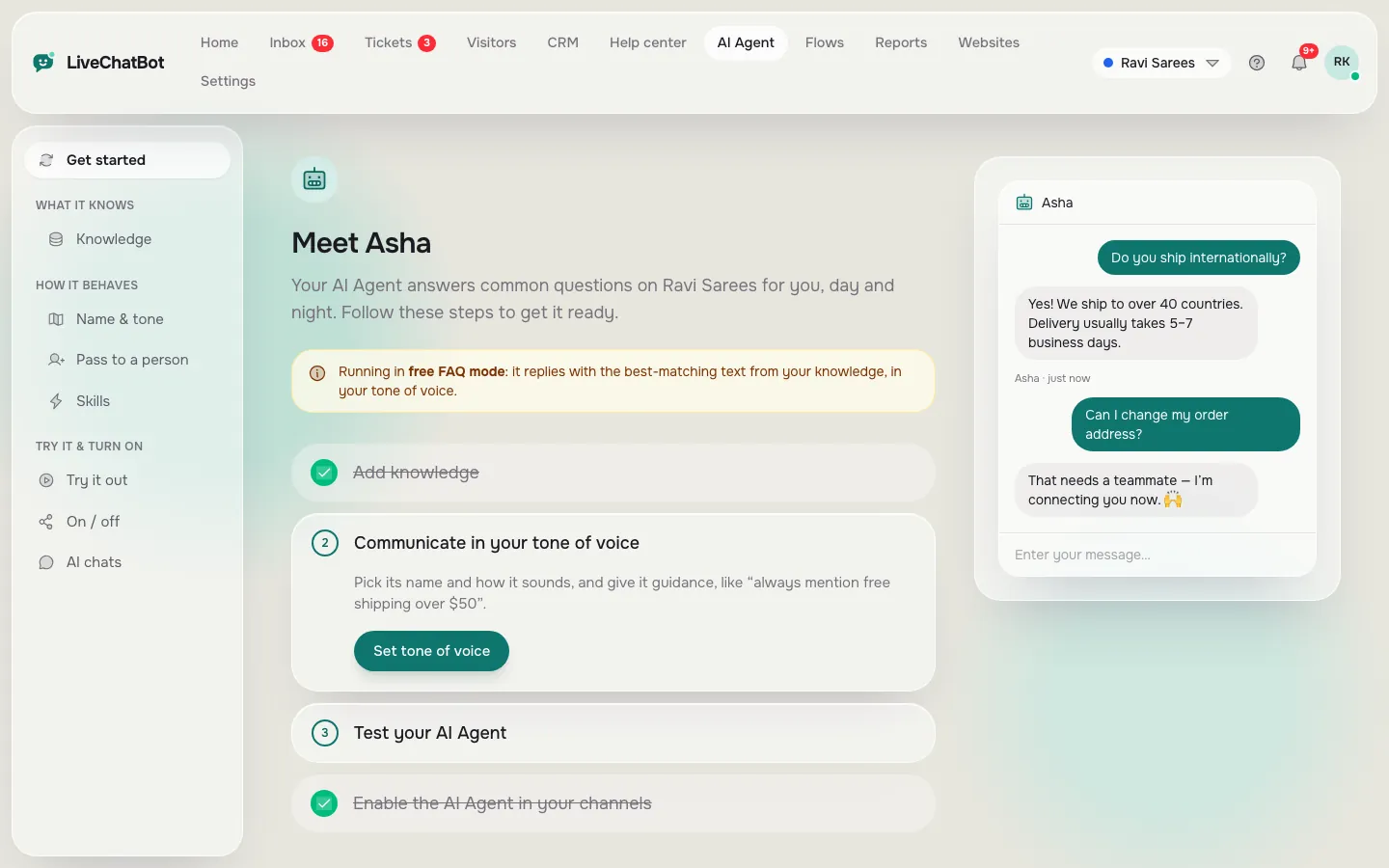
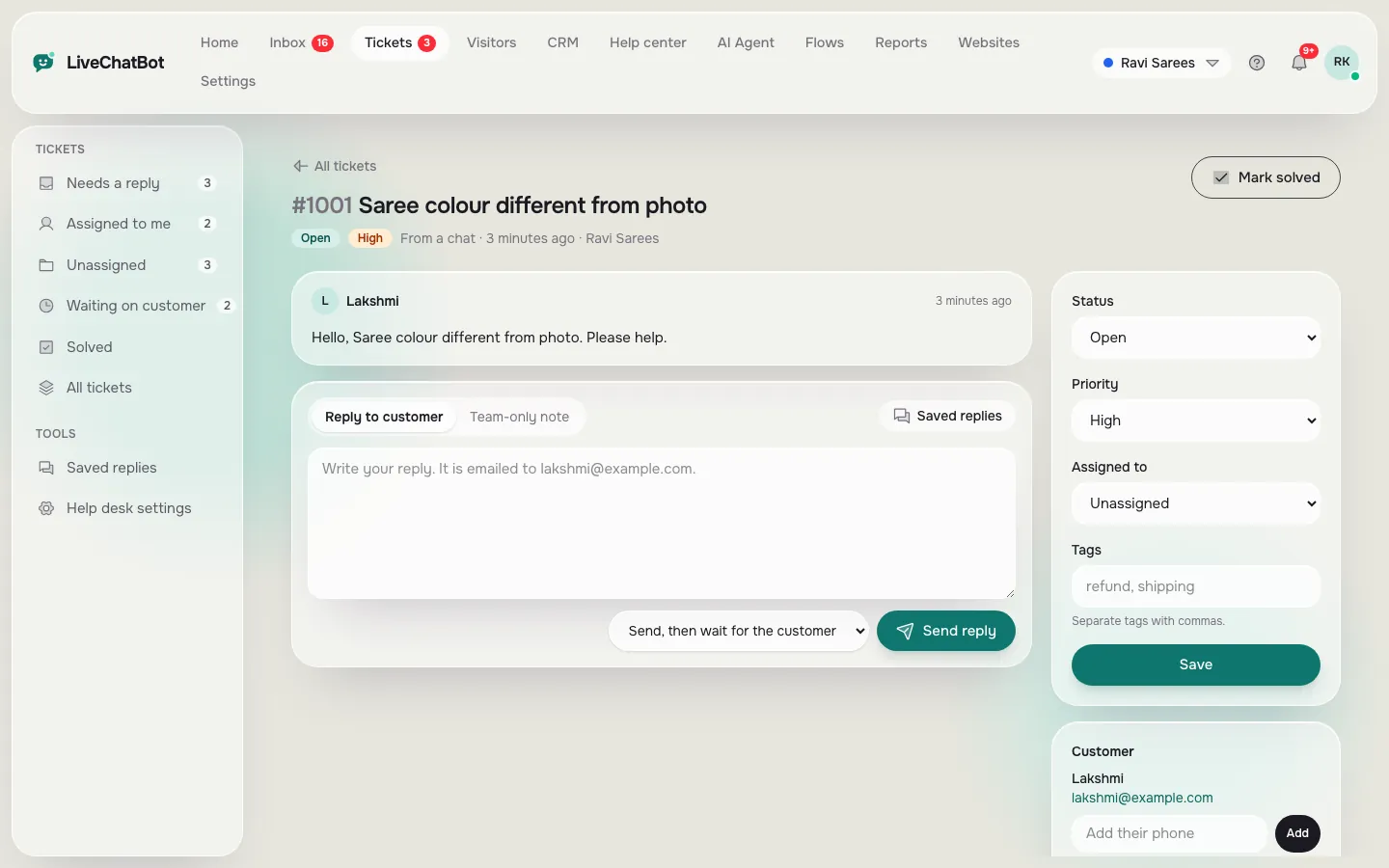
The exit
What happens when the bot cannot answer?
When a bot cannot answer, the customer must see a clear next step within seconds: a person, a form or a ticket.
This is the part most buyers forget to test. A bot that fails silently makes customer service worse than having no bot. In LiveChatBot there are four exits, and you can use all of them:
- Handover to your team. The chat lands in the shared inbox. Agents can use “Assign to me”, and the Unassigned and Mine folders keep ownership clear.
- Chat rescuer. If nobody replies within 6 seconds, the chat asks the visitor for email and phone so the lead is not lost.
- Away form. Outside opening hours, the chat collects email or phone for a morning follow-up. See how to set live chat opening hours.
- Tickets. Any chat can become a ticket with an owner and a customer ticket page. Our guide to turning a chat into a support ticket shows the steps.
Test all four before you announce the bot. Ask it something you never taught it, and watch where the customer ends up.
What most guides miss
The same-question-twice rule
Our rule: the best measure of a bot in customer service is how often a customer asks the same thing twice in one chat.
Most guides tell you to count chats handled by the bot. That number flatters the bot, because a chat the bot “handled” may simply be a customer who gave up. A customer who asks “what is the delivery charge?” and then, two messages later, “but how much is delivery?” has told you the first answer failed.
How to run the test in 5 minutes
- Open ten recent bot-handled chats.
- Count the chats where the customer rephrased the same question.
- Divide by ten. If three or more of the ten show a rephrase, rewrite the answer in your knowledge or saved replies before adding anything new.
A low repeat rate means the answer was clear. A high one means the answer is vague, too long or missing the one detail the customer wanted, often a number. This test needs no software, costs nothing and tells you more than a “bot resolution” percentage, because it looks at what the customer actually did next.
Tone
How do you keep a bot from sounding cold?
Keep a bot warm by writing short answers in the voice your staff already use, and by letting it say what it does not know.
Two habits make the biggest difference. First, set the AI Agent’s name and tone of voice so it sounds like your business, not a generic helper. Second, write answers the way you would say them on the phone: one fact, one next step. “We open at 10 am. Want me to book you a slot?” beats three paragraphs on opening policy.
Also decide, in advance, what the bot says when it is unsure. A good line is: “I am not certain about that. I will pass this to our team, and you can leave your phone number so we can call you back.” Honest uncertainty builds trust. A confident wrong answer destroys it.
For tone ideas, our guides on how to sound human in live chat and positive scripting give lines you can adapt for bot answers as well as human replies.
Try it
Free audit checklist: set up the bot and person split
Tick each step as you finish it. It takes one afternoon on the free plan.
Limits
Where chatbots and customer service still need a person
Some customer service jobs cannot be handed to a bot, and saying so plainly protects your reputation.
LiveChatBot does not read customer sentiment, so it cannot tell on its own that a customer is upset; your team needs to watch for it. It does not look up orders in your own systems unless you connect a store: WooCommerce and Shopify connections show the cart to agents, but the bot is not a substitute for checking a delivery with your courier. It has no voice or phone-call support, and the “Powered by LiveChatBot” credit stays on every plan.
There are also built-in guard rails. Visitor chat messages are limited to 20 per minute per IP, which stops one person flooding the chat. That limit is fixed, not a setting.
None of this makes a bot a bad idea. It just means the best arrangement is a mix, and the audit shows you the exact proportions for your business. For a longer look at how teams and bots share work, our article on bots and AI in customer service is a useful companion.
Cost
What does this cost to start?
Chatbots and customer service can start for ₹0: the free plan covers 2 websites and 100 visitors per website each month, with no per-seat charges.
If your site grows, Starter is ₹299 a month for 2 websites and 750 visitors shared across them, and Growth is ₹699 a month for 5 websites and 2,500 visitors shared. Plans are prepaid, with no auto-renew and no automatic charges, and yearly billing means you pay for 10 months and get 12. AI replies come with every plan, with a monthly allowance shown in the dashboard. Check the current details on the pricing page before you decide, and run your audit first. For the team side, read our live chat for customer service guide.
Frequently asked questions
Do chatbots and customer service staff compete for the same work?
No. A bot takes repeat questions with one correct answer, which frees staff for decisions, exceptions and upset customers. Run an audit of your chats to see how much of your volume is repeats.
How do I know if my customers will accept a bot?
Customers accept a bot that answers quickly and offers a person when it cannot help. Test the exits first, and watch for customers asking the same question twice.
What should a customer service chatbot never do?
It should never promise exceptions, discounts or delivery dates it cannot check, and it should never block a customer who asks for a person.
Can a small business use a bot for free?
Yes. LiveChatBot’s free plan includes 2 websites and 100 visitors per website each month, with a keyword bot and an AI Agent allowance.
How long does setup take?
The audit takes about five minutes, and the checklist above takes an afternoon for most small businesses with ten core answers.
Start with your repeats
Run the audit, then build the bot around what repeats. Free plan for two websites on livechatbot.in.