Chatbot Maker Online Free: Which Kind of Bot Should You Make First, a Keyword Bot, a Flow or an AI Agent? (Free Quiz)
Chatbot maker online free sounds like one thing, but it hides three very different bots: one that matches keywords, one that follows a flow of buttons and messages, and one that writes answers from your facts. Pick the wrong one first and you waste a weekend. This guide explains each in plain words, shows what you can make for free on LiveChatBot, and gives you a five-question quiz that names the right one to build first.
Short answer: A chatbot maker online free tool can build three kinds of bot: a keyword bot that matches saved replies, a flow that starts the conversation, and an AI Agent that writes answers from your facts. Make the keyword bot first if your questions repeat, a flow if visitors stay silent, and an AI Agent if questions vary. LiveChatBot offers all three on a free plan for two websites.
⚡ In short
- A free online bot maker can build three kinds of bot. They solve different problems.
- Keyword bot: fastest, free, answers only what you saved. Flow: best for starting conversations and capturing leads. AI Agent: best when questions vary a lot.
- On LiveChatBot all three live in one account, so you can start small and add the next kind later.
- Take the quiz below to see which one to make first.
Three bots, one word
What a chatbot maker online free tool can actually make
A free bot maker can make three different bots, and the word “bot” hides the difference. Search for a free bot builder and every result promises the same thing: a bot in minutes. What they do not say is that “bot” can mean three different things.
The keyword bot
You save a reply, add the words that should trigger it, and the bot answers when a visitor’s message contains them. It is quick to build and never invents anything, but it only knows what you typed in. On LiveChatBot this is the free fallback that answers from your saved replies.
The flow
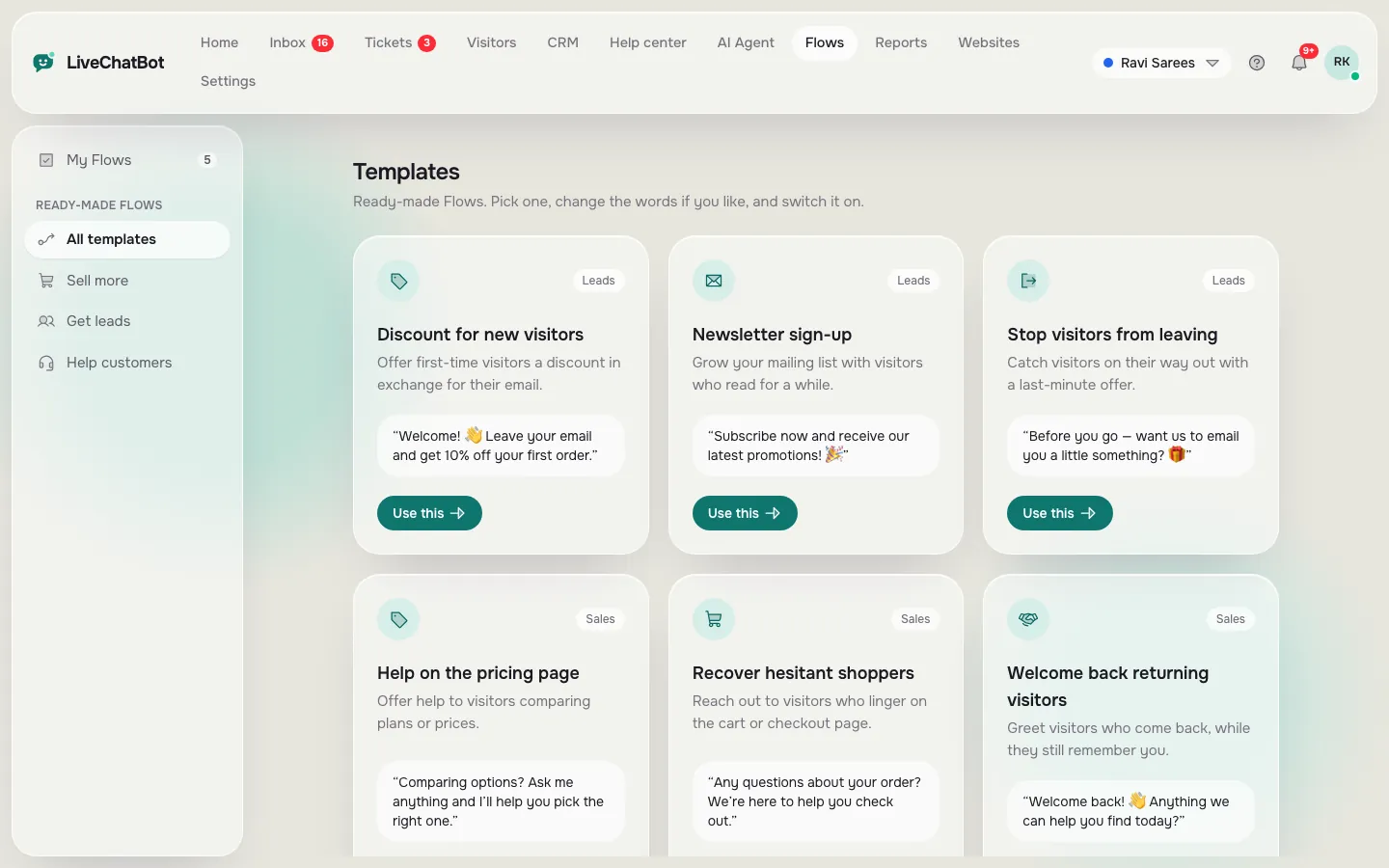
A flow is a planned conversation. It appears on chosen pages, says something useful, and offers buttons or asks for a phone number. It does not wait for the visitor to start. Our guide to creating a chat flow shows the steps.
The AI Agent
The AI Agent reads the knowledge you give it and writes answers in its own words. It copes with questions you never listed. It also needs good facts, and it works within a monthly allowance shown in your dashboard.
None of these is better in general. Each is better for a particular job.
Free quiz
Which bot should you make first?
Answer five questions about your website. The quiz counts your answers and names one bot to build first.
Keyword bot
Making a keyword bot for free in one evening
A keyword bot is the fastest free bot to make, usually in one evening. It is the quickest route, so most people should know it.
- List the ten questions you answer most. Check your email, phone notes and old chats.
- Write each reply in two or three short lines, with the price, hour or rule included.
- Add the words a visitor would use. For a delivery question: delivery, shipping, courier, when will it arrive.
- Test with your own phone, using real wording, spelling mistakes included.
The weak point is wording. If a visitor writes something you did not list, the bot has nothing to say, so keep a human handover close by. Read how to train your bot on real questions for a method that keeps improving it each week.
Flow
Making a flow: the bot that speaks first
A flow is a planned message that appears on a page you choose, without waiting for the visitor to type. It suits sites where people look but rarely type. You choose a page, a condition and a message.
- Page: show it only on pricing, product or contact pages.
- Conditions: page, source, country, device, language, number of visits, lead score or whether you already have their details. You can use up to six.
- Message: one clear offer, such as “Want the price list on WhatsApp?”
- Follow-up: a second message if they do not reply.
If nobody on your team answers within seconds, the chat rescuer asks for email and phone so the enquiry is not lost. See the chat flows page for templates you can start from.
A flow is not a clever conversation engine. Think of it as a polite shopkeeper greeting someone at the door.
AI Agent
Making an AI Agent: facts in, answers out
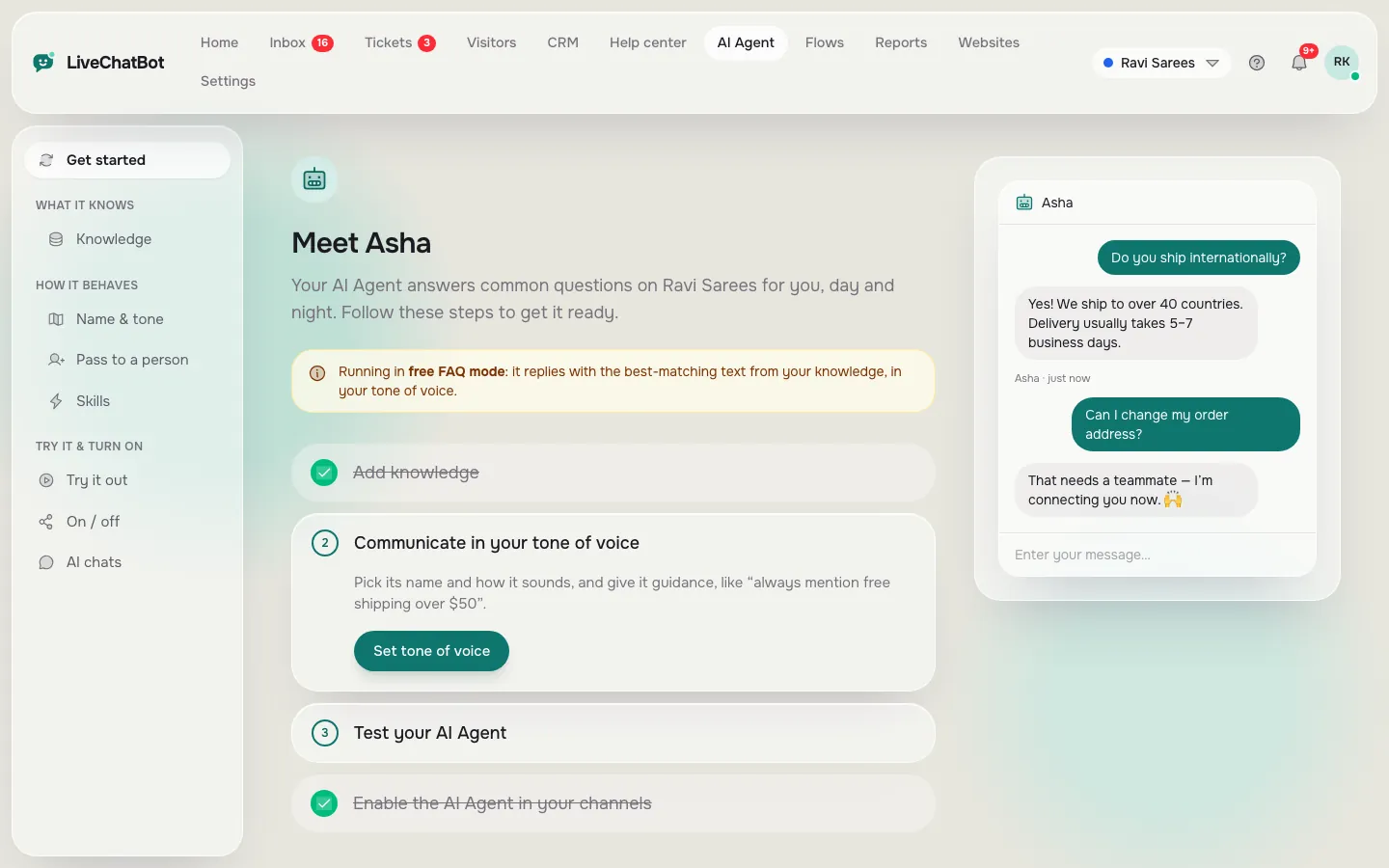
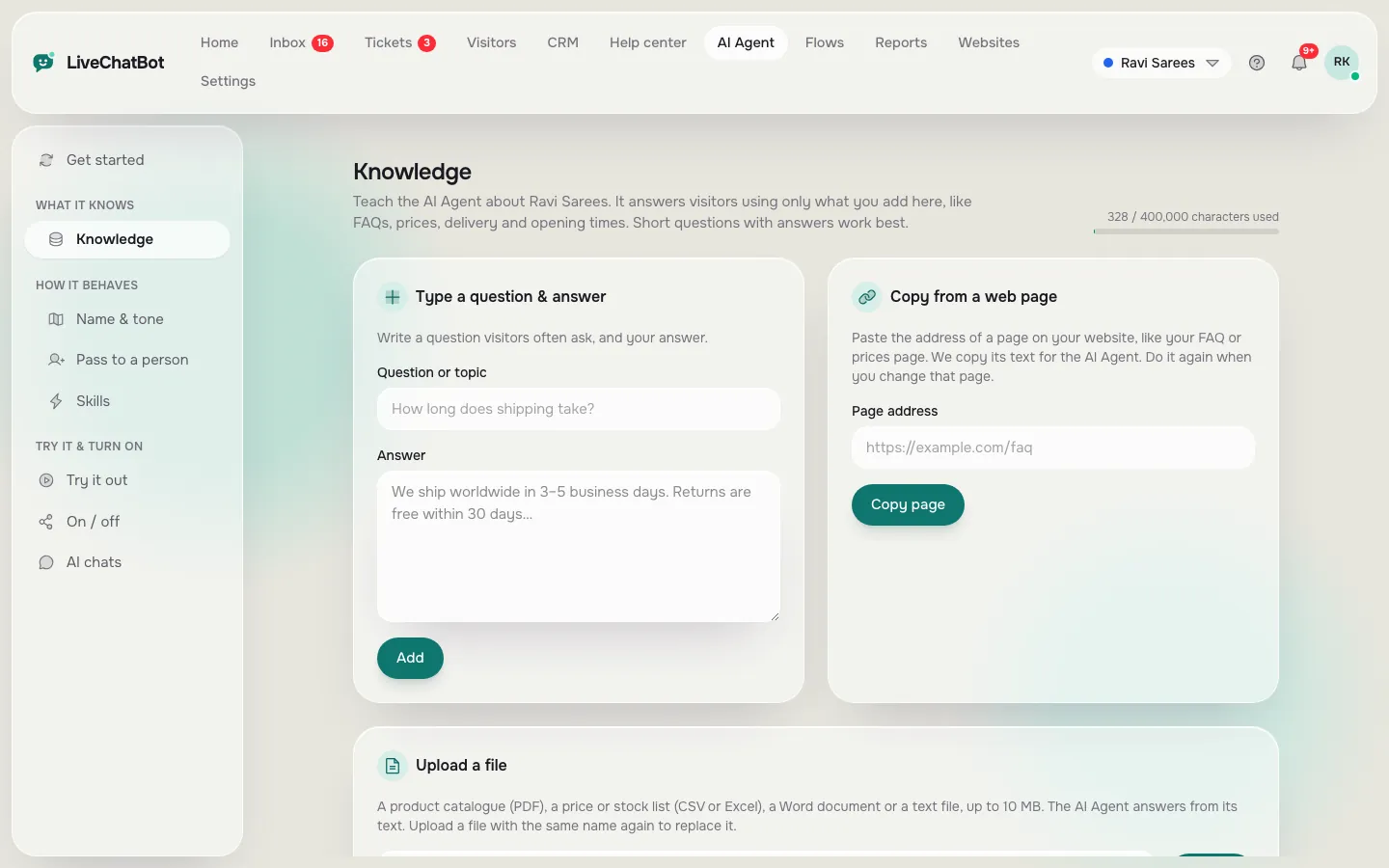
An AI Agent answers only from the knowledge you give it, so making one means writing down your facts. The AI Agent takes them in three ways: type answers, copy a web page, or upload a file such as a PDF, Word document, Excel sheet, CSV or text file.
Two boxes, two jobs
Put facts (prices, hours, delivery rules, policies) in Knowledge. Put behaviour in the Rules to follow box, for example “Never promise delivery dates” or “Ask for a phone number before discussing custom orders.” Rules work while the website has AI replies available.
What to check before trusting it
Ask a question you never taught it. A good answer says it is not sure and offers a person. Also check that facts stay in one place, because an old price in two files will give two answers.
What you cannot choose
You cannot pick the AI model or bring your own API key; LiveChatBot sets that on its side. If you need that control, a free maker is the wrong tool.
Real screens
What you will see in LiveChatBot
Real screens from the LiveChatBot panel, shown with sample data. Click any picture to see it full size.
The word free
What a chatbot maker online free plan really covers on LiveChatBot
Free on LiveChatBot means two websites, 100 visitors per website a month and no per-seat charges. Free should mean something you can check, so here are the real numbers.
- Two websites on the free plan.
- 100 visitors per website each month.
- No per-seat charges, so adding a teammate costs nothing extra.
- Prepaid plans with no auto-renew and no automatic charges.
- Paid plans start at ₹299 a month for Starter and ₹699 for Growth. See pricing.
Remember that “Powered by LiveChatBot” stays on every plan. If you need a badge-free widget, tell yourself that now rather than after setup.
When a month’s visitors go over the limit, tracking and alerts continue, and chat pauses for new visitors beyond it. Nothing is charged without you choosing to pay.
Limits
What no chatbot maker online free plan can do for you
No free maker can do everything, and LiveChatBot is no exception. A good guide admits the gaps. Before you commit time, check this list against your plans.
- No voice or speech bot.
- No native Slack, Telegram, HubSpot, Salesforce or Calendly connection. Zapier and webhooks can bridge some of these.
- No iOS app for your team; there is an Android app, and iPhone users can answer from a browser.
- No single sign-on, audit logs or custom permission roles.
If one of these is a must, read our chatbot maker comparison and shortlist tools honestly. If none is, you can stay with a free plan for a long time.
Order of work
A sensible order: small, then smarter
Make the smallest bot first and add the next kind each week. Most small teams do well with this path.
- Week one: keyword bot with ten replies, plus opening hours and an away form.
- Week two: one flow on your highest-traffic page.
- Week three: AI Agent with your facts and a short list of Rules, keeping saved replies as the fallback.
- Every week: read the chats the bot missed, and add what it lacked.
Set your opening hours early, because night-time chats are where a bot earns its keep. Start with the free live chat plan, then grow only when your numbers ask for it.
Our own numbers
Original data: what the free plan covers, worked out
The free plan covers 200 visitors a month if you use both websites, and a bot built in one evening is realistic. These figures come from LiveChatBot’s own plan limits and from simple arithmetic, not from a survey.
Visitors you can serve free
- 2 websites × 100 visitors each = 200 new visitors a month at ₹0.
- The WELCOME100 sign-up code adds 100 visitors once, so your first month can reach 300.
- The Starter plan at ₹299 a month shares 750 visitors across two websites. That is 750 divided by 299, so roughly 2.5 visitors per rupee.
Time to a first working bot
- 10 replies × about 3 minutes to write each = 30 minutes.
- Adding 4 trigger words per reply = 40 words, about 20 minutes more.
- Testing on your phone = about 10 minutes.
- Total: roughly one hour, which is why we call it an evening, not a project.
Use these as planning numbers. Your own writing speed will move them up or down.
What most guides miss
Our rule: choose the bot by how it fails, not by what it does
Pick the bot whose failure you can live with, because every bot fails on some question. Feature lists describe the good days. Nobody writes about the bad ones.
Here is the failure in each case:
- Keyword bot: says nothing, or says the wrong saved reply when wording differs.
- Flow: gets ignored. The visitor closes the message.
- AI Agent: writes a confident answer from a fact that is out of date.
The five-minute failure test
- Open your chat on your phone.
- Ask one question you never taught the bot.
- Ask one question using a different word from your saved ones, such as “courier” when you saved “delivery”.
- Ask for a person.
- Note what happened each time.
If the answers were silence, a wrong guess or a dead end, fix that before adding anything new. A bot that says “I’m not sure, can I take your number?” beats a clever bot that guesses. We have not seen this test in other maker guides, so treat it as a rule of thumb from us, not a proven standard.
Frequently asked questions
Is there a chatbot maker online free of charge for small businesses?
Yes. LiveChatBot has a free plan for two websites with 100 visitors a month each, with a keyword bot, flows and an AI Agent allowance included.
Do I need to code to use a free bot maker?
No. You type replies, set page conditions and add knowledge. You paste one script on your site, or use the WordPress plugin.
Which bot should I make first?
If questions repeat, start with a keyword bot. If visitors stay silent, start with a flow. If questions vary widely, start with an AI Agent. The quiz above picks one for you.
Can the bot give wrong answers?
A keyword bot cannot invent anything. An AI Agent answers from your knowledge, so keep facts current and test it with questions you never taught.
Can I remove the Powered by badge?
No. The badge stays on every plan, including paid ones.
More to read
More guides on this topic
AI Bot for Website Jobs: Which Job Should Your First Bot Do? Answering, Capturing Leads, Guiding Visitors or Booking (Free Job Picker Quiz)
Make your first bot today
Free plan for two websites, no coding and no per-seat charges. Start on livechatbot.in.