Chatbot Marketing Funnel: How to Turn Anonymous Visitors Into Leads, Buyers and Repeat Customers
Chatbot marketing works best when you stop thinking of the bot as a help desk and start treating it as a step in your funnel. Every visitor is at a different stage: just browsing, comparing, ready to buy, or coming back. The right message at each stage moves them one step closer. This guide maps five funnel stages to the chat messages, triggers and follow-ups that fit each, with examples a small business can set up in an afternoon.
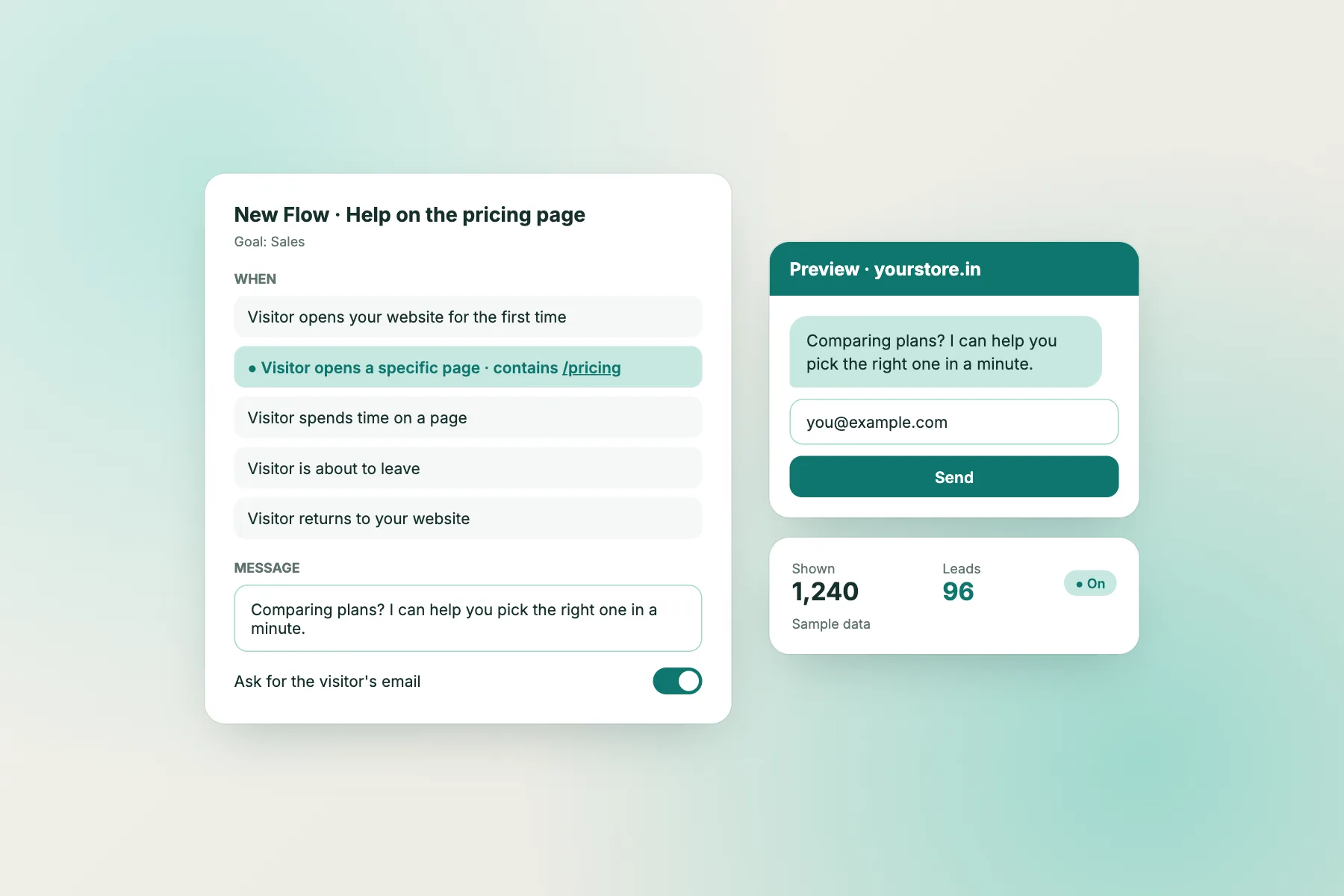
Illustrative chat. A returning visitor gets a different message from a first-timer.
⚡ In short
- Map visitors to five stages: browse, consider, decide, buy, return.
- Each stage needs a different chat message, trigger and goal. One generic greeting wastes them all.
- Use page, source, number of visits and lead score conditions to target messages.
- Measure each stage separately: replies, leads captured, assisted sales, repeat chats.
The idea
Why a single welcome message isn’t a marketing strategy
Most websites have one chat greeting: “Hi! How can we help?” It’s shown to everyone, everywhere, every time. That’s like a shop assistant saying the same sentence to a first-time browser, a customer holding a product at the till, and a regular who comes in every week.
A funnel view fixes this. Visitors arrive at different levels of interest, and what helps a browser annoys a buyer. Someone reading a blog post wants information, not a discount pop-up. Someone on the checkout page with a full cart wants reassurance about delivery or payment, not a newsletter offer. Someone on their fourth visit is clearly interested and might respond to a direct question.
Chat is unusual among marketing channels because it’s two-way and it happens while the visitor is on your site. An email arrives later; an ad interrupts. A good chat message answers the exact doubt the visitor has at that moment. Done well, it doesn’t feel like marketing at all; it feels like service.
The five stages below give you a simple map. You don’t need all five on day one. Start with the stage where you lose the most people, usually “decide” or “buy”, and add the others over time.
The five stages
Browse, consider, decide, buy, return
For each stage: who the visitor is, the goal of the chat, and a sample message.
Goal: be helpful without pushing. Trigger on blog or category pages after 40–60 seconds. Message: “Looking for something specific? I can point you to the right page.”
Goal: answer comparison doubts. Trigger on product, pricing or service pages. Message: “Not sure which plan fits? Tell me your team size and I’ll suggest one.”
Goal: remove the last doubt and capture contact details. Trigger on third visit or a high lead score. Message: “Welcome back! Any questions before you decide? I can also email you a quote.”
Goal: reassure and rescue. Trigger on checkout pages, plus a chat rescuer if a visitor goes quiet. Message: “Questions about delivery or COD? Ask me here; I reply in seconds.”
Goal: support, reorders and referrals. Trigger on order-tracking or account pages. Message: “Need help with an order? Share your order number and I’ll check.”
Targeting
How to tell which stage a visitor is in
You can’t read minds, but your chat tool can read signals. In LiveChatBot’s Flows, a proactive message can use up to six conditions together, and most of them map neatly onto funnel stages.
Page
The page someone is on is the strongest single signal. Blog and guide pages suggest browsing; product and pricing pages suggest considering; cart and checkout pages mean buying. Our page-by-page guide suggests where to greet and where to stay quiet.
Number of visits
A first visit is usually browsing. A third visit within a couple of weeks usually means serious interest. Showing a “welcome back” message to returning visitors is one of the simplest upgrades you can make.
Source
Visitors from a Google search for a product name are closer to buying than visitors from a social post. Visitors from an email campaign already know you.
Lead score and contact details
If a visitor has already shared an email or phone number, don’t ask again. If their lead score is high, a person may want to reply rather than the bot.
Country, device and language
Use these to adjust delivery promises, shorten messages on phones, and greet visitors in their language. See multilingual live chat.
Combine two or three signals per message. “Pricing page + third visit” is far more precise than either alone.
Message library
Sample messages for every stage
Copy, then adapt to your voice and products.
Capturing leads
Collect contact details at the right moment, not the first one
The marketing value of chat often comes from contact details: an email or phone number you can follow up with. But asking too early kills conversations. Nobody wants to fill in their phone number before they’ve asked a question.
Answer first, ask second
Let the visitor ask their question and get a useful answer. Then offer something that genuinely needs contact details: a quote by email, a callback, a size-swap guarantee, a reminder when stock returns. People share details when there’s a clear reason.
Use the away form after hours
Outside your opening hours, an away form that collects an email or phone number turns night-time visitors into morning follow-ups. Set it up with opening hours.
Don’t ask twice
If the visitor already shared details, use a condition so marketing messages skip the request. Repeating the question is a quick way to look careless.
Be honest about what happens next
“We’ll email your quote within an hour and won’t add you to a newsletter unless you ask” builds more trust than a vague “we’ll be in touch”. If you do want to add people to a list, ask clearly and record their consent. India’s DPDP Act 2023 expects clear notice and consent for personal data, so keep your privacy policy in step.
For more on turning chats into qualified leads, see our lead generation guide.
Measure it
One number per stage
Track these monthly. A spreadsheet is enough.
| Stage | What to count | Healthy sign | If it’s low |
|---|---|---|---|
| Browse | Replies to proactive messages | Some visitors reply or click a link | Delay the message or make it more specific |
| Consider | Comparison questions answered | Fewer repeat questions on product pages | Add missing details to the page itself |
| Decide | Contact details captured | A steady trickle of quotes or callbacks | Offer a clearer reason to share details |
| Buy | Chats on checkout that end in an order | Fewer abandoned carts after a chat | Check delivery and payment answers |
| Return | Repeat customers who chat | Reorders and reviews from chat | Greet returning customers differently |
There are no universal benchmarks for small sites; compare each month with your own last month.
Common mistakes
Five ways chat marketing backfires
Chat is personal, so mistakes feel personal too. Avoid these.
- Popping up instantly on every page. A message in the first two seconds feels like a pushy salesperson. Wait until the visitor has had time to look.
- Discount-first messages everywhere. Offering a coupon to everyone trains customers to wait for one and cuts your margin on people who would have paid full price.
- Pretending the bot is a person. Customers feel tricked when they find out. Say it’s an assistant and offer a human when needed. See how to tell visitors honestly.
- Ignoring replies. A proactive message invites a reply. If nobody answers and the bot can’t help, you’ve made things worse. Make sure someone, or a good AI answer, is there.
- Too many messages at once. One proactive message per visit is plenty. Use the follow-up message sparingly, and only if it adds something new.
Good chatbot marketing feels like a helpful shop assistant who notices you’re looking at the sizes rack and asks if you need a hand. Bad chatbot marketing feels like someone following you around the shop. The difference is timing, relevance and restraint.
By business type
Where the funnel leaks, and the message that plugs it
The stage that matters most depends on what you sell.
Online shop
Most leaks happen at buy: delivery cost, COD and returns doubts on the cart page. Put your strongest message there, with the chat rescuer on. See cart abandonment.
Coaching or courses
The leak is at decide: parents and students visit several times before enrolling. A ‘welcome back’ message offering a counselling call works well.
Clinic or salon
The leak is at consider: people want prices, timings and whether you treat their problem. Answer those instantly and offer a booking callback.
B2B services
Visitors read a lot (browse) and rarely ask. A soft message on case-study or service pages, offering a short call, turns readers into conversations.
Real estate
Enquiries arrive late at night. The away form at decide stage, collecting a phone number for a morning call, is the biggest win.
Local shop
Most visitors are at return: checking hours, stock or directions. Quick, factual answers keep them coming back.
Getting started
A one-afternoon setup
You can have a basic funnel running in an afternoon.
- Hour 1: install the chat widget, set your colours, team name and welcome text, and add your top twenty questions to the AI Agent’s knowledge so it can answer common doubts.
- Hour 2: create two proactive messages: one on pricing or product pages for returning visitors, and one on checkout with the chat rescuer switched on.
- Hour 3: set opening hours and the away form, connect leads to a spreadsheet with Zapier if you want, and test everything on your phone.
Then leave it for two weeks and read the conversations. Chatbot marketing improves fastest when you read real chats, not dashboards. You’ll quickly see which stage needs more attention.
LiveChatBot’s free plan covers two websites with 100 free visitors per website each month, including Flows, the AI Agent with a small monthly allowance and the free keyword bot as a fallback. Start on livechatbot.in. For ready-made messages, see our proactive live chat guide.
Frequently asked questions
What is chatbot marketing?
Using a website chat or bot to engage visitors with timely messages, answer buying questions, capture contact details and follow up, so more visitors become customers.
Will proactive messages annoy visitors?
They can if they appear instantly, everywhere. Target them by page and number of visits, wait a little, and show one message per visit.
When should I ask for an email or phone number?
After you’ve answered the visitor’s question, with a clear reason such as sending a quote or a callback.
Do I need a separate marketing tool?
Not to start. Proactive messages, conditions and an away form cover the basics; Zapier can send leads to your sheet or CRM.
How do I know it’s working?
Track one number per funnel stage each month and compare with the previous month.
Keep reading
Related guides
Chatbot Maker Red Flags: 10 Things That Look Great in a Demo but Cost You Later
Build your first chat funnel this week
Two targeted messages, one away form and your top twenty answers. Free on livechatbot.in.