Embed Chatbot in Website Free: Fill the Bot Before You Paste the Code, and a 20-Minute Plan That Costs Nothing (Free Quick Quiz)
Embed chatbot in website free is easy to do and easy to do badly. The code is one paste, but your first free visitors meet whatever the bot knows at that moment. This guide gives you a 20-minute order of work that puts the answers in first, the exact paste routes for common site types, and a short quiz that picks the route that fits your site.
⚡ In short
- Fill the bot first: type 10 answers, then paste the code, so your first free visitors meet a bot that knows something.
- The free plan covers 2 websites with 100 visitors each a month, no card needed.
- One paste of the install code covers every page that shares your site template.
- Prove it with a phone on mobile data, not only the computer you built it on.
Short answer
How do you embed chatbot in website free of charge?
To embed a chatbot in a website for free, create a free LiveChatBot account, add your website, copy its install code and paste it once into your site’s header or footer area, or use the WordPress plugin. The free plan covers two websites with 100 visitors each per month. Add a few answers first so the bot is useful from the first visit.
Why order matters
The order of work matters because the first free visitors arrive the minute you paste
Embedding is not finished when the widget appears; it is finished when the first stranger gets a useful answer. Most guides stop at the paste. They leave you with a chat bubble that opens onto an empty bot.
That matters more on a free plan than a paid one. Your free allowance is 100 new visitors per website per month, counted once a month per visitor when they trigger a new-visitor alert. If your first twenty visitors meet a bot that knows nothing, you have spent a fifth of your month on a bad first impression.
So the plan below reverses the usual order: knowledge first, code second, proof third. It works for any site. If you want the wider picture first, read our free live chat guide, then come back. If you are comparing routes, our post on embedding chat in website pages covers counting templates, and this one covers what to do before and after the paste.
Step 1
Step 1 to embed chatbot in website free is to create the account and add your site
Create the account and add your site first, because the install code belongs to a website entry. Go to livechatbot.in, sign up with your email and phone, and add your website address in the dashboard. The free plan needs no card and allows two websites.
Add the address visitors really type. If your shop is at www.example.com, add that, not a test link. The second free website slot is useful for a practice page before the real launch.
This step takes about two minutes. Do not copy the code yet. The point of the plan is that the code comes after the answers.
Step 2
Step 2 is to teach the bot ten answers before the code goes live
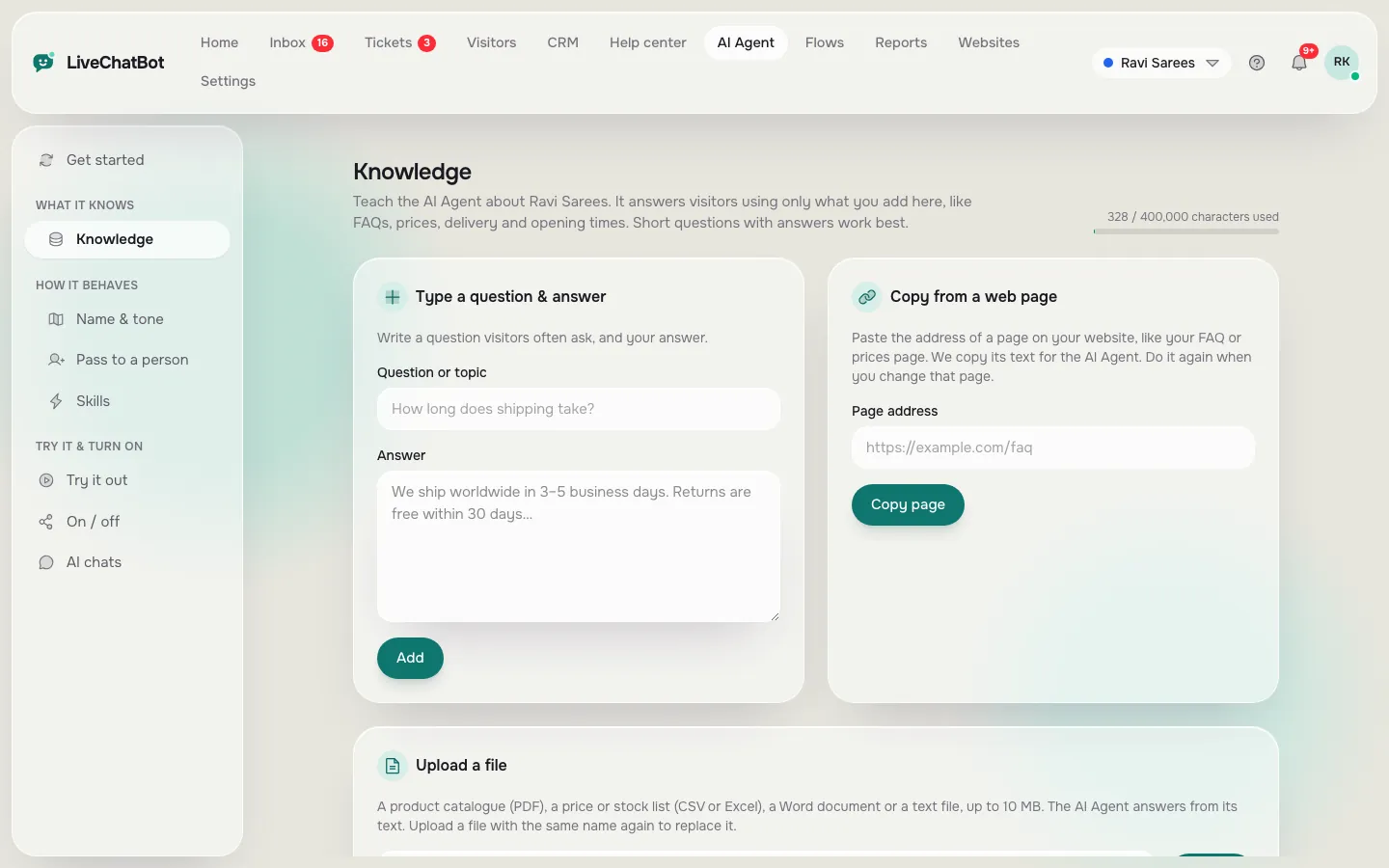
Ten answers are enough to make a first visit useful. Open the AI Agent and add knowledge in whichever way is quickest for you: type answers, copy a web page into it, or upload a file (PDF, Word DOCX, Excel XLSX, CSV or TXT).
Choose the ten questions your phone or WhatsApp already gets:
- Prices or price ranges.
- Opening hours and location.
- Delivery, booking or appointment rules.
- Returns, refunds or cancellations.
- How to contact a person.
Then set opening hours and the away form so out-of-hours visitors can leave an email or phone number. Read more on training in how to train your AI chatbot. The AI Agent answers from what you give it, so a thin knowledge base gives thin answers.
Original data
A worked example: the 20-minute free embed budget
Illustrative worked example for a small site. The times are estimates for a first-time user, not measurements; the product facts (one paste, two free websites, 100 visitors) are real.
Sign up, add the site address. Cost: ₹0.
Ten answers at about one minute each, typed or copied from a page you already have.
Set opening hours so after-hours visitors can leave email or phone.
Copy the install code and paste it once where your site keeps shared header or footer code.
Open the site on a phone over mobile data and send one test question. Total: 20 minutes.
Real screens
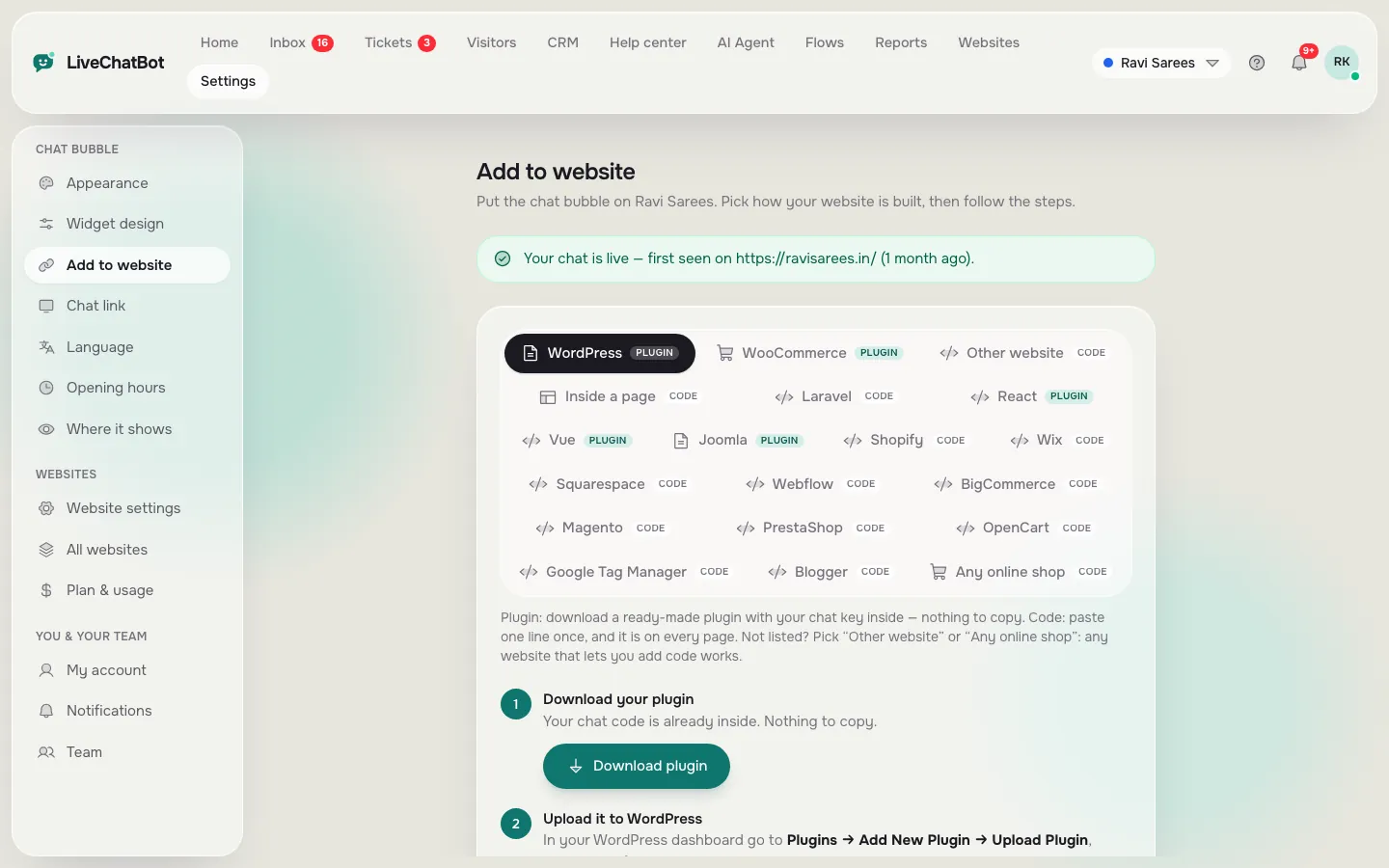
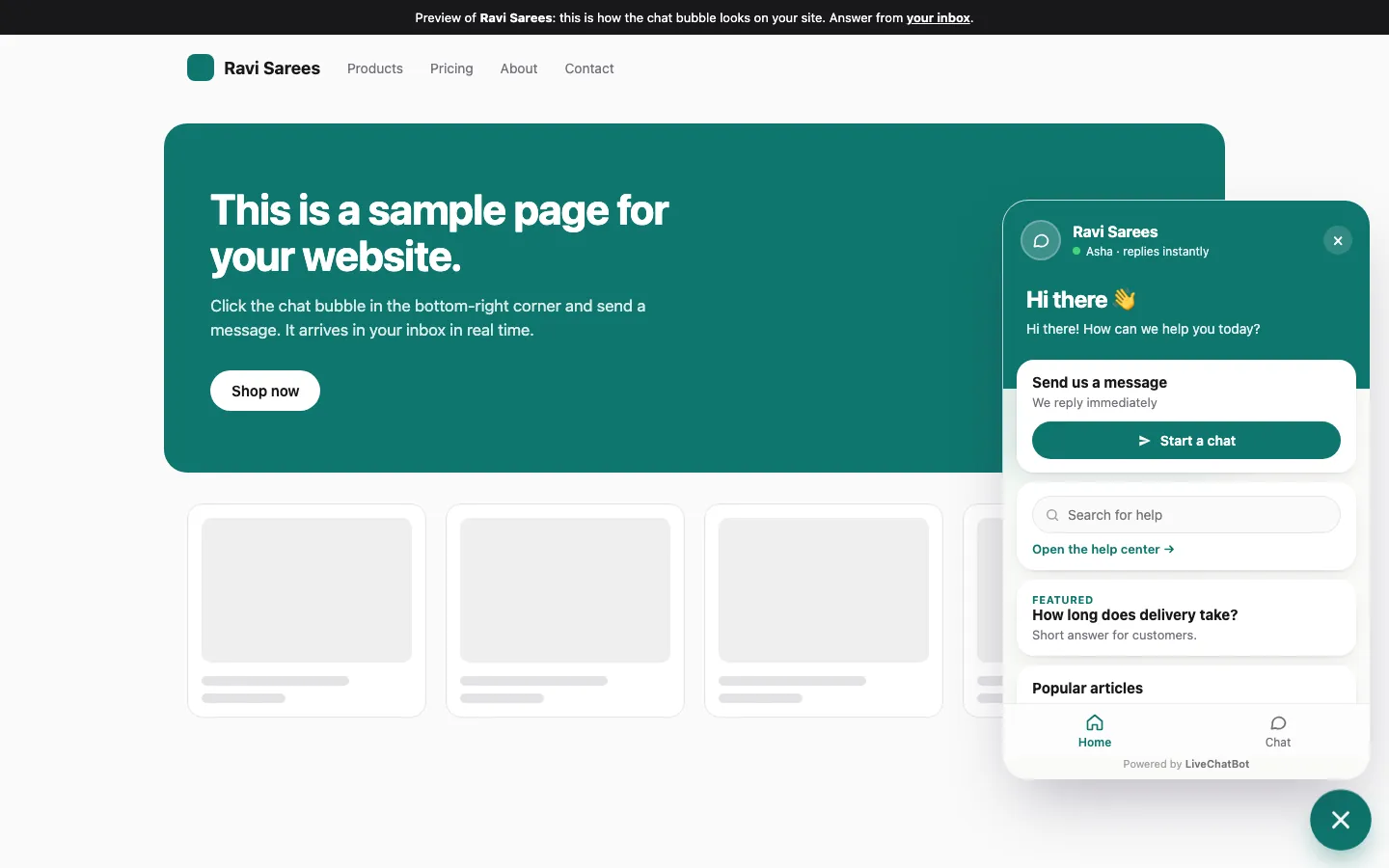
The three screens behind a free embed: install code, knowledge and the live widget
Real screens from the LiveChatBot panel, shown with sample data. Click any picture to see it full size.
Step 3
Step 3 to embed chatbot in website free is one paste, in the place your site shares across pages
The code goes in one shared place, not on every page. Which place depends on how your site is built.
WordPress
Use the WordPress live chat plugin and enter your key, or paste the code into a header and footer area. No theme file edits are needed.
Shopify, Wix and Squarespace
These paste the code into the site’s custom code area. There is no Shopify App Store app; you connect your store and paste the code. See Shopify live chat and Wix live chat.
Plain HTML and other builders
Paste the code before the closing body tag on the shared template or layout file. If every page is a separate file, repeat it per file.
Joomla, React and Vue
Joomla has an extension, and React and Vue have plugins. Each loads the same widget.
What most guides miss
Our rule: fill before you paste, and prove it on a phone you did not build it on
Most guides say “paste the code and you’re done”. Two habits make the free embed better, and as far as we can tell they are not written down elsewhere.
Fill before you paste. The bubble should never open onto an empty bot. Even ten answers change the first-visitor experience, and a free visitor allowance is worth protecting.
Prove it on the wrong device. The computer you built the page on has a cached copy and may be logged in as an admin. Open the site on a phone over mobile data, or ask a friend. If the bubble shows and a question gets an answer there, the embed is real.
This is a working rule, not a measured result. The test takes under five minutes and catches the most common “I pasted it but nothing shows” cases, which are covered in our guide to a free chatbot for website without coding.
Try it
Which free embed route fits your site?
Answer four questions. The result is a starting route, not a rule.
Step 4
Step 4 is to prove the embed with three checks that take five minutes
Three checks prove an embed: it loads on a second page, on a phone, and it sends you an alert. Do them in that order.
- Second page. Open a page you did not use for testing. If the bubble is missing, the code is on one page only, not the shared template.
- Phone on mobile data. Open the site, tap the bubble, and ask one taught and one untaught question. The untaught one should get an honest reply or a handover.
- Alert. Install the Android app and confirm your phone gets the message from step two. There is no iOS team app; iPhone users answer from a browser.
If something fails, look at where it shows: visibility rules may be hiding the chat on that page or device. See chat widget customization for the colour, position and visibility settings.
Free limits
What stays the same on the free plan after you embed
The free plan has fixed limits, so know them before you embed. These are product facts.
- Websites: 2 per account.
- Visitors: 100 per website per month. Over the limit, tracking and alerts continue, and chat pauses for new over-limit visitors until you move to a paid plan or the month resets. Nothing is charged automatically.
- Badge: “Powered by LiveChatBot” stays on every plan, including free.
- Seats: no per-seat charges, so adding a teammate does not add cost.
Paid plans are Starter ₹299 a month and Growth ₹699 a month, with visitors shared across your websites. Pay by UPI, with no auto-renew. The code WELCOME100 adds 100 visitors once at sign-up. See pricing for details.
Start now
Embed chatbot in website free today, in the order that protects your first visitors
Create your account at livechatbot.in, add ten answers, paste the code once, and test on a phone. That is the whole plan to embed chatbot in website free of charge, with the bot ready before the first visitor arrives. For more on what the word free covers, see the free live chat overview, or read how the website chat widget looks on your pages.
Frequently asked questions
Can I embed a chatbot in my website for free?
Yes. The LiveChatBot free plan lets you add two websites with 100 visitors each per month, with no card needed.
Do I need to know how to code to embed a chatbot?
No. You paste one snippet into a shared code area, or install the WordPress plugin. Builders like Wix and Squarespace have a custom code box for it.
Why does my embedded chatbot not show?
Common causes are code on one page only, a visibility rule hiding the chat, or a cached page. Check a second page and a phone on mobile data.
Does the free embed remove the Powered by badge?
No. The badge stays on every plan, including free.
How long does it take to embed a chatbot?
The paste takes about two minutes. A first-time plan including ten answers and a phone check takes about 20 minutes.
Keep reading
Related guides
Embed Chat in Website: Count Your Page Templates First, Paste Once, Then Prove It With a Three-Window Test
Embed the chat the safe way
Free plan for two websites. Add answers, paste once, prove it on a phone. Start free on livechatbot.in.