Best Free Chatbot for WordPress Should Also Catch Your Forms: Turn Contact Form 7, WPForms and Other Submissions Into Leads
Best free chatbot for WordPress lists nearly always compare chat bubbles and AI answers, and forget the other door into your inbox: the contact form. Most WordPress sites already have one, and its messages sit unread in an email folder. This guide shows how a chatbot can catch those submissions as leads, with an instant alert, and which form plugins LiveChatBot understands.
⚡ In short
- A WordPress site has two doors for enquiries: the chat bubble and the form. A good free chatbot watches both.
- LiveChatBot’s widget and WordPress plugin catch Contact Form 7, WPForms, Elementor Pro, Gravity, Fluent and Ninja form submissions as leads.
- Each new lead sends an instant New lead alert, so the form no longer waits in an email folder.
- It does not replace your form plugin or connect natively to HubSpot or Zoho.
The second door
Why the best free chatbot for WordPress watches your forms too
Picture a typical small WordPress site: a services page, a contact form at the bottom, and a chat bubble in the corner. Visitors who want a quick answer use the bubble. Visitors who want a quote fill in the form. Both are real leads.
The trouble is that the two doors usually lead to two places. Chats go to one inbox. Form submissions go to an email address that someone checks when they remember. By the time the form gets a reply, the visitor has often called a competitor.
So when you compare tools, add a question to your list: does it notice my forms? A chatbot that sees both turns your site into one funnel, with every enquiry in one list and a clear owner. For the plugin side of the decision, our guide to the best free chatbot plugin for WordPress covers what free means for plugins, and this post focuses on leads.
What is caught
Which forms LiveChatBot understands
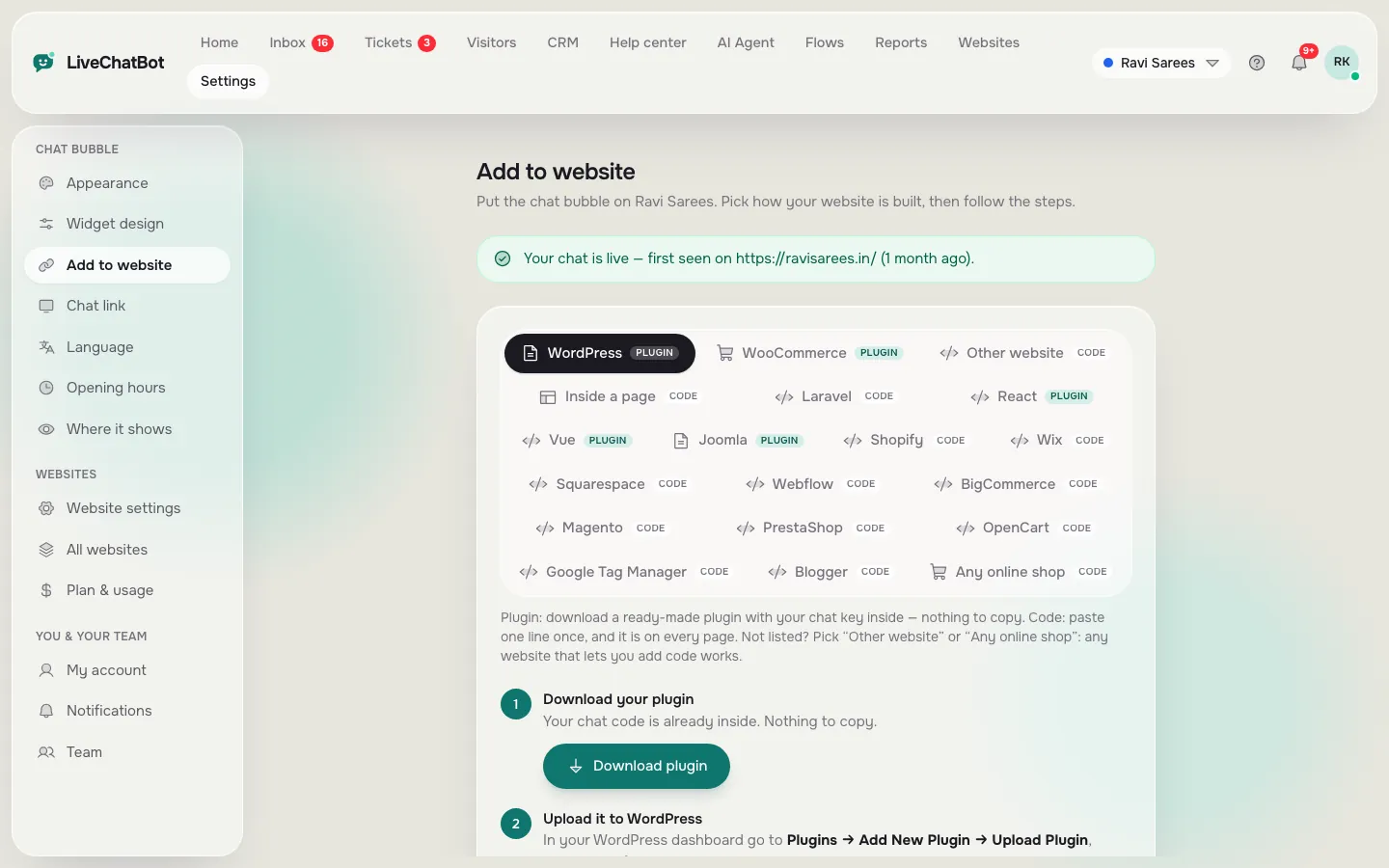
Install the LiveChatBot widget, or the WordPress plugin, and it recognises submissions from these form tools:
- Contact Form 7
- WPForms
- Elementor Pro forms
- Gravity Forms
- Fluent Forms
- Ninja Forms
When a visitor submits one, the details arrive as a lead, and the team gets an instant New lead alert on their phones through the Android app.
A few honest limits. Your form plugin keeps sending its own email as before; LiveChatBot adds a second path, it does not replace it. There is no native connection to HubSpot, Salesforce, Zoho or Pipedrive, though Zapier, webhooks and the REST API can pass lead data on. And if your form lives on a page outside WordPress, the widget still works, because it catches forms on any page where it is installed.
Real screens
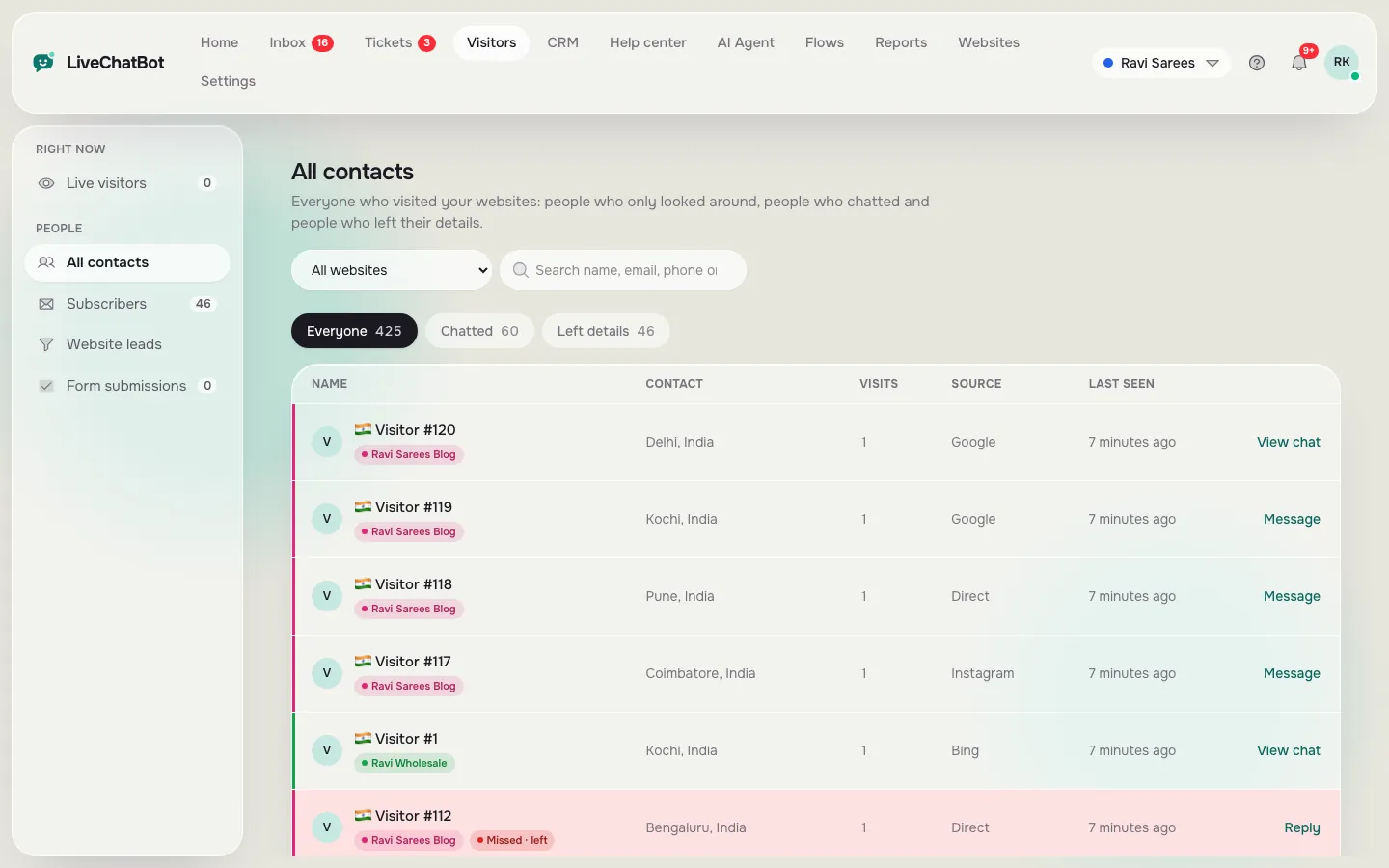
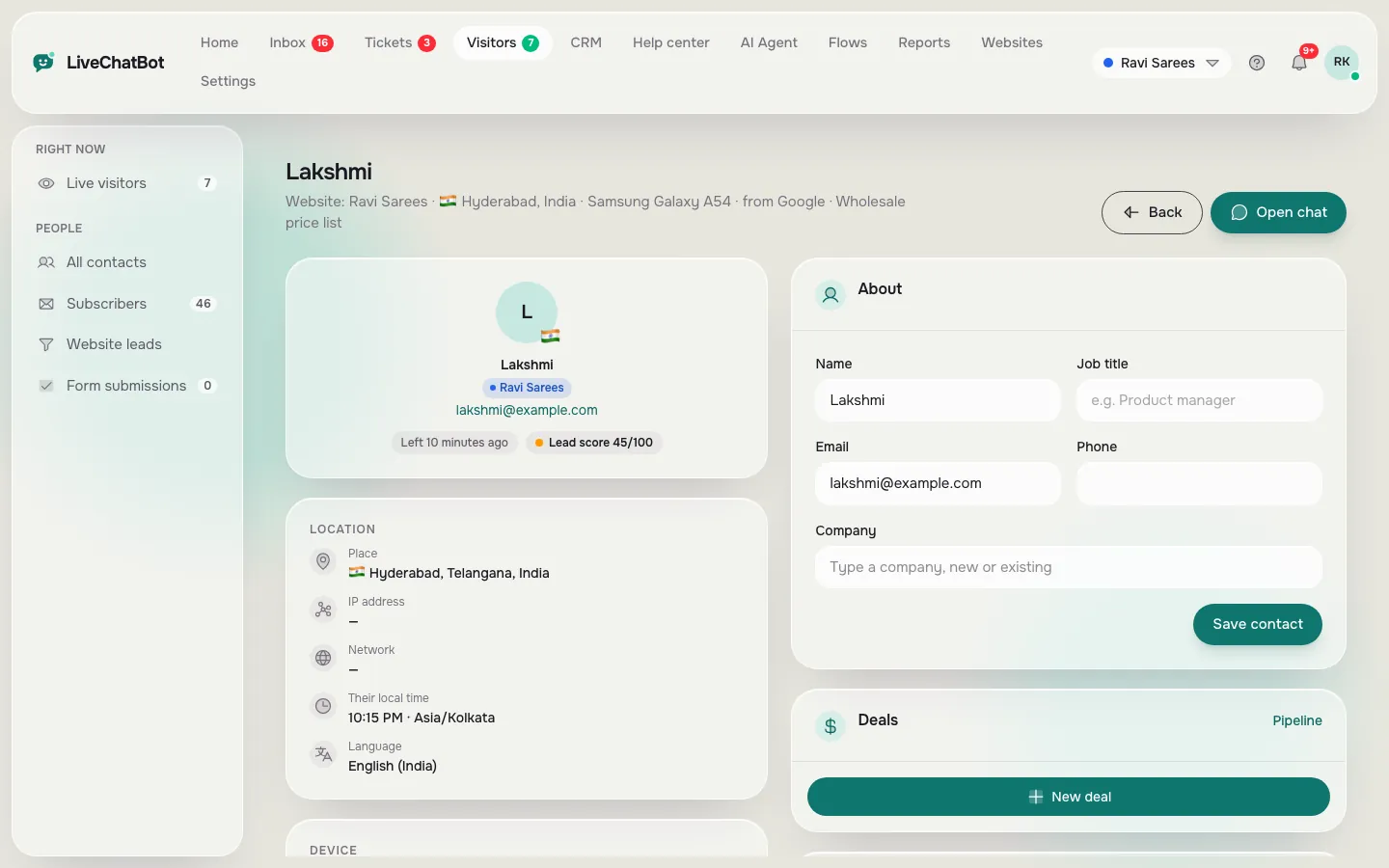
Leads in the contacts list, the install step and a visitor profile
Real screens from the LiveChatBot panel, shown with sample data. Click any picture to see it full size.
Leads in practice
What happens after someone submits a form
Walk through one real-looking case. A plumber’s site has a Contact Form 7 form on its callout page.
- A visitor reads the page, then submits the form at 9:40 pm.
- LiveChatBot records the submission as a lead.
- The plumber’s phone shows a New lead alert straight away.
- In the morning the lead sits in the contacts list and can become a deal in the CRM pipeline.
- Follow-up notes live beside the lead in the CRM.
The point is speed and visibility. The email from the form plugin still arrives, but the alert and the shared list mean the right person sees it in minutes, not hours. For the slower, longer-term view, see our WordPress live chat plugin guide, which covers installation and day-to-day use.
Habits that help
Form handling: mistakes and fixes
Five common ways form leads get lost on WordPress sites, and a better habit for each.
Free plan facts
What the free plan covers for a WordPress site
The free plan is ₹0 and covers 2 websites per account, with 100 visitors per website each month. That is enough for a new business to try the whole set-up: widget, AI Agent, form lead catching, opening hours and the away form.
When traffic grows, Starter costs ₹299 a month for 2 websites and 750 visitors, and Growth costs ₹699 a month for 5 websites and 2,500 visitors, shared across the sites. Plans are prepaid with no auto-renew, and there are no per-seat charges.
On the downside, “Powered by LiveChatBot” stays on every plan, there is no iOS team app, and there is no single sign-on. If you are choosing between several plugins, test the form capture first, using a real submission from your own site, before you spend an afternoon teaching the bot your answers.
Setup order
A sensible order for the best free chatbot for WordPress setup
Do the quick wins first when you set up the best free chatbot for WordPress on a live site.
- Install the plugin or snippet and confirm the bubble appears on your home page.
- Submit a test through each of your forms and check that each shows up as a lead with an alert.
- Teach the AI Agent your top fifteen answers.
- Set opening hours and an away form.
- Install the Android app on the phone of whoever replies.
If you want to compare other free options after that, see our free live chat for WordPress guide. Sign up at livechatbot.in and try it on a staging copy of your site first if you are cautious.
Frequently asked questions
What is the best free chatbot for WordPress?
A good one answers from your own facts, hands over to a person, and also catches form submissions as leads. LiveChatBot does all three, with a free plan for two websites.
Which WordPress form plugins does LiveChatBot catch?
Contact Form 7, WPForms, Elementor Pro forms, Gravity Forms, Fluent Forms and Ninja Forms are caught as leads.
Does it replace my form plugin?
No. Your form plugin keeps working and sending its own email. LiveChatBot adds a lead record and an instant alert alongside it.
Can leads go to my CRM?
LiveChatBot has its own CRM with deals and companies. There is no native HubSpot, Salesforce or Zoho bridge, but Zapier, webhooks and the REST API can pass data on.
Do I need the plugin, or will the snippet do?
Either works. The widget catches forms on pages where the snippet is installed, and the WordPress plugin does the same.
Keep reading
Related guides
Best Free Chatbot for WhatsApp: Button, Inbox or Bot? Know Which Part Is Free Before You Connect Anything
Best Free Chatbot Plugin for WordPress: Read the Fine Print on What Free Really Means (Free Scorecard)
Best Free Chatbot for Website Owners Is the One You Can Fill in One Afternoon: A Starter Pack of Copy-and-Paste Lines (Free Starter Pack)
Never lose a form lead again
Free plan for two websites, instant New lead alerts and no per-seat charges. Start free on livechatbot.in.