Website Visitor Chatbot That Reads the Journey: Guess Intent From Pages Viewed and Open With the Right Line (Free Journey Reader)
Website visitor chatbot greetings usually treat everyone the same: one cheerful “How can I help?” for a buyer on the pricing page, a customer chasing a refund and a student reading your blog. But each visitor leaves a trail before they ever type. The pages they open, where they came from and how often they’ve visited say a lot about what they want. This guide shows how to read that trail, match six common intents to the right opening line, and turn the pattern into targeted messages.
⚡ In short
- Visitors reveal intent through the pages they view, where they came from and how often they return.
- Six intents cover most small-business sites: buying, comparing, needing help, researching, job hunting, wanting a person.
- Each intent deserves a different first line, and some deserve silence.
- Use the signals to target messages, but never tell visitors what you tracked.
Signals
What a website visitor chatbot can know before anyone types
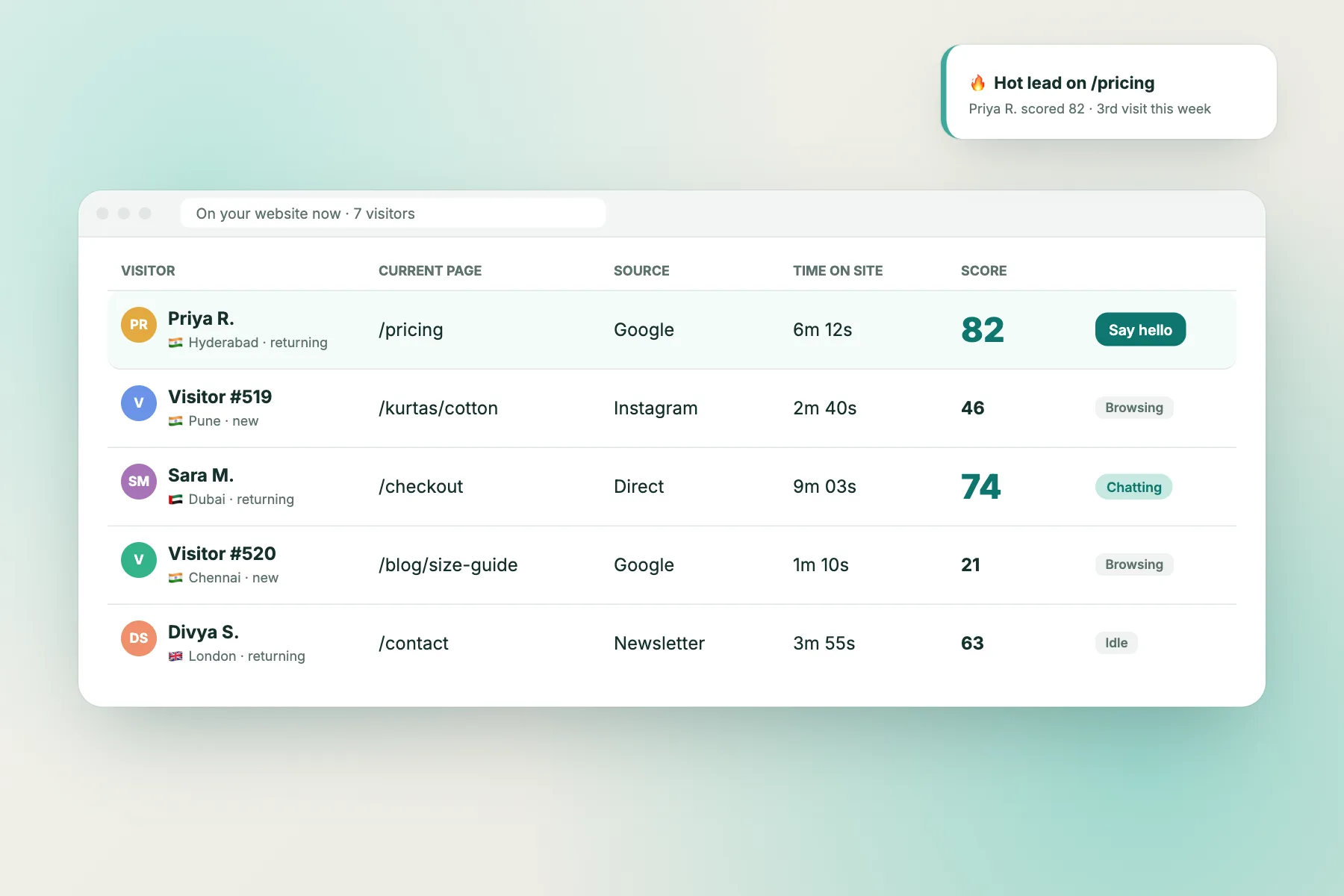
Visitor tracking shows each visitor’s journey as it happens. In LiveChatBot, visitor tracking shows who is on your site, the pages they view, where they came from and how many times they’ve visited. Three signals matter most:
Pages viewed, in order
The last page matters most, because that’s where the visitor is deciding something. A visitor who went from a service page to pricing to FAQ is weighing a purchase. One who opened “track order” and “returns” is a customer with a problem.
Where they came from
Search visitors often arrive with a specific question. Ad visitors responded to an offer. Visitors from an email or WhatsApp link are usually existing customers.
Number of visits
A third visit to the same pricing page is a stronger signal than a first. People come back when they are close to deciding and something is holding them back.
Six intents
Match the visitor to the first line
| Intent | Typical trail | Best first move |
|---|---|---|
| Ready to buy | Service page → pricing → booking | Offer help with the decision |
| Comparing | Features, reviews, gallery | Answer doubts, offer proof |
| Needs help | Track order, returns, account | Help at once, hand over order questions |
| Researching | Blog posts and guides | Stay quiet or one light line |
| Job hunting | Careers page | Point to how to apply |
| Wants a person | Contact, about, location | Offer chat as the fastest route |
Free tool
Read one visitor’s journey
Paste the pages a visitor viewed, choose where they came from and which visit it is. The reader guesses the most likely intent, suggests an opening line and lists the conditions to target visitors like them.
Paste the pages one visitor viewed, in order, one per line (copy them from your visitor tracking or analytics). Add where they came from and which visit this is.
Runs only in your browser; nothing is sent or saved. It guesses from page addresses, so name your pages clearly.
Turning patterns into messages
From one journey to a targeted message
Reading one journey teaches you something. Reading twenty shows a pattern. When you see the same trail again and again, turn it into a targeted message.
In LiveChatBot, Flows send proactive messages based on up to six conditions, including the page, the traffic source, the country, the device, the browser language, the number of visits, the lead score and whether the visitor has given contact details. A follow-up message can go out if the visitor doesn't reply. Our guide on creating a chat flow walks through it.
For example (illustrative), a renovation firm could send "Any questions about prices or timelines?" to visitors on the pricing page on their second visit or later, and nothing at all to blog readers. For the visitors who reply, the AI Agent can answer common questions straight away, and your team can step in from the inbox.
After the first reply
What happens once the visitor answers
A good opening line only earns a reply. What you do next decides whether that reply becomes a booking, a solved problem or a lost lead.
Ask for contact details at the right moment
Buyers and comparers often go quiet halfway through. Once the question is answered, ask for an email or phone number so you can follow up. Flows can also check "has contact details", so visitors you already know don't get asked twice.
Keep answers consistent
Your team will type the same replies about prices, timings and returns many times a day. Saved replies with {name} keep them quick and consistent, and the free keyword bot uses them when the AI Agent isn't available.
When nobody is online
Set your opening hours. Outside them, the away form collects an email or phone number, and offline messages can become tickets, so a customer with a returns problem at midnight isn't forgotten.
Score what you learn
The lead score condition lets you treat warm visitors differently from casual browsers, for example a faster follow-up message for high scores.
Privacy
Use the trail, don't mention it
Reading intent is helpful. Announcing it is unsettling. "I see you've looked at our pricing page four times" tells the visitor they're being watched, and many will leave.
Keep the signal behind the scenes and let it shape only the timing and topic of your message. "Any questions about prices?" on a pricing page feels natural. Mentioning visit counts, their city or the ad they clicked does not.
Two more rules. Don't greet on every page; a visitor reading an article doesn't want interruptions. And mention chat tracking in your privacy notice, in plain words, so visitors know what's recorded.
Mistakes
Where a website visitor chatbot gets intent wrong
- Treating every visitor as a buyer. Existing customers and job seekers get sales pitches and leave annoyed.
- Judging from one page. A single view of the pricing page might be curiosity. Wait for a second signal.
- Unclear page names. If your pages are called /page-12, nobody can read the trail. Use names like /pricing and /returns.
- Greeting too fast. Give visitors a few seconds on a page before a message appears.
- Never checking. Read the chats that follow each targeted message. If people ignore it, change the line or the trigger.
Getting started
Read ten journeys this week
Open your visitor list during a busy hour and copy the trails of ten visitors. Run each through the reader, write down the intents you see most, and build one targeted message for the most common one. That's the first step to a website visitor chatbot that greets people the way a good shop assistant would.
LiveChatBot's free plan includes visitor tracking, Flows, the AI Agent and the team inbox for two websites, with 100 visitors per website each month. Start at livechatbot.in.
Frequently asked questions
What does a website visitor chatbot do differently?
It uses what visitors do on your site, such as the pages they view, where they came from and how often they return, to choose when to speak and what to say, instead of greeting everyone the same way.
Can the bot read visitors' minds?
No. Page trails give a good guess, not certainty. That's why the first line should be an open, helpful question rather than an assumption.
Should I greet blog readers?
Usually not. Let them read. A small chat button is enough if they have a question.
Is tracking pages legal?
Basic site analytics is common, but you should explain it in your privacy notice and follow the rules where you operate, such as India's DPDP Act 2023.
Does the journey reader store what I paste?
No. It runs in your browser and nothing is sent or saved.
Keep reading
Related guides
AI Chatbot for Online Customer Support: Measure Real Resolution, Not Just Chats Without a Human (Free Resolution Calculator)
Real Time Website Chat Software, Timed: Where the Seconds Go Between a Visitor's Message and Your Reply (Free Delay Finder)
Live Chat Support System Blueprint: The 7 Parts Every Small Team Needs, From First Message to Follow-Up (Free Gap Checker)
Greet each visitor the right way
Visitor tracking, Flows with conditions and the AI Agent on the free plan. Start on livechatbot.in.