Cost to Build a Chatbot: The Five Bills Behind It, With the Year-One Maths Worked Out in Rupees
Cost to build a chatbot is not one number. It is five separate bills: design, building, running, upkeep and your own time. Most price pages show only the third one. This guide puts all five side by side, shows the first-year maths with every assumption visible, and compares a custom build with a ready-made plan.
Short answer
The cost to build a chatbot ranges from ₹0 on a free plan to several lakh rupees for a custom build. A ready-made plan costs ₹299 to ₹699 a month. A custom bot costs developer hours to build, then hosting, model usage and monthly upkeep, so year two is rarely free.
⚡ In short
- Five bills: design, build, running costs, upkeep and your own time. Quotes usually show one.
- Ready-made: ₹0 free, ₹299 Starter, ₹699 Growth per month; paying yearly gives 12 months for the price of 10.
- Custom: our illustrative example comes to about ₹1.28 lakh in year one. Change the assumptions to match your quote.
- Upkeep, not the build, is the bill most people forget.
The five bills
The cost to build a chatbot is five bills, not one
A chatbot costs money in five places, and each one can be zero, small or large depending on the route you take.
1. Design
Someone decides what the bot answers, what it refuses, and when it hands over to a person. On a ready-made tool this is an afternoon of your own time. On a custom build it is a written spec, often a paid line on the quote.
2. Building
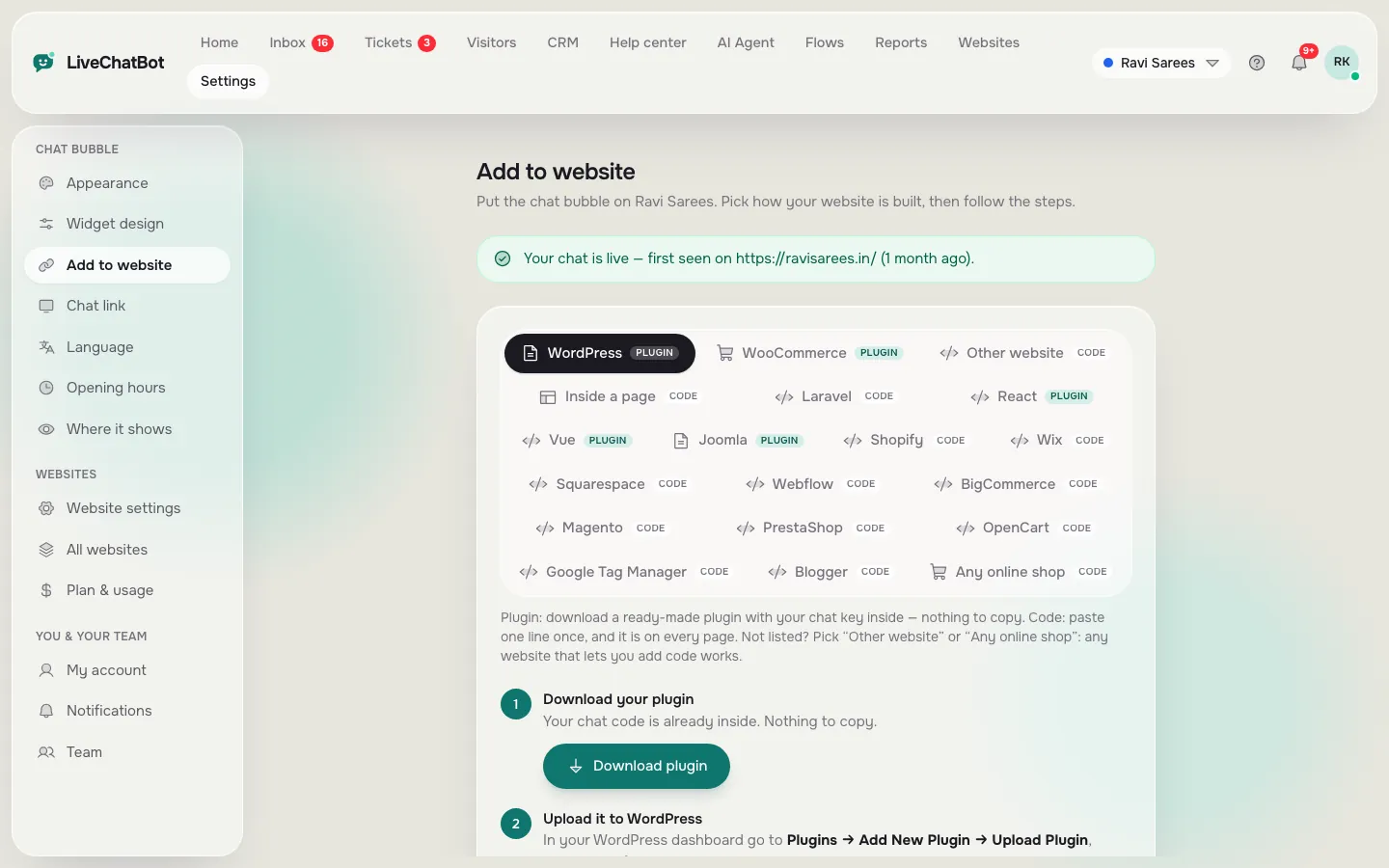
This is the line everyone asks about. Custom means developer hours: the chat window, a connection to an AI model, a place to store your facts, and an admin screen. Ready-made means a few minutes to paste one line of code.
3. Running
Hosting, the AI model’s usage fees and any message services. On a ready-made plan this is folded into the monthly price. On a custom build it is a bill that arrives every month, and it grows with your traffic.
4. Upkeep
Prices change, hours change, a new product launches. Every change has to reach the bot. This is covered in more detail below.
5. Your own time
Reading chats, correcting wrong answers, replying to the people the bot hands over. Nobody invoices it, so everyone forgets it.
Sorting the bills
Where each bill lands on each route
Worked example
Year-one maths: a custom build against a ready-made plan
A custom bot costs roughly its build hours plus a year of upkeep, and the sum is easy to check yourself. Original data, worked example: the hours and the hourly rate below are our own illustrative assumptions, not a survey. Replace them with the numbers in your own quote.
Custom build, year one (illustrative):
- Build: 80 hours × ₹1,000 an hour = ₹80,000
- Upkeep: 4 hours a month × 12 months × ₹1,000 = ₹48,000
- Year-one total: ₹80,000 + ₹48,000 = ₹1,28,000, before hosting and model usage
Ready-made on LiveChatBot, year one (real list prices, see pricing):
- Free plan: ₹0, for 2 websites and 100 visitors per website a month
- Starter: ₹299 × 10 paid months = ₹2,990 for 12 months, up to 750 visitors a month shared across 2 websites
- Growth: ₹699 × 10 paid months = ₹6,990 for 12 months, up to 2,500 visitors a month shared across 5 websites
Divide ₹1,28,000 by ₹2,990 and you get about 43. In this example the custom bot costs roughly 43 Starter years, and that gap is before a single message is sent. Plans are prepaid with UPI and similar methods, with no automatic renewal and no per-seat charges, so the ready-made figure does not creep upward.
Real screens
What building a chatbot looks like on a ready-made plan
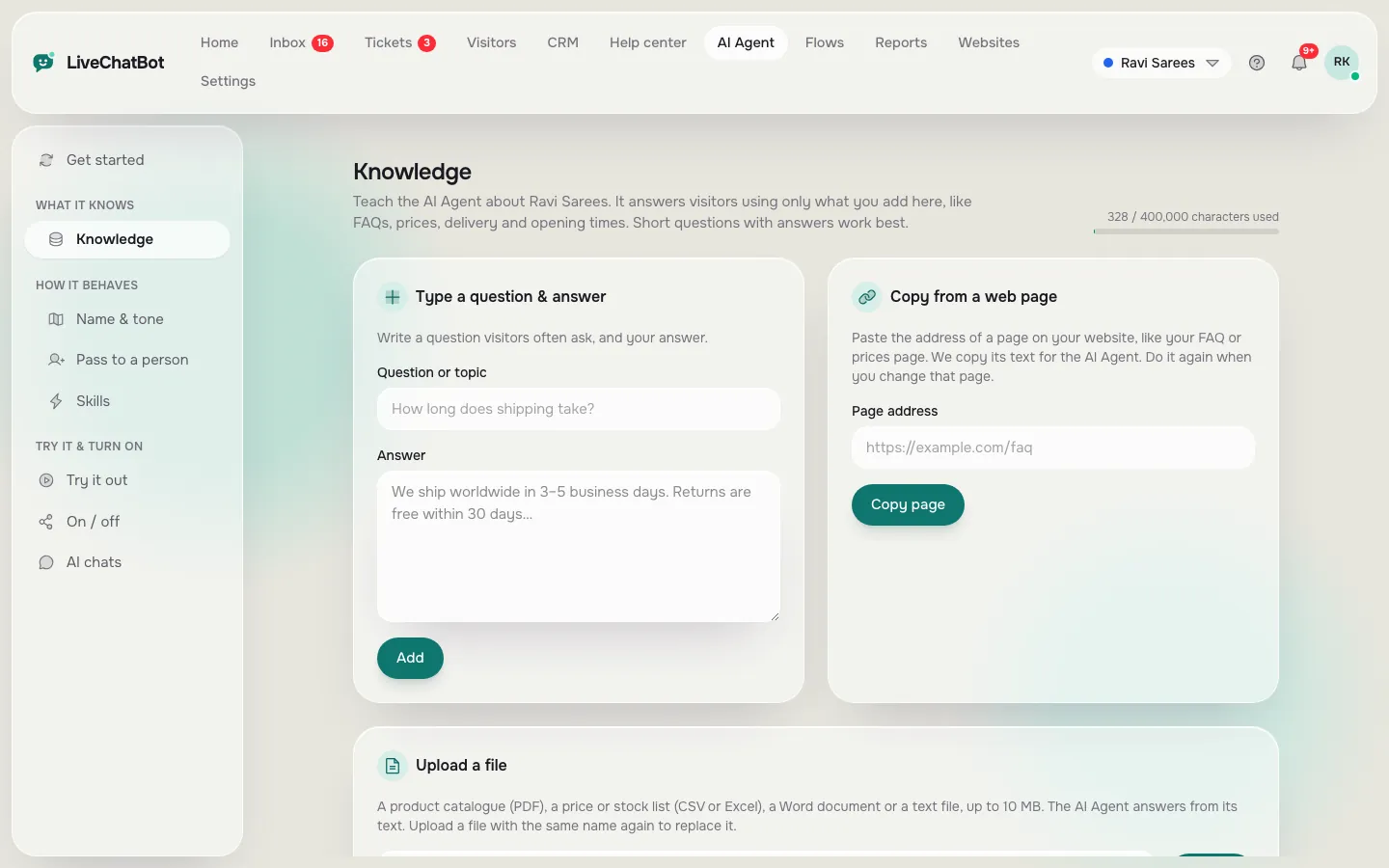
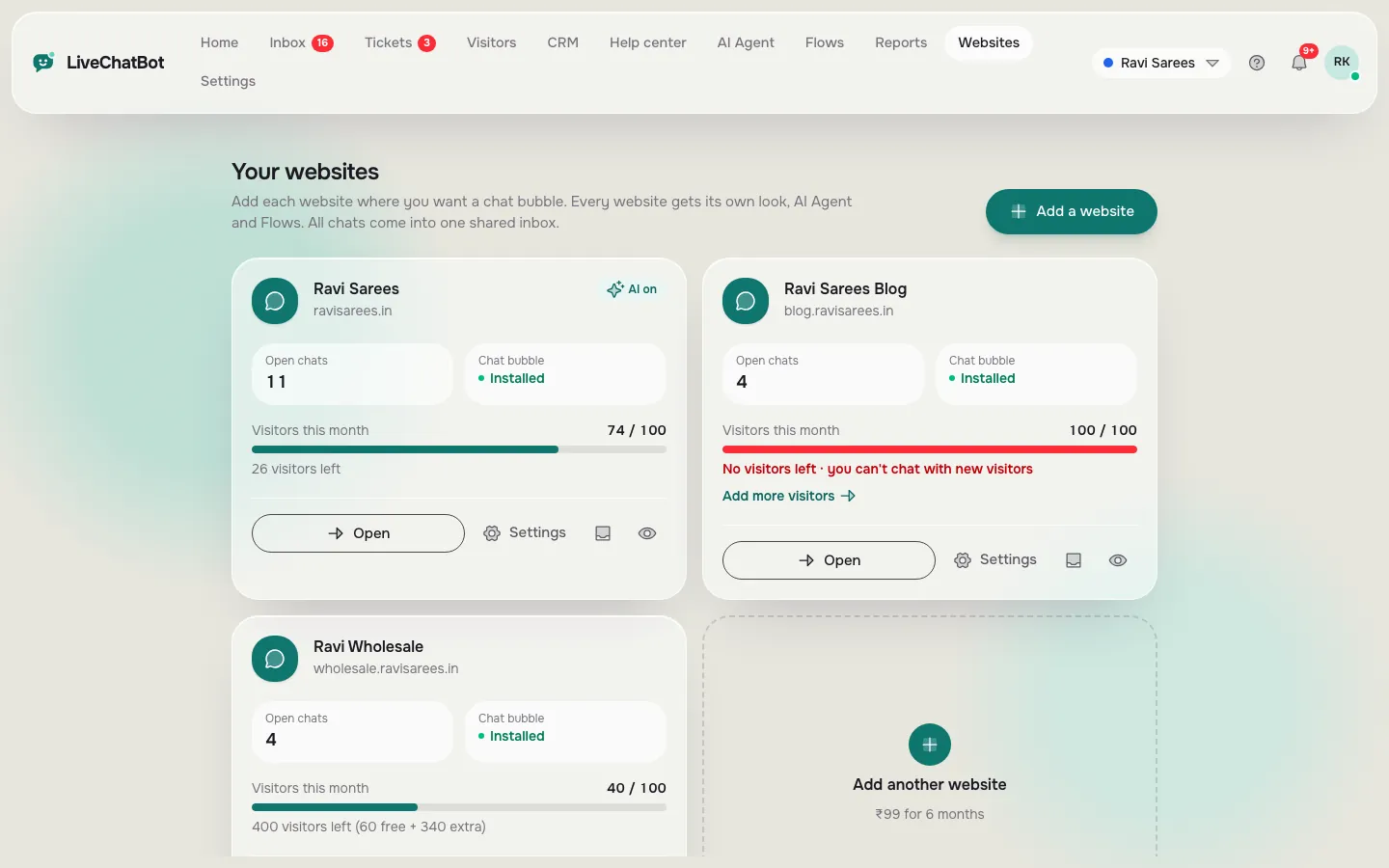
Real screens from the LiveChatBot panel, shown with sample data. Click any picture to see it full size.
Hidden cost
Upkeep is the bill most people forget
Upkeep is the monthly work of keeping the bot’s answers true, and it usually outlasts the build cost within a year or two. Every price, opening hour, delivery rule or refund policy you give the bot becomes a promise the bot repeats to customers.
Here is how it looks on LiveChatBot. You open the AI Agent, find the answer, edit it and save. You can type answers, copy in a web page, or upload a PDF, Word, Excel, CSV or text file. Read how to train your AI chatbot for the full routine. There is no ticket to a developer and no release to wait for.
On a custom build the same change is a small job for someone with access to the code. Small jobs are cheap one at a time, and expensive over twelve months. That is why the upkeep line in the example above, four hours a month, is a conservative guess for a shop that changes offers often.
Weighing the two routes? Our make-or-buy guide covers the decision itself.
What most guides miss
Our rule: budget the cost to build a chatbot in months of upkeep, not in build hours
An insight we have not seen in other price guides: the build price is a one-time number that you can negotiate, but upkeep is a recurring number that you cannot. So compare routes by their cost over 24 months, not at launch.
Here is a five-minute test. Count how many facts your bot would repeat that can change: prices, hours, stock, delivery times, offers, policies. Say it is 25. If you expect 10 percent of them to change every month, that is about 2 or 3 edits a month, forever. Now ask each vendor or developer one question: who makes those edits, how fast, and at what price?
If the answer is “you, in a minute, included”, upkeep is near zero. If it is “send us a request”, multiply the quoted rate by 30 edits a year and add it to the total. Most buyers find this line larger than the build quote itself.
For a side-by-side method, see our chatbot price comparison worksheet, which turns three quotes into one 24-month number.
Running costs
Hosting and AI model usage: the bill that scales with visitors
Running cost is what you pay each month so that the bot is live and can think, and on a custom build it rises with traffic.
On a custom bot, you rent a server and pay an AI provider for the text it reads and writes, so a viral week moves the bill.
On LiveChatBot, running cost is the plan price. The count is by visitors, not by messages: a visitor counts once a month, when they trigger a new-visitor alert. AI replies come with every plan, with a monthly allowance shown in the dashboard. If the allowance runs out, the free keyword bot answers from your saved replies. Over the visitor limit, tracking and alerts continue and chat pauses for new over-limit visitors; nothing is charged automatically.
The difference matters for budgeting. A flat plan is a number you can put in a spreadsheet. A usage bill is a range. For a deeper look at how vendors count, read our guide to AI chatbot pricing.
Your own time
The cost nobody invoices: your hours reading chats
Your time is a real cost even when no bill arrives, and any chatbot, custom or ready-made, creates some of it.
In the first month, plan to read every chat the bot has. You are looking for three things: a wrong answer, a question it could not answer, and a moment where the visitor wanted a person. Fix the first by editing the knowledge. Fix the second by adding an answer. Fix the third by checking that the bot offers a handover.
A realistic budget for a small shop is thirty minutes a day in week one, then ten minutes a day. Value those minutes at your own hourly rate and add them to the plan price. It is still far below the custom example, but it is not zero, and honest budgets include it.
Try it
Check which hidden bills your plan has covered
Tick the lines you have an answer for. A line you cannot tick is a cost you have not priced yet.
What you can skip
Costs you can skip for a small business site
You can skip several expensive items when the bot’s job is to answer common questions and pass the rest to a person.
– Per-seat charges. LiveChatBot has none, so adding a colleague does not change the price. – A custom chat window. The widget has colour, position, texts and language settings, so it can match your brand without code. – A separate inbox build. The team inbox, assignment, saved replies, tickets and the Android app already exist. “Powered by LiveChatBot” stays on every plan, so a fully white-label widget is not available. There is no iOS team app, so iPhone users answer from a browser. If those are firm requirements, a custom build may be the honest answer, and you should budget accordingly. For the free route first, see our guide to free live chat.
Next step
A low-risk way to find your own number
The fastest way to learn your real number is to build a small version for ₹0 and measure it for a month.
- Sign up at livechatbot.in and add one website.
- Paste the install code into your site.
- Add your twenty most-asked questions to the AI Agent.
- Set opening hours and the away form.
- Install the Android app on the phone of whoever answers.
- After 30 days, count the chats, the handovers and the hours you spent.
Now you have your own data for the maths above. If the free plan’s limits hold, your cost to build a chatbot was your own afternoon. If you outgrow it, the pricing page shows whether Starter or Growth fits.
Frequently asked questions
How much does it cost to build a chatbot for a small business?
On a ready-made plan, between ₹0 and ₹699 a month. A custom build costs developer hours first, then hosting, model usage and upkeep. In our illustrative example that came to about ₹1.28 lakh in year one.
Is a free chatbot really free?
On LiveChatBot the free plan is ₹0 for 2 websites and 100 visitors per website a month. The free plan has limits, and the Powered by LiveChatBot badge stays on all plans.
What is the biggest hidden cost?
Upkeep. Every price, hour or policy the bot repeats has to be kept true. Ask who makes the edits and how fast before you sign.
Do I pay per agent or per team member?
Not on LiveChatBot. There are no per-seat charges.
What happens if I go over the visitor limit?
Tracking and alerts continue, and chat pauses for new over-limit visitors until the month resets or you upgrade. Nothing is charged automatically.
More to read
More guides on this topic
Create Chatbot for Website in One Afternoon: A Four-Hour Build Plan, Worked Out Minute by Minute
Find your own number for free
Free plan for two websites, no per-seat charges and prepaid plans with no auto-renewal. Start free on livechatbot.in.