Companies With Chatbots: 9 Patterns Big Brands Use That a Small Business Can Copy This Week
Companies with chatbots range from global banks and airlines to the corner bakery with a website, and the big ones have spent years learning what works. You don’t need their budget to borrow their lessons. This guide pulls out nine patterns that large brands rely on, explains why each one works, and shows the small-business version you can set up in an afternoon.
⚡ In short
- Large companies with chatbots use them for narrow, repeatable jobs first: order status, opening hours, account basics.
- They always offer a clear route to a person, and they tell customers when they are talking to a bot.
- The patterns that matter most are scope, handover, timing, tone and measurement, not fancy technology.
- Every pattern here has a small-business version you can switch on with a free plan.
Why look at big brands at all
Expensive lessons you get for free
When a bank, an airline or a large online store adds a chatbot, it joins the long list of companies with chatbots, and does so at enormous scale. Millions of customers use it, complaints arrive quickly, and the team adjusts. Over a few years, the patterns that survive are the ones that genuinely reduce effort for both sides. Small businesses can skip the expensive experiments and copy the survivors.
That doesn’t mean copying everything. Big brands also do things a small business should avoid: endless menus, bots that hide the phone number, and scripted replies that never admit a limit. Part of the value of studying them is knowing which habits to leave behind.
The patterns below are described in general terms, based on what you can see for yourself when you use the chat on well-known websites and apps. We don’t quote internal numbers from any company, because those are rarely published and often marketing. Instead, each pattern explains the reasoning, which you can test on your own site.
If you’re new to the topic, our plain guide on what a chatbot is covers the basics, and chatbot vs live chat explains how the two fit together. Here we focus on practice: what to set up, in what order, and what to watch.
The nine patterns
What successful bots have in common
Each card names the pattern, the reason it works, and the small-business version.
1. Narrow first job
Big brands launch with one or two jobs, such as order tracking or branch timings. Copy it: start with your top five questions only.
2. Visible way out
A ‘talk to a person’ option is always on screen. Copy it: add a handover button and an away form for after hours.
3. Honest label
The bot says it is a bot. Copy it: name it ‘Assistant’ and say a person can join.
4. Context from the page
Bots know which page you’re on. Copy it: use Flows with page conditions to greet differently on pricing and product pages.
5. Proactive, not pushy
A single, relevant nudge at the right moment. Copy it: one proactive message after 30 seconds on checkout, nowhere else.
6. Buttons for common paths
Quick options for the top journeys. Copy it: three buttons in your welcome message.
7. Tickets for slow questions
Anything that needs checking becomes a case. Copy it: turn chats into tickets with an owner.
8. Opening hours
Clear about when people answer. Copy it: set opening hours and an away message.
9. Weekly review
Teams read failed chats and fix answers. Copy it: a 30-minute review every Friday.
Pattern deep-dive
Scope: why the best bots do less
The single biggest lesson from large companies is that successful bots start small. When you open the chat on a large retailer’s site, the first screen usually offers a handful of options: track an order, start a return, talk to support. That is not a lack of ambition. It is a deliberate choice to do a few jobs very well before adding more.
Small businesses often do the opposite. They try to make the bot answer everything on day one, write vague answers to dozens of questions, and end up with a bot that is mediocre at all of them. Customers notice within one or two messages.
How to choose your first jobs
Look at the last month of enquiries from WhatsApp, phone and email. Write down every question, then group them. You’ll usually find that five or six topics make up most of the volume: delivery, price, availability, timings, location and order status are common for shops; fees, batches and syllabus for coaching institutes; slots and charges for clinics and salons.
Write those answers properly
For each topic, write a short, specific answer with numbers: “Delivery in Bengaluru takes 2 to 3 working days and costs ₹49, free above ₹999.” Load these as the bot’s knowledge or as saved replies. Anything outside those topics should go to a person, not get a guess.
Expand monthly
Once the first jobs work, add the next most common topic. Large brands grow their bots one job at a time, and that is the safest pace for a small team too.
Handover
What the way out looks like in practice
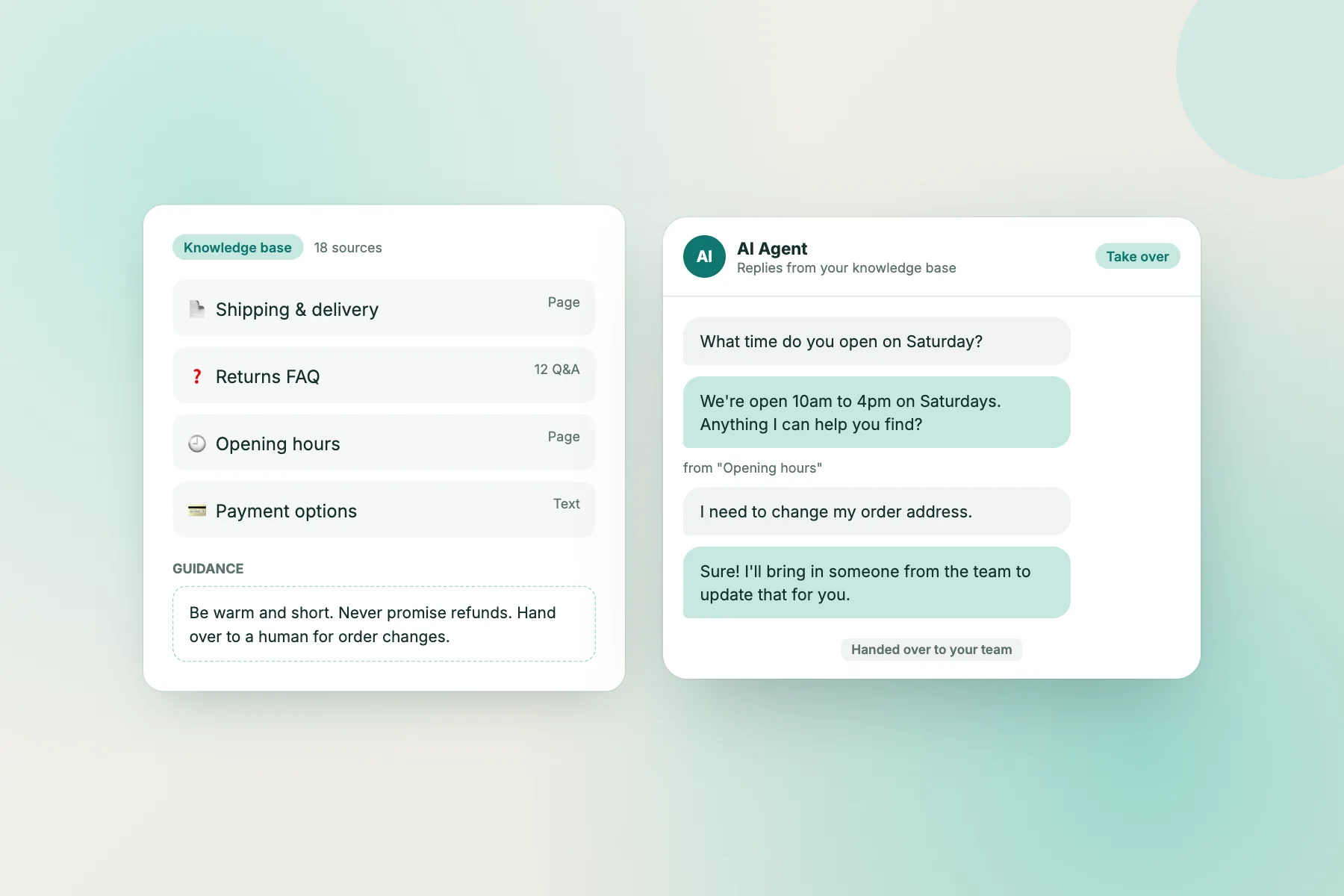
An illustrative chat showing the small-business version of pattern 2.
The bot admits the limit, keeps the details, and a person finishes the job.
Honesty and tone
What big brands learned about trust
Early bots often pretended to be people, with human names and fake typing delays. Many large companies moved away from this, because customers felt tricked when they realised. Today, the common pattern is a clearly labelled assistant with a friendly but plain voice.
Say what it is
A short line in the welcome message works: “I’m the shop assistant, a bot. I can answer delivery, size and returns questions, or connect you to our team.” This sets expectations and reduces frustration when the bot reaches its limit. Our guide on telling visitors honestly has more wording you can copy.
Match your brand, not a call centre
Big brands keep their bot’s tone consistent with their website and adverts. For a small business, that means writing the way you talk to customers in the shop: warm, direct, short sentences. Avoid stiff phrases like “Your query has been registered.”
Admit limits early
The worst experience is a bot that loops. Good bots say “I don’t know that one” and offer a person or a form within two attempts. You can build this in by keeping answers grounded in the knowledge you provide and setting a fallback that offers handover.
Don’t hide contact options
Some large companies are criticised for using bots to make it hard to reach a person. Customers remember that. Keep your phone number, email and opening hours visible on the site and in the chat.
Timing and context
Patterns 4 and 5: the right message on the right page
Large companies with chatbots rarely show the same greeting everywhere. A travel site might greet you differently on a booking page than on a blog post. A bank’s app might show different options depending on what you were doing. The principle is simple: the more the greeting matches what the visitor is doing, the more useful it feels.
Page-based greetings
With chat flows you can set conditions such as the page, the traffic source, the device or the number of visits. A shop could show “Questions about sizes? Ask us” on product pages and “Need help with payment or COD?” on the checkout page. A coaching institute could greet visitors on the fees page with “Want the batch timings and fee breakdown?”
One nudge, not three
Proactive messages work when they are rare and relevant. Big brands usually limit them to high-intent pages and moments, such as a long pause on checkout. On a small site, pick one page and one moment to start. If the message gets ignored, change the wording before adding more.
Quiet where it matters
Some pages should have no greeting at all: the order-confirmation page, legal pages, or a page where people are reading long content. You can hide the widget on specific pages using the “where it shows” settings, as explained in showing live chat on specific pages.
Side by side
Big-brand habit vs small-business version
What to borrow, and what to leave behind.
| Habit you’ll see | Borrow it? | Small-business version |
|---|---|---|
| Short menu of top tasks | Yes | Three buttons in the welcome message |
| Clear bot label | Yes | ‘Assistant’ name and a one-line disclosure |
| Handover to an agent | Yes | Handover button, away form after hours |
| Long nested menus | No | Let people type; keep buttons to the top three paths |
| Hiding the phone number | No | Show phone and email next to chat |
| Pop-ups on every page | No | One proactive message on one high-intent page |
| Case numbers for complex issues | Yes | Turn the chat into a ticket with an owner |
| Weekly review of failed chats | Yes | 30 minutes on Friday with a notebook |
Measurement
Pattern 9: how teams improve bots week by week
Large companies have analysts reviewing bot performance. A small business needs a lighter version, but the habit is the same: look at what went wrong and fix it.
Three numbers to watch
– Handover rate: how many chats needed a person. Some is healthy; a sudden rise means a gap in the bot’s knowledge. – Unanswered questions: questions the bot couldn’t answer. Each one is a candidate for a new answer. – Reply time for handovers: how long people wait once a person is needed. Our guide to live chat response time explains realistic targets.
A Friday review
Every Friday, open ten chats where the bot struggled. For each, ask: was the answer missing, wrong, or unclear? Fix the answer, or add a new one. Write down what you changed so you can see if it helped next week.
Ask the team
The people who take over chats know where the bot fails. Ask them for the top three annoyances each month. Large companies run formal feedback loops; a five-minute conversation does the same job in a small team.
Over a few months, this routine is what separates bots that customers like from bots they avoid. It costs nothing but attention.
Your first week
Copy three patterns in five days
A simple order that works for most small sites.
Pull them from WhatsApp, phone and email. Write specific answers with numbers.
Add it to your site; see the setup guide. Set your colour, name and welcome text.
Handover button, opening hours, and an away form that collects email or phone.
A Flow on your most important page with one relevant message.
Read every chat from the week. Fix two answers. Note what to add next.
Mistakes to avoid
Where small businesses copy the wrong thing
It is easy to borrow the visible parts of a big-brand bot and miss the reasons behind them. These are the most common mistakes we see when small businesses imitate large ones.
Copying the menu, not the scope
A long menu looks professional but makes people work. Big brands can afford usability testing on every level of a menu; most small businesses can’t. Short menus plus free typing are safer.
Copying the persona, not the honesty
A fun name and avatar are fine, but don’t use them to hide that the visitor is talking to software. Be clear, and keep the persona light.
Automating before understanding
Large brands automate questions they have already answered thousands of times. If you haven’t answered a question by hand a few times, you don’t know enough to automate it well. Answer it yourself first, then save the answer.
Measuring nothing
Without a weekly look at failed chats, a bot slowly drifts out of date as prices, stock and policies change. Put a recurring reminder in your calendar.
Ignoring mobile
Most visitors to small Indian websites arrive on phones. Test your chat on a cheap Android phone with mobile data before you call it finished.
Getting started
Try the patterns on a free plan
You can try every pattern in this guide without paying. LiveChatBot’s free plan covers two websites with 100 visitors per website each month, the chat widget, the team inbox, Flows with page conditions, opening hours with an away form, tickets and saved replies. The AI Agent answers from the knowledge you give it, with a small free monthly allowance of AI replies, and the free keyword bot answers from your saved replies when AI isn’t available. If you grow beyond the free visitors, visitor packs start at ₹99 for 100 visitors and never expire, and there are no per-seat charges.
Start with pattern 1, a narrow first job, and pattern 2, a visible way out. They deliver most of the benefit. Then add one pattern a week. Sign up on livechatbot.in, and see pricing if you want to check the numbers first.
Frequently asked questions
What kinds of companies with chatbots get the best results?
Those that give the bot a narrow, clear job, offer an easy route to a person, and review failed chats regularly. Size matters less than these habits.
Do I need a big budget to copy these patterns?
No. Every pattern here can be set up on a free plan with no code: welcome buttons, handover, page-based greetings, opening hours and tickets.
Should my bot pretend to be a person?
No. Label it clearly as an assistant and offer a person when needed. Customers trust honest bots more.
How many questions should my bot answer at launch?
Start with your top five or six topics and answer them well. Add more each month based on what customers actually ask.
How often should I review my bot?
Weekly for the first two months, then at least monthly. Fix missing or unclear answers each time.
Borrow the best patterns, skip the big budget
Start free on livechatbot.in with two websites and 100 visitors per website each month.