Chatbot With Visitor Tracking: Read the Live Visitor List Like a Shop Floor and Decide Who to Greet, Who to Leave Alone (Free Visitor Triage Tool)
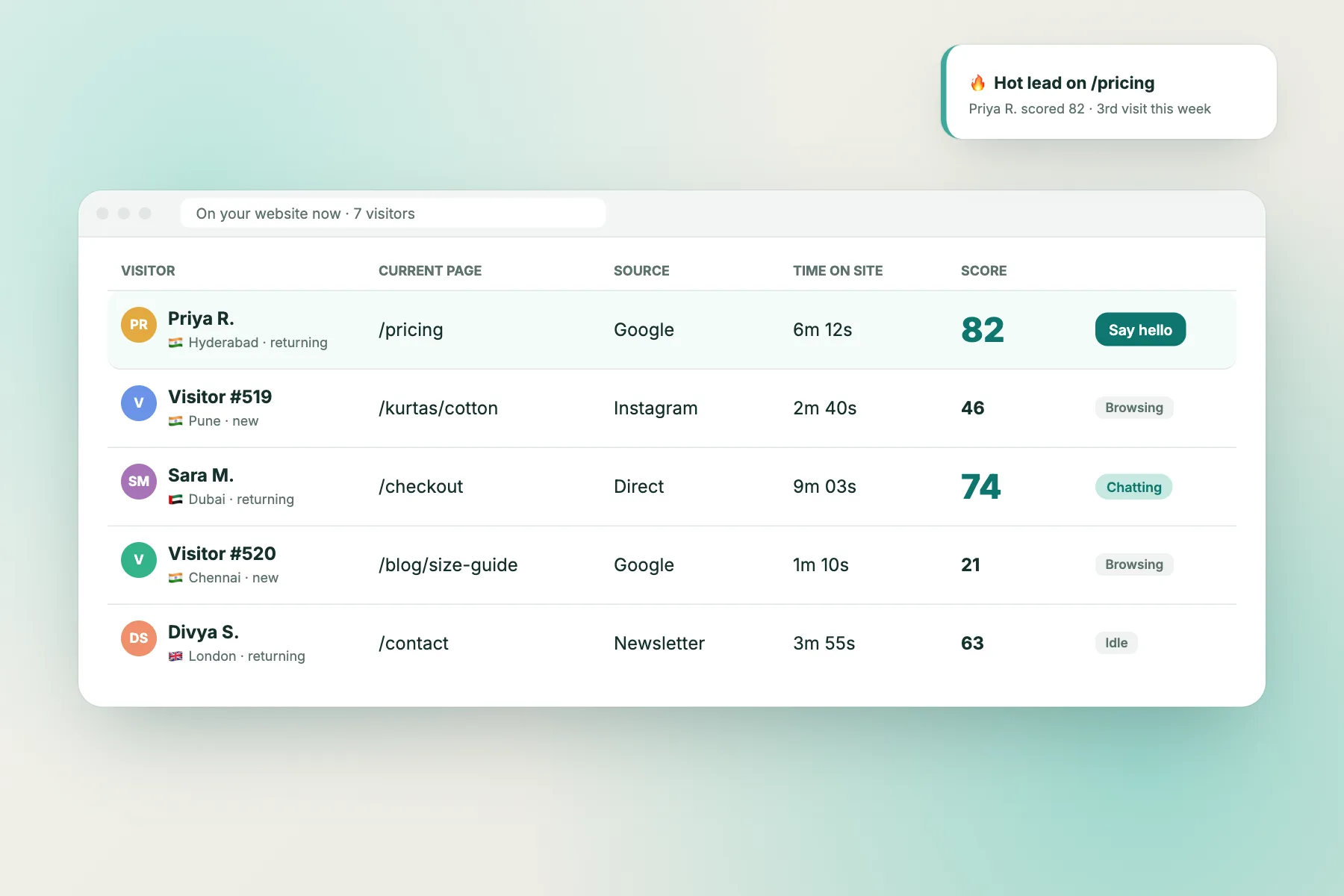
Chatbot with visitor tracking sounds like a feature list item, but it changes how you work. Instead of waiting for someone to type, you can see who is on your site right now, which pages they’ve opened, where they came from and whether they’ve been before. The skill is reading that list the way a good shopkeeper reads the floor. This guide teaches the signals, the six visitor types they reveal, and what to say to each.
⚡ In short
- Tracking is only useful if it changes when and how you greet someone.
- Read four signals: pages in order, time on site, source, and visit number.
- Greet people who need help or who keep returning to prices. Leave readers and new arrivals alone.
- Turn the patterns you greet by hand into Flows, so the bot greets them when you’re busy.
The idea
A shopkeeper doesn’t greet everyone the same way
Think of a good shop assistant. Someone walks in and glances around: they get a nod, not a sales pitch. Someone picks up the same item three times: the assistant wanders over. Someone is standing at the counter holding a receipt and looking annoyed: they get help straight away.
Website visitors behave the same way, but without tracking you can’t see any of it. A chatbot with visitor tracking gives you the floor view: a live list of visitors, the pages they’re on, how they arrived and how often they’ve come back.
The mistake is treating that list as a target list and greeting everyone. That’s the website version of an assistant following each customer around the shop. Visitors close the chat, and some leave. The tracking data is there to help you pick the few moments when a message is welcome.
The signals
Four things to read for every visitor
1
Pages in order
The path tells the story. Home, product, pricing, pricing again is a decision in progress. Track-order, returns, contact is a problem.
2
Time on site
Under a minute: still looking. Several minutes on one page: reading closely, or stuck.
3
Source
Google search, an ad, Instagram or a direct visit. Ad visitors expect the landing page to answer first.
4
Visit number
A third visit to the pricing page is a returning evaluator. They’re closer to buying than a first-timer.
Six types
The visitor types you’ll see every day
Needs help
Two or more support pages (track order, returns, contact). Greet straight away and offer to check their order or pass them to the team.
Stuck near the finish
On the cart or checkout page for more than two minutes. A short “any question before you order?” can save the sale. Our cart abandonment guide covers the reasons.
Returning evaluator
Back for the second or third time and on pricing or comparison pages. Welcome them back and offer a quote or a quick comparison.
Comparing or hesitating
First visit, looking at prices or the same page twice. Greet after a minute, with one useful line.
Just arrived, or reading
Under a minute, or reading blog posts. Stay quiet; an attention grabber card is enough.
Ad visitor
Let the landing page work first. Greet only if they reach pricing or the offer details.
Free tool
Triage your live visitor list
Copy a few visitors from your live list as simple lines. The tool labels each one, says whether to greet now, later or not at all, and suggests the first message.
Paste visitors as you see them in your live visitor list, one per line: visit number | minutes on site | source | page > page > page. Example: 3 | 6 | google | home > pricing > pricing
Runs only in your browser; nothing is sent or saved. Use page names only, no personal details.
Automate it
Turn your manual greetings into Flows
Greeting by hand works while you’re watching the list. When you’re busy, the same rules can run as Flows, the proactive messages in LiveChatBot. Each flow can combine up to six conditions: page, source, country, device, browser language, number of visits, lead score and whether the visitor has already given contact details.
So “returning evaluator” becomes: page contains pricing, number of visits at least two, send “Welcome back, want a quick quote?”. “Stuck near the finish” becomes: page is checkout, with a follow-up message if they don’t reply. The chat rescuer can step in when a visitor waits too long for a person.
Start with two flows, not ten. Check after a week whether those visitors replied, then add the next. Our chat flow guide walks through the setup.
Careful
Visitor tracking without being creepy
Seeing someone’s path doesn’t mean you should mention it. “I see you’ve looked at the pricing page three times” feels like being watched. “Any questions about plans?” uses the same knowledge politely.
Keep three rules:
- Never quote the pages back to the visitor.
- Don’t greet the same person again on every page. One greeting per visit is plenty.
- Mention chat and tracking in your privacy notice, as India’s DPDP Act 2023 expects you to be clear about what you collect.
Tracking also helps you stay quiet. Use “where it shows” to hide the widget on pages where chat only gets in the way, such as payment confirmation.
Daily habit
A 15-minute routine for the busiest hour
You don’t need to watch the visitor list all day. Pick the busiest hour (the coverage table in your inbox history usually shows it) and run this routine:
- Minute 0. Open the live list. Ignore anyone under a minute.
- Every few minutes. Look for support paths and checkout pages first. Greet those.
- Then prices. Greet returning visitors on pricing or comparison pages with one line.
- End of the hour. Note which greetings got a reply and which were ignored.
After a week of notes you’ll know which greetings work for your site. Those become your first two Flows, so a chatbot with visitor tracking does the routine for you outside that hour.
What you get
What a chatbot with visitor tracking in LiveChatBot includes
On the free plan, visitor tracking shows who is on your site and what they’re browsing, and Flows can act on page, source, country, device, browser language and number of visits. You get a new-visitor alert in the inbox and on the Android app, and the proactive messages run without you watching. The AI Agent or the free keyword bot answers when a greeted visitor replies, and a person can join at any time.
Each website has 100 free visitors a month, with one-time visitor packs if you need more. See pricing.
Frequently asked questions
What does a chatbot with visitor tracking show?
A live list of who is on your site, the page they’re on, the pages they’ve seen, where they came from and how often they’ve visited, so you or the bot can greet the right people at the right time.
Should I greet every visitor?
No. Greet people who need help, are stuck at checkout or keep returning to prices. Readers and new arrivals usually prefer to be left alone.
Can the bot greet visitors automatically?
Yes, with Flows. Set conditions such as page, source and number of visits, and the proactive message goes out when they match.
Is visitor tracking legal in India?
Generally yes, if you’re clear about it. Mention chat and tracking in your privacy notice and collect only what you need, in line with the DPDP Act 2023.
Does the triage tool store my visitor data?
No. It runs in your browser and nothing is saved.
Keep reading
Related guides
Live Chat Software With Analytics for Small Teams: Use Chat Times to Find the Hours You’re Losing Visitors (Free Coverage Gap Finder)
Chatbot With WhatsApp Integration: The Four Levels Vendors Mean, and How to Test Which One You’re Buying (Free Claim Decoder)
Read the floor, greet the right people
See who’s on your site, greet the visitors who need you and let Flows handle the rest. Start free on livechatbot.in.