Chatbot Marketing Examples for the Indian Calendar: 14 Seasonal Campaigns, Month by Month
Chatbot marketing examples are easy to find, but most are written for American shops and American holidays. Indian businesses live by a different calendar: exam results, monsoon, Raksha Bandhan, Navratri, Diwali, wedding season and the March financial year-end. This guide gives fourteen seasonal chat campaigns, each with the trigger, the exact message and the goal, so you can plan your website chat a whole year ahead.
⚡ In short
- Seasons change what visitors ask. Your chat messages should change with them.
- Each campaign below is one proactive message with a page trigger, a short message and a single goal.
- Schedule campaigns a week before the season starts and switch them off when it ends.
- These chatbot marketing examples are illustrative; adapt prices, dates and offers to your business.
Why seasonal chat works
The questions change before the sales do
Watch your chat inbox for a year and you’ll see the seasons arrive in the questions before they arrive in the sales. In late September, gift shops start getting “will this reach Pune before Diwali?” In April, coaching institutes get “when do the new batches start?” In June, uniform and stationery shops get size questions from anxious parents.
A seasonal campaign is simply a proactive message that answers the season’s biggest question before the visitor asks it. It’s not a pop-up advertisement; it’s a timely, useful line shown on the right pages at the right time. “Order by 25 October for Diwali delivery anywhere in Maharashtra” does more than any banner, because it arrives in the corner of the screen while the visitor is looking at gifts.
Seasonal messages also make your website feel alive and attended. A visitor who sees a message about Raksha Bandhan delivery cut-offs knows someone is running this shop right now. That small signal of care builds trust, especially for smaller brands competing with marketplaces.
The fourteen campaigns below follow the year from January to December. Each one has four parts: who it suits, the trigger (which page and condition), the message, and the single goal. Pick the four or five that match your business and put them on your calendar.
January to April
New year, exams, Holi and the financial year-end
1. New-year planning (Jan)
Best for: Coaching, gyms, software, services
Trigger: Pricing or plans page, returning visitors
Message: “Planning for the new year? Tell me your goal and I’ll suggest the right plan.”
Goal: Book consultations while resolutions are fresh.
2. Republic Day sale (Jan)
Best for: Online shops
Trigger: Sale category pages, from 20 January
Message: “Republic Day offers end on the 26th. Need help picking a size?”
Goal: Answer sizing doubts that block sale orders.
3. Holi colours and gifts (Mar)
Best for: Gift, sweets and skin-care shops
Trigger: Product pages, two weeks before Holi
Message: “Ordering for Holi? Orders placed by Thursday reach most cities in time.”
Goal: Set clear delivery cut-offs to avoid late complaints.
4. Financial year-end (Mar)
Best for: B2B suppliers, software, CA firms
Trigger: Pricing and services pages, March
Message: “Need an invoice before 31 March? Tell me what you need and we’ll arrange it today.”
Goal: Capture budget-flush purchases and invoice requests.
May to August
Results, school reopening, monsoon and Rakhi
5. Exam results (May)
Best for: Coaching institutes, colleges, counsellors
Trigger: Course pages, returning visitors
Message: “Results out? Tell me your stream and marks range, and I’ll share the batches that fit.”
Goal: Turn anxious result-day visits into counselling calls.
6. Back to school (June)
Best for: Uniform, stationery, books, tuition
Trigger: Category pages, late May to early July
Message: “Back-to-school shopping? Ask me about sizes, bulk discounts or delivery dates.”
Goal: Answer size and bulk questions from parents.
7. Monsoon (July)
Best for: Footwear, rainwear, pest control, home repair
Trigger: Relevant product or service pages
Message: “Monsoon is here. Want help choosing waterproof options, or booking a visit before the rains get heavy?”
Goal: Capture seasonal demand early.
8. Raksha Bandhan (Aug)
Best for: Gift, sweets, jewellery shops
Trigger: Gift pages, three weeks before
Message: “Sending a rakhi abroad or out of state? Ask me for the last safe order date.”
Goal: Prevent late orders and missed deliveries.
September to December
Festive season, Diwali, weddings and year-end
9. Navratri and Durga Puja (Sep–Oct)
Best for: Clothing, jewellery, event services
Trigger: Ethnic-wear or event pages
Message: “Shopping for Navratri? Tell me the colour of the day and I’ll show matching picks.”
Goal: Guide browsing into specific products.
10. Diwali gifting (Oct–Nov)
Best for: Gift hampers, sweets, electronics, home décor
Trigger: Gift and corporate pages
Message: “Need Diwali gifts for your team? Share the quantity and budget for a quick quote.”
Goal: Collect bulk and corporate leads.
11. Diwali delivery cut-off (Oct–Nov)
Best for: All online shops
Trigger: Cart and checkout pages, final week
Message: “Want it before Diwali? Check your pin code with me before you pay.”
Goal: Reduce cart abandonment and complaints.
12. Wedding season (Nov–Feb)
Best for: Caterers, photographers, venues, boutiques
Trigger: Service and gallery pages, evenings
Message: “Planning a wedding? Share the date and city, and we’ll check availability.”
Goal: Capture date enquiries, even after hours.
13. Christmas and New Year (Dec)
Best for: Bakeries, restaurants, hotels
Trigger: Menu and booking pages
Message: “Booking for 31 December? Tables are filling up. Want me to note a request?”
Goal: Secure bookings early.
14. Year-end clearance (Dec)
Best for: Online shops with old stock
Trigger: Sale pages, returning visitors
Message: “Last-season stock is on sale. Tell me your size and I’ll check what’s left.”
Goal: Clear inventory with help, not hard selling.
How to set one up
From idea to live campaign in fifteen minutes
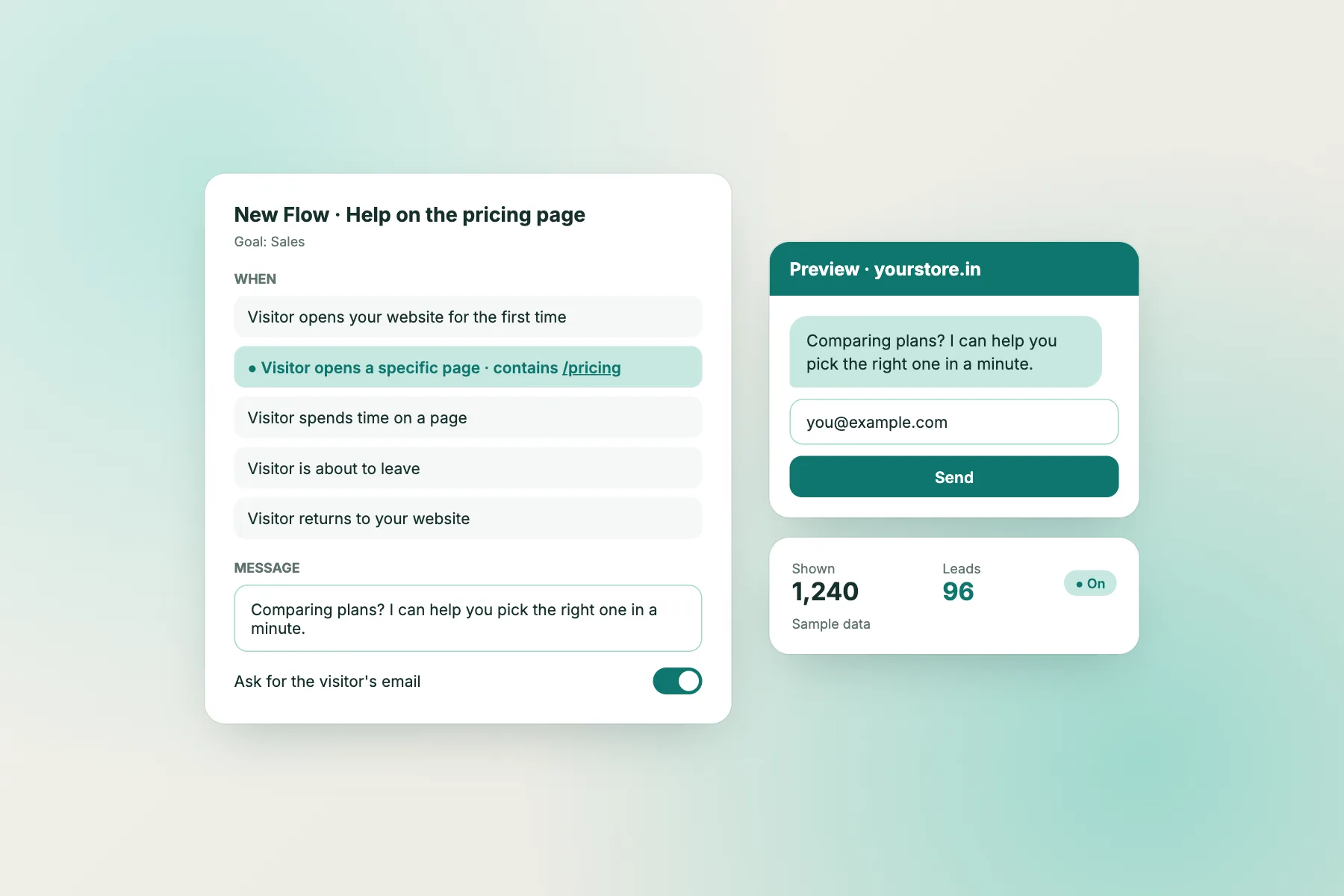
Each of the chatbot marketing examples above is a single proactive message. Here’s how to set one up in LiveChatBot’s Flows in about fifteen minutes.
1. Choose the pages
Pick the pages where the seasonal question naturally comes up: gift categories before Diwali, course pages after results. Avoid showing seasonal messages on unrelated pages like your contact or careers page.
2. Add one or two conditions
Page is usually enough. Add “number of visits” if you want to target returning visitors, or “country” if delivery cut-offs differ for international customers. Flows support up to six conditions, but simple targeting works best.
3. Write the message
Keep it to one or two sentences, mention the season, and end with something the visitor can reply to. The message should answer a real question, not just shout an offer.
4. Prepare the answers
Seasonal messages create seasonal questions. Add the answers to your AI Agent’s knowledge and your saved replies: cut-off dates, bulk pricing, gift wrapping, delivery zones.
5. Switch it on and off
Turn the campaign on a week or two before the season and off the day after. A Diwali message still showing in mid-November looks careless.
Plan your year
A simple campaign calendar
Copy this into a sheet and fill in your own dates.
| Month | Campaign | Start | Stop | Answers to prepare |
|---|---|---|---|---|
| January | New-year planning / Republic Day | 1 Jan | 31 Jan | Plans, sizes, sale end date |
| March | Holi / year-end invoices | 1 Mar | 31 Mar | Delivery cut-offs, GST invoices |
| May–June | Results / back to school | Results day | Mid-July | Batches, sizes, bulk prices |
| July–August | Monsoon / Raksha Bandhan | Early July | Rakhi + 1 day | Waterproofing, last order date |
| Sep–Oct | Navratri / Durga Puja | 2 weeks before | Dussehra + 1 day | Colours, styles, delivery |
| Oct–Nov | Diwali gifting and cut-offs | 3 weeks before | Diwali + 1 day | Bulk quotes, pin-code delivery |
| Nov–Feb | Wedding season | November | February | Availability, packages |
| December | Christmas, New Year, clearance | 1 Dec | 31 Dec | Bookings, stock left |
Festival dates move each year with the lunar calendar. Check them every January.
Measuring results
How to know a seasonal campaign worked
Seasonal campaigns are short, so measure them simply and soon after they end.
- Replies: how many visitors replied to the message? Compare with the same pages before the campaign.
- Leads: how many emails, phone numbers or quote requests came through chat during the campaign?
- Questions avoided: did “will it arrive in time?” complaints drop after the festival?
- Assisted orders: how many orders came from visitors who chatted? Your inbox shows which visitors chatted; match them with your orders.
Write a two-line note after each campaign: what worked, what to change next year. Next year’s Diwali campaign will start from a tested message instead of a blank page. Our proactive live chat guide covers timing and frequency in more depth.
Don’t judge a campaign by one year alone. Festivals fall on different dates, and a late Diwali or a heavy monsoon changes everything. Look for patterns over two or three seasons.
Write your own
Turn any local occasion into a campaign
The fourteen chatbot marketing examples here cover national seasons, but some of your best campaigns will be local. Pongal and Onam, Bihu and Ugadi, a city marathon, a college fest, a regional trade fair or the start of the tourist season can matter more to your customers than any national sale.
To write your own, ask three questions. First, what do visitors worry about at this time? Usually it’s timing (will it arrive?), availability (is it in stock? is the date free?) or choice (which one should I pick?). Second, which pages do they visit when they worry? That’s your trigger. Third, what single action helps them? A pin-code check, a date enquiry, a size suggestion or a quote by email.
Put the answers into one sentence that names the occasion and ends with an easy reply. “Coming for the Kochi marathon weekend? Rooms near the start line are going fast; share your dates and I’ll check.” That’s a complete campaign.
Keep a running list of occasions in the same sheet as your campaign calendar. Add new ones whenever a burst of similar questions appears in your inbox; your customers are telling you about a season you didn’t know you had. Over a year or two, this list becomes one of the most useful marketing documents your business owns, because it’s built from real demand rather than guesses.
Mistakes to avoid
Five ways seasonal messages go wrong
Seasonal campaigns are high-visibility, so mistakes stand out.
- Promising delivery you can’t keep. A cut-off date in chat is a promise. Check it with your courier before you publish it, and give yourself a buffer.
- Forgetting to switch off. Old messages make the site look abandoned. Put the stop date in your calendar when you start.
- Assuming every visitor celebrates. Phrase messages around the need (“ordering gifts this week?”) rather than assuming religion or region, and keep them respectful.
- Running everything at once. Three overlapping festival messages confuse visitors. One message per page per season.
- No one to answer the replies. Festive weeks are your busiest; make sure the AI Agent has seasonal answers and someone checks the Android app in the evenings.
Avoid these and your seasonal messages will feel like a helpful shop assistant, not a loudspeaker.
Frequently asked questions
What are good chatbot marketing examples for Diwali?
Delivery cut-off messages on checkout pages, bulk-gift quote offers on corporate pages, and gift-finder messages on gift categories. Start them two to three weeks before the festival.
How early should a seasonal campaign start?
One to three weeks before the season, depending on how long customers take to decide and how long delivery takes.
Should I offer discounts in chat?
Only if the discount is real and limited. Most seasonal messages work better by answering a doubt, such as delivery dates, than by offering a coupon.
Can I target messages to returning visitors only?
Yes. Use the number-of-visits condition in Flows, alongside the page condition.
What if my business isn’t seasonal?
Most businesses have at least two busy periods. Look at last year’s enquiries and sales to find yours, then plan messages around them.
Keep reading
Related guides
Chatbot Marketing Funnel: How to Turn Anonymous Visitors Into Leads, Buyers and Repeat Customers
Chatbot Maker Red Flags: 10 Things That Look Great in a Demo but Cost You Later
Plan next season’s chat today
Pick two campaigns from the calendar, write the messages and schedule them. Free on livechatbot.in.