Chatbot and Live Chat Together: Write a Hand-Off Map That Says Which Questions the Bot Keeps and Which Go to a Person
Chatbot and live chat work best as one chat window with two kinds of helpers behind it, not as two products to choose between. The bot takes the repeat questions at any hour. Your team takes the ones that need judgement. What most small businesses never write down is the line between them, and this guide helps you draw it.
Put a bot and live chat in one window. The bot answers repeat facts at any hour, and your team takes money, complaints and buying signals. Write a one-page hand-off map listing each question type, who answers first and what happens if that helper cannot finish.
⚡ In short
- Do not pick a side. Put the bot in front for repeat questions and keep people for money, mood and exceptions.
- Write a hand-off map: a one-page list of which questions stay with the bot and which go to a person.
- Give every bot answer a way out: a button to reach a person, or an away form after hours.
- Review the map monthly, because real chats will show you what to move.
The idea
Why chatbot and live chat belong in one window
A bot and a human team belong in one window because each one covers the other’s weak spot. If you have read chatbot vs live chat, you know the trade-offs: a bot is fast and always on, a person is warm and flexible. This guide starts after that decision. You want both, and now the question is how to run them without confusing the visitor.
For the visitor there should be one bubble and one conversation. They should not need to know whether a bot or a person is typing.
A bot never gets tired at 2 am, but it cannot judge an angry customer. A person can, but cannot answer the same delivery question forty times a day. Splitting by question type makes the pairing pay off.
The map
What a hand-off map is and why you need one
A hand-off map is a one-page document that says which questions the bot keeps and which go to a person. It has three columns: the question types you see, who answers them first, and what happens when that helper cannot finish. You write it once, then keep it next to your bot settings and your team’s reply habits.
Without a map, the bot guesses on hard questions or the team answers everything by hand. With one, the rule is clear: facts go to the bot, decisions go to people.
What goes in each column
- Question type: “Where is my order?”, “Do you deliver to Pune?”, “Can I get a discount?”
- First helper: bot, person, or form.
- If it fails: hand over to the team, take a phone number, or create a ticket.
Start with the ten questions your team answers most often.
Bot lane
Questions the bot should keep
The bot’s lane is every question whose answer is a fact you can write down once. That means anything where the answer is a fact you can write down once. Opening hours, delivery areas, return rules, price ranges, how to book, where to find a document. These questions are the same every time, and the answer does not depend on who is asking.
How to feed the bot
In LiveChatBot the AI Agent answers from the knowledge you give it. You can type answers, copy a web page, or upload a PDF, Word, Excel, CSV or text file. It can follow written rules, such as “Never promise delivery dates”, which you set in the Rules box. Our guide on how to train your AI chatbot walks through the steps.
Keep it honest
If the facts are not in the knowledge, a good bot says so and offers a person. Test that on day one by asking something you never taught it. A bot that admits it does not know is far more useful than one that sounds confident and is wrong.
People lane
Questions a person should always take
A person should always take chats about money, mood, sensitive topics and buying intent. Some chats should never stay with a bot, however clever it is. Mark these in the second half of your map.
- Money and exceptions: refunds, discounts, custom quotes, large orders.
- Upset customers: anyone who writes in capitals, mentions a complaint or says “again”.
- Anything personal or sensitive: health, legal or account problems.
- Buying signals: “Can someone call me?”, “I want to book today.” A fast human reply here is worth more than any automation.
When one of these appears, the bot should stop and pass the chat on. In LiveChatBot, chats that need a person land in the shared inbox, where an agent can press Assign to me and the chat moves to their Mine folder. If you use teams, you can route a chat to Sales or Support. Prepare a few saved replies for the first line after a hand-off.
Real screens
Both sides of the same chat: the AI Agent, the shared inbox and opening hours
Real screens from the LiveChatBot panel, shown with sample data. Click any picture to see it full size.
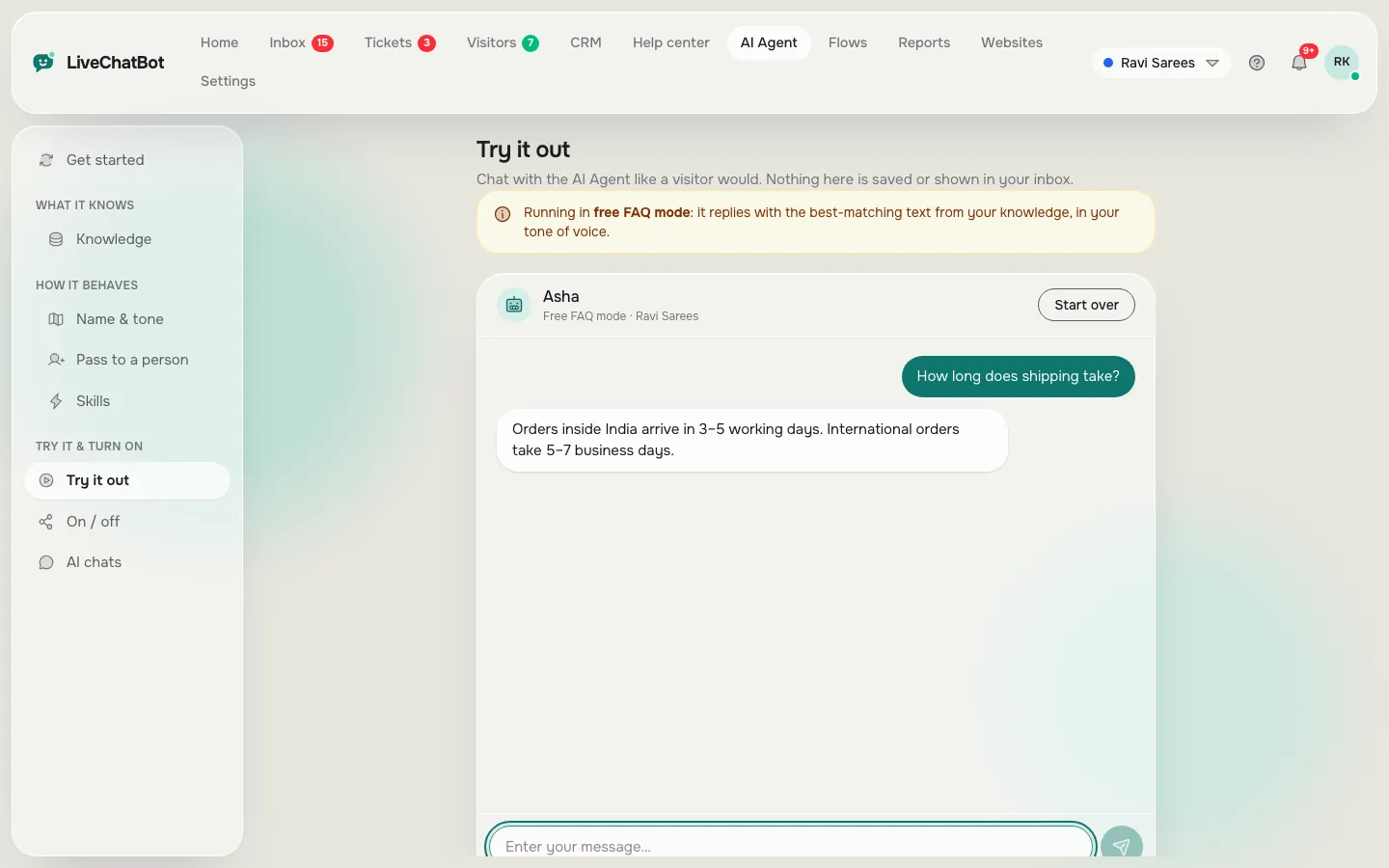
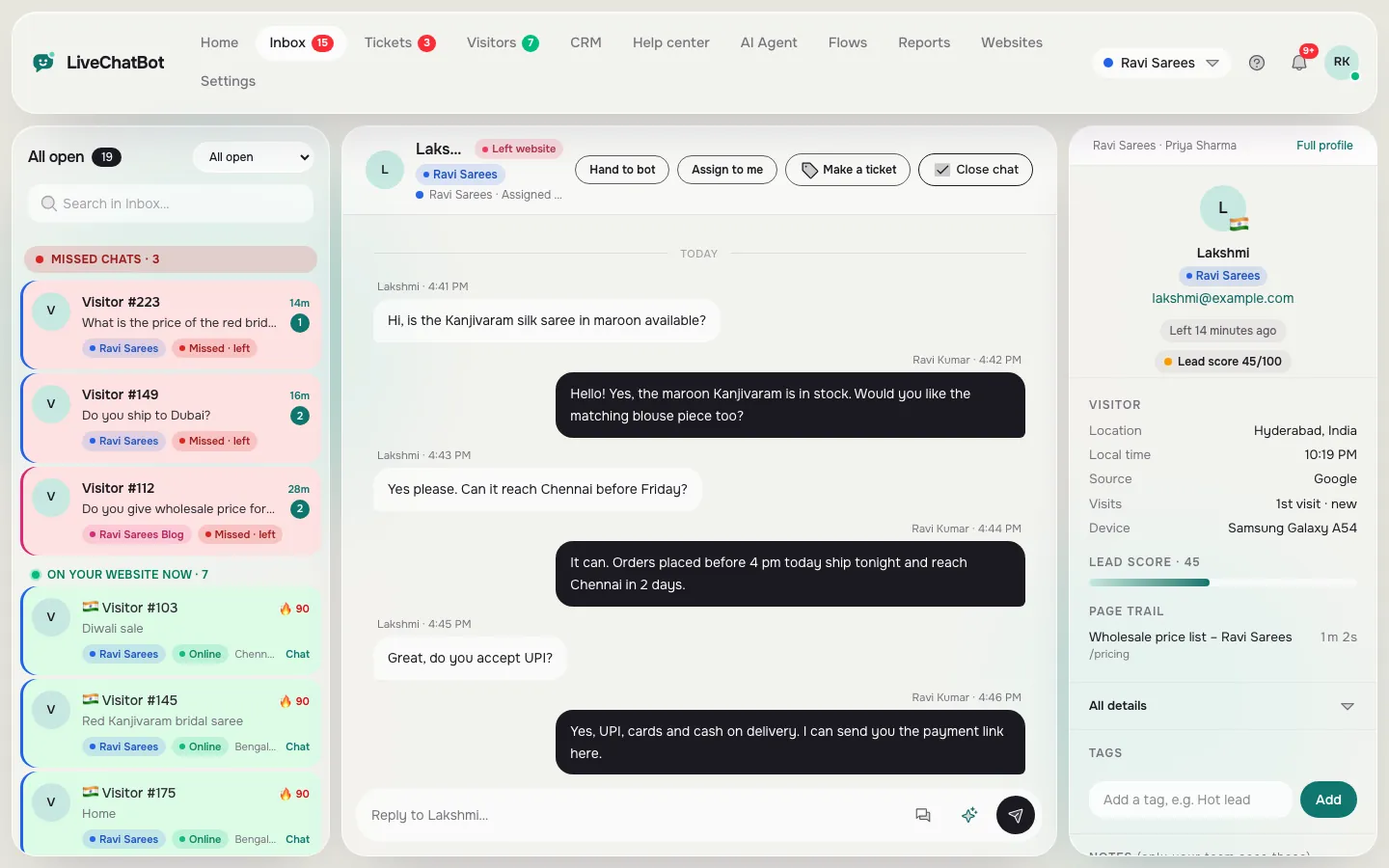
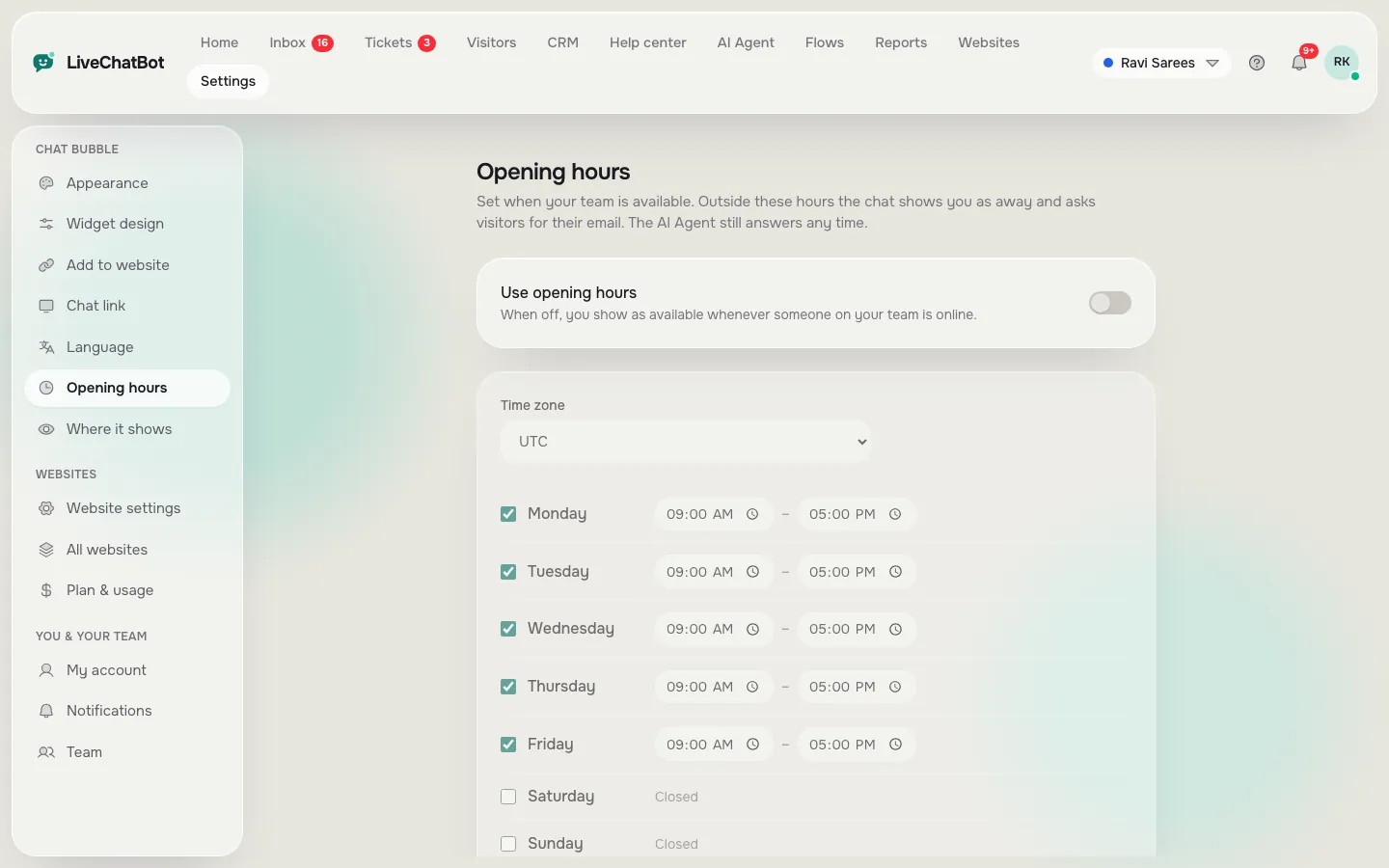
Try it
Route a question: bot, person or form?
Follow the branches. Each lane shows where a typical question should land in a combined chatbot and live chat setup.
Original data
Worked example: how many chats the bot can really take off your team
A hand-off map is easiest to believe when you do the arithmetic once. This is an illustrative example with made-up volumes, so swap in your own numbers; the maths is the useful part.
Say a shop gets 40 chats a day. After sorting a month of chats into your map, you find 24 are repeat facts (delivery area, returns, hours), 10 are order lookups and 6 are money or complaint chats.
- Bot lane: 24 of 40 chats = 60%.
- Person lane: 10 + 6 = 16 chats.
- If a person spends 3 minutes on each chat, 40 chats cost 120 minutes a day. With the bot taking the fact chats, 16 chats cost 48 minutes.
- Time handed back to the team: 120 – 48 = 72 minutes a day.
The 60% is a ceiling, not a promise, because the bot only earns that time if its answers are right.
Built-in numbers worth knowing
These come from LiveChatBot itself, not from a survey. The Rules box takes up to 5,000 characters of written instructions. Visitor chat messages are limited to 20 per minute per IP address, so a pasted flood from one device cannot swamp your team. The free plan covers two websites with 100 visitors per website a month.
What most guides miss
Our rule: every hand-off message must name a time
The most common failure in a bot-plus-people setup is not a wrong answer. It is a hand-off that says “Let me connect you with the team” and then goes quiet. The visitor does not know whether that means ten seconds or ten hours, so they leave.
Our rule is that every message that passes a chat to a person must contain three things: who will reply, when they will reply and what we already have. For example: “Priya from our team will reply here by 10 am tomorrow. I have noted your order number, so you will not need to repeat it.”
Test it in five minutes
Open your widget on your phone. Ask the bot something it cannot answer, then read the hand-off message out loud. If it does not name a person or team, a time and one thing you already know, rewrite the rule in the AI Agent’s Rules box. Write the same line into your away form wording and your first saved reply so the promise sounds the same whoever speaks.
Timing
Who is on duty at which hour
Three zones decide who is on duty: team online, team away with the bot on, and the rescue zone. The second half of the map is time. Your team probably works set hours, while the bot works all day. That gives you three zones.
Team online
The bot answers first and a person is a click away. The bot handles simple facts while staff reply to the rest.
Team away, bot on
The bot still answers facts. For everything else, it should tell the visitor when someone will reply and ask for an email or phone number. Set this up with live chat opening hours and the away form.
Rescue zone
If a visitor asks for a person and nobody replies within a few seconds, the chat rescuer asks for email and phone so the lead is not lost. Switch it on and test it once from your own phone.
Review
Review the map once a month
Review the map once a month, because your first draft will be wrong in places. Once a month, open the last 30 days of chats and sort them into three piles: the bot answered correctly, the bot passed on correctly, and the bot should have passed on but did not. Act on the third pile: add the missing fact, add a rule, or move that question type to the people lane.
Reports show conversations per day, first response time and the share resolved by the AI Agent. A low resolved share means gaps in your knowledge. A slow first response means the map sends too much to people.
Honest limits
What this setup does not do
This setup does not choose the AI model, score sentiment or connect natively to Slack. Be clear about what you are buying. LiveChatBot’s AI Agent works from the knowledge and rules you give it, and you cannot choose the underlying AI model or bring your own API key. There is no sentiment scoring, so the bot will not detect an angry mood by itself; your rules and keywords have to do that. “Powered by LiveChatBot” stays on all plans, and there is no Slack, Telegram or Instagram DM integration, though Zapier and webhooks can bridge some tools.
None of that stops a small business from running a good chatbot and live chat setup. It only means you should write your map around what exists today. Plans start free; see pricing for details.
Get started
Set up the pair in one afternoon
You can set up the pair in one afternoon with five steps. Create a free account at livechatbot.in, add your ten most common questions to the AI Agent, set opening hours and install the Android app. Then test three questions: one fact, one complaint and one after-hours message. You can also start chats yourself with a chat flow.
Frequently asked questions
Can I use a chatbot and live chat on the same website?
Yes. In LiveChatBot there is one chat window. The AI Agent can answer facts, and your team answers the rest from the shared inbox, so visitors see a single conversation.
How does the bot know when to pass a chat to a person?
It does when the answer is not in its knowledge, when you write a rule for that topic, or when the visitor asks for a person.
What happens after hours?
The bot can still answer facts. For other questions, the away form takes an email or phone number, and the chat rescuer asks for contact details if nobody replies in time.
Do I pay extra for each person on my team?
No. There are no per-seat charges, so adding an agent does not change the price.
Can I run this without a developer?
Yes. You add knowledge, rules, hours and the chat code with simple forms. The WordPress plugin makes installing easier on WordPress sites.
Keep reading
Related guides
Chatbot API for Website Owners, Followed Through One Enquiry: Which Door Does What, From Page Load to Solved Ticket (Free Enquiry Timeline)
More to read
More guides on this topic
Shopify Customer Support Chatbot: Which Store Questions the Bot Answers and Which Go to You, With a Ticket Routine (Free Bot-or-Person List)
Chatbot Live but Not Behaving? Troubleshoot a Bot That’s Switched On but Silent, Wrong or Handing Everything Over (Free Symptom Checker)
Run the bot and your team in one chat
Free for two websites, no per-seat charges. Start on livechatbot.in and draw your hand-off map today.